The latest Qt for Android Automotive 6.10 was just released and is based on Qt 6.10. The Qt release itself brings a lot of new features across the board while Qt for Android Automotive brings two new highlights specific to Android Automotive. Let's dive into all the new and exiting features!
News in Qt for Android Automotive
Big news in Qt for Android Automotive 6.10 is the addition of a completely new Service module. The module allows developers to run Qt application as an Android Service and use the content from the service in either native Android applications or even on different operating systems. The module is currently marked as a Technical Preview (TP).
Rendering as a service
The Rendering as a Service feature provides rendering capabilities that can be accessed from a service by multiple applications. This enables efficient resource sharing and centralized rendering management in Android systems. In technical terms, Qt application can run as a foreground or background service and share the screen content with native Android applications built with Java and Kotlin using either XML Layouts or Jetpack Compose.
In practice, if you adopt this approach when designing your infotainment system, your applications that have 3D content will start almost instantly. Additional benefit of this approach is that multiple applications reuse the same 3D scene and same runtime saving a lot of processing power along the way. This modular approach also allows developers to create multiple 3D scenes that run within a single rendering engine instance and connect multiple clients (N-N binding). The example application is already available in Qt Creator and our Documentation.
Surface Streaming
The Surface Streaming feature enables low-latency video streaming from Android surfaces over the RTSP protocol. It uses an Android MediaCodec for efficient compression and is designed for scenarios where you need to stream display content from an Android device to another system or application.
Imagine a scenario where you have separate processing units for infotainment and driver display. Infotainment unit is based on Android and is a non-critical system. The driver display on the other hand is safety critical or quality monitored system based on QNX, Automotive Grade Linux (AGL) or another safety centered operating system. If you use case requires you to show an automated driving (ADAS) view showing lanes, traffic signs and other road users, you can now render it on Android and stream the content to the driver display with very low latency. This greatly reduces requirements on the side of the driver display and makes it easy to bring new updates to the driver display through over-the-air updates on Android side.
One more possibility coming from the use of Surface Streaming feature is to steam native Android applications to the external devices. This can be done by combining the Surface Streaming with our existing Activity View module.
To try out the new feature, we've prepared a new example that is also available in Qt Creator and on our online Documentation.
Improvements to the UI and graphics
Qt Quick keeps evolving and embracing new technologies to support faster development and iterations. With Qt 6.10 we bring new ways to make your UI more modern and responsive.
Flexbox Layout
Qt has for a long time provided a variety of layout types, which automatically arrange user interface components within a user interface. Qt's layouts are particularly well-suited for creating responsive and resizable interfaces, which is great when building user interfaces that have to run on a variety of platforms, with different screen sizes and aspect ratios. It also makes it possible to build a single user interface that can get translated to languages with varying text lengths, or where users might prefer different font sizes.
With Qt 6.10, a new FlexboxLayout type joins the existing layout types in Qt Quick. Qt's FlexboxLayout provides functionality familiar from CSS's Flexible Box Layout, while integrating tightly with the concepts familiar from Qt Quick's layout mechanism, such as attached properties to configure the behavior of individual items in the layout.
The FlexboxLayout is currently marked as a Technology Preview (TP).
Animated Vector Graphics
Over the last couple of releases, we have steadily improved support for vector graphics, both in the Qt Quick scene graph and the Qt Quick Shapes module, and in Qt's ability to handle SVG images. In Qt 6.8, we introduced the VectorImage element and the svgtoqml tool, both of which make it trivial to feed vector graphics content directly into the Qt Quick scene graph.
With Qt 6.10, we are adding support for animated vector graphics, for images in either SVG or Lottie formats. The support for Lottie files has generally improved, and the Qt Lottie module will now support a much larger range of modern Lottie files. With direct support of Lottie in the VectorImage type, you can now render Lottie files as scalable and hardware-accelerated vector graphics.
For more details, read Eskil's blog.
Improvements for Android platform
Qt 6.10 includes a number of enhancements that make targeting the Android platform more developer-friendly, adds support for latest Android versions, and makes it easier to create a good first impressions for your app.
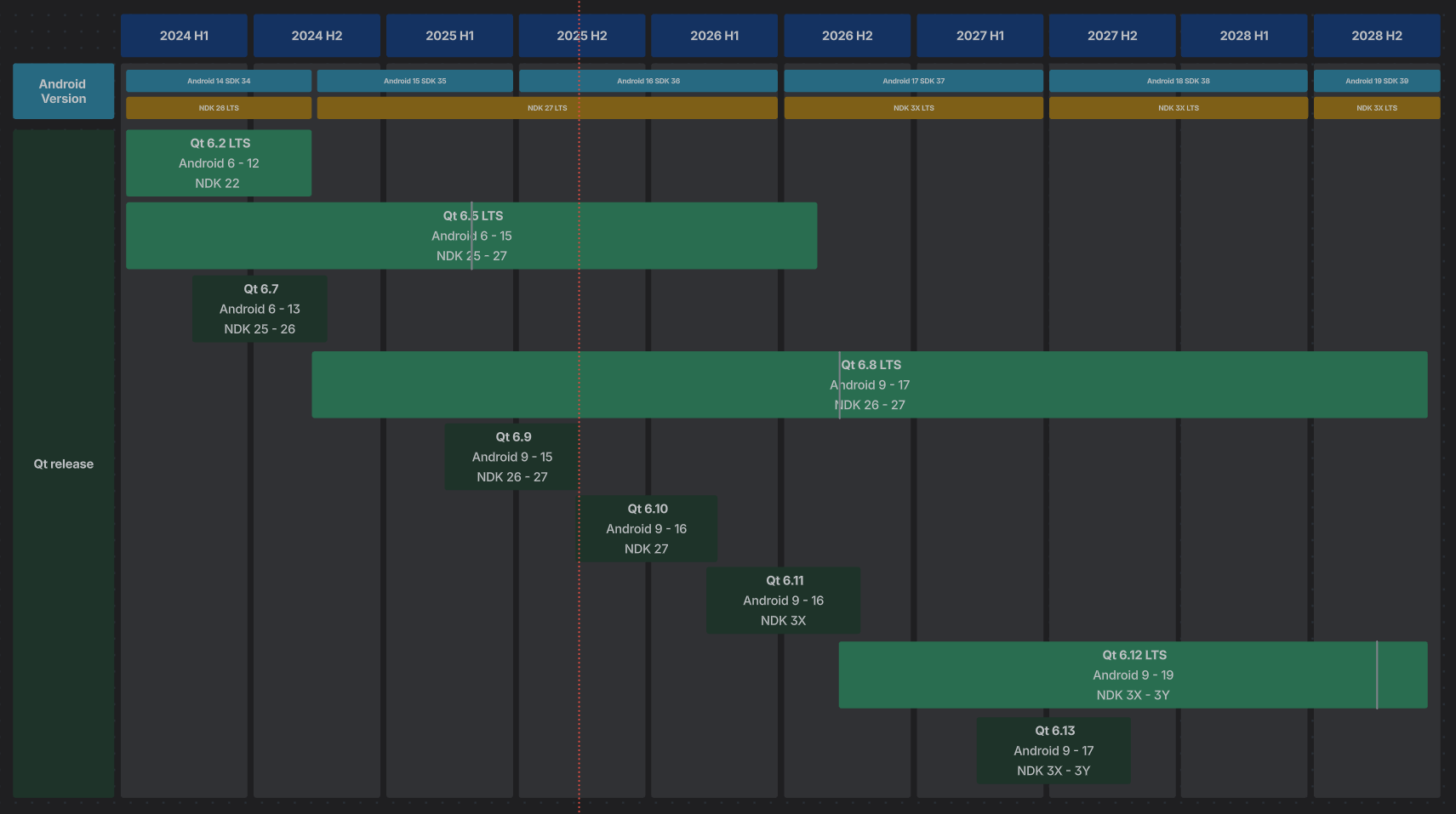
Android 15 & 16 Support
With Qt 6.10 we official support Android 15 and 16. This includes updates to the build system and support for 16K pages, allowing you to to target the most up-to-date Android systems. The support ensures that Qt applications remain stable and performant across the evolving Android ecosystem. This also means your applications will work on Android Automotive 15 and 16.
Interacting with Android system and external libraries
Qt Jenny is a new tool that simplifies the integration of Android Java APIs into Qt applications. It acts as a code generator for JNI glue code, allowing developers to automatically generate Qt C++ APIs from annotated Java classes. Qt Jenny consists of a compiler and an annotation processor, enabling access to Android native services like BatteryManager, PowerManager, and AudioManager from Qt code. The generated code utilizes QJniObject, and also supports notifications, which are quite complex to implement via JNI. Qt Jenny is available via Maven Central, and examples are included in Qt Creator and online Documentation to help developers get started quickly.
Provide feedback
For any issues, please submit a detailed bug report to bugreports.qt.io or contact our technical support team if you have a support plan with your commercial license. You are also welcome to join the Qt Project mailing lists and developer forums discussions.
Qt 6.10 release plan
We will continue releasing new patch releases to the Qt 6.10 series. The target is to release Qt for Android Automotive 6.10.2 at the end of January 2026.
Where can you get more info?
For the full list of improvements check out What's new in Qt 6.10 and What's new in Qt for Android Automotive 6.10. For further technical information about Qt for Android Automotive, please check out Qt for Android Automotive technical documentation.
.webp%20(WEBP%20Image%201360%20%C3%97%201088%20pixels)%20%E2%80%94%20Scaled%20(85%25).png?width=500&name=Screenshot%202025-10-27%20at%2015-10-08%20Adas-web-02%20(1).webp%20(WEBP%20Image%201360%20%C3%97%201088%20pixels)%20%E2%80%94%20Scaled%20(85%25).png)