Mar 5, 2026
Comments
The previous parts of this trilogy have introduced Qt Canvas Painter and its novel new features. This post will focus on the accelerated 2D canvas performance aspect, demonstrating how our holistic approach to performance can be shown in benchmarks.
Let's start with a summary and then work our way to how we actually got these results:
- On a PC with an integrated or a lower-end external GPU, the Canvas Painter performance is about 2X compared to QPainter with the OpenGL backend.
- On a lower-end Android tablet, the Canvas Painter performance is about 5X compared to QPainter with the OpenGL backend.
- On a higher-end Android tablet, the Canvas Painter performance is about 10X compared to QPainter with the OpenGL backend.
At this point, let's again mention the mandatory warning:
Qt Canvas Painter is a tech preview in Qt 6.11. This means that we don't guarantee API or ABI stability yet.
Also worth noting is that these benchmarks have been done using Qt 6.11.0 RC. The performance will very likely improve while the development of Qt's accelerated 2D canvas capabilities continues.
The Testing Methods
One of the main goals of Qt Canvas Painter has been to achieve high performance and especially doing so on mobile/embedded devices with a GPU. To validate this, we obviously need proper benchmarking for our accelerated 2D canvas, done on the actual hardware. And this benchmarking should also contain alternative painting methods for an apples-to-apples comparison.
To do this, we use the QCPainterBench application that has exactly the same test cases implemented with Qt Canvas Painter and QPainter. It contains these 6 individual tests that can be turned on or off separately:
- Ruler: Benchmarks short separate lines and (dis)appearing text elements.
- Circles: Benchmarks circles and arcs with round caps.
- Bezier lines: Benchmarks bezier line graphs with gradient fill.
- Bars: Benchmarks painting rectangles to create bar graphs.
- Icons & Text: Benchmarks painting small images and short static texts.
- Flower: Benchmarks transforming and coloring an otherwise static path.
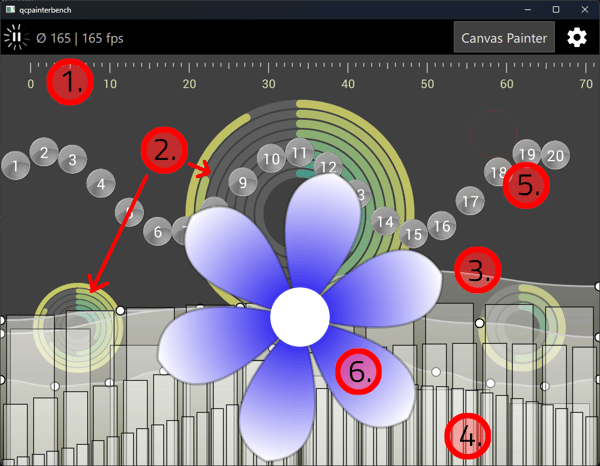
With this application, it would be possible to compare individual painting features by enabling each test case separately and comparing the results. But for the purpose of this blog post, we don't have time to go that deep into details, as we mainly want to get a ballpark estimation of the average expected performance of our accelerated 2D canvas capabilities. So we run the benchmark with the default tests enabled, meaning all tests except the Flower one are enabled.
To get a comprehensive results, the testing is done on these systems:
- Lenovo ThinkPad P16 Gen 2. This system acts as an example of a laptop/desktop PC. Tests are done with both integrated Intel UHD Graphics 770 GPU and dedicated NVIDIA RTX 2000 Ada GPU.
- Lenovo Tab M10 HD. This system acts as an example of lower-end embedded hardware. The chipset is MediaTek Helio P22T with PowerVR GE8320 GPU.
- Samsung Galaxy Tab S8. This system acts as an example of higher-end embedded hardware. The chipset is Qualcomm SM8450 Snapdragon 8 with Adreno 730 GPU.
One thing to note is that the antialiasing of QPainter OpenGL is set to use 4X MSAA. This should be a good compromise between performance and quality, and it doesn't cause a big performance drop on any of the tested systems. Qt Canvas Painter uses its vertex-based antialiasing. Also, we use QSG_NO_VSYNC=1 to force timer-based rendering, so the results are not affected by vsyncing.
Here is a short video showing the benchmark application running on both of the tested tablets.
Accelerated 2D Canvas Results
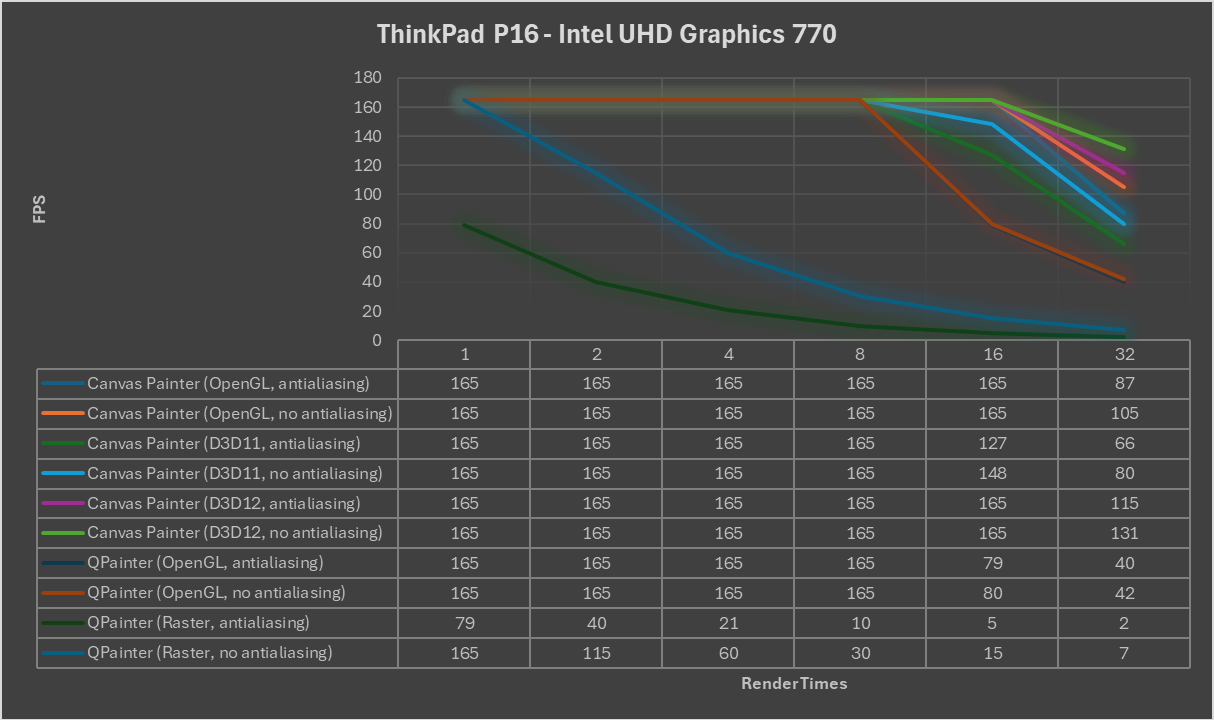
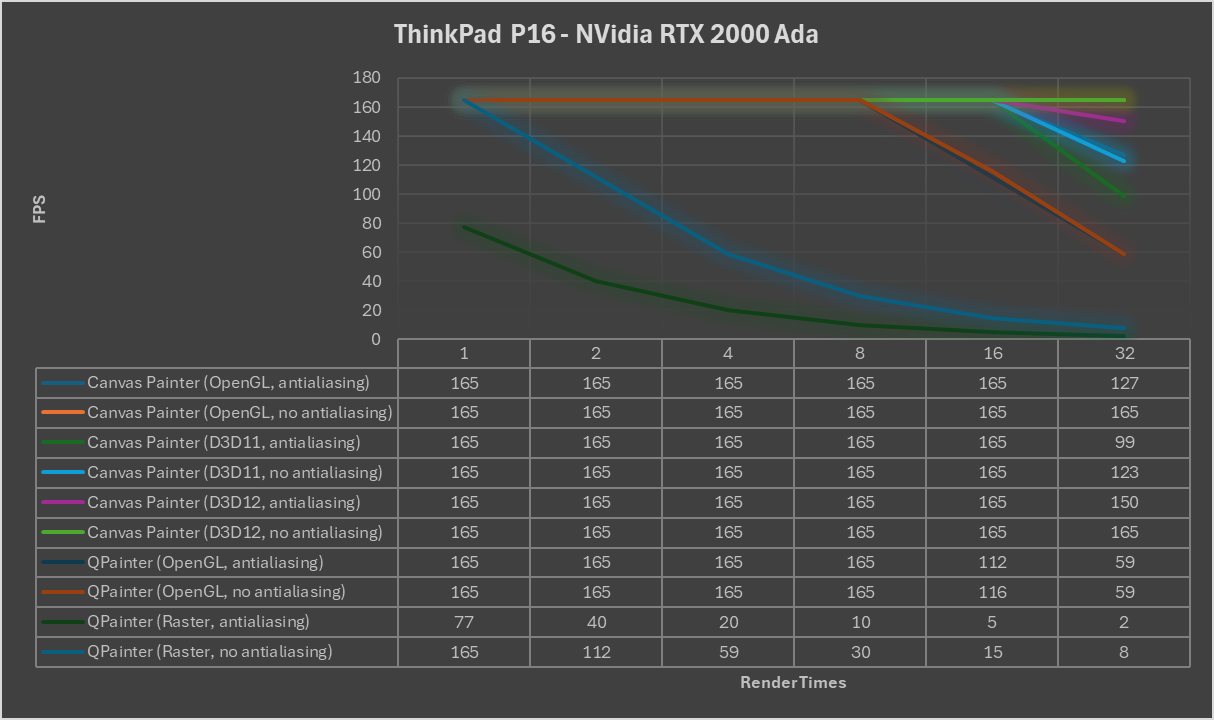
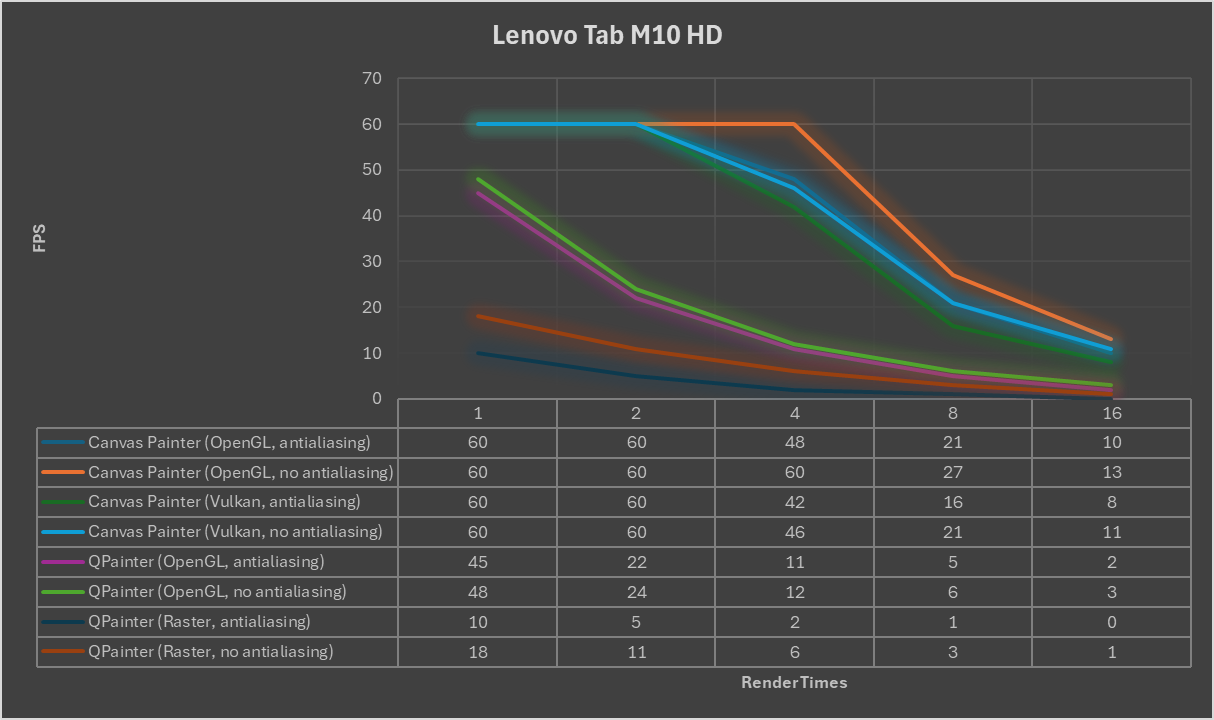
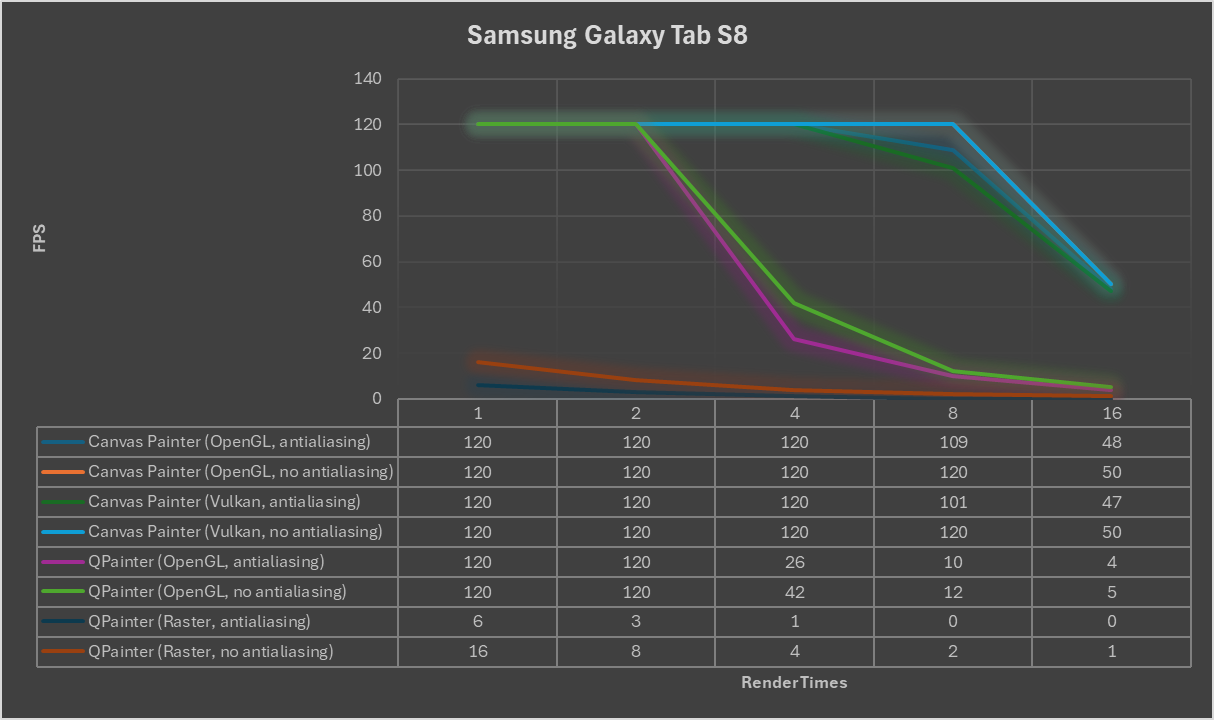
The testing was done so that the amount of rendering count is increased (1, 2, 4, 8, etc.), and then measuring how this affects the average fps. Initially, the rendering performance is capped by the screen update frequency, until increasing the rendering times causes missing the frames.
Here are the benchmark results on all the tested systems.
The Conclusions
There are a lot of conclusions to be made from the above results, but here are the ones most interesting to me:
- It is fascinating to see how D3D12 is notably faster than D3D11 or OpenGL. Direct3D 12 is a modern API compared to those other two, so it makes sense that QRhi can take an advance of this low-level graphics API for better efficiency. D3D11 being slower than OpenGL seemed suspicious, and we were actually able to track that down and fix it, so currently on dev, the performance of these backends is actually close to the same.
- On Android tablets, Vulkan performance behaves a bit differently. On Galaxy S8, Vulkan and OpenGL performance are about the same, while on Lenovo M10, Vulkan performance is about 20% lower than OpenGL. The assumption is that the OpenGL ES drivers of these devices are highly optimized, and so the lower-level Vulkan API does not provide performance improvements on this test case. We will, however, continue profiling and testing this with other systems.
- Antialiasing is particularly demanding with the QPainter Raster backend. This is not surprising, as antialiasing on the CPU is known to be a slow operation. QPainter software rendering is so much slower than the accelerated rendering options that it doesn't make much sense to compare these. The Canvas Painter vertex-based antialiasing, while being higher quality, affects performance maybe slightly more than the QPainter 4X MSAA approach. Canvas Painter can also optionally support MSAA antialiasing, so that could be benchmarked as an alternative option.
- Galaxy S8 absolutely shines with the Canvas Painter. High resolution screen (2560 x 1600) and a fast Qualcomm Adreno GPU are a good combination for the QRhi accelerated Canvas Painter. It can maintain the full 120fps screen refresh rate with 8 render counts of all the tests enabled.
To sum up the performance numbers, we can conclude the same as at the beginning of this blog post:
On an average PC, the Qt Canvas Painter performance is about 2X, on a lower-end Android tablet, about 5X, and on a higher-end Android tablet, about 10X faster compared to QPainter with the OpenGL backend.
We have made our best to provide a concrete, real-life benchmarking and accurate results for the accelerated 2D canvas. But it would be great to get them validated and have more results on different systems. So we encourage all of you to install the latest Qt 6.11 (pre-)release and run the QCPainterBench yourself on your development system or, even better, on a target system. You can provide your results as comments here, on the Qt Forum thread or create Qt Bug Tracker tickets for the CanvasPainter component.
Blog Topics
Related Articles
Canvas2D: WatchUI Demo
In the previous blog post I introduced Canvas2D, the new QML item in Qt..
Read Article
Canvas2D: New QML canvas element using Qt Canvas Painter
In the earlier blog posts about Qt Canvas Painter we have looked at what..
Read Article
A Cross-Platform C# UI Framework via Qt’s Bridging Technology
Every C# UI framework comes with a familiar pattern: Windows-first, Linux..
Read Article