May 12, 2026
Comments
How a Documentation MCP Tool Saves LLM Token Usage
Agentic development, and agentic documentation, comes with a cost. Every time an AI agent searches the web for Qt documentation today, it receives full HTML pages loaded with navigation chrome, cookie banners, related-article sidebars, and search-engine snippets that have nothing to do with the answer - burning thousands of LLM tokens before a single line of useful content appears. Qt's new official Model Context Protocol (MCP) tool for Qt documentation solves this directly.
A part of Qt's AI-powered development tools, the Documentation MCP tool for Qt, offered as a cloud service over HTTPS, provides AI agents with structured, targeted access to Qt's full API reference and guides, returning only relevant documentation excerpts rather than an entire web page. In practice, a single lookup through the MCP uses a fraction of the tokens of an equivalent web search, keeping context windows free for actual coding work and reducing inference costs for developers running agentic workflows at scale.
Video: Qt Documentation MCP Service in Claude Code (some sequences are shortened or accelerated)
Why Qt's Documentation MCP Is More Authoritative by Design
Unlike community-driven resources such as StackOverflow or Reddit threads, every answer from the Qt Documentation MCP comes directly from Qt's canonical documentation. This distinction matters more than it might first appear. Community answers are snapshots in time - a highly upvoted Stack Overflow reply written for Qt 5.15 may still rank first in a web search today even though the API it describes was deprecated years ago.
Qt's documentation, by contrast, is version-controlled and maintained by the same engineers who write the framework itself. Agents querying the MCP will not receive speculative workarounds, version-mismatched advice, or well-intentioned but incorrect explanations. They receive exactly what Qt ships: class references, property tables, signal and slot signatures, enum values, and officially supported usage examples - nothing more, nothing less.
What tools does the Qt Documentation MCP Service expose?
The Documentation MCP Tool for Qt is provided as a service by the Qt Company exposing two primary tools to AI agents:
-
qt_documentation_search - accepts a natural-language or keyword query and returns a ranked list of matching documentation sections across Qt's full module catalog
-
qt_documentation_read - retrieves the full content of a specific documentation page by URL or identifier, returning clean structured text ready for the model to reason over
Together, these tools allow agents to resolve unfamiliar Qt APIs without leaving the conversation, cross-reference related classes, verify signal signatures before generating connection code, and confirm which Qt version introduced a given feature - all within a single agentic turn.
How does it work?
When a developer asks an AI agent a Qt-specific question - "How do I make a QListView emit a signal when selection changes?" or "What properties does PathView expose for wrapping?" - the agent invokes qt_documentation_search with the relevant terms. The MCP server queries an index built from Qt's official documentation corpus, and returns focused excerpts with page references. The agent can then call qt_documentation_read on the most relevant result to retrieve the full API reference before generating code.
Depending on which agentic harness you use, you might need to add an instruction to your agent to use the Documentation MCP tool for Qt-related questions. For example, for GitHub Copilot, modify your custom agent instructions or add a skill to point to the Qt documentation service. Otherwise, expert advice might still rely solely on LLMs' pre-trained knowledge.
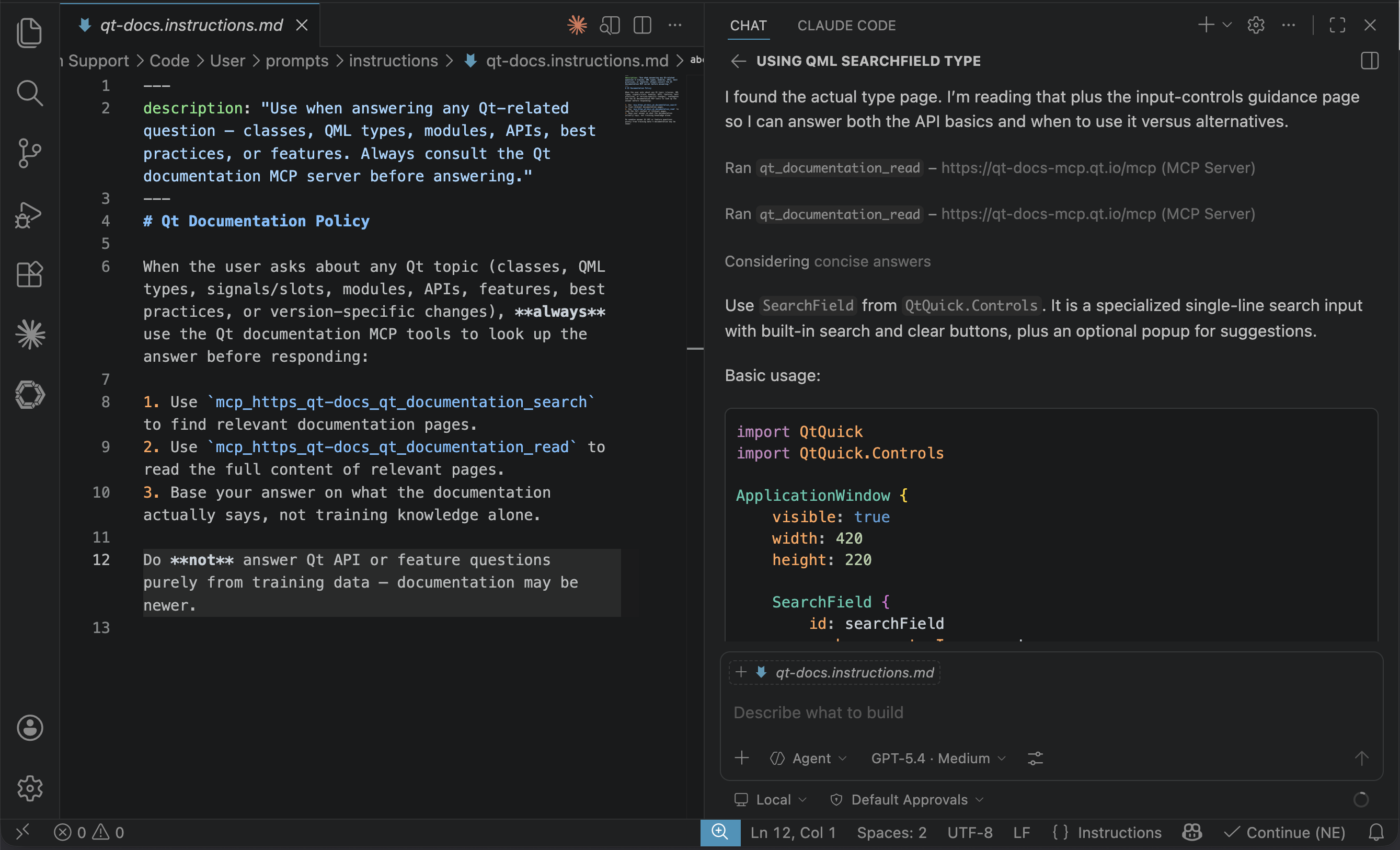
Image: Screen capture of Qt Documentation MCP Tool result in GitHub Copilot with dedicated trigger skill
What Are the Strengths and Limitations of the Documentation MCP Tool for Qt?
As with other MCP-based documentation services, there are inherent constraints worth understanding before relying on the tool in production agentic pipelines:
-
Qt release focus: We are covering the latest Qt release and the latest LTS release with the Qt Documentation MCP Tool, which at the time of writing are Qt 6.11 and Qt 6.8 LTS, respectively.
-
Query sensitivity: Like all search-based MCP tools, result quality is sensitive to query phrasing. Vague or overly broad queries may return low-relevance excerpts that the agent must sift through.
-
Authentication and rate limits: The service is currently as open as the online Qt documentation on doc.qt.io for evaluation purposes. Should we see extensive misuse by a few users degrading service quality for everybody, we retain the right to introduce authentication via Qt Account and a reasonable daily request limit.
These are common trade-offs in the MCP documentation space and are generally far outweighed by the token efficiency and accuracy gains over open-web search.
Getting Access to the Qt Documentation MCP Service
The Qt Documentation MCP is available through two paths. The easiest is the Claude Marketplace plugin: search for the "qt-development" plugin. If you have installed the Claude Marketplace plugin already, then ask Claude to update it to the latest version from the GitHub repository.
For developers who prefer to wire it up themselves, or use other agentic harnesses than Claude Code, the MCP can be added manually by appending the server configuration to their configuration file and pointing it at Qt's hosted MCP endpoint. Full configuration instructions are available at https://github.com/TheQtCompanyRnD/agent-skills/blob/main/docs/mcp/setup-manual.md
Tested Environments
The Qt Documentation MCP has been verified with Claude Code CLI, Claude Desktop, Qt Creator 20 Beta, and the GitHub Copilot extension for VS Code.
Updated (12-05-26): removed note about restarting MCP Service in VS Code.
Blog Topics
Related Articles

Qt Creator 20.0.2 released
We are happy to announce the release of Qt Creator 20.0.2! The release..
Read Article
Canvas2D: WatchUI Demo
In the previous blog post I introduced Canvas2D, the new QML item in Qt..
Read Article
Qt Bridge for Rust 0.3 Beta: CXX-Qt Compatibility and Soundness
As part of the on-going development of Qt Bridges, we are out with a new..
Read Article