May 4, 2026
Comments
Reviewing, auditing, or sanity-checking code usually means running separate linters, reading through checklists, and manually verifying Qt-specific patterns across dozens of files. A valuable addition to Qt's AI-powered development tools, Qt code review skills help developers to automate part of this code review phase. Developers avoid a laborious manual walkthrough of every file, with the AI agent running a deterministic linter followed by six parallel deep-analysis agents and surfacing real issues with mitigations in a few minutes.
AI-Powered Code Reviews with Reliable Results
The promise behind these review skills is simple: the linter is authoritative and the agents will not second-guess it; only findings above 80/100 confidence are reported as confirmed issues; and the skills are read-only - they will not modify your code.
Video: Qt C++ code review skill in action in Claude Code CLI (some sequences are shortened and accelerated)
The Qt C++ review skill targets Qt6 C++ source files and headers. The QML review skill targets Qt6 QML files and optionally invoke the system qmllint for type-level checks. Both skills can operate on a single commit, a directory, or an entire project, and they share the same three-phase analysis architecture.
Two review skills, one architecture
Both review skills target Qt6 source. The C++ review skill operates on .cpp, .h, and .hpp files. The QML review skill operates on .qml files and optionally invokes the system qmllint for type-level checks. Both can review a single commit, a directory, or an entire project, and both share the same three-phase pipeline.
When is the code review skills triggered?
The Qt code review skills is used by the AI agent whenever a developer asks to review, check, audit, or sanity-check code - or is reminded to do so before committing. Phrases like "review my changes", "audit the module", "check this before I push", or simply "code review" are enough to kick them off. The skills also detect whether the intent is narrow (review just the diff or a specific commit) or wide (review an entire directory or the full codebase) and adjust their scope accordingly.
The Qt code review skills explained
Once triggered, the skills take over a workflow that would otherwise require a developer to run separate linters, read through checklists, and manually reason about subtle Qt-specific patterns across dozens of files. Here is what happens at each step.
Step 1 - Scope detection
The skill first determines what to review. If the developer says "this commit", it runs git diff HEAD~1..HEAD; if they say "my changes", it combines unstaged and staged diffs. In either case it reviews the changed lines plus ±50 lines of surrounding context, and only reports issues that fall inside the changed lines. If the developer names a file, directory, or the full project, it globs for all .cpp, .h, and .hpp files (C++ skill) or all .qml files (QML skill) in that scope.

Step 2 - Deterministic linting
A single-pass Python linter runs against all files in scope. The C++ linter encodes 60+ mechanically-checkable rules across categories including include ordering, deprecated class usage, anti-patterns, QAbstractItemModel contract violations, error handling, lifecycle, API naming, headers, timeouts, conditionals, value-class hygiene, and ternary operator style.
The QML linter encodes 47+ checks covering import ordering, attribute ordering, property bindings, layout and anchoring, Loader patterns, delegate safety, States, image loading, performance anti-patterns, style conventions, signal handler syntax, error and security patterns (hardcoded http://, non-portable paths), and JavaScript style. Both linters are deterministic and authoritative - their output feeds directly into the next step, and the agents will not relitigate it.

Step 2b - System qmllint (QML skill only)
After the Python linter, the QML skill optionally runs the system qmllint with JSON output if it is available on the PATH. qmllint is authoritative for type-level checks - unresolved types, incompatible property assignments, and alias cycles - while the Python linter covers style, ordering, and performance patterns that qmllint does not detect. The two outputs are merged and deduplicated.

Step 3 - Six parallel deep-analysis agents
With the linter output as context, six focused agents launch in parallel. Each agent has a tight scope and a specific checklist, and none will duplicate what the linter already flagged.
For the Qt C++ skill the agents cover:
-
Model Contracts — QAbstractItemModel signal protocol, role system, index validity, and proxy model correctness.
-
Ownership & Lifecycle — memory ownership, parent-child relationships, resource cleanup, Rule of Five, and RAII correctness.
-
Thread Safety — cross-thread QObject access, mutex consistency, and signal emission from worker threads.
-
API, Naming & C++ Correctness — Qt naming conventions, const-correctness, move semantics, enum hygiene, and noexcept correctness.
-
Error Handling & Validation — missing error checks on QFile, QJsonDocument, QNetworkReply, SSL, and user-supplied input.
-
Performance & Code Quality — algorithmic anti-patterns, unnecessary copies, COW detach traps, dead code, magic numbers, copy-pasted logic, stale caches, and nondeterministic iteration order.
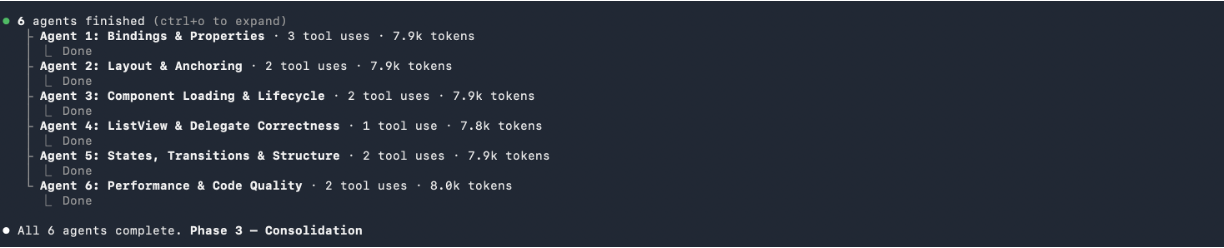
For the QML skill the six agents cover:
-
Bindings & Properties — multi-cycle binding loops, alias chains, unqualified property access, missing readonly declarations, and pragma ComponentBehavior: Bound coverage.
-
Layout & Anchoring — anchoring to invisible items, cross-branch anchoring, ambiguous Layout sizing, and missing fill policies.
-
Component Loading & Lifecycle — Loader patterns, dynamic object creation leaks, Connections lifecycle, and C++ integration correctness.
-
ListView & Delegate Correctness — required property patterns, delegate reuse safety, scroll performance, and known Qt delegate bugs.
-
States, Transitions & Structure — PropertyChanges correctness, transition coverage, StateGroup usage, and Qt 5 → 6 migration patterns (Binding.restoreMode, Connections handler syntax, QtGraphicalEffects → MultiEffect).
-
Performance & Code Quality — costly bindings, signal-vs-function direction, singletons-for-data anti-patterns, MouseArea vs pointer handlers, parent null-checks in delegates, and reusable-component sizing.
Step 4 - Consolidation and reporting
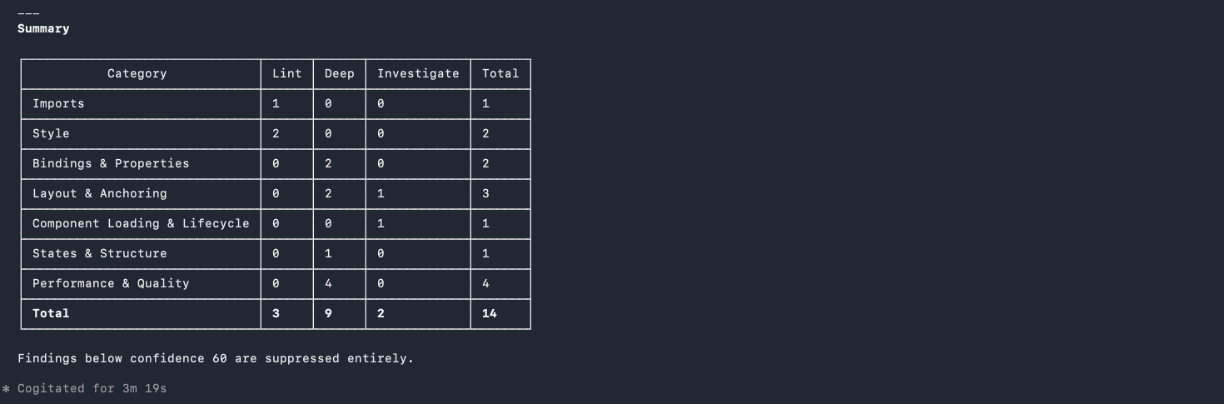
The skill merges all linter and agent output, deduplicates findings at the file-and-line level, and applies confidence scoring. Only findings above the 80/100 confidence threshold are reported as confirmed issues. Findings in the 60–79 range are surfaced as a separate section of investigation targets, capped at ten across the full report. Anything below 60 is suppressed. Each confirmed finding includes the file and line, the rule category, a description of the problem, and a concrete mitigation - described in prose, never as a code patch.
Limitations of the code review skills
The skills are not a substitute for traditional static and dynamic analysis tooling. Architecture verification - checking that component boundaries, layering, and dependency graphs are sound - requires dedicated tools and human judgment that go beyond what a per-file linting and agent review can provide. Similarly, security scanning for known vulnerability patterns, CVE-matched dependency checks, and supply-chain analysis should be handled by purpose-built security review skills or external scanners. These skills complement the Qt code review skills and should be used alongside them rather than instead of them.
The analysis is bounded by what the agent can read in the review session. Cross-repository dependencies, generated code, and third-party headers that are not present in the source tree will not be analyzed. Issues that only manifest at link time or runtime - undefined behavior triggered by specific input sequences, race conditions that require a particular thread interleaving, or Qt signals connected dynamically at runtime - are outside the scope of static review.
The confidence threshold suppresses uncertain findings, which means some real issues will not appear in the report. Reviewers working on safety-critical or security-sensitive code should treat the report as a floor, not a ceiling, and combine it with manual review.
Dependencies
The Qt C++ code review skill requires Python 3 to run the bundled linter - no additional packages beyond the standard library are needed. Git must be available on the PATH for diff-scope reviews. The skill targets Qt6 C++ codebases; Qt5 projects will mostly work but some checks are Qt6-specific.
The QML code review skill also requires Python 3 for its linter. Optionally, qmllint from a Qt6 installation enables type-level checks; the skill detects it automatically under $QT_HOST_PATH/bin/ or the system PATH and skips it gracefully if not found.
Tested with
The skills have been tested with Claude Code CLI, Claude Desktop, and GitHub Copilot in VS Code. Claude Sonnet 4.6, GPT 5.4, and Gemini 3.1 Pro deliver good results. Beyond these tested, frontier models are always recommended for in-depth tasks.
Getting the skills
You can get your Qt agent skills from our GitHub repository: https://github.com/TheQtCompanyRnD/agent-skills
Alternatively, you can install the official Qt code review skills directly from Claude’s marketplace as a plugin (search for “qt-development”).
Related Articles
Qt for Python Release: 6.12 is here!
Qt for Python 6.12 is here, alongside the Qt 6.12 LTS release. This is the..
Read Article
Introducing the QML Live Preview MCP Tool for Agentic Development of Embedded Devices
Agents Edit QML, But Don’t See the Result Without Building, Compiling, and..
Read Article
Qt for MCUs 2.12.3 LTS Released
Qt for MCUs 2.12.3 LTS has been released and is available for download...
Read Article