Feb 2, 2026
Comments
Building Volumetric Light Shafts with Real IES Profiles
You know that feeling when the street lamps on a hazy evening cast these particular patterns of light? I've always been fascinated by those effects, so I decided to build a real-time volumetric lighting system using Qt 6.11's graphics capabilities, leveraging its QML shader integration and 3D rendering pipeline to recreate them with actual IES profiles.
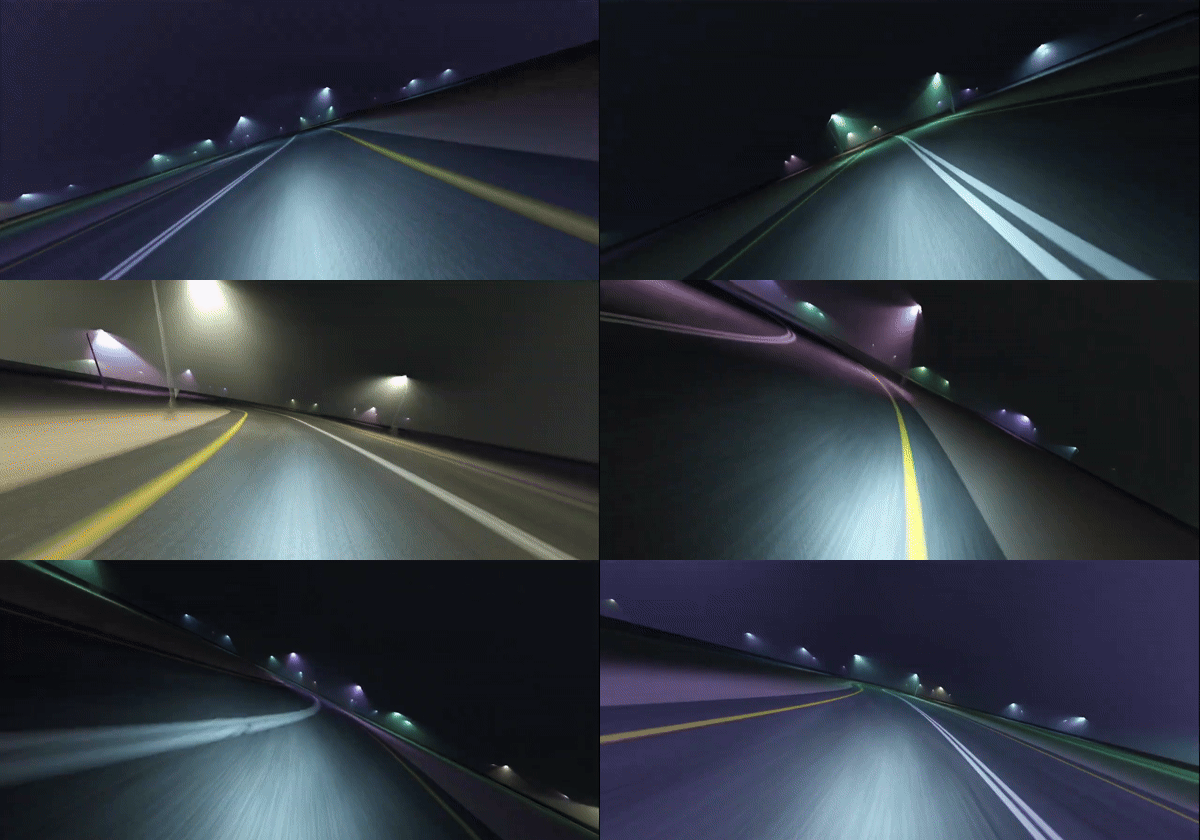 Streetlight patterns in the evening haze
The result is a system that renders atmospheric light shafts with realistic light distribution patterns, all running in real-time. This was my project for the Qt Hackathon in January 2026, and it's been a fun journey into light transport and shader programming, so I wanted to share how it works.
Starting with Single Scattering
When light travels through fog or dust, it bounces off particles in the air. In an ideal world, we'd simulate every single bounce - light hitting a particle, scattering in a new direction, hitting another particle, and so on. That's called multiple scattering, and it's beautiful but computationally expensive.
Single scattering is the simpler approach: we only care about light that hits a particle once and then travels directly to your eye. It turns out this gives you surprisingly good results, especially for lighter fog or atmospheric haze.
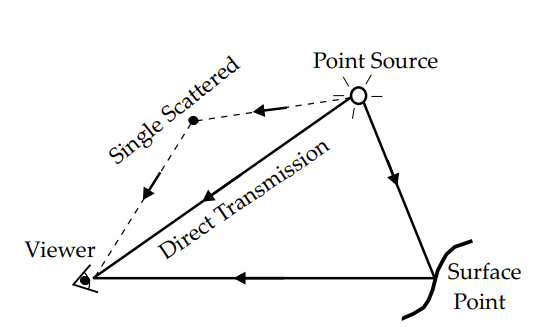
Single scattering: light hits a particle once and travels directly to the viewer
The math is actually pretty straightforward. For any point you're looking at, you need to figure out: how far is it from the light? How much light is going in that direction (that's where IES comes in)? How much fog is in the way? Put it all together, and you get your scattering intensity.
What Is an IES File?
An IES file is a human-readable format (text file) that stores a light fixture’s measured intensity across different directions, often assuming symmetry to reduce data size.
To use it in a GPU-friendly way, I parsed the file on the CPU, expanded it into a 360 × 181 2D image covering all spherical directions, and stored it in a 3D texture. Each layer can hold a different IES profile, which shaders in QML can sample directly. Thanks to Qt’s customizable texture data.
No extra symmetry logic needed at run-time, just simple texture lookup. It's a nice fit for GPU texture sampling since you can just use hardware interpolation to get smooth values between the measured angles.
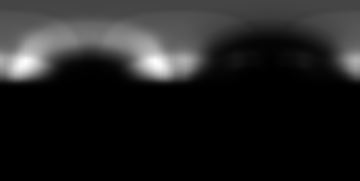
Parsed IES: One texel per degree horizontally and vertically
The Heart of It: The Volumetric Scattering Shader
This is where things get interesting. For every pixel, we need to figure out how much light is scattered into the camera along that view ray. Here's the approach I settled on:
float volumetricScatter(vec3 cameraPos, vec3 worldPos, vec3 lightPos, vec3 lightDir,
                        float density, float iesIndex, float omnidirectionality) {
    vec3 rayDir = worldPos - cameraPos;
    float rayLen = length(rayDir);
    rayDir /= rayLen;

    // Find the point on our view ray that's closest to the light
    float t = clamp(dot(lightPos - cameraPos, rayDir), 0.0, rayLen);
    vec3 closest = cameraPos + rayDir * t;
    float dist = length(lightPos - closest);
    vec3 lightToPoint = normalize(closest - lightPos);

    // Check the IES profile to see how much light goes this direction
    float directionality = min(sampleIES(lightToPoint, lightDir, iesIndex) + omnidirectionality,
    	1.0);

    // Classic inverse square falloff with density and ray length
    return (directionality * density * rayLen / (dist * dist + 0.0001));
}
The clever bit here is finding that closest point. Instead of ray marching (which would mean stepping along the ray and sampling at each step), we just find the single point on the view ray nearest to the light source. It's an approximation, but it's fast and looks great in practice.
The inverse square law handles distance falloff - light spreads out as it travels, so intensity drops with the square of distance. We multiply by the ray length because longer rays accumulate more scattering, and by density to control how thick the fog is.
IES intensity sampling is also intuitive using a 2D slice of a 3D texture.
float sampleIES(vec3 lightDir, vec3 lightForward, float iesIndex) {
    // Vertical angle (theta): angle from the forward direction
    float theta = acos(dot(lightDir, lightForward));

    // Build tangent space for horizontal angle calculation
    vec3 right = normalize(cross(lightForward, vec3(0.0, 0.0, 1.0)));
    vec3 up = cross(right, lightForward);

    // Project direction onto a plane perpendicular to the forward
    vec3 projectedDir = lightDir - lightForward * dot(lightDir, lightForward);

    // Horizontal angle (phi): rotation around forward axis
    float phi = atan(dot(projectedDir, up), dot(projectedDir, right));

    // Convert to UV coordinates [0,1]
    vec2 uv = vec2(phi / (2.0 * PI), theta / PI);

    // Sample 3D texture (multiple IES profiles)
    return textureLod(lightIES, vec3(uv, iesIndex / iesCount), 0).r;
}
Combining Projection and Volumetric Lighting
The system renders both surface lighting (projection) and volumetric effects:
// The fog effect
float scatter = volumetricScatter(cameraPosition, worldPos, lightPosition, lightForward,
                                  scatterDensity, iesIndex, omnidirectionality);
vec3 volumetricLight = lightColor * lightIntensity * scatter;

// Regular surface lighting with the same IES profile
float iesIntensity = min(sampleIES(lightToSurface, lightForward, iesIndex) + omnidirectionality,
	1.0);
float attenuation = 1.0 / (distanceToLight * distanceToLight + 0.0001);
vec3 projectedLight = lightColor * iesIntensity * attenuation * projectionIntensity;

// Add them up
finalColor += (projectedLight + volumetricLight) * distanceAttenuation;
So you get the crisp projected light patterns on surfaces, plus the soft volumetric glow in the air. Both follow the same IES distribution, which makes everything feel cohesive.
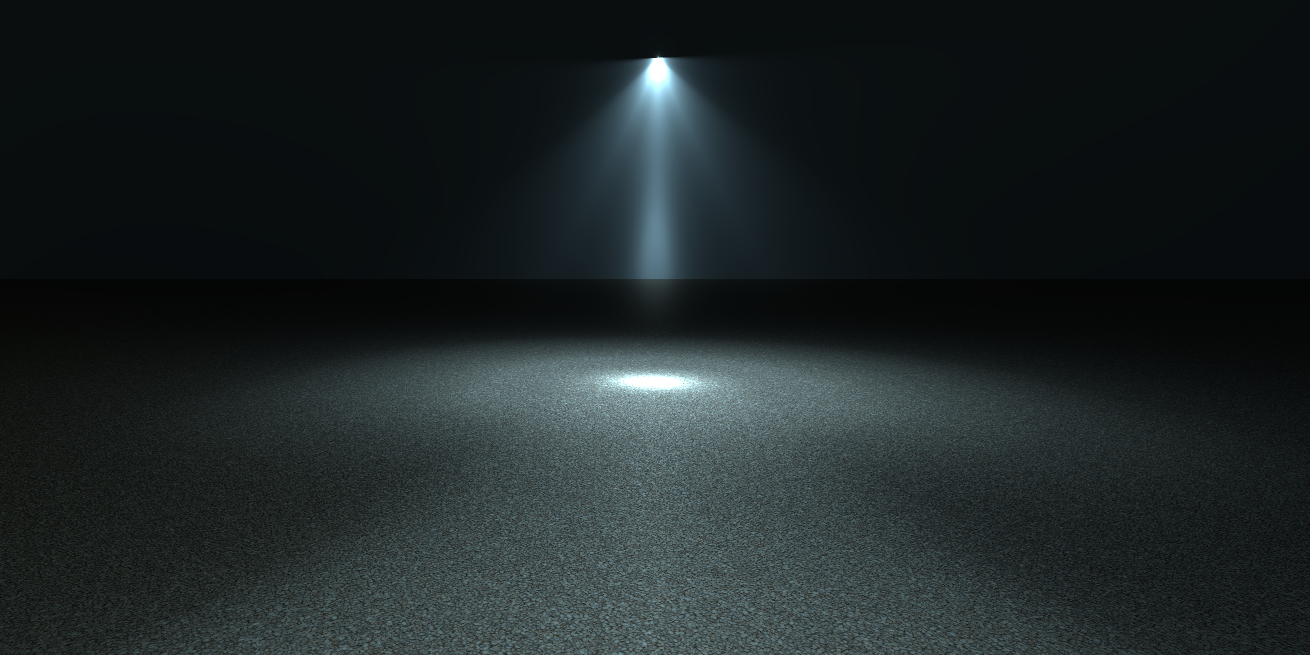 Combination of projected light patterns and volumetric glow
Managing Multiple Lights
I needed to handle a bunch of lights simultaneously - street lamps, traffic lights, vehicle headlights, all with their own IES profiles and properties. The approach I went with was to pack all the visible (active) light data using a simple sphere bound check against camera into a texture that gets updated each frame:
tempLights.push({
    position: Qt.vector3d(x, y, z),
    forward: Qt.vector3d(dx, dy, dz),
    omnidirectionality: 0.0,
    color: "lightblue",
    intensity: 20,
    scatterDensity: 0.4,
    projectionIntensity: 100000.0,
    iesIndex: 1,
    visible: true
});
Each light has its own scatter density (how much fog effect), projection intensity (surface lighting strength), and IES index. This lets you have a street lamp with heavy volumetric scattering but relatively weak surface projection, while a vehicle headlight might be the opposite.
The shader uses a QML ExtendedSceneEnvironment post-process effect to iterate over all the lights and accumulate their contributions. It's not the most sophisticated light management system, but it works well enough for a few dozen lights.
Building a Demo Scene
Single scattering is "wrong" compared to true light transport, but it's wrong in ways that mostly don't matter for the visual effect you're trying to achieve.
Once I had the volumetric lighting working, I wanted to test it in a proper context. So I built this motorcycle racing demo with a procedurally generated road system. The road uses Catmull-Rom splines to create smooth curves from control points, and I spawn street lights along the path at regular intervals.
The procedural road geometry calculates tangent and binormal vectors at each point, which allows me position the lights correctly perpendicular to the road direction. Each light gets a random IES profile from the loaded set and a color from a palette.
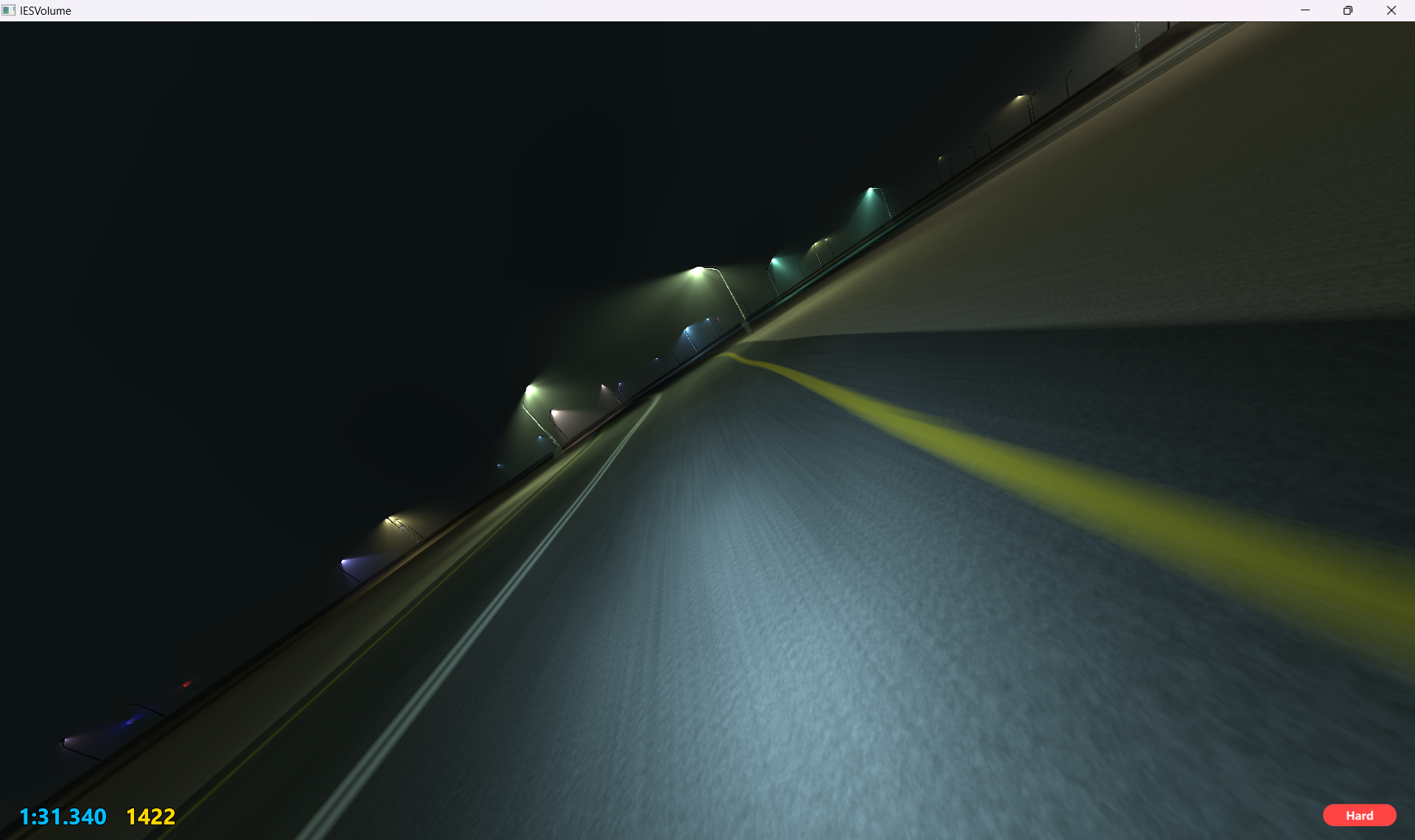
Demo: Watching dozens of colored light shafts sweep past as you race through the track really sells the feeling
I also hooked into Qt 6.11's new motion vector buffer as another ExtendedSceneEnvironment post-process effect to add proper motion blur as a post-processing effect:
void MAIN() {
    vec2 texcoord = TEXTURE_UV;
    if (FRAMEBUFFER_Y_UP < 0.0)
        texcoord.y = 1.0 - texcoord.y;

    vec4 motionvector = texture(MOTION_VECTOR_TEXTURE, texcoord);
    vec2 velocity = motionvector.xy;
    if (FRAMEBUFFER_Y_UP > 0.0)
        velocity.y = -velocity.y;

    const int SAMPLES = 16;
    const float BLUR_STRENGTH = 1.5;

    vec4 color = vec4(0.0);

    for (int i = 0; i < SAMPLES; i++)
    {
        float t = float(i) / float(SAMPLES - 1);
        vec2 offset = velocity * t * BLUR_STRENGTH;
        color += texture(INPUT, texcoord + offset);
    }

    color /= float(SAMPLES);

    FRAGCOLOR = color;
}
The motion vectors tell you how each pixel moved between frames, so you can blur along that direction. Combined with the volumetric lighting, it gives you this nice sense of speed - the light shafts streak past with the motion blur, which really sells the feeling of racing through a foggy night.
To make it more interesting, I added difficulty modes that change the road curvature - normal mode has gentler curves, hard mode tightens them up. There's a lap timer and scoring system too. The whole thing turned into more of a game than I initially planned, but it's a good stress test for the lighting system. When you're racing at high speed with 30+ lights active, traffic lights changing, and motion blur running, you really find out if your performance is where it needs to be. You can check out the source code here.
Blog Topics
Related Articles
Canvas2D: New QML canvas element using Qt Canvas Painter
In the earlier blog posts about Qt Canvas Painter we have looked at what..
Read Article
A Cross-Platform C# UI Framework via Qt’s Bridging Technology
Every C# UI framework comes with a familiar pattern: Windows-first, Linux..
Read Article
QML and C# without C++: Qt Bridge for C# 0.4.0 Beta Released
As part of the on-going development of Qt Bridges, and beyond the two Beta..
Read Article