Qt Quick for Android - Qt 6.9 and 6.10
January 16, 2026 by Rami Potinkara | Comments
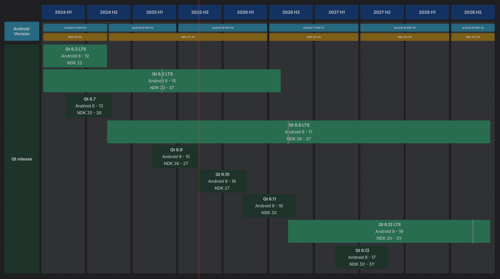
Just noticed that we have not posted recently updates from the Qt Quick for Android. The Qt 6.11 is coming so let's catch up first briefly what new features it has for Qt 6.9 and Qt 6.10 releases. The 6.10 ones you may peek from What's new 6.10 Qt Quick for Android section and 6.9 ones from What's new 6.9 Android section. But what does the following nerdy terms actually mean?
Partial data changes
Embed multiple QML views from an Android Service.
Multiple argument signals
Public Java APIs in javadoc
And what do they look like? And what can you do with them?
Let start from "Public Java APIs in javadoc.". It means that all Qt Quick for Android Java APIs (QtQuickView, QtQuickViewContent, QtAbstractItemModel, QtAbstractListModel, QtModelIndex and QtQmlStatusChangeListener) are documented in Javadoc style instead of QDoc style, like Qt APIs do and QtQuickView API used in Qt 6.8! Previously they only had class references, like QtAbstractItemModel. This conforms to industry standards and Java developers with familiar documentation!
Multiple argument signals allow QML root objects to emit signals with multiple parameters at once simplifying communication. For example, you can send four tire pressure updates in one signal instead of four separate ones. The new signal system is designed to handle data transfers up to a maximum size of 1MB.
Developers can now embed multiple QML views within a single Android Activity (context). This enables more complex layouts. For example, it allows layouts where different sections of a native screen need to be powered by separate QML components.
How about partial data changes? New API methods setData and dataChanged from QtAbstractItemModel with onDataChanged allow this within your app. Previously, updating a model often required removing and re-adding items, which forced the UI to destroy and rebuild objects, creating a major performance cost. With these new APIs, you can edit models directly from the UI and notify the system which data has changed!
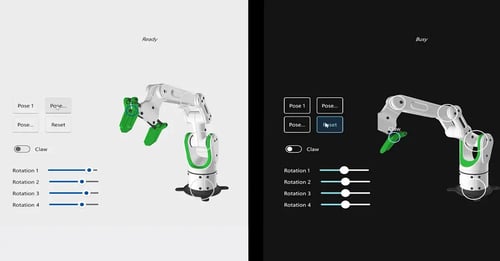
All this make it easier for Android developers to add high-performance graphic features like 3D to their pre-existing and new Java or Kotlin apps. Instead of rewriting your entire app, you can now embed Qt content while maintaining a native-centered project structure. Qt Quick 3D allows you to create cool 3D content and seamlessly mix 2D (Android) and 3D (Qt) elements in a single scene. Unlike traditional cross-platform Qt apps, this approach lets Android create and control the content you build in your main app in Android Studio using Java or Kotlin and simply use QML for specific parts, like 3D views.
What is also cool is that you may test the Android app mixing 2D (Android) and 3D (Qt) UI's with Squish! That what we at Qt Co. RnD do as well. If you wanna know more check this post: Testing Qt Quick for Android applications with Squish from Olli.
To try out that your self you can start your journey from Qt Academy course Embedding Qt Quick 3D Content in an Android App.
Blog Topics:
Comments
Subscribe to our newsletter
Subscribe Newsletter
Try Qt 6.10 Now!
Download the latest release here: www.qt.io/download.
Qt 6.10 is now available, with new features and improvements for application developers and device creators.
We're Hiring
Check out all our open positions here and follow us on Instagram to see what it's like to be #QtPeople.