Feb 10, 2026
Comments
Preparing a Safe Transition
Welcome back to this series about moving a Qt Widgets legacy code base to Qt Quick. In the previous installment, we compared the typical software architectures used by such applications. We could see how the "MVC with a twist" generally used in Qt Widgets based applications was a problem for code reuse and so a limiting factor to move to Qt Quick.
Now that we have a clearer view of our starting point architecture ("MVP with a twist") and the one we're aiming at (MVP), it's time to cover how to move from one to the other. We'll first check if there is any tooling to help us and then I'll present the approach we use at enioka Haute Couture for such large scale changes.
About the Available Tooling
The concern of porting Qt Widgets applications to Qt Quick is not a new one. So along the years some tools appeared aiming at least in part at tackling the task.
First, we have the Declarative Widgets library. It has been created by Kevin Krammer from KDAB a decade ago. It's aiming at providing a QML API for Qt Widgets. This approach would naturally push new Qt Widgets based GUIs to follow the MVP pattern when written with the support of Declarative Widgets. Unfortunately, Declarative Widgets never made it to Qt Widgets itself and is still a third party library. This likely limited its adoption because of the lack of awareness and perhaps also because it then relies on object extensions to expose the properties effectively doubling the number of objects used by a GUI when used.
Second, we have the Qt Bindable Properties which have been introduced in Qt 6. They provide property bindings but without the need to jump into QML to get the feature. But unfortunately nothing in Qt Widgets is using them so it's not really helping in our context.
That being said, even if they made it to Qt Widgets, both Declarative Widgets and Qt Bindable Properties only solve part of the problem. The one about having nicer tools to implement MVP with Qt Widgets. Even if they make it easier, they're not required to do so and they don't help for the transition between "MVC with a twist" to MVP.
Indeed, you still need to do the work of freeing the business logic from the old controller/widget and instead make it available through a proxy. This is not a small feat and it needs to be tackled responsibly.
Our Controlled Experiment
It is now time to introduce the little application we're going to use to illustrate our approach. It is inspired by the Gilded Rose code kata which I use in enioka Haute Couture courses about code legacy. It's been quite a bit modified for the purpose of the software architecture transition we're considering but the core logic stays the same.
So that you can follow along, we made all the code available in its own "GildedRoseQtWidgetsToQtQuick" repository. The commits have been split so that you can easily inspect the various stage of evolution of the code.
Now let's see how our little application looks:
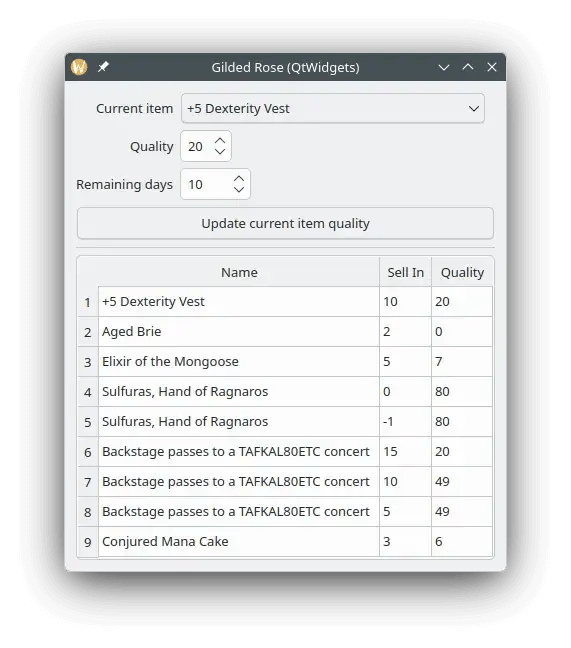
We have a "simple" Qt Widgets based window but it shows several interaction patterns. The bottom half is a QTableWidget displaying the whole data of the system. It is managing a database of items which can be sold. Items have a name, a sell in date (remaining number of days) and a quality value.
In the top half, an item can be selected via a QComboBox and two QSpinBoxes can be used to change the quality and remaining days values. Under those we have a QPushButton allowing to trigger the business rules applying how the values of an item evolve during a day. The actual details of how those values change won't matter much for the purpose of this series but let's assume this code is large, nasty, and can't be easily changed without regressions.
Now let's have a glimpse at the important parts of the code (commit 0e2cdb9).
First the Item interface:
This is a simple and unsurprising value class, it just exposes the values we discussed before and an id(). This identifier would be for instance the primary key of the corresponding record in a database.
Next, we need to get to Item instances, so we have a Repository to fetch such items of modify them:
Again, no big surprise here, we can fetch all the items in the system, or one item based on its id. Of course we can also write an Item back in the database with the save() method. Note we assume here the Repository is following the Singleton pattern, this is to simplify things a bit for our experiment, but I would like advise against it in a real system.
Together, Item and Repository form the model of our system. The view is provided by a UI file which we've seen the result of in the screenshot. Time to look at the control part, where we'll find most of the code in a true "MVC with a twist" fashion.
The constructor does the important behavior setup for the GUI. Making sure everything reacts to interactions and update Items as needed. The details of the corresponding slots follow:
As one would expect they either take values from an Item to apply them to the widgets or get values from the widgets and apply them to an Item. It is also where we find the business logic for updating Items quality.
The last two slots are a by-product of not having any QAbstractItemModel in our system:
The lack of QAbstractItemModel forces us to regularly copy data from the repository to the QComboBox and the QTableView. This is hopefully not too much of a common situation nowadays, but we decided to go for the worst case scenario in this series.
Altogether, this forms our Qt Widgets legacy system. Assuming we want to move it to Qt Quick how can we approach this daunting task? Here we have a few hundred lines of code but in a real system this would be two or three order of magnitudes bigger, we can't just rewrite. This would be too risky and disruptive for our users. The chances of failure of a rewrite are very high.
The Responsible Thing to Do
Since we don't have a tool acting as a silver bullet, we'll have to rely on good old discipline and rigorous method to deal with our architectural transition. In particular, we have to ensure we're not breaking the application as we make progress.
Our goal is thus to make sure we're not going to introduce regressions, while applying a large scale architecture change. This requires automated tests but most code bases we encounter in the wild don't have the appropriate set of tests for that. You basically need to have end to end tests which cover the whole feature set. This can get very expensive to produce quickly.
That said, we can be saved by the introspection features provided by QtWidgets, Approval Tests and doctest. This way we can produce a good test suite in the cheapest way possible.
This would give a test which looks like this (omitting the integration details between doctest, Approval Tests and Qt, [commit 6fe1647]):
This test goes through each of the items, select them in the combo box and check that both the GUI and the underlying data are aligned everywhere. It also simulates a click of the button in order to simulate the evolution of quality over almost 30 days. This way we have a good idea of how the business rules get the values to evolve. At the end Approval Tests compare the state we produced with a previous snapshot and fails the test in case something changed.
I won't dive deeper into the details of why we consider this the best solution and how we got there. This is mainly for avoiding making this series even longer. Just know there is a method to get there and it's not by accident.
With such a test we quickly get an excellent coverage both in term of lines and features. On a real project, while it would take months or years to produce tests by going back to the specifications, a few pin tests like the one above can be produced in a fraction of the time (probably counted in days or weeks).
What's Next…
Now that we secured the system, we can responsibly transition our legacy Qt Widgets application from the traditional "MVC with a twist" architecture to an MVP one. This is what we will explore in the next post of this series.
About enioka Haute Couture
Businesses of all kinds have become highly dependent on their IT systems. And
yet, many of them have lost control of this essential part of their assets. enioka Haute Couture specializes in mastering complex software development, be it because of the domain, the organization or the timing of the project.
enioka Haute Couture works in close collaboration with customer teams to build software tailored
to the specific needs. And if developing it, enioka goes the extra mile to ensure the customer has it under control. enioka helps customer teams adopt the right organization, technologies and tools. Finally, every time it is suitable, enioka helps to setup Free and Open Source Software projects or interact with existing ones.
With enioka Haute Couture, customers have a trusted provider who facilitates the development needs while keeping full control of their systems. No more vendor or service provider lock-in.
Blog Topics
Related Articles
Canvas2D: WatchUI Demo
In the previous blog post I introduced Canvas2D, the new QML item in Qt..
Read Article
Canvas2D: New QML canvas element using Qt Canvas Painter
In the earlier blog posts about Qt Canvas Painter we have looked at what..
Read Article
A Cross-Platform C# UI Framework via Qt’s Bridging Technology
Every C# UI framework comes with a familiar pattern: Windows-first, Linux..
Read Article