Mar 30, 2026
It has been a while since we last wrote about the Qt Interface Framework on this blog, so before jumping into the Qt 6.11 news, let's quickly recap what it does and why you should care.
A Quick Refresher: What Is the Qt Interface Framework?
At its core, the Qt Interface Framework provides a complete toolchain for building middleware APIs — the layer between your application's UI and the underlying services or hardware. You describe your API once in a .qface IDL file, and the Qt Interface Framework Generator (ifcodegen) produces all the glue code you need: frontend C++ and QML classes, backend interfaces, simulation backends, and even IPC transport layers.
The key idea is the Dynamic Backend System: a clean separation between what your API exposes (the feature) and how it is implemented (the backend). This means you can swap between a simulation backend during early development, a QtRemoteObjects backend for inter-process communication, and a production backend connecting to real hardware — all without changing a single line of your application code.
In short, you define it once, and the generator does the rest. Change your API, rebuild, and everything stays in sync.
This pattern is useful whenever the UI and the service layer evolve in parallel — which, in practice, is the case for most non-trivial projects. Whether you are building an in-vehicle infotainment system, a smart home controller, an industrial HMI, or an IoT dashboard, the Qt Interface Framework fits.
Built-in Backends and Custom Templates
Out of the box, the generator ships with two backend templates: a simulation backend (backend_simulator) that lets you develop and test your UI against mock data using QML-scripted behavior, and a QtRemoteObjects backend (backend_qtro) that provides ready-made inter-process communication between your application and a separate server process.
But you are not limited to these two. The generator template system is fully extensible — you can write your own Jinja-based code generation templates to produce backend plugins for any IPC mechanism or protocol you need. Whether that is D-Bus, gRPC, a proprietary protocol, or something else entirely, you define the template once, and the generator takes care of producing the boilerplate for every interface in your IDL file.
What’s New in Qt 6.11
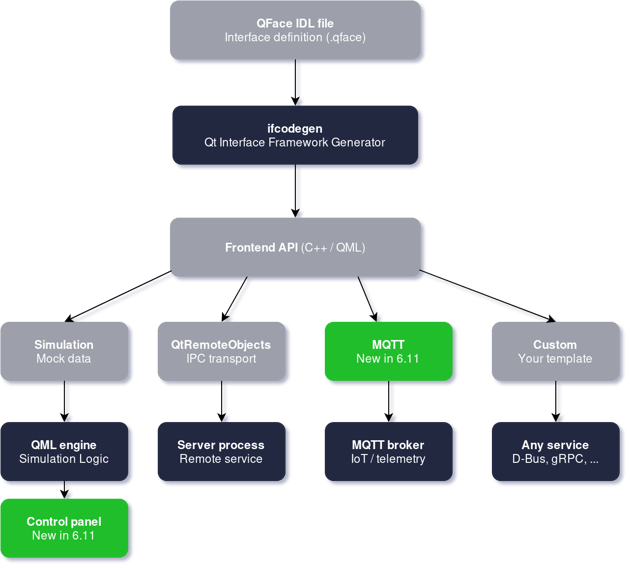
With Qt 6.11, we are extending this story in both directions: the simulation backend gains a new Control Panel for runtime inspection, and a brand new MQTT backend template joins the lineup as a third built-in option. We hope to support more backend types out of the box in future releases.
This blog post focuses on the new MQTT backend template. A follow-up post will cover the Simulation Control Panel in detail.
MQTT Backend Template
The new backend_mqtt code template generates a fully functional backend plugin that communicates over MQTT — the lightweight publish/subscribe protocol widely used in IoT, industrial automation, and telemetry scenarios. Just like the existing backend_qtro template generates a QtRemoteObjects-based backend, the backend_mqtt template produces a backend that synchronizes property values, invokes operations, and receives signals over configurable MQTT topics, using the QtMqtt module under the hood.
MQTT is a lightweight publish/subscribe protocol widely used in IoT, industrial automation, and telemetry scenarios. If your Qt application needs to talk to sensors, actuators, edge gateways, or any system that already speaks MQTT, this template bridges that gap with almost no manual coding.
Let's walk through a concrete example. Suppose you're building a smart home panel that will have to work with MQTT and Thread but you don't want to re-write the logic for both protocols? The example covers the MQTT part, a thread integration could be done by writing your own custom generation template. With the @config_mqtt annotations placed directly in the .qface file, the IDL describes both the API and its MQTT mapping in one place:
module SmartHome.Sensors 1.0@config_mqtt: {default_server: "mqtt://192.168.1.100:1883",topic_prefix: "home/livingroom/",retain: true, qos: 1}interface TemperatureSensor {real currentTemperaturereal humidity@config_mqtt: {mandatory: false}bool sensorActive@config_mqtt: {topic: "commands/calibrate",result_topic: "commands/calibrate/result", qos: 2}void calibrate()@config_mqtt: {retain: false}signal alert(string message)}
Let's have a quick walk-through of what's happening here.
Topic Structure
The interface-level topic_prefix of "home/livingroom/" is automatically prepended to each symbol's topic. By default, this topic is simply its name, so the currentTemperature property maps to home/livingroom/currentTemperature and humidity maps to home/livingroom/humidity. You only need to set an explicit topic when you want a name that differs from the property name — as we do for the calibrate operation, which publishes to home/livingroom/commands/calibrate.
Retain and QoS
The retain flag controls whether the MQTT broker stores the last published message on a topic. When a new subscriber connects, it immediately receives the retained value instead of waiting for the next update. In our example, this is set to true at the interface level, which makes sense for properties like temperature and humidity — a newly connected client should know the current readings right away. For the alert signal, we override this to false, since alerts are transient events that should not be replayed to late subscribers.
The qos (Quality of Service) setting defines the delivery guarantee. QoS 0 means "fire and forget," QoS 1 guarantees at-least-once delivery, and QoS 2 guarantees exactly-once delivery. The interface default is set to QoS 1, which is a good balance for sensor data. For the calibrate operation we use QoS 2, because we want to make sure a calibration command is delivered exactly once — triggering it twice could be problematic.
Request/Reply for Operations
MQTT is a publish/subscribe protocol and does not natively support a request/reply pattern. The backend_mqtt template solves this by using two topics: the operation's topic for sending the request, and a separate result_topic for receiving the reply. In our example, calling calibrate() from the frontend publishes a message to home/livingroom/commands/calibrate. The backend then subscribes to home/livingroom/commands/calibrate/result to receive the return value, which is delivered back to the caller via the usual QIfPendingReply mechanism. If no result_topic is specified, the template derives one automatically by appending _result to the operation's topic.
To generate an MQTT backend from this file, you add a single call in your CMakeLists.txt:
qt_ifcodegen_add_plugin(sensors_backend_mqttIDL_FILES sensors.qfaceTEMPLATE backend_mqtt)
For the full list of available @config_mqtt annotations — including options like reset_on_error and clear_on_change — see the backend_mqtt template reference.
For larger projects, you can also place the config_mqtt annotations in a separate YAML file instead of embedding them in the .qface file. This keeps the IDL clean and lets you maintain different MQTT configurations (e.g., development vs. production brokers) without modifying the interface definition. See the Annotations documentation for details.
The backend_mqtt template and the Simulation Control Panel are both Technical Previews in Qt 6.11. This means that we don't guarantee API stability yet. We encourage you to try them out and share your feedback.
Additional Improvements
Beyond the two headline features, Qt 6.11 also brings some quality-of-life improvements.
Better IDE support for QFace and Jinja. The QFace IDL and Jinja template languages now have syntax highlighting, code folding, and selection range support in Qt Creator. The Jinja highlighting is even aware of the embedded language based on the secondary file extension — so myclass.cpp.jinja highlights as C++ with Jinja directives overlaid. This makes writing and maintaining custom code generation templates much more pleasant.
Getting Started
If you are new to the Qt Interface Framework, the best starting points are:
For the new features specifically, check out the Simulation Control Panel documentation and the backend_mqtt template reference.
We would love to hear how you are using the Qt Interface Framework — whether in automotive, IoT, industrial automation, or something entirely different. Feel free to open a bug report at bugreports.qt.io or reach out on the Qt Forum.