BUILT WITH Qt

iLovePDF

Fluid Desktop Version of the PDF Tools

Better UI Development by Migrating to Qt 6 and QML

2x

Faster Application Performance

98%

of the Code Shared Across Two Platforms

3x

Faster Developer Onboarding

iLovePDF is an online PDF management platform serving over 15 million daily users. The company also provides an iLovePDF Desktop version, using Qt for Application Development to allow Windows and macOS users process heavy PDF tasks offline in seconds.

Life of our developers is now much easier.

Alexander Giss, Technical Lead, iLovePDF

Qt 6 Migration Highlights

Modern, fluid, and visually rich UI

 Clear separation of frontend and backend

 Significantly improved performance

The Challenge: Modernizing the Desktop Experience

iLovePDF had already built a successful desktop application using Qt 5 and the earlier Qt Widgets module. However, as the company values its strong usability-first approach, there was more and more pressure on the UI development to meet the evolving user expectations.

The initial idea was to develop a new desktop version with Qt Widgets, because our developers didn’t have knowledge about QML at all, says Alexander Giss, Technical Lead of the desktop team at iLovePDF.

The primary challenges with the desktop application were:

  1. Modernizing the user interface: There was a need for a significant UI overhaul to provide a smoother, more intuitive, and aesthetically pleasing user experience.
  2. Accelerating development: The team needed to speed up the UI development to ship new features and respond to user feedback more quickly.
  3. Maintaining performance and cross-platform support: From Qt 5, the team wanted to maintain the high file processing speed and continue to support both Windows and macOS from a single, manageable codebase.

The first goal was to make the UI look nice, but then the requests expanded to introducing dark mode, animations, etc. It no longer made sense to try and do it with Qt Widgets, remarks Mr. Giss.

It's better to use Qt 6 because development will be faster.

Alexander Giss, Technical Lead, iLovePDF

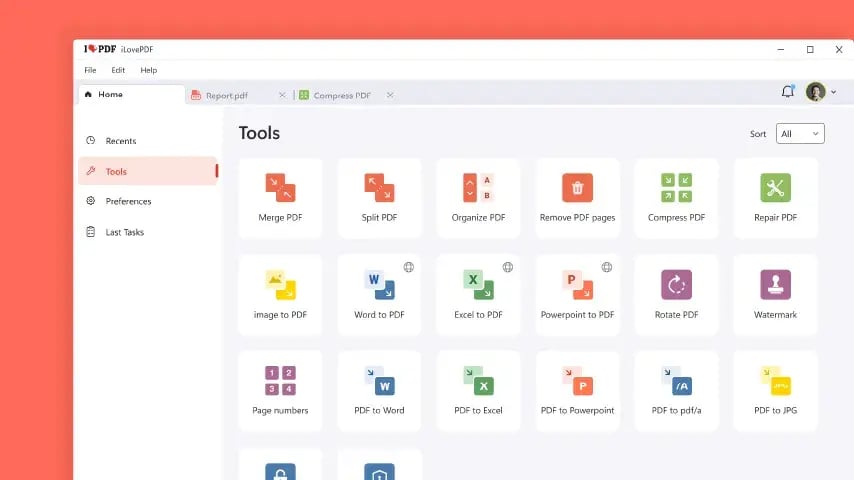
BuiltWithQt-iLovePDF-UIExample-Tools-854x480

The Solution: Why iLovePDF Chose Qt 6 and QML 

In addition to migrating to Qt 6, the iLovePDF team decided to also switch to using Qt’s declarative QML language. This enabled a whole new level of UI development, and provided an out-of-the-box solution for nearly every technical requirement.

The migration was quite easy because we chose to rewrite the UI part fully. Yes, it took time, but we got rid of old bugs and limitations, and now have a very clear architecture thanks to QML, says Mr. Giss.

The team praises how they now have a clear separation between their frontend and backend. The declarative “items inside other items” QML structure allows the developers to form a mental picture of how their UI is structured, making it easier to understand. It also makes it easier to further expand it.

Moreover, the new setup allows for efficient cross-platform development and maintenance of the desktop application for both Windows and macOS from a single codebase, significantly saving time and resources.

With Qt Framework, 97-98% of the code in our project is completely shared between our two platforms. There are only very few, specific exceptions, but for the rest, we can build our project for both platforms without problems. It's good in terms of the development time, but also any of us can develop in Windows and in macOS without distinction, continues Mr. Aguilera, Senior Software Engineer at iLovePDF.
It really has paid off to move to Qt 6.

Sergio Aguilera, Senior Software Engineer, iLovePDF

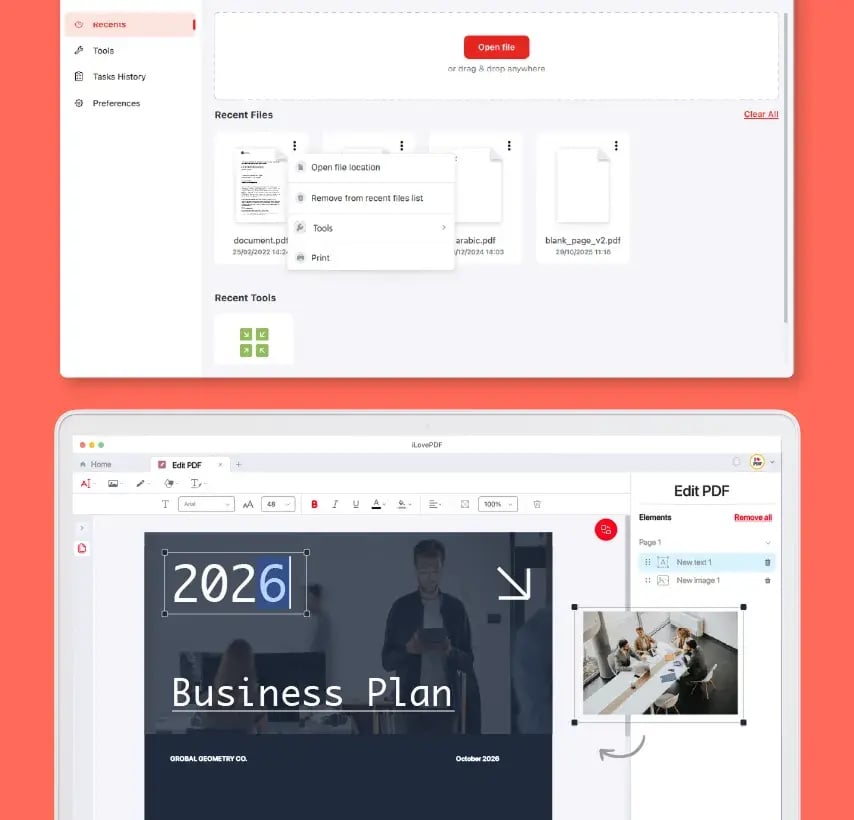
BuiltWithQt-iLovePDF-UIExample-RecentsAndEditing-854x820

How iLovePDF Has Benefitted from Qt 6 and QML

iLovePDF has been very happy with their choice to go with Qt 6 and QML. They now benefit from development efficiency, significantly improved application performance, stellar user experience, and a wealth of other improvements to speed up their work.

Fast Learning Curve to QML

The new architecture allows the developers to focus on different parts separately. Thanks to that, for instance, newcomers have been able to get up to speed faster, and the entire team delivers more efficiently.

For example, one developer can develop a UI part and another developer the backend part, and then just join it all together, and it works, praises Mr. Giss.

The small team delivers full stack development with such efficiency that currently there’s no need to grow the team.

With QML, it’s about UI development in general. It doesn’t matter which platform you deliver for, you’re just creating the UI and that's all, says Mr. Giss.

The entire desktop development team today knows QML without problems. Yet they’re continuously improving their knowledge as Qt Framework develops.

For example, we participate in Qt World Summit, and try to keep up and introduce new things in our code as Qt evolves, concludes Mr. Giss.
Going to QML has improved our onboarding and training process for new developers up to 3 times.

Curial Lloses, Operations Officer, iLovePDF

Significantly Improved Performance

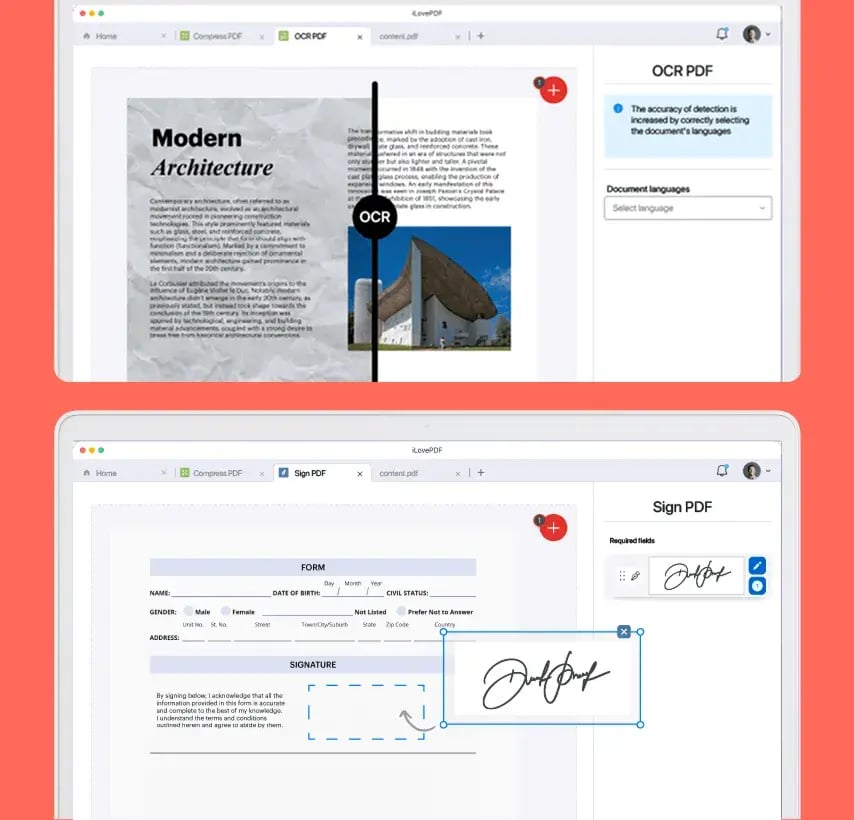
To speed up the go-to-market, iLovePDF’s focus was first on improving the UI, leaving the backend untouched. Eventually, however, the team ended up re-writing also the backend, improving backend operations such as file conversion and OCR. As a result, the desktop application has become the fastest one among the iLovePDFs products.

We now utilize QThread and QThreadPool to use the full capacity of the used computer’s processor. So, the more powerful our end user’s computer is, the faster our application works, explains Mr. Giss.

Thanks to Qt, the desktop team doesn’t need third-party viewports. Instead, they’re able to write and implement both frontend and backend themselves. Even if it means more work compared to the other iLovePDF dev teams, thanks to the new efficiency, the desktop team delivers new features at the same speed as the others.

In addition, the team praises their desktop application’s high performance with Qt 6.

The same application written for Qt 5.8, for example, will perform much better if it's just taken as it is and adapted to the latest version of Qt, notes Mr. Aguilera.

With QML, the speed is about 5-6 times faster.

Alexander Giss, Technical Lead, iLovePDF

BuiltWithQt-iLovePDF-UIExample-OCRAndSignature-854x820

Next-Level User Interface

As a very user-oriented company, iLovePDF highly values their now much improved, smoother UI.

With QML, we have a user interface that is more interesting and more intuitive than our competitors, claims Mr. Giss.

For iLovePDF, it's very important that their users can use the PDF tools very easily and get results fast, also when they’re not digital experts.

With QML, we have much more flexibility with the frontend in terms of design, and for us, it really opened up the possibility to create the desktop application that we wanted. We now provide a very comfortable experience for our users, adds Mr. Lloses, Operations Officer and one of the founding members at iLovePDF.

The iLovePDF team also created a library of UI components for efficient re-use. It further enables very fast mockups and joined experimentation with the designers, as well.

We can implement new functionalities very quickly. When the design team has a new idea, thanks to QML, it’s very easy to create quick UI sketches and in a few hours, have a small demo of the new functionality, says Mr. Aguilera.

This also helps create and maintain a cycle of continuous improvement.

With QML, you can see exactly what happens in the UI, and it's more understandable from the developer side, praises Mr. Giss.

In addition, the team praises the improvements with images, animations, effects such as shadows, and rendering capabilities that have significantly improved in Qt 6 compared to Qt 5.

I did some tests with the same code, because the code is compatible, and with QML, the speed is about 5-6 times faster, remarks Mr. Giss.

The team also finds that Qt 6 keeps evolving. For example, the JavaScript engine behind QML and the painting mechanism of QML have become better and better with every minor release in Qt 6.

 

Read More about Qt Framework

Networking, Real-Time Features and Data Handling

The use of Qt 6 at iLovePDF doesn’t stop at UI development. The desktop team makes wide use of Qt’s networking and data handling capabilities, as well.

We’ve had no problems with networking because Qt Framework is quite easy to understand, to write requests and so on, says Mr. Giss.

Core tasks such as file system access are managed efficiently with Qt Core capabilities. Qt WebSockets enables real-time features for instant document transfers, and local data persistence is handled by Qt SQL for a consistent offline experience.

For networking, Mr. Giss highlights the ease of building authentication and authorization with Qt, used to control user access to iLovePDF’s premium subscription features. In addition, iLovePDF Desktop uses Qt Network to collect anonymous statistics, and to send over user data to the support team in case of any issues.

Further Efficiency from Great Tooling and Support

Tooling

The iLovePDF development team finds the Qt Creator IDE very useful in their daily development work.

Qt Creator has improved a lot in the past two years, becoming better and better in every update, says Mr. Aguilera.

One specific IDE trait praised by the team is the ability to find and compare changes and see who made them. It speeds up the process to resolve bugs.

When trying to solve bugs, it’s useful to speak to the person who introduced the related line because maybe there was a reason why it was done in a certain way. Qt Creator allows finding the exact commit, when it was done and by whom, with a few clicks, explains Mr. Giss.


Qt Support

The support team at iLovePDF manages a huge amount of feedback from their users. Therefore, when any of that feedback is related to the technology, it's important for the iLovePDF team to find workarounds fast. The Qt Support team has been a great help in this.

This is why for us, it's important to have a support relationship with Qt, and why we are happy with the Qt Support, remarks Mr. Lloses.

The iLovePDF team has found the collaboration with Qt working well and improving over the years with fruitful, mutual learnings.

Yes, you pay for the licenses, but you also have support and can ask questions when needed. This has really helped us to solve some bugs, says Mr. Giss.

Qt support has improved significantly over the last 1-2 years. Any issues have been well covered during the support period of each release that we have had, says Mr. Aguilera.

The essential value is not in the KPIs, however. What we’ve gained is invaluable.

Curial Lloses, Operations Officer, iLovePDF

Conclusion

By leveraging the efficiency, versatility, and comprehensive nature of Qt, iLovePDF successfully launched a new version of its application that is more powerful, visually appealing, and user-friendly. Moving to Qt 6 and QML not only let the team achieve the goal of modernizing their UI, but also streamlined the development process, setting iLovePDF off for continued innovation.

We could say that obviously we have saved time, maybe double, maybe more. But in reality, what we’ve gained is invaluable. We now have much greater flexibility and much better ability to achieve more also in the future, remarks Mr. Lloses.

Another important factor for iLovePDF has also been making technology choices that don’t limit their options for the future, and ensure compatibility also going forward.

We don't want to get stuck with past decisions on which platform we will target, or what kind of user experience we will provide. Qt 6 allows us to have this freedom. That's why Qt is valuable for us, praises Mr. Lloses.


IlovePDF@2x

About iLovePDF

iLovePDF is on a mission to make PDF management easy, accessible, and reliable for everyone. Founded in Barcelona, the company has grown from a simple online tool into a global productivity platform serving over 15 million daily users, ranked among the 50 most visited websites in the world. iLovePDF offers a full suite of PDF tools across web, desktop, and mobile platforms, allowing users to easily convert, modify, electronically sign, watermark, merge, and compress their PDF documents.

Oh, there's more
Discover the Power of Qt 6

Learn More about Qt Framework and QLM