Nov 6, 2025
Comments
Modern software development demands efficient internationalization (i18n) workflows, and translation bottlenecks can significantly slow down product delivery. With the coming Qt 6.11, we're excited to introduce AI Translation in Qt Linguist. This is a powerful new feature that leverages local Large Language Models (LLMs) to automatically generate translations for your application strings.
The Challenge of Manual Translation
Qt Linguist has long been the go-to tool for managing translations in Qt applications. However, the translation workflow presents several practical challenges that AI assistance can address. Professional translators can reduce their workload by reviewing AI-generated translations rather than translating from scratch. This is particularly beneficial for open source projects. Recruiting volunteers to review existing translations is more feasible than finding contributors willing to translate from scratch.
Additionally, AI translation provides immediate feedback on text length variations during the design phase. This helps developers allocate adequate space for strings across different languages in their UIs.
Enter AI Translation
The new AI Translation feature addresses these challenges by integrating directly with local LLM servers through Ollama, enabling you to:
- Generate translations locally without sending sensitive strings to external services
- Accelerate translation workflows during development and testing
- Perform AI translation completely free
- Maintain full control over your data and translation models
- Batch-process multiple strings with context awareness
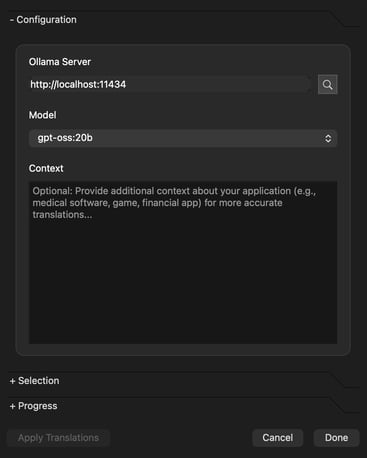 The AI Translation Dialog: Configure Translation
How It Works
The system groups related strings by context and developer comments, then generates specialized prompts for professional software translation. The system preserves critical UI elements like:
- Keyboard accelerators (&File, &Exit)
- Placeholder variables (%1, %2)
- Ending punctuation
- Developer context comments
- String groupings by application context
Getting Started
Setup Ollama
- Install Ollama as instructed on their website
- Pull a translation model in terminal:
$ ollama pull 7shi/llama-translate:8b-q4_K_M
-
- We suggest using one of OpenAI’s open-weight models, e.g., gpt-oss:20b or other LLMs trained for translation, e.g., 7shi/llama-translate:8b-q4_K_M.
- Start the Ollama server
$ ollama serve
Using AI Translation in Qt Linguist
- Open your TS file in Qt Linguist
- Navigate to Translation → AI Translation to open the AI Translation dialog
- Configure the settings:
- Ollama Server: Typically http://127.0.0.1:11434 (default)
- Model: Select from your locally installed models
- Context (Optional):, give a context about the application, e.g.,
"This is a medical application that ..."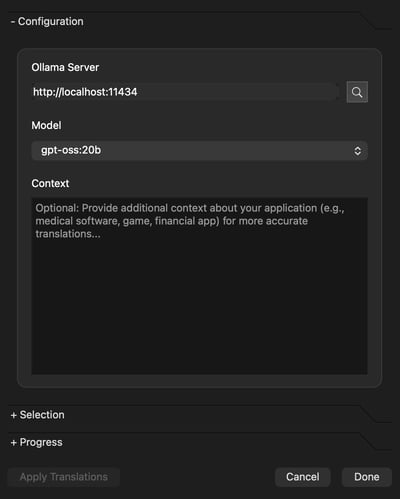
- Select what should be translated:
- File: Your current TS file (auto-populated)
- Filter (Optional): limit translation to specific contexts or labels
- Click Translate to start the AI translation process
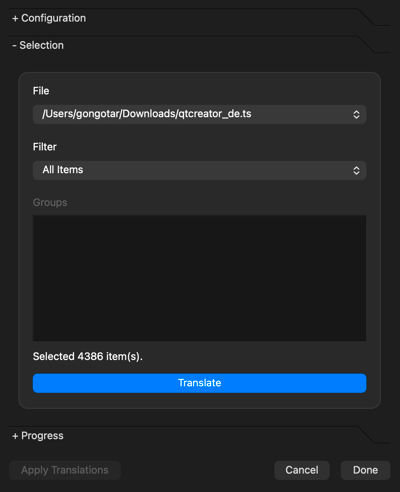
- Review the results in the Translation Log
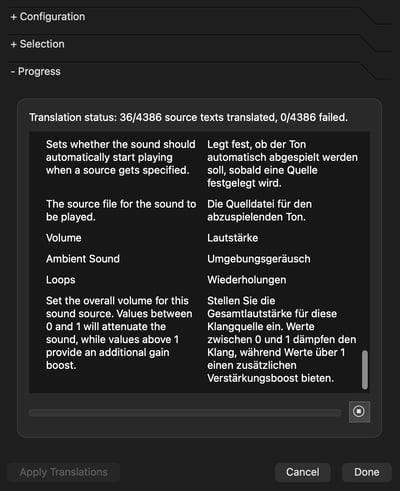
- Apply Translations to insert the AI-generated translations into your TS file
Recommended Models
Based on our testing, we recommend:
- OpenAI’s open-weight models, e.g., gpt-oss:20b
- 7shi/llama-translate:8b-q4_K_M: Balanced general-purpose model with good translation quality
- granite3-dense:2b: Lightweight option for resource-constrained environments
Feel free to experiment with other models available through Ollama to find what works best for your specific language and translation requirements.
Advanced Features
Translation in Batches
The translation engine groups strings by context and label, to ensure related UI elements are translated consistently. The context and optional comments are also taken into account and sent to the LLM. This context-aware approach produces more coherent translations than processing individual strings in isolation.
Application Context
In addition to the existing information about the translation context and optionally extra comments, Linguist allows to provide even broader context about the whole application and its purpose. This can help the larger LLMs to know what the application does and tune the translations for that purpose.
Retry Logic and Error Handling
The system includes robust error handling with automatic retry logic (up to 3 attempts per batch), automatic fallback between Harmony (a conversational, instruction-following model) and formatted models (constrained to emit strict, schema-friendly outputs), fuzzy matching in the returned source → translation map, and graceful degradation when the AI service is unavailable.
Model Flexibility
The Ollama integration automatically discovers available models on your system, to allow you to experiment with different LLMs to find the best balance of speed, accuracy, and resource usage for your specific needs.
Privacy and Security
One of the key advantages of the AI Translation feature is that all processing happens locally on your machine. Your source strings never leave your development environment, addressing common privacy and security concerns with cloud-based translation services.
Conclusion
AI Translation in Qt Linguist 6.11 brings the power of modern language models directly into your development workflow, enabling faster iteration cycles while maintaining the privacy and control that professional development teams require.
Whether you're prototyping a new application, testing internationalization infrastructure, or accelerating your translation workflows, AI Translation provides a powerful new tool in your Qt development toolkit.
The feature will be available in Qt Linguist starting from version 6.11. Give it a try with your next project and let us know your feedback on the Qt forums or through our bug reporting system.
Related Articles

Qt Contributors Summit 2026: Oslo in October!
Hello Qt, We are happy to announce the dates for the Qt Contributors..
Read Article
What's new in QML Tooling in 6.11, part 3: context property support
The latest Qt release, Qt 6.11, is just around the corner. This short blog..
Read Article