Sep 17, 2026
Comments
Every C# UI framework comes with a familiar pattern: Windows-first, Linux absent, roadmap uncertain. WPF stalled, MAUI skipped Linux, WinUI 3 stays Windows-native. At the same time, demand for embedded Linux grows and C# teams feel the lack of good UI alternatives for C# on Linux. Qt Bridges, a bridging technology in public beta for C#, provides access to a UI framework that allows preserving your existing C# codebase while utilizing Qt Quick’s feature-rich UI libraries and APIs, hardware acceleration, and cross-platform capability.
What is Qt Bridge for C#?
Qt Bridges is a future bridging technology that will enable a single frontend implementation to be used with a variety of backend languages. For C#, it practically offers a new, cross-platform alternative for existing C# UI frameworks. Currently, the C# bridge is available as public beta.
The C# bridge connects your C# application logic layer directly to Qt Quick, Qt's proven UI framework (the same one used in automotive dashboards and medical devices worldwide) without needing to abandon your codebase, your .NET integrations, or what your team is familiar with. Hardware acceleration, genuine support for C# on Linux, and a gradual WPF migration path via HWND embedding are all part of the package. Your workflow stays intact; what changes is what you can ship.
How Does the Qt Bridge Work as a C# UI Framework?
When you write an application using C# and QML, this bridge will provide native, Qt-based wrappers for C# types. These wrappers will handle all interoperability tasks such as object instantiation, method invocation, event notification, etc. With these in place, it will then be possible to reference C# types in QML, as in the following example:
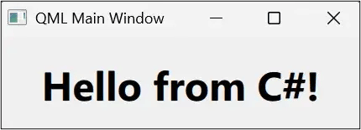
Getting Started with the C# Bridge
Qt Bridges is currently available as a C# UI framework for Windows and Linux.
C# on Windows / Visual Studio
The easiest way to start working with the C# bridge on Windows is to install the Visual Studio extension and create a C# + QML app based on the bundled project template.
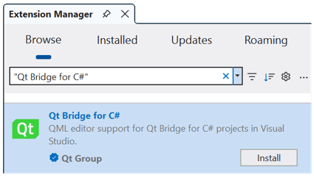
Install Qt Bridge for C# Visual Studio extension:
-
Open the Visual Studio Extension Manager:
-
Extensions > Manage Extensions…
-
-
Search for the Qt Bridge for C# extension and select Install.
Create a C# + QML app project
-
Select the option to create a new project:
-
File > New > Project/Solution
-
-
In the Search for templates box, type QML and wait for the search results to appear.
-
Select the QML Application project template.
-
Press Next.
-
In the Configure your new project window, set the Project name and press Next.
-
Optionally, in the Additional information window, check the Add sample code to project checkbox to create a project with some sample C# and QML code.
-
Press Create.
After Visual Studio generates the project, you can open its source files to examine the code that was added to the project, then press F5 to build and run the application.
C# on Linux or MacOS
To get started with the Qt Bridge for C# on Linux or MacOS, install the templates package and then create a new project based on the C# + QML app template. An installation of Qt for the specific platform (Qt for Linux or Qt for MacOS) is required to use the C# bridge.
Set up the Qt Bridge for C#
Install the templates package:
-
$ dotnet new install QtGroup.Qt.Bridge.CSharp.Templates
Configure the location of the Qt installation, for example:
-
$ export QtDir=~/Qt/6.11.1/gcc_64
Create a C# + QML app project
-
$ dotnet new qt --Framework net8.0 --SampleCode
Build and run the application
$ dotnet run
What’s Next
Try it out, learn more in the Qt Bridge for C# documentation, and please provide your feedback.
We’re now working towards the C# bridge to reach a Technology Preview (TP) state with a refined version.
Also, do let us know how you experience the lack of support for C# on Linux in the existing frontend options, because our feeling is if you’re developing anything outside the Windows ecosystem, there really isn’t a C# UI framework that would have what you need. With the demand for embedded Linux growing, we’re keen on hearing if you find patching it together with workarounds exactly as painful as we think?
Your feedback is very valuable for growing this into the best UI option for C#, so we hope to hear from you. Use the Qt Bridges Forum for any discussion and sign up to stay up-to-date on the project news.
Blog Topics
Related Articles

Implementing Tracepoints in Qt Applications using Qt Creator 21
Sometimes, as a developer, you need to find out why your application is..
Read Article
Qt Creator 21 Beta released
We are happy to announce the release of Qt Creator 21 Beta! You find a..
Read Article
Introducing the Canvas2D Coding Skill for Agentic Development of Embedded Device UIs
The Challenge: Getting AI Agents to Draw Correct Canvas2D Qt 6.12..
Read Article