Dec 17, 2025
Comments
Let’s talk about Figma to Qt — the plugin that closes the gap between Figma designs, Qt, and the final product. After launching our first public beta in September, we’re back with powerful new updates. Here’s what the plugin can do today.

Every great product starts as a design, yet many never make it to the device in the way they were imagined.
What looks perfect in Figma often gets compromised once it reaches development and appears on an actual screen. This happens because between the design and the product sit multiple layers — implementation details, tools, and hardware devices — each speaking a different dialect.
Developers, on the other hand, often need to manually implement designs from scratch in QML, including interpreting layouts, manually building components based on design intent, and adding interactions and data bindings.
This disconnect traps designers in a reactive loop — waiting for feedback, fixing issues, and spending time on avoidable rework. For teams, the cycle can expand into repeated revisions and long review chains. Industry estimates suggest that up to half of a project’s time can disappear into this rework alone.
Figma to Qt was built to change that. A plugin that speaks both languages — Figma GUI design and Qt — so teams can stay aligned and move faster. It empowers designers to deliver with confidence, preserving their design intent throughout the entire workflow, from Figma to Qt and ultimately to the final product.
This isn’t our first effort to bring Qt and Figma closer. Qt Bridge for Figma laid the groundwork by enabling the conversion of designs into QML. Figma to Qt is the evolution of that work — not only generating code but also transforming the entire design workflow. It provides designers with earlier insight into how their work translates into Qt, streamlining the path from design to implementation across teams and tools. Figma to Qt will eventually replace Qt Bridge for Figma, and we will share more information in the coming months.
Let’s explore how the plugin reshapes the workflow between designers and Qt developers.
Bring your Design to Life
The plugin generates clean, development-ready QML code from your Figma design. This is the heart of the plugin. It removes guesswork, documentation overhead, and unnecessary iteration. Designers can trust what they deliver. Developers no longer rebuild UIs from scratch.
Layers and Properties
Basic Figma layers and properties — including frames, groups, text, fills, borders, and more — are converted into QML, preserving their structure, hierarchy, and styling. This ensures the visual foundation of your GUI design is accurately reflected in code.
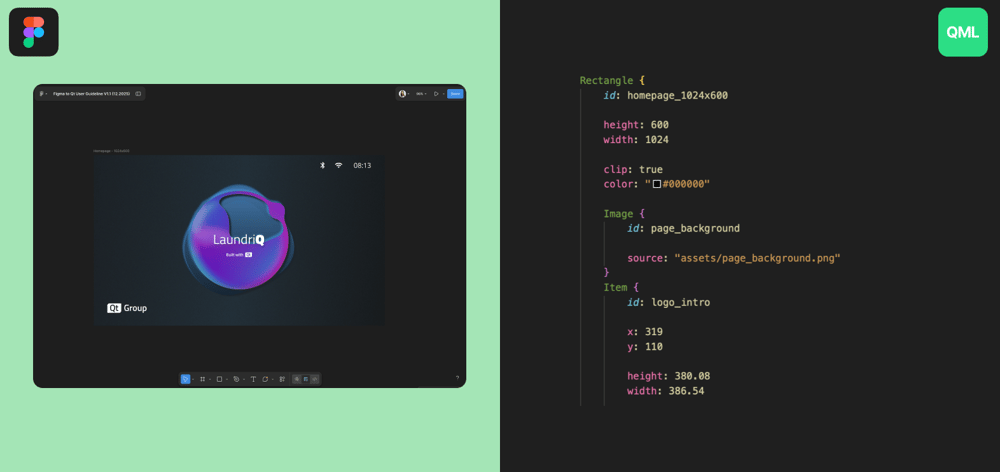
Layout
Auto Layout is crucial for building responsive, scalable graphical user interfaces in Figma. To support this reliably, we translated Auto Layout into Qt’s new FlexboxLayout, preserving spacing, alignment, padding, and resizing behavior. The structure you design is the structure developers receive.
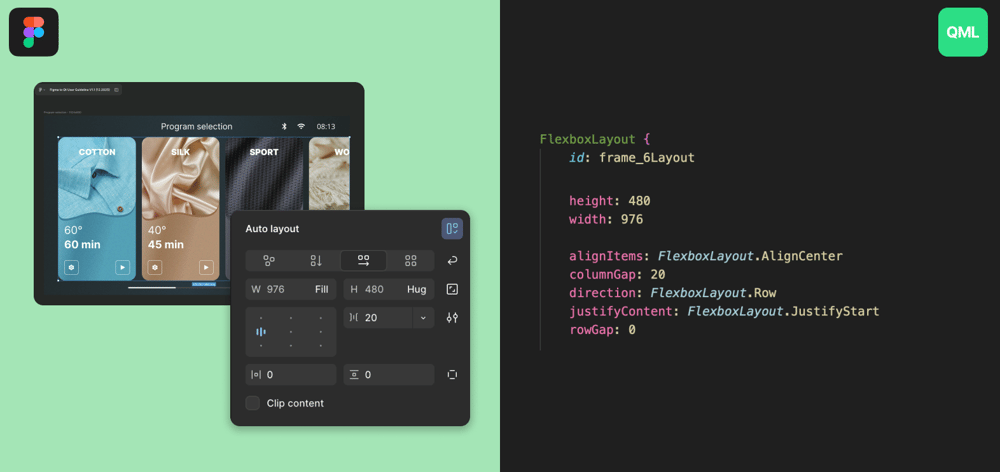
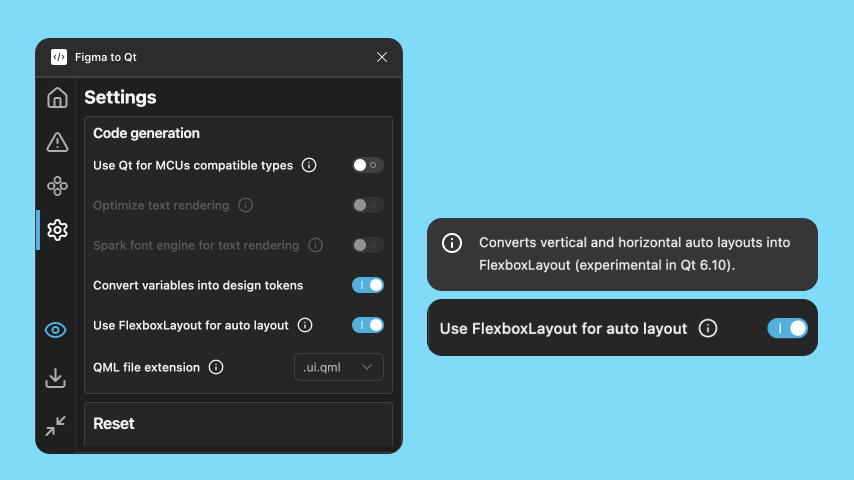
In this beta, we are introducing the first version of Auto Layout support with Qt’s new Flexbox Layout. Enable it in the settings and try it out! Your feedback will help us improve compatibility and behavior.
Controls
Designing buttons, sliders, switches, and toggles shouldn’t result in static, decorative assets. Our goal is to transform interactive GUI components represented in Figma into functional Qt Quick Controls — not just grouped rectangles.
In this beta, we are introducing the new Qt Quick Control Library, a predefined and customizable set of native graphical user interface controls. To start, we have included three sample controls: a button, a switch, and a checkbox. When exported, a button behaves as a button. A switch behaves as a switch. This allows developers to begin with a functional GUI, rather than a reconstruction.
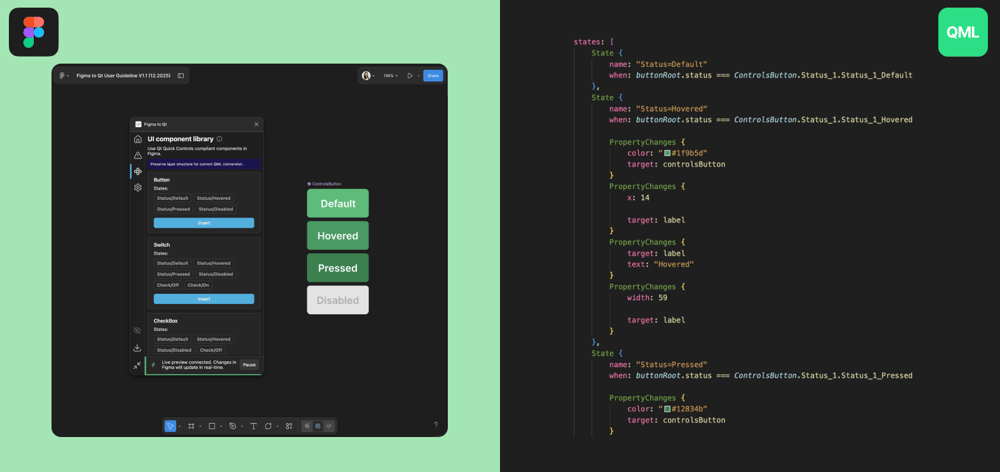
In this beta, you'll find the first iteration of Qt Quick Controls. We encourage you to test it out and share your feedback!
Already have existing button designs? Stay tuned — more features are on the way. Soon, you'll be able to convert your existing designs into native controls.
Design System
A scalable design system is essential for teams building a complex product or multi-product portfolios. Most organizations utilize shared tokens and reusable components. The plugin ensures that these properties remain consistent across both design and generated QML.
In this beta version, we are introducing a crucial step towards complete design system support: the introduction of local Variables support. The plugin reads local variables for colors, typography, and spacing, and translates them into QML as design tokens. This ensures that visual consistency is maintained across design and development processes. Enable it in the settings and see it in action!
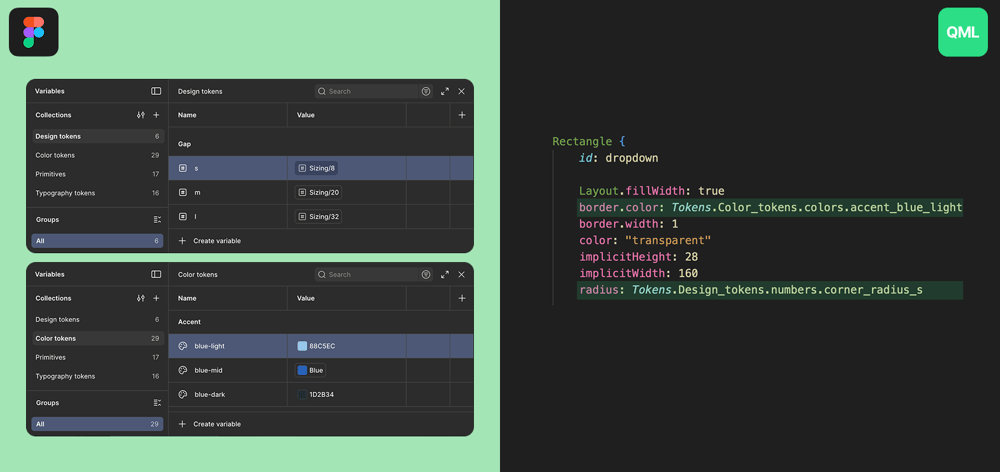
Have global libraries of shared remote components? Don’t worry, they’re coming soon. Support for complex design systems is underway, and upcoming releases will interpret Figma’s shared libraries.
Design Smarter
Designs that appear flawless in Figma can encounter challenges during implementation. The Issues tab in the plugin identifies these challenges early by scanning your design and surfacing unsupported design properties before they reach the developers. Each identified issue comes with guidance on its meaning and how to resolve it, enabling designers to take proactive measures and avoid surprises later in the process.
See Design in Action
Figma to Qt includes a Live Preview that brings your design into motion — rendered as a real Qt graphical user interface in your browser. What you see is what you ship. You can validate the visual fidelity and interaction behavior of your design long before implementation or hardware is ready.
Screen Preview
Live Preview displays selected Figma screens rendered in Qt in real time. If you designed using the Qt Quick Controls Library, the preview is also interactive.
Have you used the earlier beta? You will notice new improvements. You can now select and preview multiple frames at once, allowing you to validate multi-screen experiences without switching between the browser and Figma.
Code View & Inspect
The Live Preview features Code View and Inspect mode, allowing you to select any element in the preview to instantly highlight the corresponding generated QML. This functionality creates a shared language between designers and developers, reducing ambiguity and enhancing communication.
File Navigator
The Files tab in Live Preview shows the complete QML project structure, reflecting exactly what developers will receive — including files, folders, and assets. Designers gain transparency. Developers gain clarity and predictable projects.
Screen Resolution Overlay
Embedded HMI products often come in various screen sizes. Live Preview offers visual overlays of different screen resolutions, enabling you to validate scaling before implementation.
Font Management
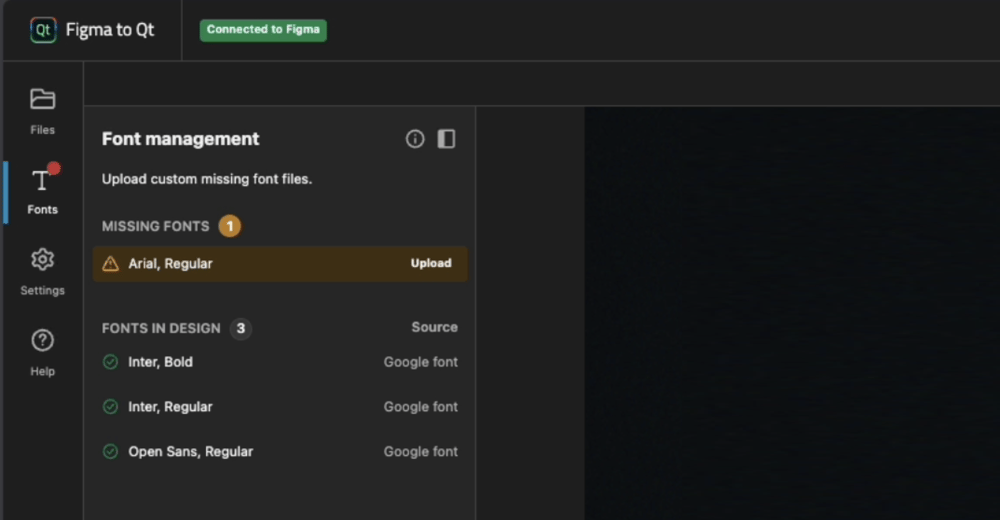
The plugin automatically identifies fonts in your design and indicates their availability. You can add any missing custom fonts for accurate rendering.
Deliver Design with Precision
When you’re ready, export the entire experience as a zipped QML project. Developers can open it directly in Qt Creator or Visual Studio Code (using the Qt Extension for Visual Studio Code) and begin building right away. Say goodbye to PDFs, screenshots, and static prototypes — this is a fully functional project that you can start immediately.
Most embedded products never ship exactly what was designed — not because teams lack ability, but because the tools and languages between design and implementation don’t speak to each other.
Figma to Qt closes that gap.
Designers stay closer to the real product. Developers start from a stronger foundation. Teams collaborate on the same source of truth earlier in the process. HMI creation becomes faster, clearer, and far more predictable.
With the new beta, we’re on track for a 1.0 launch early next year as we expand capabilities and polish the whole experience.
Figma to Qt isn’t just a plugin — it’s a statement: every designer deserves to see their creation come alive exactly as they imagined.
Try it out today from the Figma Community and see your designs come to life in Qt!
Blog Topics
Related Articles
Updated Qt Code Review Skills Reduce Token Costs by Up To 75%
Whether you are reviewing Qt Quick or Qt Widget code with Qt’s agentic..
Read Article
Qt Creator 21 - CMake Changes
Here are the new CMake changes in Qt Creator 21: Editor Qt Creator 21..
Read Article
Qt Creator 21 Beta2 released
We are happy to announce the release of Qt Creator 21 Beta2. Please head..
Read Article