May 11, 2026
Comments
The Challenge: Elevating AI-Generated QML to Best-Practise Quality
Frontier Large Language Models have become genuinely capable QML authors. Benchmarks show models like Claude, GPT, and Gemini achieving between 75% and 86% accuracy on the QML100 benchmark for single-turn coding tasks - a result that reflects the depth of Qt’s open-source ecosystem and the decades of publicly available QML code that has served as training material. For everyday UI components, a well-prompted AI agent can produce working, readable QML on the first attempt.
Yet despite this fluency, AI-generated QML often falls short of the idioms that make Qt Quick applications maintainable, upgradeable, or performant.
Enter the QML Agentic Coding Skill
As a part of Qt's AI-powered development tools, the new QML coding skill raises the baseline of AI-generated QML by embedding a curated body of best-practice knowledge directly into the AI agent’s reasoning context. Where a general-purpose model relies on statistical patterns absorbed during pre-training, the skill provides explicit, authoritative guidance on how QML objects, properties, bindings, and components should be structured for long-term maintainability, smooth upgradeability across Qt releases, and optimal runtime performance - giving AI-generated code the same considered judgement a senior Qt engineer would apply in a pull-request review.

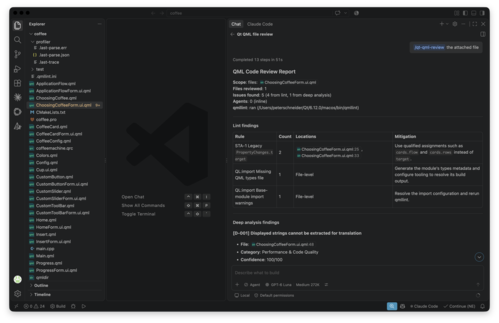
Image: Screen capture of QML Coding Skill in Claude Desktop
The skill activates whenever QML source code is the primary subject of the work: writing new components from scratch, improving existing QML for clarity or correctness, refactoring files to better align with current Qt idioms, optimizing rendering-heavy scenes, or reviewing binding structure for performance. It integrates naturally into the agentic development workflows that are reshaping how Qt software is built.
The skill does not activate for purely conversational questions about QML where no code is produced or examined - for example, “explain how anchors work” without any accompanying source to act on.
Key Capabilities of the QML Coding Skill
The skill covers the full range of day-to-day QML work an agent might perform:
Writing new QML components - scaffolding well-structured items with correct property declarations, proper use of id, scoped signal definitions, and idiomatic binding expressions
Structural improvement - applying best practices to property binding structure, item geometry, parent-child relationships, and signal handling so components are both correct today and straightforward to maintain as requirements evolve
Refactoring - converting imperative signal-handler logic to declarative bindings, collapsing redundant property chains, and eliminating unnecessary property var declarations
Performance optimization - reducing binding evaluation cost, applying layer.enabled judiciously, and identifying over-eager delegate instantiation inside views
Focus on Qt 6-release QML code for 2D UIs
The skill applies improvements within individual QML objects and their nested child items of the Qt 6 release family - covering property binding structure, item geometry, delegate composition, component instantiation, state logic, and visual organisation in ways that support maintainability and long-term upgradeability. It does not, however, address concerns that span multiple QML documents or require reasoning about the module-level architecture of a Qt Quick application. Considerations that emerge from the interplay between separate QML files - type registrations, module exports, or signal connections across component boundaries - are outside its scope.
The skill similarly does not cover CMakeLists.txt configuration, the Qt resource system, or any other project-level build concerns. Qt project structure and build-system correctness remain areas where agents need additional, dedicated guidance.
The skill also cannot compensate for gaps in a model’s Qt API knowledge that stem from insufficient pre-training material. Less-documented or niche Qt modules may still be handled incorrectly because the underlying model has not encountered enough representative examples - the skill provides structural and idiomatic guardrails, not encyclopaedic Qt API coverage.
Equally important, the skill does not add knowledge of Qt capabilities introduced after a model’s pre-training data cutoff. Developers working with features from recent Qt releases should verify that generated code reflects the current API and not an older version the model was trained on. The skill improves how a model applies what it already knows about QML; it does not extend that knowledge forward in time.
Finally, the skill is focused on 2D graphical UI development with Qt Quick. Qt Quick 3D scenes, spatial components, and 3D-specific QML types fall outside its scope, and agent-generated code for Qt Quick 3D should be treated with additional care until dedicated guidance is available.
Tested with
The skill works with any Qt 6 project where QML is used as the primary UI language. The skill has been tested with Claude Code CLI and GitHub Copilot in VS Code utilising Claude Sonnet 4.6, Gemini 3.1 Pro, and GPT 5.4.
Where can I get the skill?
The QML coding skill is available via the Qt agent skills GitHub repository and through Claude’s marketplace under the qt-development plugin, alongside the QML profiler skill, the Qt C++ code review skill, and other Qt-specific agentic capabilities.
You can get this and other official Qt agent skills from our GitHub repository: https://github.com/TheQtCompanyRnD/agent-skills
Related Articles
Updated Qt Code Review Skills Reduce Token Costs by Up To 75%
Whether you are reviewing Qt Quick or Qt Widget code with Qt’s agentic..
Read Article
Qt Creator 21 - CMake Changes
Here are the new CMake changes in Qt Creator 21: Editor Qt Creator 21..
Read Article
Qt Creator 21 Beta2 released
We are happy to announce the release of Qt Creator 21 Beta2. Please head..
Read Article