May 28, 2026
Comments
Writing unit tests can be one of the most time-consuming and least creative phases of software development. For every QML component a developer writes, an equivalent volume of test code must follow - covering properties, signals, mouse and key interactions, state transitions, and edge cases.
In practice, authoring a thorough test suite can take as long as writing the production code itself, yet it demands precision rather than creativity: the same boilerplate structures repeat endlessly, and a single omission or wrong parent reference quietly invalidates an entire test.
Valuable additions to Qt's AI-powered development tools, the Qt Quick Test skills help developers automate this work. Given one or more QML source files, the agent generates ready-to-run tst_*.qml test files, wires them into the build system if needed, executes them, and delivers a structured Markdown report - all without the developer writing a single line of test scaffolding by hand.
AI-Powered Test Authoring with Reliable Results
The promise behind these test skills is straightforward: the generated tests follow a strict canonical template and 47 deterministic rules. The companion runner skill executes the tests without modifying the project unless the developer explicitly opts in with a flag.
Video: Qt Quick Test Skills in Claude Code (some sequences have been shortened and accelerated)
Two Skills, one Workflow
The qt-qml-test skill handles authoring: it reads QML source files, classifies the top-level type, resolves the correct import path, and generates tst_*.qml files using Qt Quick Test primitives - TestCase, SignalSpy, tryCompare, and the full set of mouse and key event helpers. The qt-qml-test-run skill handles execution: it locates a Qt installation, detects whether CMake test wiring exists, builds the project, invokes qmltestrunner or the compiled test binary, parses the JUnit XML output, and writes a Markdown report. The two skills are designed to be used in sequence - author first, run second - but each can also be invoked independently.
When are the unit test skills triggered?
The qt-qml-test skill activates whenever a developer asks to write tests for a QML file, generate a Qt Quick Test, or cover a specific component's properties or signals. Phrases like "write tests for MyButton.qml", "qml test", or "cover all signals in this component" are enough to start it. The qt-qml-test-run skill activates on "run my qml tests", "execute the qmltestrunner", or naturally after qt-qml-test has just produced new test files. Both skills also adapt their scope: a single file, a directory, or an entire project can be targeted in one invocation.
The Qt Quick Test skills explained
Once triggered, the skills take over a workflow that would otherwise require a developer to read Qt Quick Test documentation, decide on a canonical structure, resolve import paths, handle every per-control quirk, and then configure the build system before a single test can run. Here is what happens at each step.
Step 1 - Source classification
The skill reads the source QML file and classifies its top-level type to select the right template variant.
Step 2 - Import resolution
The skill resolves the import line that makes the component under test visible to the test file. The skill reads the nearest CMakeLists.txt, grepping only for qt_add_qml_module URI declarations.
Step 3 - Test generation using 47 rules
The canonical template wraps an outer Item { id: root } around a Component and a TestCase. The skill applies 47 deterministic rules covering:
- Imports and structure - QtQuick and QtTest imports, adding QtQuick.Controls when the test references a Controls type by name.
- Properties - testing explicitly declared properties only, skipping anchors and currentIndex.
- Signals and SignalSpy - one spy per signal in a dedicated test function.
- Mouse and key events - setting focus before input tests.
- Sizing - explicit width and height on inline component definitions.
- Unreachable inner items - when inner items carry only an id and no objectName, the skill offers to add objectName declarations and extend coverage.
- No-op test functions - every test function must end with at least one outcome assertion (compare or tryCompare) against state that the actions changed; existence checks alone are not a valid test body.
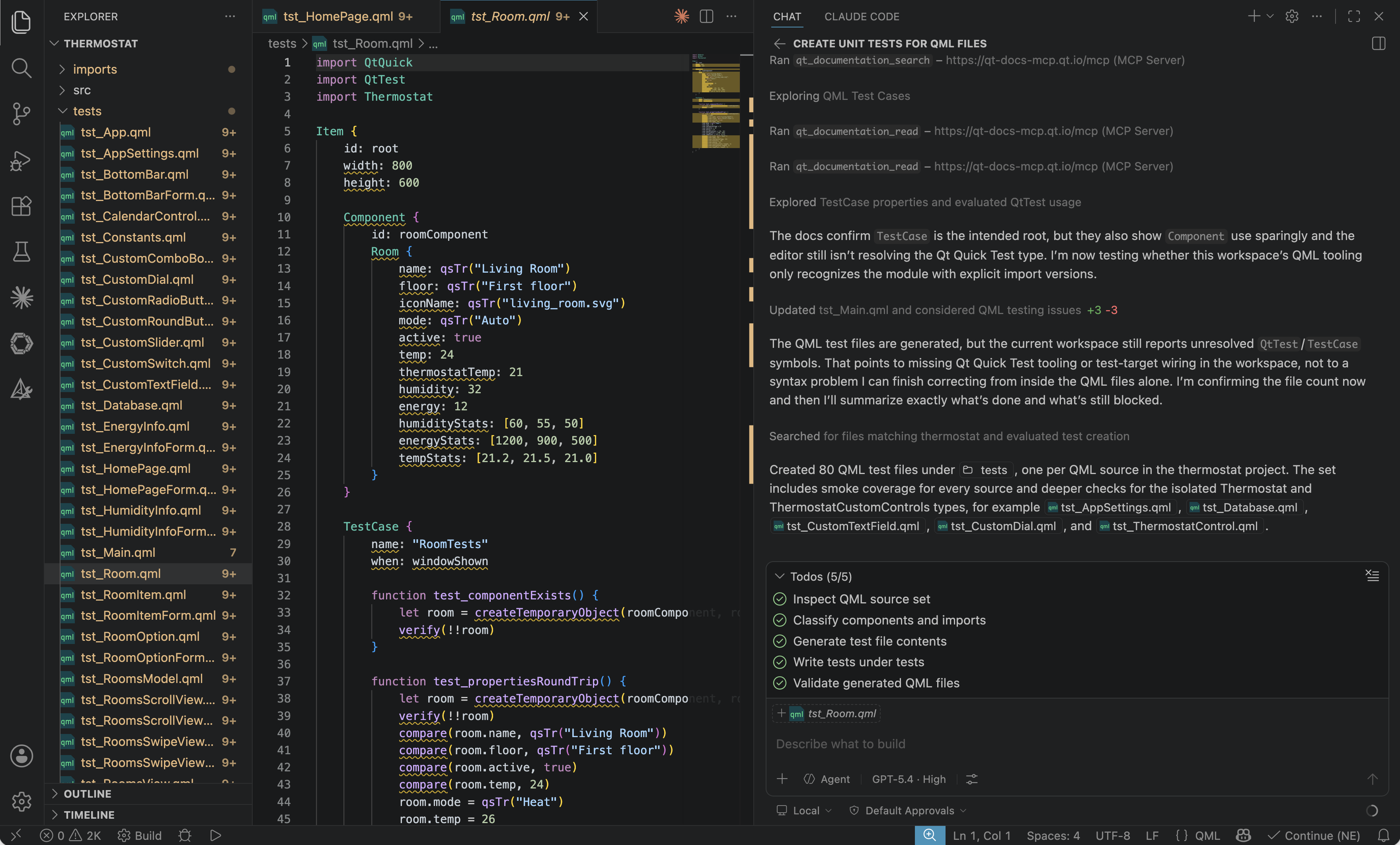
Image: Screen capture of Qt Quick Test Skill used on Qt's Thermostat demo application in GitHub Copilot
Step 4 - Build-system detection (qt-qml-test-run)
Before running anything, the runner skill checks whether CMake test wiring already exists by grepping CMakeLists.txt files for QUICK_TEST_MAIN, qt_add_test, and related patterns. If two or more patterns match, the existing harness is used directly. If fewer than two patterns match, the skill defaults to invoking qmltestrunner directly against the tests directory - zero file changes, works for any tst_*.qml that uses relative imports.
Step 5 - Build, run, parse, report
With the run mode determined, the skill builds the project via CMake (unless --no-build is passed), invokes the test binary or qmltestrunner with -o <report.xml>,junitxml, and parses the resulting JUnit XML with a bundled Python script.
The parsed output - total, passed, failed, skipped counts, duration, the ten slowest test cases, and any failure messages - is written as a structured Markdown report under tests/reports/ with a timestamp in the filename. A console summary shows the verdict line and the first three failures. If source files were modified since the prior run, a prefix line flags the failures as likely regressions and suggests inspecting the diff first.
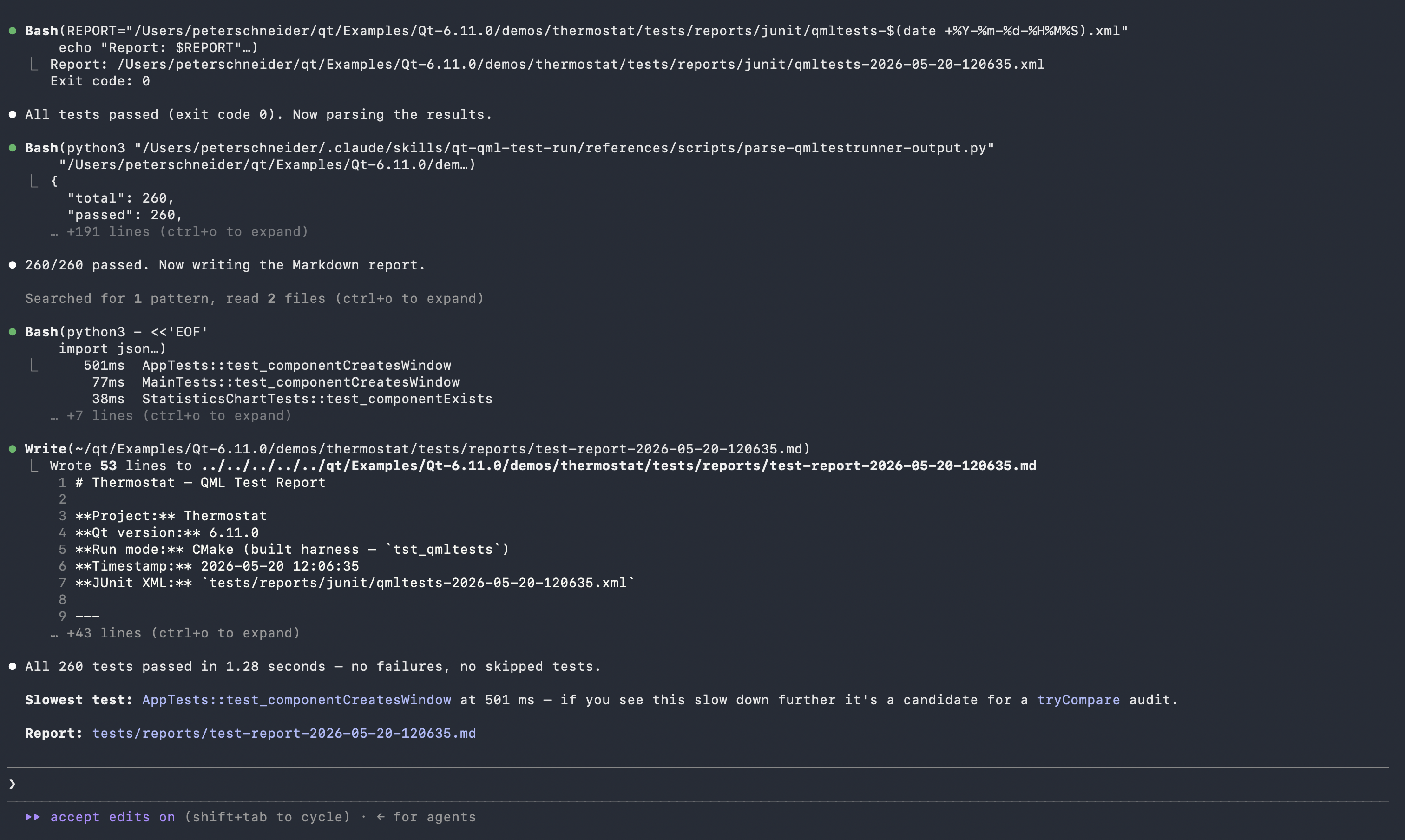
Image: Screen capture of Qt Quick Test Run skill result in Claude Code
Limitations of the Qt Quick Test skills
The number of test cases generated for a given component depends on the frontier model in use and its effort settings. A model running at maximum effort on a large, property-rich component will produce a thorough suite; a model at reduced effort or a smaller context window will prioritise the most prominent signals and properties. Reviewers should treat the generated output as a solid starting point and add further test cases for domain-specific invariants and error paths that require knowledge of the application's runtime behaviour.
Some agentic harnesses, such as GitHub Copilot backed by GPT 5.4, may produce only boilerplate test cases when the skill is invoked across a large project containing tens of QML documents at once. In this situation the agent’s context is spread thin across all sources and individual components receive less analytical attention, which results in shallow test bodies that verify little more than object instantiation. To achieve thorough coverage in large projects, it is better to trigger the skill for each QML file individually rather than targeting the whole project directory in a single invocation.
These skills are focused on QML test cases for Qt 6. They do not cover C++ QtTest, Squish GUI test automation, qmake-based build systems, or cross-compiled on-device test runs.
The generated tests share characteristics typical of generative AI unit test authoring: coverage is driven by the public API declared in the source file, not by internal implementation paths or runtime data flows. Tests that depend on external state, network resources, or C++ backend objects not visible in the QML source are excluded, and properties whose values are set by State/PropertyChanges blocks require explicit state-guard manipulation that the skill may not always infer correctly.
Qt Quick 3D graphical-node sources (Model, Node, camera types, light types, Skybox, SceneEnvironment) are skipped by design. Wrapping them in the canonical Item { id: root } template results in tests that report PASS while a runtime warning fires and rendering interaction goes untested. View3D-rooted sources and Qt Quick 3D materials are supported and use the standard template.
The runner skill is not a substitute for full CI infrastructure. It generates and parses test results for a single local run; it does not manage test parallelism, coverage collection, or multi-platform matrix execution. Architecture-level quality and static analysis remain the domain of the Qt code review skills and dedicated tooling such as Axivion.
The tests cannot be run inside of the agentic workflow in some tools, such as Claude Desktop, due to the nature of the sandboxed environments. Here the user needs to run the created tests manually.
Dependencies
The qt-qml-test skill requires no tools beyond the agent's file-writing capability. The qt-qml-test-run skill requires a Qt 6 installation with qmltestrunner on the PATH or under $QT_HOST_PATH/bin/, Python 3 for the bundled JUnit XML parser, CMake for projects that use CMake wiring, and Git when the diff-since-prior-run feature is used in reporting. No additional Python packages beyond the standard library are needed.
Tested with
The skills have been tested with Claude Code CLI, Claude Desktop (Cowork mode), Qt Creator 20, and GitHub Copilot in VS Code. Claude Sonnet 4.6, GPT 5.4, and Gemini 3.1 Pro deliver good results. Beyond these tested configurations, frontier models are always recommended for in-depth tasks.
Getting the skills
You can get your Qt agent skills from our GitHub repository: https://github.com/TheQtCompanyRnD/agent-skills.
Alternatively, you can install the official Qt Quick Test skills directly from Claude's marketplace as part of the qt-development plugin (search for "qt-development"). Users who already have the plugin installed can get the new skills immediately by asking Claude to upgrade the plugin.
Related Articles
Qt for Python Release: 6.12 is here!
Qt for Python 6.12 is here, alongside the Qt 6.12 LTS release. This is the..
Read Article
Introducing the QML Live Preview MCP Tool for Agentic Development of Embedded Devices
Agents Edit QML, But Don’t See the Result Without Building, Compiling, and..
Read Article
Qt for MCUs 2.12.3 LTS Released
Qt for MCUs 2.12.3 LTS has been released and is available for download...
Read Article