Jan 14, 2026
Comments
In this blog post I will discuss some of the recent improvements around lightmap baking, global illumination, and related technologies for making Qt Quick 3D scenes more realistic looking. I will talk mostly about lightmap baking improvements added in Qt 6.10, but also about two new features in the upcoming Qt 6.11 version, namely Screen-space global illumination (SSGI) and Screen-space reflections (SSR).
Lightmap Baking Improvements
With the release of Qt 6.10, the Qt Quick 3D module introduces major improvements around lightmap baking. If you're building real-time 3D scenes with QML and want richer lighting with less runtime cost, this is for you. In this section I'll walk you through what lightmap baking is, what's new and why it matters.
What Is Lightmap Baking?
Lightmap baking is a technique used in 3D rendering to pre-calculate how light interacts with static objects in a scene.
Instead of computing lighting, shadows, and indirect light in real time, the lighting information is "baked" into special texture maps, called lightmaps, during an offline process. At runtime, these textures are sampled by the renderer, giving you realistic global illumination, soft shadows, and ambient light bounce at a fraction of the computational cost. The result is visually richer scenes that perform better, especially on mobile and embedded devices where GPU resources are limited.
Qt has had preliminary support for lightmap baking since version 6.4. In this post I will specifically focus on the improvements in 6.10, so for an in-depth explanation on how baking works and how to implement it in your application I suggest reading the official Qt documentation.
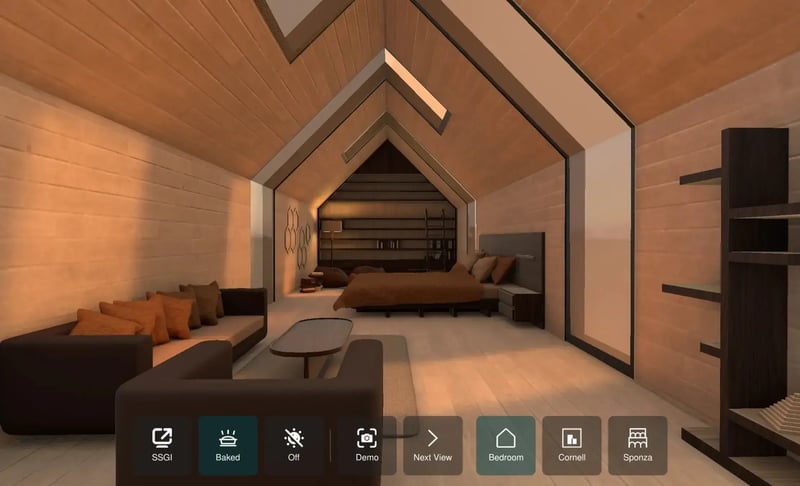
The image below shows a QtQuick3D scene with baked lighting.
What's New for Global Illumination
There are several improvements to lightmap baking in Qt 6.10 especially around the ergonomics of baking and setting up your scene. I will focus on just the most important ones and go through them one at a time.
NLM-Based Built-In Denoiser
Qt Quick 3D in 6.10 includes a built-in Non-Local Means (NLM) denoiser that runs automatically after lightmap baking. The NLM algorithm reduces noise in the baked lighting by averaging similar regions across the image, removing random noise from the raytracing process. You can control its strength with the new Lightmapper::denoiseSigma property: lower values keep more texture detail but leave a bit more grain, while higher values produce smoother, cleaner results at the cost of some sharpness. This means you no longer need to post-process your lightmaps manually since Qt Quick 3D handles the denoising as a part of the bake step.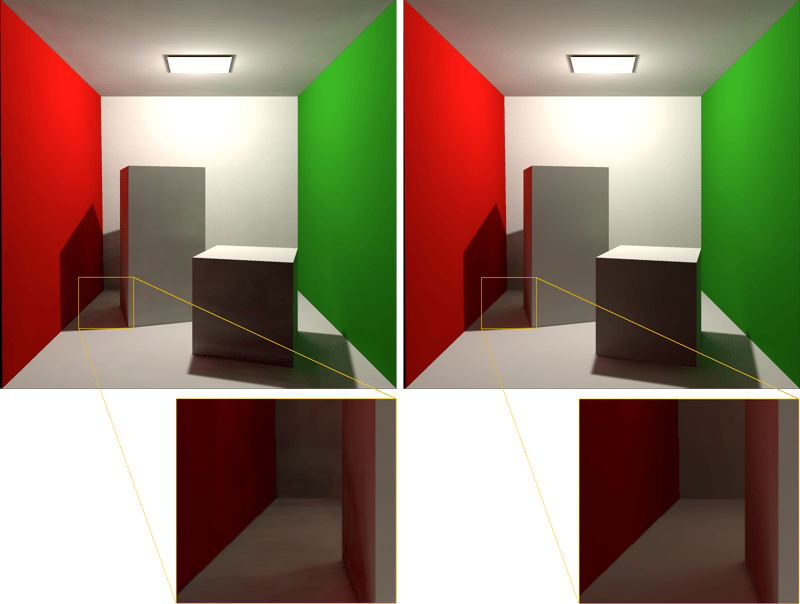
The above image shows the Cornell box scene using a noisy lightmap (left) and a denoised lightmap (right).
Lightmaps Based on Texels-Per-Unit
Qt Quick 3D in 6.10 introduces a new way of specifying the resolution of the generated lightmaps. Instead of having to specify fixed dimensions for each Model, you define the approximate number of lightmap texels that a unit surface in world space will have. This is referred to as texels-per-unit (TPU).
The TPU is set in the Lightmapper::texelsPerUnit, or Model::texelsPerUnit properties. This means that a 100x100 rectangle with a texels-per-unit value of 1 would be approximately 100x100 texels. The benefit of this approach is that it is trivial to keep the lightmap sizes consistent when adding several models to the same scene, as well as increase or decrease them. Keep in mind that the sharpness of the direct shadows will depend on the resolution of the lightmap as seen in the image below.
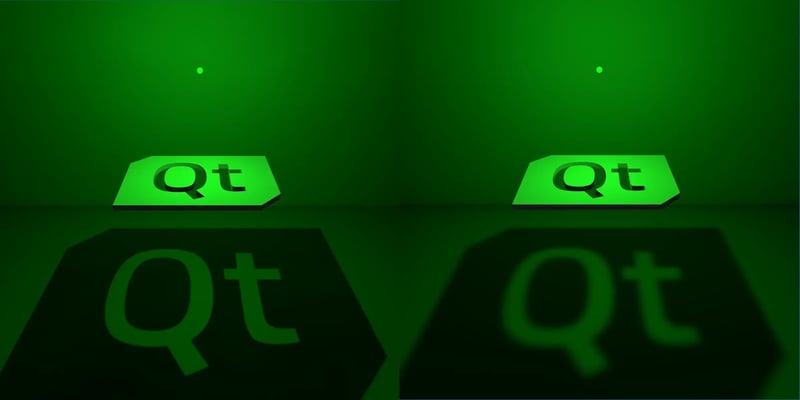
The above image shows the same scene but with different texel-per-unit values. The left scene has five times the texel-per-unit value compared to the right scene.
Improved Progress Tracking
When starting a lightmap bake through the DebugView QML component, a popup window is shown. This window has been improved to show a progress bar and an estimation of the time remaining of the bake. It is now also possible to continue interacting with the main application while the bake is in progress.
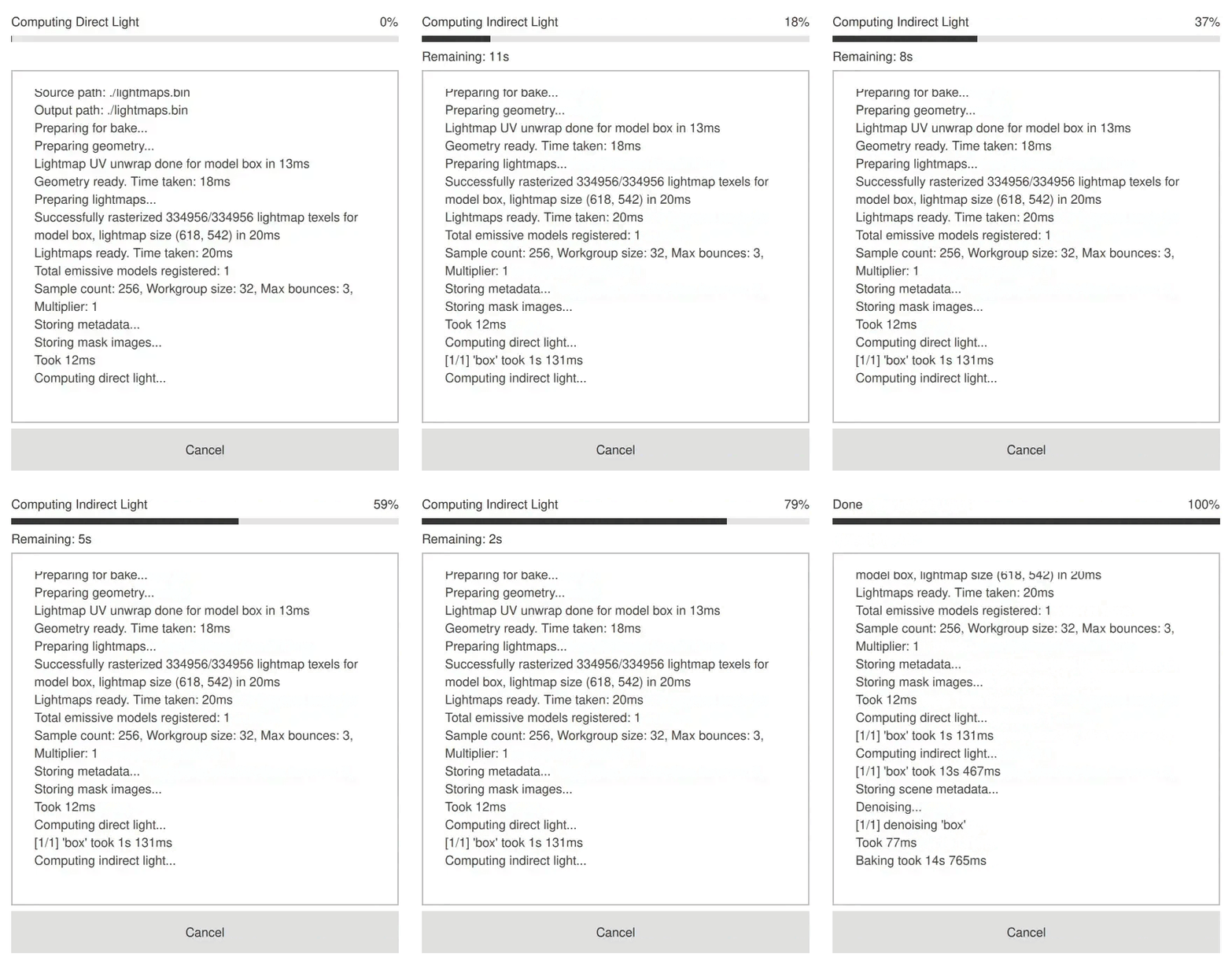
The above image shows the progress window when baking lightmaps.
Lightmap Viewer
One notable change in Qt 6.10 is that there is now a Lightmapper::source property that specifies one file containing all the lightmaps used in the scene. In older versions, for each Model used in lightmap baking, a mesh and a lightmap texture file was generated. Now all that data is stored in just one file using a custom file-format unique to Qt Quick 3D. This not only simplifies the workflow but also makes it possible to easily inspect this file. For this purpose a Lightmap Viewer application has been created. Using this application you can inspect the generated lightmaps and their respective models.
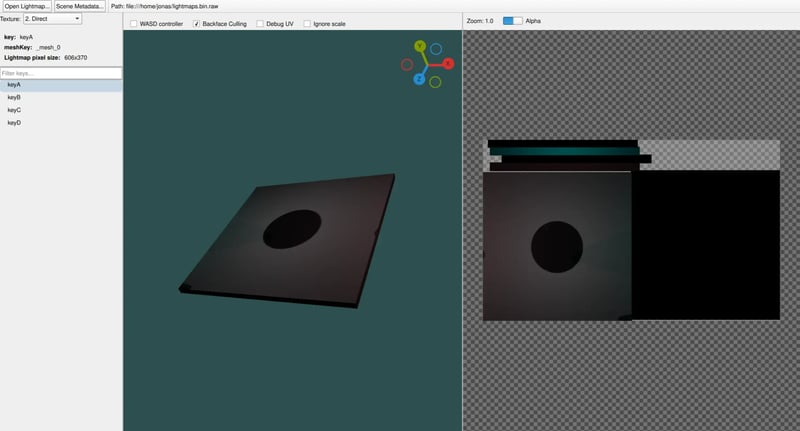
The above image shows the lightmap viewer with a loaded lightmap file.
Screen-Space Global Illumination
We will now look at a new technique added in Qt Quick 3D as an alternative to baking lightmaps. SSGI (Screen Space Global Illumination) is a real-time rendering technique that simulates realistic indirect lighting (light bouncing off surfaces) using only the data available in the screen's depth and color buffers. Since this is a dynamic, post-processing effect, it does not rely on pre-baked lightmaps and will react to dynamic changes in the scene.
SSGI can be enabled in Qt 6.11 and later by setting ExtendedSceneEnvironment::ssgiEnabled to true. There are further properties for tweaking the look of the SSGI in ExtendedSceneEnvironment.
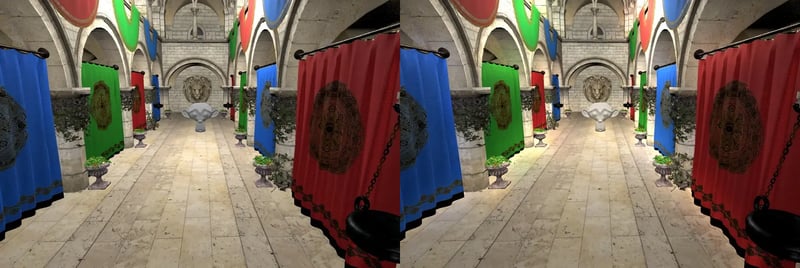
The above image shows a scene where SSGI is disabled (left) and SSGI is enabled (right). Notice how the monkey head and the curtains get illuminated from reflected light on the floor when SSGI is enabled.
Screen-space Reflections
Screen Space Reflections (SSR) is another real-time rendering technique similar to SSGI. Like SSGI, it uses only data available in the screen's depth and color buffers, but it is used for rendering reflections. It works using a technique called "raymarching" by going through each pixel in the screen and finding and blending the corresponding reflected screen pixel(s).
SSR can be enabled in Qt 6.11 and later by setting ExtendedSceneEnvironment::ssrEnabled to true.
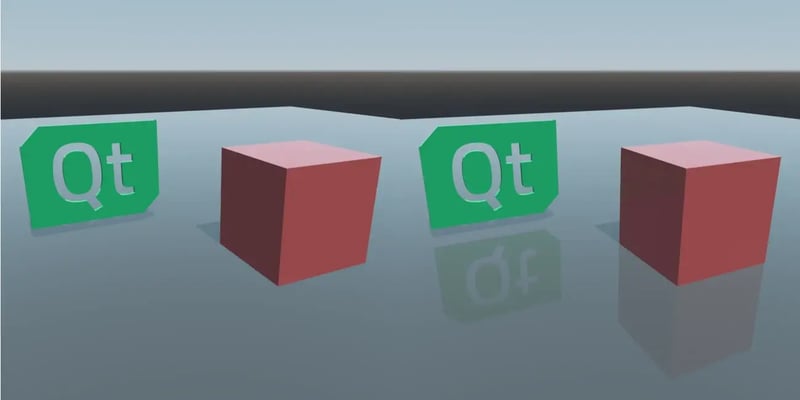
The above image shows a scene where SSR is disabled (left) and SSR is enabled (right).
Closing thoughts
If you are already using the lightmap baking features in Qt Quick 3D, I hope Qt 6.10 brings a boost to what you can achieve visually and performance-wise. If you have not tried it out before, then this is the perfect time to do so. Checkout the baked light map example and the documentation for a good place to start.
For trying out SSGI and SSR you should checkout the ExtendedSceneEnvironment QML type.
I hope you've enjoyed this post and look forward to seeing what you will create with Qt!
Blog Topics
Related Articles

Qt AI Assistant Retires As We Invest in Agentic Development Tools
The Way Developers Use AI Has Changed When Qt AI Assistant was introduced,..
Read Article
Qt 6.11.2 Released
Qt 6.11.2 is now available for download. As a patch release, Qt 6.11.2..
Read Article
A Cross-Platform Rust UI Framework via Qt’s Bridging Technology
Rust has achieved something extraordinary: it genuinely excites people to..
Read Article