The new Qt Task Tree module, available soon with Qt 6.11 as a technology preview, is a comprehensive solution for managing automated asynchronous tasks. But what truly sets this module apart is its completely new approach to C++ API design in Qt. It also changes the way we think about writing and reading asynchronous code. Furthermore, it unifies various asynchronous APIs, and provides means for adapting any asynchronous task to work with the module.
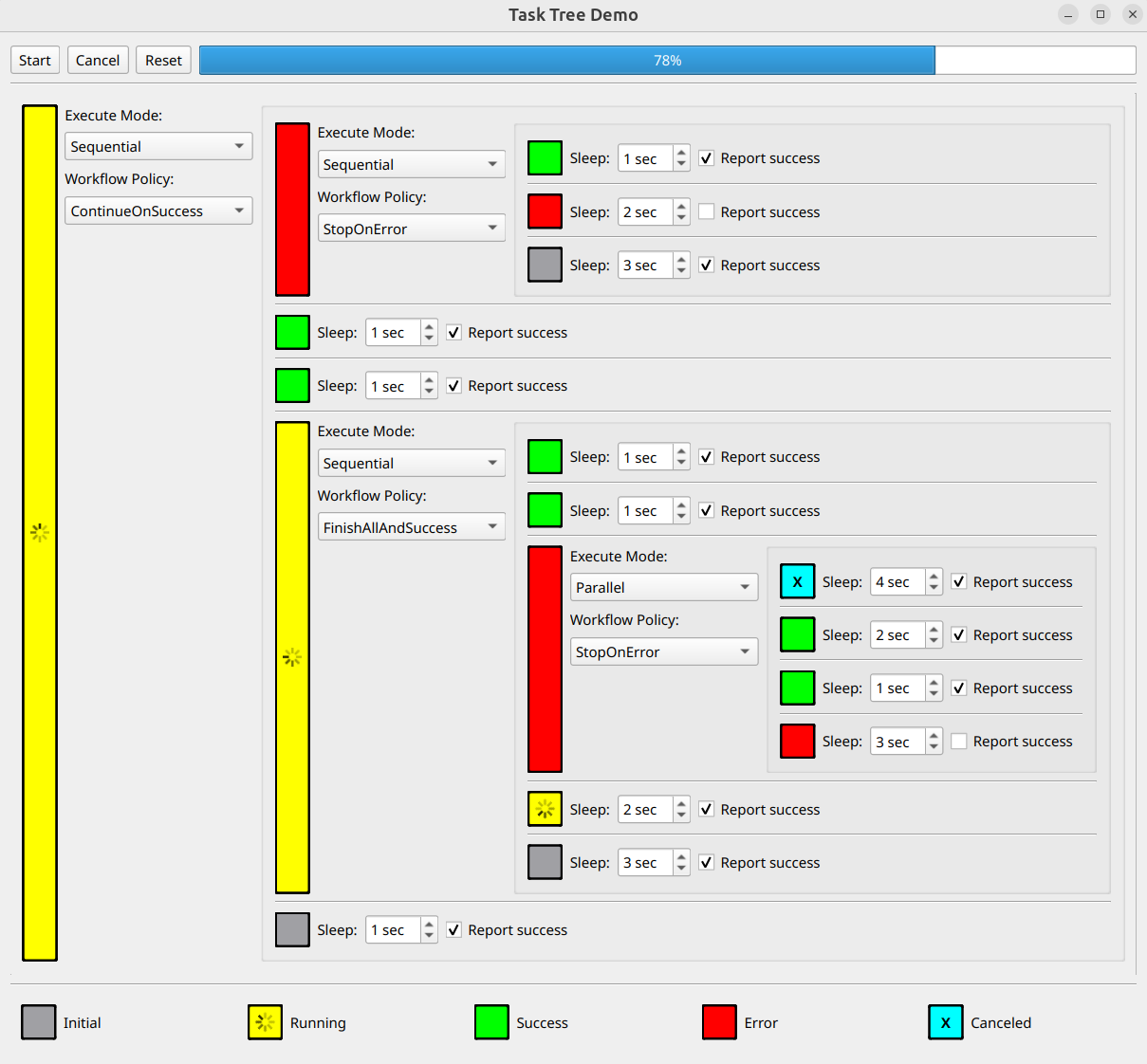
Screenshot of the Task Tree Demo example.
A Completely New, Declarative Approach for the Qt C++ API
Qt is well known for its declarative API expressed in QML language. The new Qt Task Tree module brings declarative APIs to the Qt C++ world.
Declarative Recipe and Task Tree
The declarative description of an asynchronous workflow is expressed via a so-called recipe. The recipe is a copyable value-type object, that is passed to an instance of a task tree. When the task tree is started, it reads the recipe and automatically manages the complex asynchronous workflow according to the passed recipe. The workflow includes dynamic creation of asynchronous tasks, dynamic creation of data objects for inter-task data exchange, lifecycle management of created tasks, and execution of continuation upon task completion.
The recipes are reusable – this means they may be part of more general recipes, may run multiple times, or be run by multiple task trees running in parallel.
Cartridge and Player Analogy
Think of the recipe and the task tree as an analogous to a cartridge and a cartridge player. The cartridge itself does nothing on its own. Similarly, when defining a recipe, you don't create any task or data object. You're merely defining a description of exactly what the task tree should do when the recipe is passed to the task tree and the task tree is started. This is precisely what happens when the cartridge is inserted into the player and the player begins playing it—the player reads the cartridge's contents and knows exactly what to do.
When you want to create a new game, you simply design a new cartridge and let the player execute it according to its content. The cartridge designer doesn’t need to change anything in the player - instead, after inserting a cartridge, they press the Play / Cancel / Reset buttons. The same thing happens with recipes - if you want to write your own complex, asynchronous workflow, you simply prepare your own recipe. Then you pass it to the task tree and play / cancel / reset the task tree. You don't need to make any changes to the task tree to properly execute the recipe.
This shift in thinking about writing code is a key factor in the successful use of this module.
Responsibilities
Since this is the first declarative C++ API in Qt, it’s essential to understand how to use it and what precise responsibilities of a recipe and task tree are.
The user of the Qt Task Tree module focuses on creating a recipe that precisely describes the desired asynchronous workflow. The content of a recipe is entirely declarative, and it's important to remember that it's just a description - nothing more.
Another important thing to remember is that the task tree itself acts as a recipe reader / executor. Using the task tree is simple - you don’t need to (nor you should) subclass QTaskTree. You simply pass the recipe to it and run it. You can then cancel / reset it, or receive a notification about the completion – that’s all.
And here's the biggest benefit for you - under the hood, the task tree is doing a lot of the boring, boilerplate work for you, with no additional coding.
Let’s see the exact responsibilities of the recipe and the task tree, and how the content of the recipe affects the running task tree:
|
Recipe (cartridge), defined by user, describes: |
QTaskTree (player), instantiated by user, reads the passed recipe and automatically does the following: |
| What tasks are to be executed | Creates and destroys tasks, taking care of their lifetime |
| In which order | Respects the order of task execution defined by the recipe |
| Execution mode (sequential, parallel) | Executes tasks in sequence or in parallel |
| Workflow policy | Controls execution according to the results of completed tasks and the defined workflow policy, by executing continuation, or by skipping remaining tasks and by canceling tasks running in parallel |
| Nested groups | Executes a group of subtasks, which is seen by its parent as a single asynchronous task, with its own execution mode and workflow policy |
| Setup handlers | Executes setup handlers prior to task or group start, making it possible to configure tasks according to user needs |
| Done handlers | Executes done handlers on task or group finish, making it possible to collect result data from the finished tasks |
| Storage<DataType> objects for inter-task data exchange | Dynamically creates and destroys DataType objects described by the corresponding Storage<DataType> objects, used in setup and done handlers of different tasks and groups or in conditional expressions |
| Conditional expressions | Chooses different paths of execution according to collected data or asynchronous task result |
Moreover, the QTaskTree provides basic progress info about finished tasks and makes it possible to cancel all currently running tasks regardless of the current state of execution. From a developer's perspective, the only work is to define the recipe (left column of the table). In the right column of the table, you can see how much work QTaskTree does for you, without any extra code. This eliminates almost all boilerplate code typically needed in asynchronous programming.
The Power of the Declarative Approach
Clearly separating the exact workflow from boilerplate code makes the code much more readable than traditional approaches. The boilerplate code disappears because the task tree handles the tedious tasks for you. On the other hand, the workflow is clearly and precisely described in one place, even if it's complex.
Let’s see how a simple example recipe may look.
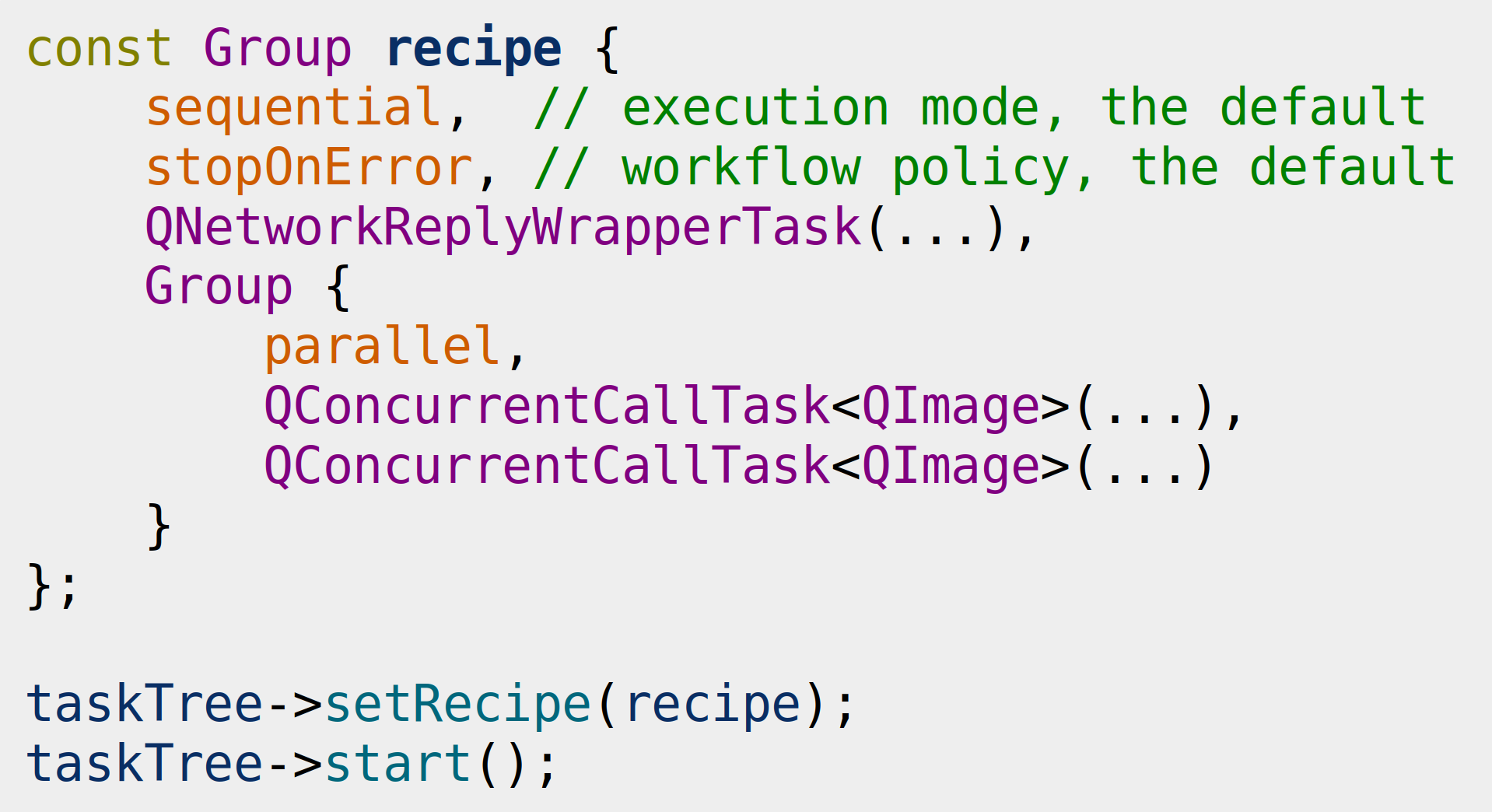
The recipe consist of a top level Group element. Within this element, we define properties and tasks. Note the phrase "when this recipe runs" used in the explanation below to emphasize that things happen not when the recipe is defined, but later, during its execution.
The first property value is sequential, meaning that when this recipe is run, the direct child tasks of the top-level group will be executed in chain - the next task is started after the previous completes. The sequential element is the default execution mode of any group, and can be omitted.
The second property value is stopOnError. This means that when this recipe is run, whenever any direct child task of the top-level group exits with an error, we stop executing this group, skip all pending tasks, and report an error. Otherwise, after all tasks successfully completed, we report successful execution. This is also the default workflow policy of any group, so it can be skipped as well.
Next, we define the first task of the top-level group – QNetworkReplyWrapperTask - this task will asynchronously retrieve data from the network when this recipe is run.
The final element of the top-level group is the nested Group. It will be executed after the download task successfully completes when this recipe is run. This group contains the parallel property, ensuring that all its tasks execute in parallel. Finally, we define two QConcurrentCallTask<QImage> tasks - each of which executes a function running in a separate thread when this recipe is run, transforming the collected network data into a QImage of the desired size.
The final step is to pass the recipe to the QTaskTree instance and run it.
Unification of Various Asynchronous APIs
The Qt Task Tree module addresses a crucial aspect of asynchronous programming – it unifies various asynchronous APIs into a single, coherent interface.
Automatically creating, starting, notifying about task completion, and deleting tasks of different types would be difficult without this unification. The following table shows how the different asynchronous Qt APIs start tasks. Similar differences exist for creating, finishing, and destroying APIs.
|
Asychronous Task |
Starting API |
| Process | QProcess::start() |
| Network Query | QNetworkAccessManager::get()/put()/post()/other… Instantiates QNetworkReply dynamically. |
| Concurrent Call | QtConcurrent::run() Returns QFuture handle |
| Timer | QTimer::singleShot() |
In the Qt Task Tree module, the issue of asynchronous API incompatibilities has been resolved. All these types are unified through a common interface utilising task adapters provided for existing APIs. For more information on the built-in adapters and how to adapt any other custom asynchronous task type, see the QTaskInterface and QCustomTask documentation.
Task Tree in Action
The Qt Task Tree module was originally developed as a part of the QtCreator project in late 2022. During this time we added many improvements, to name just a few:
- Running parts of the recipe in For loops
- Conditional expressions operating directly on asynchronous tasks: If () >> Then {} >> Else {}
- Logical operators for asynchronous tasks, such as conjunction, disjunction, and negation, which operate in a short-circuit fashion
- Convenient task tree runners, enabling single / sequential / parallel / mapped execution of recipes
The Qt Task Tree eventually matured enough to be released as a public API in Qt 6.11. Currently, the Qt Task Tree is used in over 100 different places in QtCreator. It manages build / deploy / run project configurations, controls the execution of all locator filters, executes VCS commands, drives Axivion plugin network communication, executes the Clang tool, runs autotests, and more...
The Qt Task Tree module contains several examples demonstrating its capabilities. Let’s take a brief look at them:
Experiment with Execution Modes and Workflow Policies
The Demo example shows how different execution modes and workflow policies influence the execution of subtasks in a complex task tree structure. It also allows you to observe how task durations and their expected results influence the continuation of execution. This example also exists in a web assembly version, so you can play with it directly in your browser.
State Machine Possibilities
The Traffic Light example demonstrates the use of a task tree as a state machine. It shows how to use the Forever element to construct a repetitive recipe that functions as a state machine.
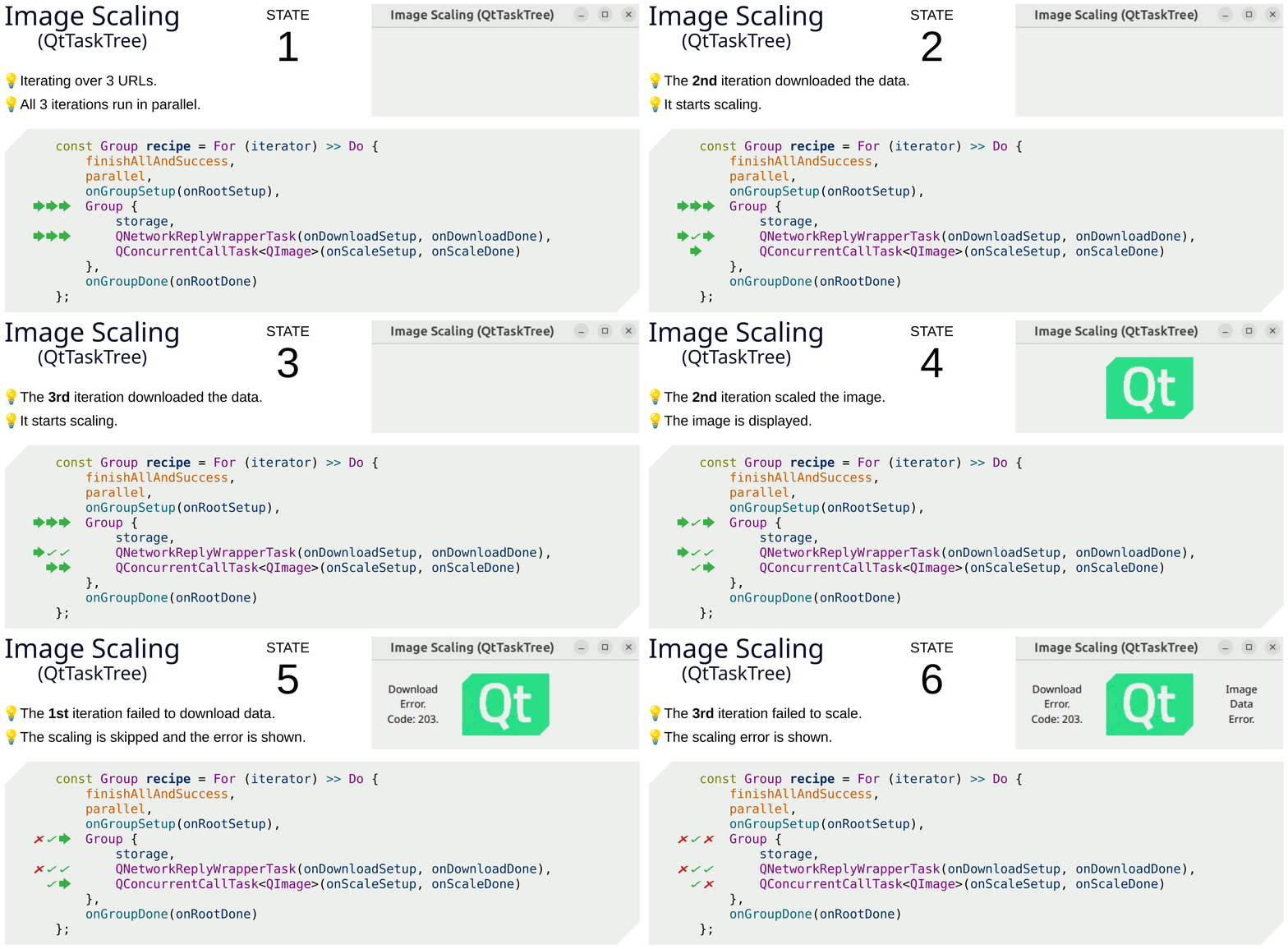
Running Iterations in Parallel
With Qt Task Tree, it’s possible to start all asynchronous iterations simultaneously. This is shown in the Image Scaling example. It also explains how to use the Storage object to exchange dynamic data between different tasks.
Additional Links
Here you can find links to the full documentation, source tree, and general task tree page with additional information.
Your Opinion Matters!
We are really thrilled to see this new module in the official public release of Qt 6.11. It’s truly exciting to see the first declarative C++ API for Qt. This innovative approach to API design piques our curiosity to see how Qt users will experience this shift in thinking about writing code. We also look forward to hearing your feedback. Have fun with the new Qt Task Tree module!