Development Tooling Available for Qt

There is a wealth of development tooling and utilities available for building your software with Qt.

Development Tooling from IDEs to the Command Line

Qt Framework comes with integrated development tooling to make your work as smooth as possible. While a lot of the tools are built into or exclusive to the Qt Creator IDE, there are plenty of tools that can be used via various IDEs. Here are our highlights.

The tools are divided into categories to give you an easy overview. In addition, check out also the Qt Creator IDE and Qt’s Design Tools.

Build Tools & Compilers

Qt Framework works well together with various cross-platform build tools and compilers, enabling development across hardware architecture borders. Here are some highlights.

Cross-Platform Build System

The most commonly used build system, CMake, provides a unified build process across desktop, mobile, and embedded platforms. Qt’s CMake integration provides Qt-specific functions, enabling it to automatically handle platform-specific settings, library paths, and dependencies.

Compilers Tied in with Kits

Qt provides kits to simplify cross-platform development. The kits define the used components, such as the target device, compiler, and development tooling, in a uniform manner.

Qt supports a wide variety of compilers for various targets, including embedded Linux and real-time operating systems. In addition, there’s a possibility to add your own compiler.

CMake

A widely used build system to simplify the build process for projects across platforms.

qmake

Qt’s earlier build system for projects across platforms. Now often replaced by CMake.

Qt Quick Compiler

Precompiles QML and JavaScript for improved performance.

Clang

A fast C / C++ compiler with LLVM as backend.

GCC

A widely used compiler, available as "MINGW" on Windows host.

MSVC

A widely used C++ compiler.

Resource Compiler (rcc)

Embeds resources into Qt applications during the build process.

Meta-Object Compiler (moc)

Generates code to make use of the meta-object functionalities.

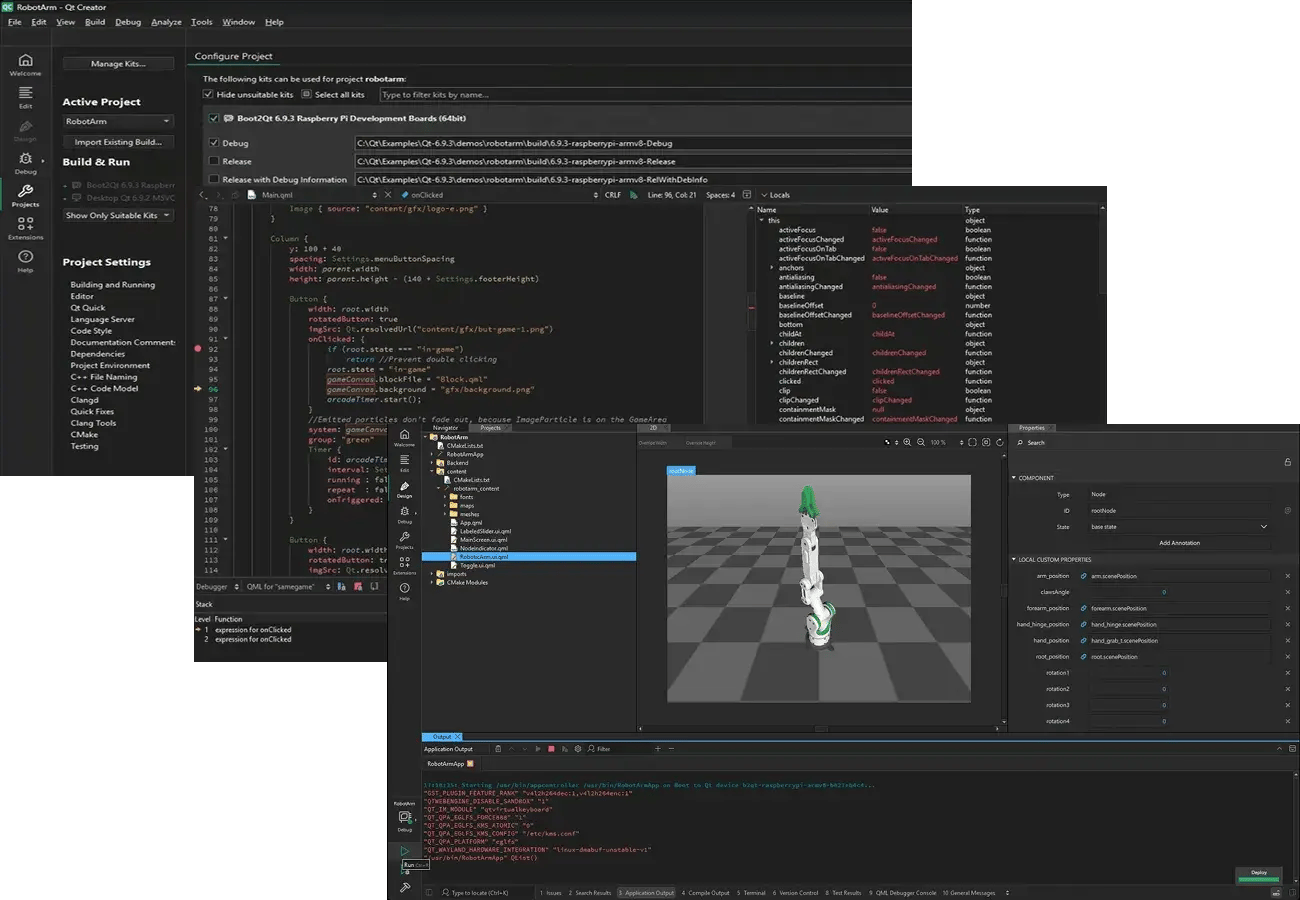
QtCreatorIDE-Example-BestIDEForEmbedded
PICK YOUR IDE

Development Tooling for the Full Cycle

Use an Integrated Development Environment (IDE) to expand the development tooling for the full development cycle:

  • Creating and managing projects
  • Coding, debugging, and profiling
  • Unit testing and analyzing your code
  • Deployment to target platforms and devices

The Qt Creator IDE provides a comprehensive, out-of-the-box Qt developer experience. In addition, there are a number of extensions and integrations to other IDEs. Make your pick!
The profiling and analyzing tools helped spot and eliminate bottlenecks, and ensured a significant advantage in the everlasting time-to-market race.

See how GLP Systems saved a large amount of development time.

Go to Their Story

QML Tools

The QML tools bring efficiency specifically for QML development, adding to the coding and debugging capabilities you find in IDEs.

As highlights, the QML development tooling helps, for example, with syntax checking, autocompletion, bottleneck identification, and visualization to optimize UI responsiveness. In addition, Qt provides QML tools for linting, formatting, and ahead-of-time compilation.

QML Language Server

Provides deep QML understanding in the IDE via an industry standard Language Server Protocol.

QML Runtime Tool

QML preview for your application’s visual elements.

QML Profiler

Provides diagnostics for analyzing the application code for performance. 

Qt_Creator_AI_Assistant2
THE OFFICIAL Qt CREATOR IDE EXTENSION

Boost Your Productivity with Qt AI Assistant

Qt AI Assistant helps developers focus on what they love doing the most: programming. Free time to coding from complementary tasks such as writing test cases, code documentation, and boilerplate QML code.

  • Optional auto-completion
  • Code explanation, refactoring, optimization
  • Open access to your favorite LLMs
  • Automatic generation of unit tests and documentation

Adapt to User Needs

Localization

Qt Linguist is a set of tools for translating Qt C++ and Qt Quick applications into local languages. It enables adapting your products for various languages and regions without engineering changes, and adding locale-specific components such as date, time, and number formats.


Go to Qt Linguist Documentation

Learn More about Internationalization

Documentation

The QDoc tool allows developers to generate documentation for software projects. In addition, the QHelp module in Qt Framework enables generating end-user documentation and embedded it in your application with built-in search functionality.


Go to QDoc Documentation

Go to QHelp Documentation

Deployment Tools

Qt provides tooling to deploy the generated application to a wide selection of embedded, mobile, and desktop targets, making it easy to deliver your software across multiple platforms. Here are some highlights.

The deployment tools automate packaging, dependency management, and platform-specific adjustments, ensuring that your software runs smoothly regardless of the target platform or device. Fast deployment also enables on-device testing and debugging, bringing significant time-savings and shortening your time-to-market.


On-Device Deployment and Debugging

Deployment for embedded devices via the Qt Creator IDE.

QML Project Exporter

Exports Qt Quick Ultralite projects to embedded IDEs for MCUs.

Android Deploy Qt

The androiddeployqt tool automates the Qt application deployment on Android.

The Windows Deployment Tool

The windowdeployqt automates the Qt application deployment on Windows.

The Mac Deployment Tool

The macdeployqt tool automates the Qt application deployment on macOS.

Templates & Examples

Set up your project in no time with Qt’s project templates guiding the way. Get started quicker and deepen your know-how with a wide range of examples, code samples, step-by-step tutorials, and online courses.


Create Projects and Custom Wizards in Qt Creator

Go to Qt Creator Tutorials

Take Online Courses in Qt Academy

More on Development Tooling

Comparing Data Serialization Formats: Code, Size, and Performance

In this post, we explore different approaches for data serialization, ...

Read more

Qt CAN Bus API extensions

The latest Qt 6.5 release introduced a lot of new features. You can re...

Read more

How to Select the Right CPU or SoC for your Embedded Project

The central processing unit (CPU) or system on a chip (SoC) you choose...

Read more

More on Qt Framework

Qt Framework’s comprehensive set of libraries take away your routines from middleware to UI, 2D to 3D, platform to platform.

Looking for Design Tools Instead?

Figma to Qt and Qt Design Studio bridge the gap between designers and developers, turning designs into production-ready QML code.

Get the Most Out of Qt with Integrated Development Tooling

Experience the toolability of Qt at its smoothest with the integrated development tooling.