Jan 28, 2026
Comments
A Tale of Two Software Architectures
I've been working with Qt on and off for more than 20 years and during that time I've seen Qt Widgets grow and then the advent of Qt Quick. This means having two different graphics stack available at your fingertips in Qt.
They both have their pros and cons of course, but if you're in the situation of having legacy Qt Widgets code and you want to move to Qt Quick, how best to proceed? I didn't feel there was a very good answer to this question in the public discourse, hence my talk during QtWS25.
Today, I'm also starting this short series of posts to provide a longer format which people can read on their own time. Hopefully this will benefit the Qt users community at large.
At the heart of the "porting from Qt Widgets to Qt Quick" issue, there is a software architecture conversation to have. Turns out that as a polyglot developer and tech lead at enioka Haute Couture, I encountered many different contexts through our customers and we really have a knack for software architecture.
This first post will bring my own perspective on the software architecture patterns used in Qt applications.
The Typical Software Architecture of Qt Widgets Applications
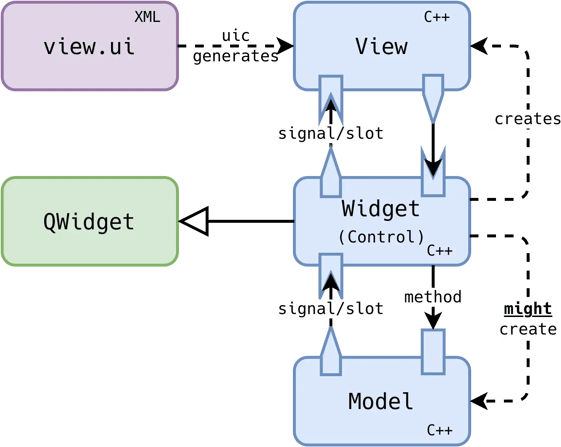
Here is a way to visualize how the typical software architecture of Qt Widgets applications:
Discussion
Of course, we have to imagine having several classes of each of the types described in this diagram. Here we show three classes in interaction but in our application, this pattern is likely repeated over and over.
The architectural pattern this indicates is "almost" the Model View Controller (MVC) one. We will come back to this later in this post, as it is important for our exploration. But first, let's consider the different parts.
First, we have the model classes, they are good old QObject subclasses or value types. We likely have quite a few of those in our application. They interact with the widgets (controllers) mostly by emitting signals and via direct calls from the widgets. There is likely a complex relationship between the model and widget classes.
Then, we have the view part. It is C++ code as well but this code is likely generated. In most cases, the Qt Designer is used (standalone or embedded in Qt Creator) to graphically design the content of the view. This will create a ui file consumed by uic to generate the corresponding C++ code.
Finally, we have the controller part. It will create its corresponding view (except in extremely rare cases there's one widget per view and vice versa). The communication between the controller and the view is done using signals and slots in both directions. We also call such controllers widgets here since in Qt Widgets based applications these classes also inherit from QWidget.
Which is why I don't call the software architecture MVC but "MVC with a twist". In a normal MVC application we don't have such a strong coupling between the controller and the view, or between the controller and the GUI stack.
Simplified Code
In the case of the code for such applications the bulk is in the widget/controller and will likely look like this:
If we assume the existence of Model and also that Ui::View was generated by uic. The code above would be the strict minimum to be able to hook up the model, the view and the controller.
Of course, to really put it all together we likely have something like the following written somewhere:
The Typical Software Architecture of Qt Quick Applications
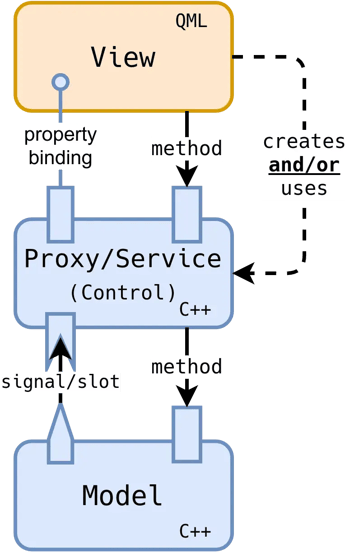
Now, what about the typical software architecture of Qt Quick applications? Here is a visualization of the involved components:
Discussion
Again, we have to imagine several classes of each of the types described in this diagram. In the typical Qt Quick application, this pattern of classes in interaction is repeated many times.
The architectural pattern this indicates is akin to the Model View Presenter (MVP) one. Let's consider the different parts of such a pattern.
First, we have the model classes, like for our MVC case, they are good old QObject subclasses or value types. They interact with the proxy (also sometimes called service) mostly by emitting signals and via direct calls from the proxy. On that side of the communication, it is similar to the model/controller communication we've seen earlier, and similarly, there is likely a complex relationship between the model and proxy classes.
The view part is very different in the Qt Quick case. Instead of C++ code, we have QML code. It might be obtained via a graphical editor, but it's likely hand rolled. It will also have the responsibility for creating the proxy or using a preexisting proxy. This is the opposite responsibility we've seen in our "MVC with a twist" where the controller was creating the view.
Finally, we have the proxy part. It will need a way to find its corresponding model. The communication between the proxy and the view is done using property bindings and direct method calls by the view.
Simplified Code
Code-wise, the proxy will look similar to this:
One notable difference from the Qt Widgets case is that our proxy is this time a simple QObject. It integrates with the QML runtime for its interface to be available in this language but there is no strong coupling to the GUI stack.
The QML code for the view will then look like this:
This view creates the proxy and passes the necessary information to find the relevant model object(s) using the modelId property. The GUI is also bound to the proxy.value property to display it.
Now to have a running application we have something like the following in the main function:
And Now What?
We confirmed the Qt Widgets and Qt Quick applications generally have different software architectures. Let's see what we can conclude from this.
The first obvious thing we notice is that the typical software architecture of Qt Widgets based applications gets in the way of reusability. This "MVC with a twist" is overfitted to the composition pattern of widgets. It is nice in a way as it allows to quickly compose such widgets together in bigger GUIs. Unfortunately, while doing so, we're also capturing quite a bit of the business logic in the GUI. It can only lead to issues when that logic needs to be reused in a different context... like porting to Qt Quick.
My bias here is clear, I find the software architecture pattern used by Qt Quick applications superior. It leads to much less coupling between the view and the proxy. Or at least, the remaining coupling goes in the right direction (the view knows about the proxy but not the other way around). This MVP architecture pattern is more future proof and would allow to have different GUIs attached to the same set of proxies.
Now, the situation on the Qt Widgets application side is unfortunate, but how did we get there? After all, they didn't have to follow the "MVC with a twist" pattern. We collectively ended up doing this for historical reasons. In the beginning only Qt Widgets existed and we didn't know any better (I plead guilty as well). Also, the official documentation and how-to for Qt Widgets shows only examples following the "MVC with a twist pattern". This is fine for such small examples but as we've seen it won't survive the test of time when scaling up the application.
Fortunately, I think we have a way out of the status quo.
What's Next…
In the next post of this series, we'll see how to responsibly transition your legacy Qt Widgets application from the traditional "MVC with a twist" architecture to an MVP one. We'll take care of preparing everything before the actual transition to avoid disruptions on your project as much as possible.
Next parts:
About enioka Haute Couture
Businesses of all kinds have become highly dependent on their IT systems. And
yet, many of them have lost control of this essential part of their assets. enioka Haute Couture specializes in mastering complex software development, be it because of the domain, the organization or the timing of the project.
enioka Haute Couture works in close collaboration with customer teams to build software tailored
to the specific needs. And if developing it, enioka goes the extra mile to ensure the customer has it under control. enioka helps customer teams adopt the right organization, technologies and tools. Finally, every time it is suitable, enioka helps to setup Free and Open Source Software projects or interact with existing ones.
With enioka Haute Couture, customers have a trusted provider who facilitates the development needs while keeping full control of their systems. No more vendor or service provider lock-in.
Blog Topics
Related Articles
Canvas2D: WatchUI Demo
In the previous blog post I introduced Canvas2D, the new QML item in Qt..
Read Article
Canvas2D: New QML canvas element using Qt Canvas Painter
In the earlier blog posts about Qt Canvas Painter we have looked at what..
Read Article
A Cross-Platform C# UI Framework via Qt’s Bridging Technology
Every C# UI framework comes with a familiar pattern: Windows-first, Linux..
Read Article