Mar 24, 2026
Comments
The latest Qt release, Qt 6.11, is just around the corner. This short blog post series presents the new features that QML tooling brings in Qt 6.11. You can find part 1 on new qmlls features here, and part 2 on new qmllint warnings here.
In this blog post, we will start with a short recap on the context property and go through the new context property support in qmllint and QML Language Server.
Recap on context properties
What are they?
Context properties embed C++ objects into QML. They are defined at runtime on the QQmlContext of a QObject, and can be accessed from QML. Here is an example:
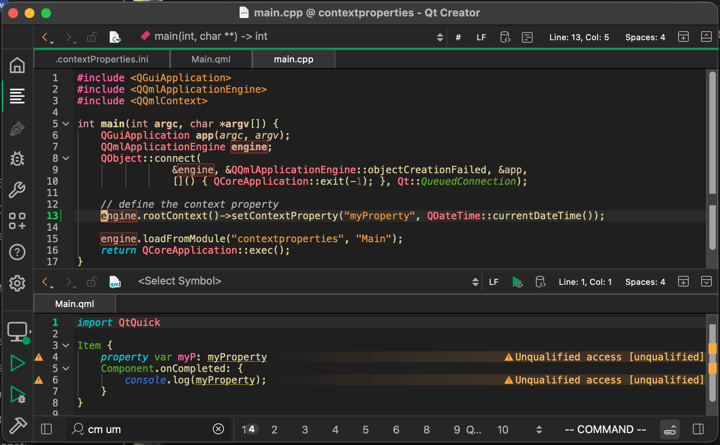
The C++ code uses engine.rootContext()->setContextProperty(...) to define the context property at runtime, and the QML code accesses it via myProperty. Running the above program will print out the date and time obtained from QDateTime::currentDateTime() during the setContextProperty()-call.
Why are they bad?
The above example suffers from multiple problems because of its use of context properties.
Limited reusability of the QML files
QML files with context property usages have a dependency on a specific QQmlContext, even if there is nothing in the QML files that states that dependency. Therefore, anyone trying to reuse your code will have difficulty determining whether the reuse location has a QQmlContext sufficient for your code.
In our previous example, reusing Main.qml in another place with a different context triggers these runtime errors:
qrc:/qt/qml/contextproperties/Main.qml:6: ReferenceError: myProperty is not defined
qrc:/qt/qml/contextproperties/Main.qml:4: ReferenceError: myProperty is not defined
Limited QML tooling support
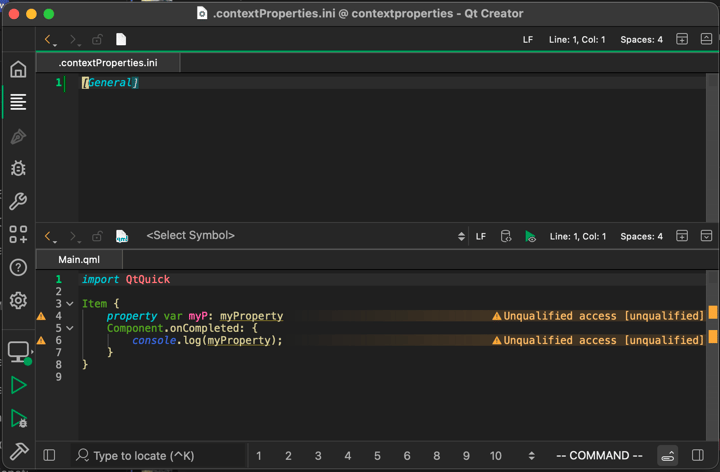
QML tooling doesn't know about the context property definition and can't discern unqualified accesses from context property usages. You might have seen in the previous screenshot that QML Language Server warns that usages of myProperty are unqualified accesses
How to replace them?
You can find a guide on how to replace them with singletons or required properties in the documentation (warning: might contains spoilers!) .
What if replacing them is not an option?
Sometimes replacing context property usages might not be feasible, for example, because they are too widespread or come from a third-party API. The rest of the blog post explains how to teach QML tooling about context properties to avoid all those "unqualified access"-warnings when using context properties.
Configurable context properties warnings
qmllint adds basic support for context properties in Qt 6.11. Prior to 6.11, qmllint treated unqualified accesses and context property accesses identically. This meant that warnings about the use of context properties couldn’t be silenced without losing actual relevant unqualified access warnings.
To separate actual unqualified accesses from context property accesses, we added a new configuration file that allows you to declare the context properties that exist in your code. To use the new context property configuration file, create a .contextProperties.ini file with the following content inside your project source folder.
[General]
disableUnqualifiedAccess = "myContextProperty1,myContextProperty2"
warnOnUsage = "myContextProperty3,myContextProperty4,myContextProperty5"
disableHeuristic = false
We will explain each setting key in this example in the next sections. Here is how the warning looks without any .contextProperties.ini file.
Disable unqualified access
If you have decided that a context property can’t or won’t be replaced with a better alternative, and if you want to silence all unqualified access warnings on that context property, then disableUnqualifiedAccess was made for you. That setting key should contain all the context property names where unqualified access warnings should be silenced. Use "," to separate multiple context property names.
qmllint silences all unqualified access warnings on those property names, allowing you to focus on the other relevant unqualified access warnings.
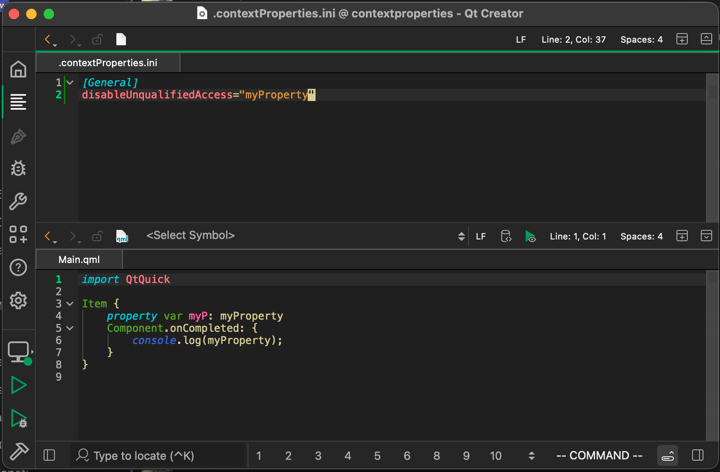
In our example, adding our context property name to disableUnqualifiedAccess silences the warning:
Warn on usage
You might have (rightfully!) decided that you still want to get rid of your context property usages, so silencing the warning via disableUnqualifiedAccess and forgetting about the context properties might not be feasible for you. In that case, you might want unqualified accesses to emit unqualified access warnings and context property accesses to emit context property-related warnings. To do so, add the context property name to the warnOnUsage key. Use "," to separate multiple context property names.
qmllint will emit a different warning with a different warning category for unqualified accesses on properties in the warnOnUsage-list. This allows you to unclutter the unqualified warning category.
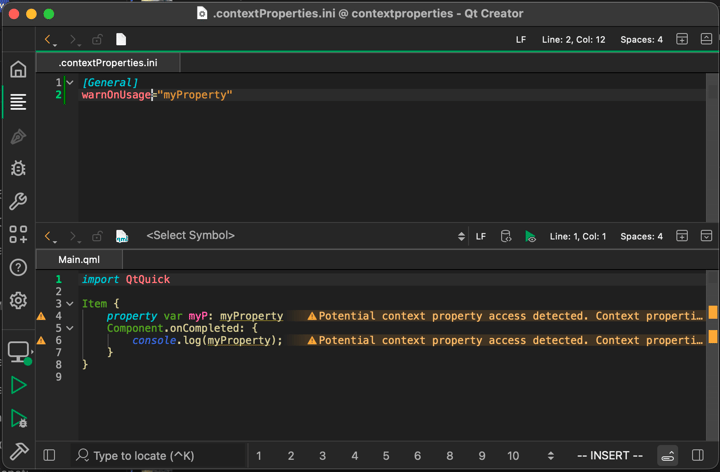
In our example, adding our context property name to warnOnUsage makes qmllint emit a different warning:
You might ask yourself now, "This is all good, but do I really have to type all of my context property names inside this configuration file? What if I can't remember how I named my context properties ages ago?" Fortunately, there is a heuristic that can help you find your context properties.
Find context property definitions
The CMake scripts in 6.11 include a heuristic search for context property definitions in C++ code. It greps your source folder for setContextProperty() calls and saves the result into your build folder. This way, qmllint picks up the context property definitions at runtime and can warn when accessing them.
Grepping the source folder with the heuristic takes some time on bigger projects and is therefore disabled by default. To run the heuristic manually, call the dump_qml_context_properties CMake target. The results of the heuristic search are saved in the build folder and read by qmllint during linting.
To run the heuristic search automatically during the CMake linting targets, like all_qmllint, for example, set the QT_QMLLINT_CONTEXT_PROPERTY_DUMP CMake variable to ON before calling the linting target.
After running the dump_qml_context_properties target via the editor's CMake extension, for example, by typing cm dump_qml_context_properties in Qt Creator's locator and hitting enter, we get the following warnings on our context property usage:
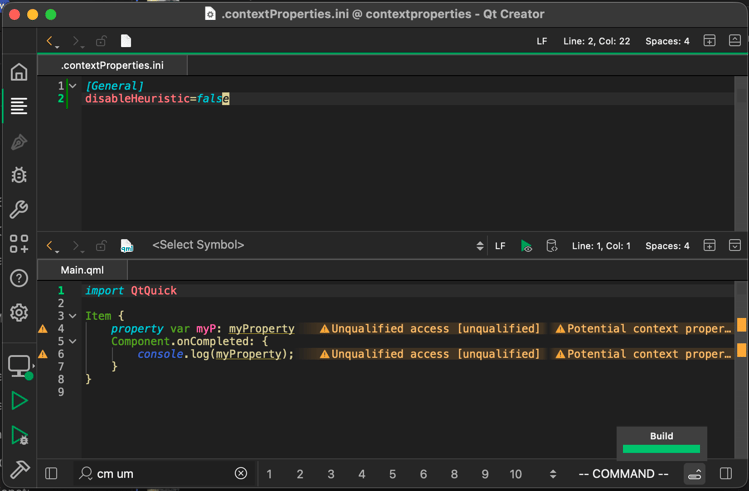
The unqualified warning is no longer the only one: a new warning has been added about a potential context property access being detected. It also contains the location of the "definition" for the context property that can be seen when looking at the entire warning message:
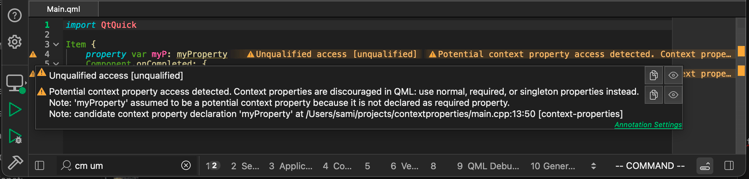
The location of the "definition" we can use to check whether myProperty is really a context property or a false positive. If it really is a context property, we can add it to warnOnUsage in the .contextProperties.ini to remove the unqualified access warning. The entire list of context property names found by the heuristic is in the build folder at <build>/.qt/.contextPropertyDump.ini.
Disable the heuristic
To disable warnings about context property names found by the heuristic, set the disableHeuristic key in the configuration file to true, or delete the .contextPropertyDump.ini file from the build folder.
Summary
We started with a recap on what context properties are and went through the new context property support in QML tooling. This was the last part of this series. We hope that you enjoyed it. Remember to open a bug report in JIRA if anything is not working as expected or is insufficiently documented.
Related Articles

Implementing Tracepoints in Qt Applications using Qt Creator 21
Sometimes, as a developer, you need to find out why your application is..
Read Article
Qt Creator 21 Beta released
We are happy to announce the release of Qt Creator 21 Beta! You find a..
Read Article
Introducing the Canvas2D Coding Skill for Agentic Development of Embedded Device UIs
The Challenge: Getting AI Agents to Draw Correct Canvas2D Qt 6.12..
Read Article