This release focuses on three things teams consistently ask for: better guidance on where to invest testing effort, broader language coverage, and less manual work when setting up instrumentation. Here is what changed.
CRAP Metric: Turning Coverage Gaps into a Risk Ranking
Coverage percentages answer "how much is tested." They do not answer "where does untested code pose the greatest risk." Most teams know their complex functions are undertested but have no objective way to quantify it or rank it. The new CRAP (Change Risk Anti-Patterns) metric addresses that gap by combining Coco's existing McCabe cyclomatic complexity analysis with coverage data into a single risk score per function.
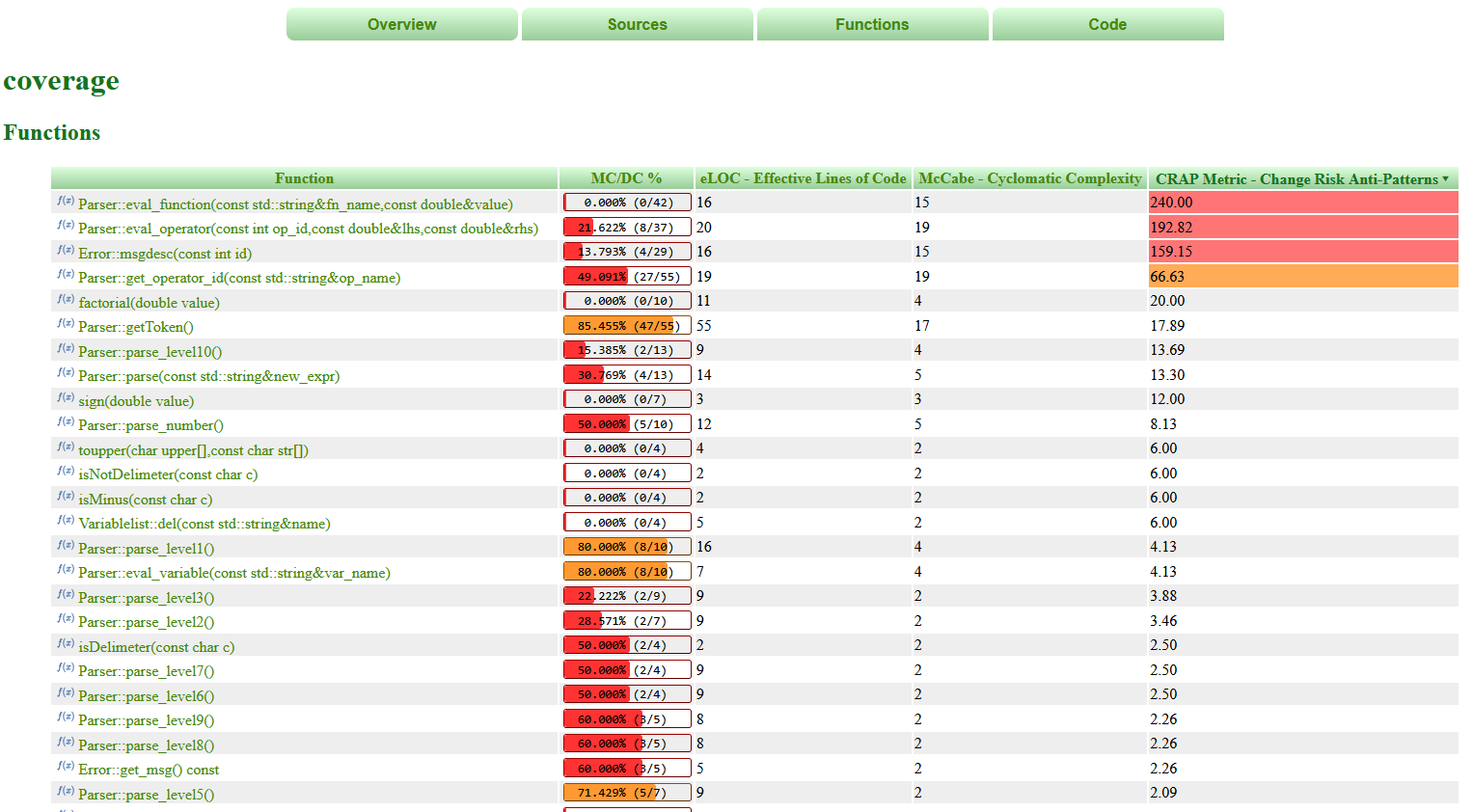
The calculation reflects a straightforward reality: complex code with low instrumentation coverage is the most dangerous combination. A function that is highly complex but well-covered by tests scores low. A function that is equally complex but poorly covered is penalized heavily. Functions scoring above 30 are flagged as high-risk in CoverageBrowser, highlighted in yellow (concerning) or red (critical), and can be sorted to surface the worst offenders immediately.
CRAP scores are available in CoverageBrowser and in HTML and CSV reports, so they can be incorporated into review gates, sprint planning, or compliance documentation.
Python Coverage via coverage.py
coverage.py has been the standard tool for measuring Python code coverage. It tracks which lines and branches executed during a test run and produces a report. Most Python teams already use it, typically through pytest-cov. What it does not provide is analysis: it cannot tell you which tests cover which functions, which untested code poses the most risk, or how Python coverage relates to the rest of a mixed-language codebase. Teams default to running their full test suite on every commit because there is no built-in way to know which subset of tests is actually relevant to a given change.
Coco now closes that gap. By importing coverage.py's JSON export into Coco's instrumentation database, Python coverage data becomes subject to the same analysis capabilities available for C/C++. For teams with large Python test suites, Coco's Patch Analysis is the most immediate practical benefit: Coco traces which tests cover which functions and, when a code change is introduced, identifies precisely which tests need to run. That directly reduces CI time and infrastructure cost without reducing coverage confidence.
-
For teams with mixed codebases, Python and C/C++ coverage can be merged into a single instrumentation database, giving a unified view across languages in CoverageBrowser. Line coverage, decision/branch coverage, and function coverage are all supported. The workflow does not change: tests continue to run the same way via coverage.py, and Coco sits downstream consuming the JSON export.
A demo project is included with the installation. Coverage.py version 7.10 or later is recommended.
Improved Qt for MCUs Support
Getting coverage instrumentation onto an MCU target has historically required significant manual effort: configuring compiler profiles by hand, writing custom IO functions to retrieve execution reports from the device, and handling C++ and QML coverage through separate processes with no unified result. For many embedded teams, that overhead has made continuous coverage measurement impractical. This release removes most of that friction.
CoverageScanner now includes correct compiler profiles for Qt for MCUs supported toolchains by default. The new --qul option instruments QML (Qt Quick Ultralite) code automatically, without the project-level changes that were previously required. DeviceLink integration handles execution report retrieval directly from the target board, so there is no need to implement custom IO or attach a debugger solely for coverage data collection.
CoverageBrowser gains a dedicated Qt for MCUs panel for device discovery, debug output monitoring during test runs, and one-click import of execution reports from connected devices. C++ and QML coverage results can be merged into a single instrumentation database for a complete view of application coverage across both languages.
These features are compatible with Qt for MCUs version 2.12.1 and above.
cocosetup: Automated Toolchain Configuration
Coco ships with pre-configured compiler profiles for common toolchains. For compilers not covered by those profiles, configuration was previously a manual process that required deep knowledge of the toolchain's capabilities, a particular barrier in the embedded space where toolchain diversity is high and documentation is often sparse. The new cocosetup utility automates it.
cocosetup probes a given toolchain for available capabilities: memory allocation methods, file APIs, performance counters, and other features that affect how compiler wrappers are generated. It adapts the configuration to what the toolchain actually supports, which is particularly relevant in embedded environments where standard features like malloc may not be available.
The tool supports both interactive and command-line modes, so it fits into guided setup sessions and scripted CI pipelines equally well. Wrapper files can be placed in a separate output directory or configured in place, with revert support. Recursive toolchain discovery handles cases where compiler binaries are nested deep within a toolchain package directory. After configuration, cocosetup runs built-in verification tests against the generated wrappers to confirm the setup is correct before any project is instrumented.
This is the initial release of cocosetup and will continue to be extended in future versions.
Getting Started
Each of these additions targets a concrete gap: knowing where untested complexity creates risk, bringing Python into the same analysis environment as C/C++, reducing the manual overhead of embedded coverage, and making toolchain setup accessible without specialist knowledge.
If you are already using Coco, the full release notes and updated documentation cover the configuration details for each feature. If you are evaluating Coco for the first time, a free trial gives you access to the complete toolchain across all supported languages and platforms.