Coco
End-to-End Code Coverage for Embedded Solutions
Coco is a modern code coverage tool for software teams developing desktop applications and embedded systems. It supports C, C++, C#, QML, and Tcl, providing instrumentation and precise test coverage analysis. With Coco, you can generate audit-ready reports aligned with international safety and compliance standards such as ISO 26262 and DO-330. Built for speed and accuracy, Coco integrates seamlessly into CI/CD pipelines, giving teams full visibility into testing and confidence in software quality.
Try Coco for Free Contact UsThese Teams Rely on Coco to Close Code Coverage Gaps
QA in Complex Software Projects isn’t Easy
The Realities of Software Development
You work under pressure to meet strict standards, avoid regressions, and keep pace with rapid development. But too often, QA teams are left asking:
Are we testing the right code?
In safety-critical development, it’s not just about how much code is covered but which parts are tested and how thoroughly. Standards like ISO 26262, DO-178C, and IEC 61508 require more than just line or branch coverage, they demand Modified Condition/Decision Coverage (MC/DC) and traceability.
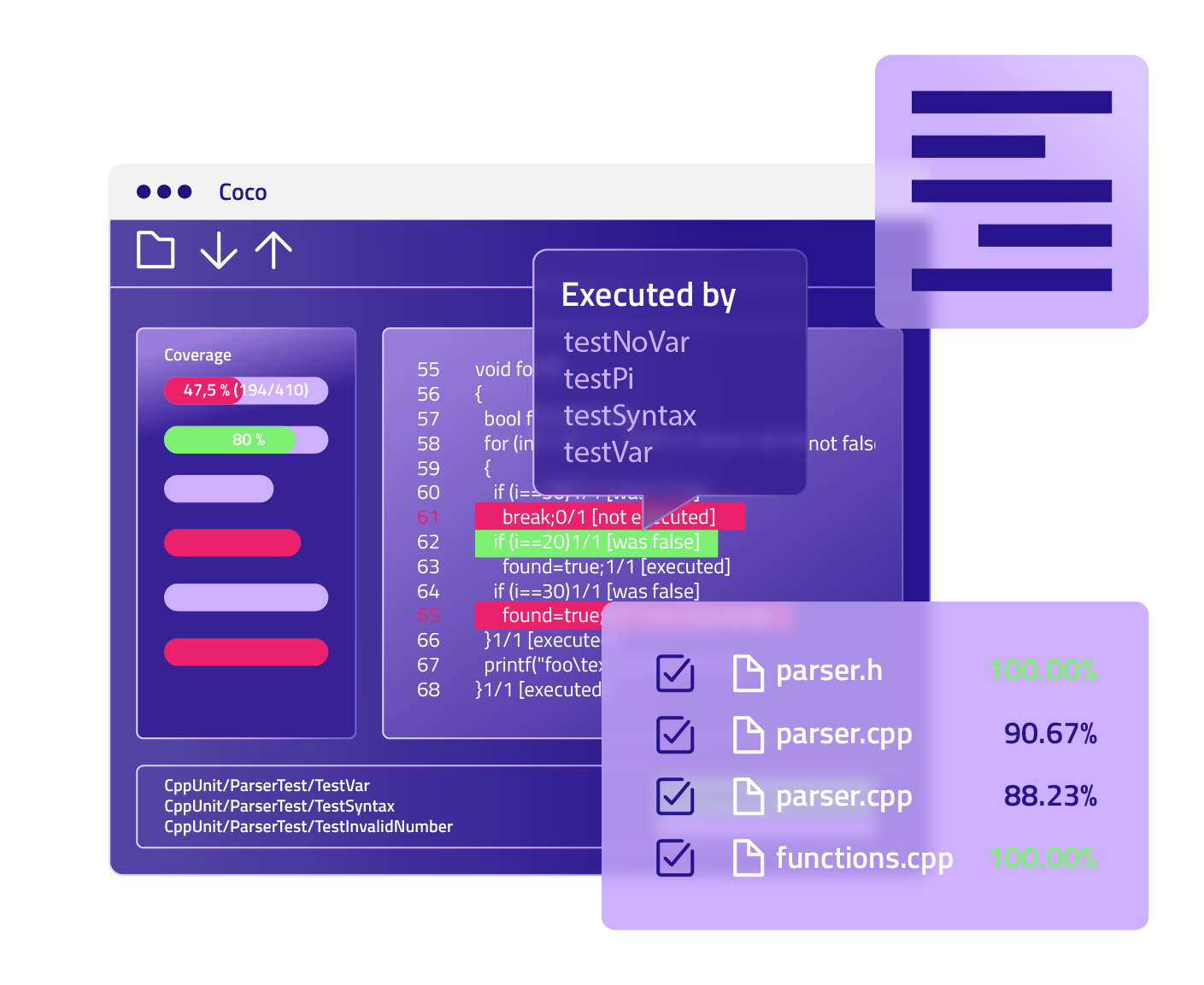
Coco supports all key coverage levels, from basic function and line coverage to condition, decision, and MC/DC. It visually maps these coverage results in its CoverageBrowser, helping QA teams pinpoint untested logic and verify that tests align with both technical and regulatory expectations.
Why are our test cycles so long?
Full regression suites can take hours, or even days. And running everything after every change is rarely efficient.
Coco introduces change-based testing. Its patch analysis feature automatically compares source code revisions and tells you which tests are needed based on the changes. This means your team can avoid redundant test executions, reduce load on CI infrastructure, and shorten test feedback loops, all without compromising coverage.
Can we trust results from emulators alone?
Emulators are useful, but they don’t fully replicate runtime behaviour on real hardware, especially in embedded systems.
With Coco’s runtime instrumentation, you can run tests on actual embedded targets (including RTOS-based systems) and collect reliable coverage data. This ensures your metrics reflect how the software behaves in production environments, not just in simulation.
How do we manage QA across remote/outsourced teams?
Many teams are now distributed across offices, time zones, or even external partners, and not everyone can (or should) access source code.
Coco enables black-box testing and secure distributed workflows. Its architecture separates code instrumentation from test execution, so you can generate instrumented binaries locally and share them with outsourced or remote QA teams. Test data can be collected without sharing source code, then sent back and merged into centralized coverage reports.
Is our coverage percentage number even useful?
A high overall percentage can feel reassuring but it doesn’t mean critical logic is being tested. Numbers alone don’t reveal redundant tests, gaps in decision logic, or coverage volatility over time.
Coco goes beyond percentages. With features like CoverageBrowser visualizations, test impact analysis, and report merging, teams gain actionable insights, not just data. You can track coverage across versions, see how tests relate to code structure, and understand how changes affect coverage over time.
With the Test Center add-on, you can also track coverage trends over time and manage results across projects.
Read more in the blog: Is 70%, 80%, 90%, or 100% Code Coverage Good Enough? What 100% Statement Coverage Really Tells You and What It Doesn’t
Our tools don’t handle C++, C#, and QML well, what should we do?
Many coverage tools break or produce incorrect results when dealing with real-world systems that mix C++, C#, QML, Tcl, or SystemC. Some don’t support embedded compilers or non-standard toolchains.
Coco was designed with cross-language, cross-platform development in mind. It supports a broad set of languages and compiler toolchains, including embedded environments and safety-related workflows. It integrates easily with Qt-based projects, making it uniquely suited for teams developing with Qt/C++ and QML.
How can I test coverage of a legacy code?
Legacy systems often have limited documentation and little test coverage. Understanding them well enough to build meaningful tests can be a major challenge.
Coco helps you explore legacy code from a test perspective. It identifies untested branches, functions, and conditions, giving you a clear roadmap for where to focus your testing efforts. Instead of rewriting the code, Coco helps you write better tests, increasing safety and stability without starting over.
Product Demo
Measure and Improve Your Code Coverage
Coco helps you move beyond just hitting coverage numbers
Coco gives your team a full picture of code coverage across languages, layers, and testing workflows. Whether you're working on embedded systems or safety-critical applications, Coco brings clarity, speed, and confidence to your test process.
You can track test coverage at every level to collect precise insight into what’s tested and what’s missed, critical for safety validation, debugging, and test planning:
Function Coverage
Are your tests reaching the right parts of your application?
Function coverage ensures that each function in your codebase is called during testing. It’s a direct way to confirm that key logic units aren’t being skipped, and a first step toward better test confidence.
Statement Block Coverage
Statement block coverage checks whether all statement blocks in a program have been executed. Statements that always run together are grouped into blocks, making this metric a practical way to measure coverage while reflecting the natural structure of most programming languages.
Line Coverage
Every line counts.
Line coverage checks whether each line of code was executed. It’s a simple but powerful way to spot gaps in your test suite and improve the thoroughness of your testing process.
Branch and Decision Coverage
Don’t miss critical paths.
Branch coverage examines all possible outcomes of if/else and other decision points. It helps you catch edge cases early before they lead to bugs in production.
Condition Coverage
Find what your eyes can’t see.
Condition coverage verifies that every part of a logical condition (like if (A && B)) is evaluated both true and false. This helps uncover subtle bugs hidden in compound logic, especially in rule-heavy or state-driven systems.
MC/DC and MCC Coverage
Built for teams with compliance in mind.
For software in automotive, medical, aerospace, and other regulated fields, Coco supports Modified Condition/Decision Coverage (MC/DC) and Multiple Condition Coverage (MCC). It is essential for meeting standards like ISO 26262, DO-178C, and IEC 61508. With Coco, your team is audit-ready without the extra overhead.
Test Timing & Performance Metrics
Smarter testing, faster releases.
Coco doesn’t just show you what’s covered, it also tells you how long each test runs and how often each part of your code is executed. These insights help optimize test performance and improve efficiency across your CI pipeline.
Everyone in a Team Can Benefit from Coco
For QA Engineer
See what is tested, improve test coverage, and catch testing gaps early

For QA Manager
Track test effectiveness, reduce testing time, and stay audit-ready
For DevOps Engineer
Optimize test cycles, integrate with CI/CD, and improve test speed
For Compliance Lead
Export reports aligned with safety and industry standards
“[Coco] code coverage is a relevant tool for us, because you do not know how good your [software] quality is until you understand the code coverage and testing coverage.”
Jaakko Palokangas, Director of Digital Technology Development, Metso
Measure what matters with advanced MC/DC, branch, and decision coverage
Coco helps your team see exactly what your tests are doing, and what they’re not. It measures code coverage from unit tests to system-level tests and supports all major coverage types, including MC/DC. Whether you’re running automated tests or manual scenarios, Coco highlights the gaps and helps your team close them fast.
Accelerate release cycles without sacrificing quality
Cut testing time by quickly identifying untested paths and redundant test cases, so you can ship faster and with more confidence.
Catch hidden risks before they hit production
Uncover logic branches and edge cases missed by basic tools, minimizing the risk of undetected bugs or system failures.
Unify QA visibility across teams and toolchains
Bring clarity to fragmented testing setups with actionable reports that integrate into your existing CI/CD and development environments.
Shorten test cycles by removing redundant cases
Coco highlights unnecessary or ineffective tests, helping teams optimize test suites and reduce time spent on validation.
Reach target coverage required in safety-critical code
Coco helps teams reach safety-critical coverage goals by supporting manual test validation and automating test data generation. This ensures gaps are closed quickly while meeting strict compliance requirements.
Meet compliance standards with less manual work
Achieve coverage metrics like MC/DC required by ISO 26262 or DO-178C, backed by traceable, audit-ready reports.
Code Coverage Tool That Works With Your Setup
Coco plugs into your CI/CD, IDE, and quality tools to make coverage insights instantly usable where you work. Streamline your path from test data to quality improvements.
Develop & Build Faster
Build systems without needing to change your tools or refactor your code. Coco fits right in
Visual Studio

Eclipse

Qt

CMake
MSBuild
QML
C Languages
Tcl/Tk
Report & Stay Compliant
Export in the formats your teams and auditors already know

SonarQube

Cobretura

JUnit

HTML 5
Test with What You Already Use
Coco works right alongside your existing frameworks: GoogleTest, Boost.Test, NUnit

Boost

Nunit

Automate & Ship
Get automated coverage feedback in your CI/CD pipeline

Jenkins

GitHub

GitLab
Platform & Compiler Support
Plug Coco Into the Tools You Already Use
Native Compatibility
Run Coco natively on the systems your teams already use
Pre-built packages are available for:
-
Linux and Windows (32- and 64-bit), plus macOS 64-bit with Intel and ARM supported via Rosetta 2. No extra configuration required.
-
UNIX variants like Solaris and AIX (available upon request for enterprise deployments).
Cross-Compilation
Extend Coco to embedded and constrained environments
With the Coco Cross-Compilation Add-on, you can target:
-
Embedded Linux or Windows common in industrial and automotive systems
-
RTOS and mobile platforms, including QNX, VxWorks, and FreeRTOS
-
Bare-metal microcontrollers, ideal for safety-critical, no-OS devices
Supported compilers
Works with both mainstream and specialized toolchains*
-
Popular compilers: GCC, Clang, MS Visual Studio, Intel, Mono
-
Specialized targets: QNX, ARM (Keil), Green Hills, HighTec, Diab, TI, and more
*(Some toolchains require the Coco Cross-Compilation Add-on)
Target hardware
Run qualification on real, production hardware
-
Wide support for processor families like:
Intel x86/x64, ARM, PowerPC, MIPS, SPARC, AURIX™, and more -
Perfect for everything from general-purpose CPUs to safety-grade microcontrollers
Cross-Compiled, Coverage-Tracked, Auditor-Ready
What Takes Others Days, Coco Does in Minutes
Turnkey Traceability
Pre-qualified Platforms
Cross-Compiler Support
Compliance Workflow
Certification Artifacts
Coco
Auto‑links tests, coverage & requirements
Ubuntu, Windows, embedded, bare‑metal microcontrollers, RTOS, mobile OSes, direct hardware
Built‑in with add-on to microcontrollers, RTOS
From target selection to artifact generation
Auto-generated reports for auditors
Alternatives
Manual setup
Often coverage limited to host systems only — target hardware support is complex or missing
⚠️ Limited
⚠️ Piecemeal tools
⚠️ DIY documentation
“Coco brings together the missing link between code and tests. Coco seemed like a regular code coverage tool at first, but after we started using it, we found some very advanced features.”
InnovMetric
Why Use Coco
- Know exactly which parts of your code are tested
- Focus on what has changed, not everything
-
Gain full visibility into testing performed by outsourced teams
-
Save time by skipping unnecessary tests
- Get reports you can share and use to show test coverage
- Pass safety and quality certifications
- Utilize manual and automated testing workflows
How to Get Started
Step 1: Add Coco to your build process using its compiler wrappers
Step 2: Run your tests (unit, system, or manual)
Step 3: View results in the CoverageBrowser or your IDE
Step 4: Export coverage reports or integrate with CI tools
Step 5: Use patch analysis to optimize regression testing
Ready to Try Yourself?
Tool Qualification for Regulated Industries
Avoid months of manual work
If you need to certify your software, you need to qualify your tools.
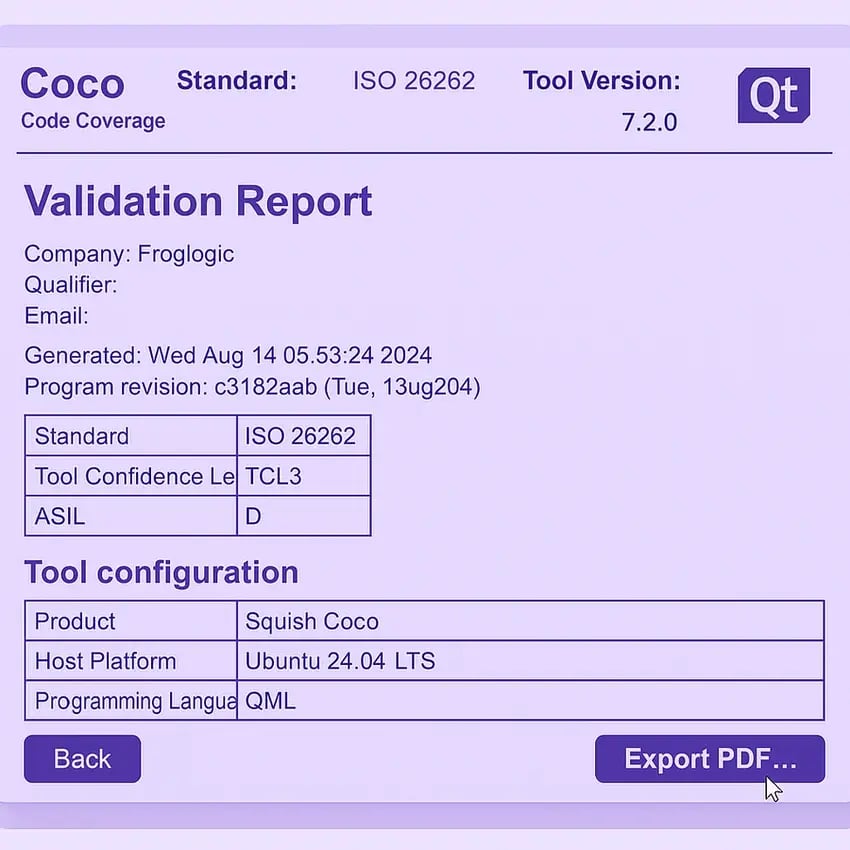
The Coco Qualification Kit gives you everything needed to prove Coco is safe and reliable for use in safety-critical development. No need to build test suites or write justification from scratch, we’ve done it for you.
-
Pre-built test cases and expected results
-
Tool classification and safety manuals
-
Ready for ISO 26262, DO-178C, IEC 62304, EN 50128, and more
Designed to support a wide range of industries, Coco simplifies compliance and quality assurance by providing ready-to-use validation reports, process documentation, and certification templates.
Learn more about Tool Qualification Kit
What’s new in Coco? Always something.
From better coverage insights to faster tooling and broader language support, Coco releases bring continuous improvements for test and compliance teams. Explore recent updates and changelogs here.
Extend Coco with Intelligence & Compliance
Compliance kits and real-time dashboards that take Coco from tool to platform
Reporting & Analytics
Transform Raw Coverage Data Into Clear Next Steps
Connect Coco to Test Center, or any other test result management platform that you are already using, to gain a full test intelligence view. Test Center collects, consolidates, and visualizes all your test and coverage data across teams, projects, and pipelines so you can:
-
Track test completeness and quality over time
-
Visualize coverage linked to requirements
-
Spot regressions and gaps at a glance
-
Generate audit-ready reports for compliance
Start with Coco alone, or plug into Test Center for scalable, organization-wide insight. Either way, you’re in control.
Get to know Test Center
Blog
Is 70%, 80%, 90%, or 100% Code Coverage Good Enough?
Numbers like 70%, 80%, or even 100% do not tell the whole story, and sometimes they can create a false sense of security. In our deep dive, “Is 70%, 80%, 90%, or 100% Code Coverage Good Enough?”, we break down what those metrics really say about your tests, why 100% statement coverage can still leave dangerous gaps.
Tutorial
Using AI Code Assistants to Generate Unit Tests and Maximize Coverage
See how you can use GitHub Copilot + Coco Code Coverage to raise test coverage from 65% to 78%, and how this approach can be adapted for other frameworks and industries, including safety-critical domains.
Qualification Kit
A custom, comprehensive qualification tool to gain the confidence you need to ensure your test processes meet safety standards.
Read moreCoco Evaluation Guide
Evaluation Guide is here to support you throughout the process of an evaluation, from downloading the tool to the point of installing and starting the use.
Learn more