Published On
Apr 30, 2026
Read Time
16 mins

The Bar For Embedded UI Design Has Been Set By The Phone In Your Pocket
Think about the last time you felt genuinely frustrated by a piece of technology. Chances are, it was not your smartphone. It was probably the screen on a piece of industrial equipment, the monitor of a medical device, an in-flight entertainment system, or a car dashboard. Devices that are central to how we work, travel, and make life-critical decisions. And yet their interfaces look and feel like they were designed in a different era.
That gap is not accidental. It is structural. And it is getting harder to ignore.
The smartphone has become the universal reference point for what a good interface feels like. It is fast, fluid, responsive, and beautiful to look at. We interact with it dozens of times a day. And because of that daily exposure, our expectations have been recalibrated. We no longer accept sluggish transitions, outdated graphics, or interfaces that require memorization rather than intuition.
This shift (sometimes called the consumerization of technology) is moving upstream. It is no longer confined to consumer apps. It is shaping expectations in B2B software, enterprise platforms, and yes, embedded user interface design too. When someone sits down at a factory floor control panel, or operates a medical monitoring device, or settles into an airplane seat, they bring those recalibrated expectations with them.
I remember flying on an Airbus A380 for the first time. The aircraft itself was extraordinary. I was looking forward to finding the new Led Zeppelin documentary to relax during the flight. But the moment I touched the in-flight entertainment screen, the experience collapsed. It was laggy. The graphics looked dated. Moving through the menus required patience I did not have. And in that moment, my impression of the airline changed. If they are cutting corners here, I found myself thinking, what else are they cutting corners on?
That reaction is not irrational. The quality of an interface communicates something about the quality of the whole product. A smooth, well-designed embedded UI signals that a company understands its users, minimizes risk, and takes quality seriously end to end. In competitive B2B markets, where the hardware is increasingly commoditized and available to anyone with the budget, the user experience is becoming one of the last genuine differentiators.
We have heard this directly from customers. A medical device company we work with told us that UX is now a core part of their product strategy and is instrumental in preventing them from losing market share. Their head of R&D described design quality as key to their continued success in their device category.
That is not a peripheral concern. It is a strategic priority. McKinsey's research on the business value of design confirms this pattern at scale: companies in the top quartile of design performance achieve significantly higher revenue growth and shareholder returns than their peers.
The Research Is Clear: Embedded UX Design Is Underserved
At the end of 2025, we commissioned research among over 400 UI/UX designers working on embedded devices. The findings confirmed what many of us in this space have long suspected.
Six out of ten designers said they felt the need for a different tool. But here is the part that stops you in your tracks: most of them could not name one.
That is not a minor detail. It is a signal. In a mature market, professionals can tell you exactly what they need. They know the names. They have opinions. In a market with a real gap, they sense the problem clearly but cannot point to a solution.
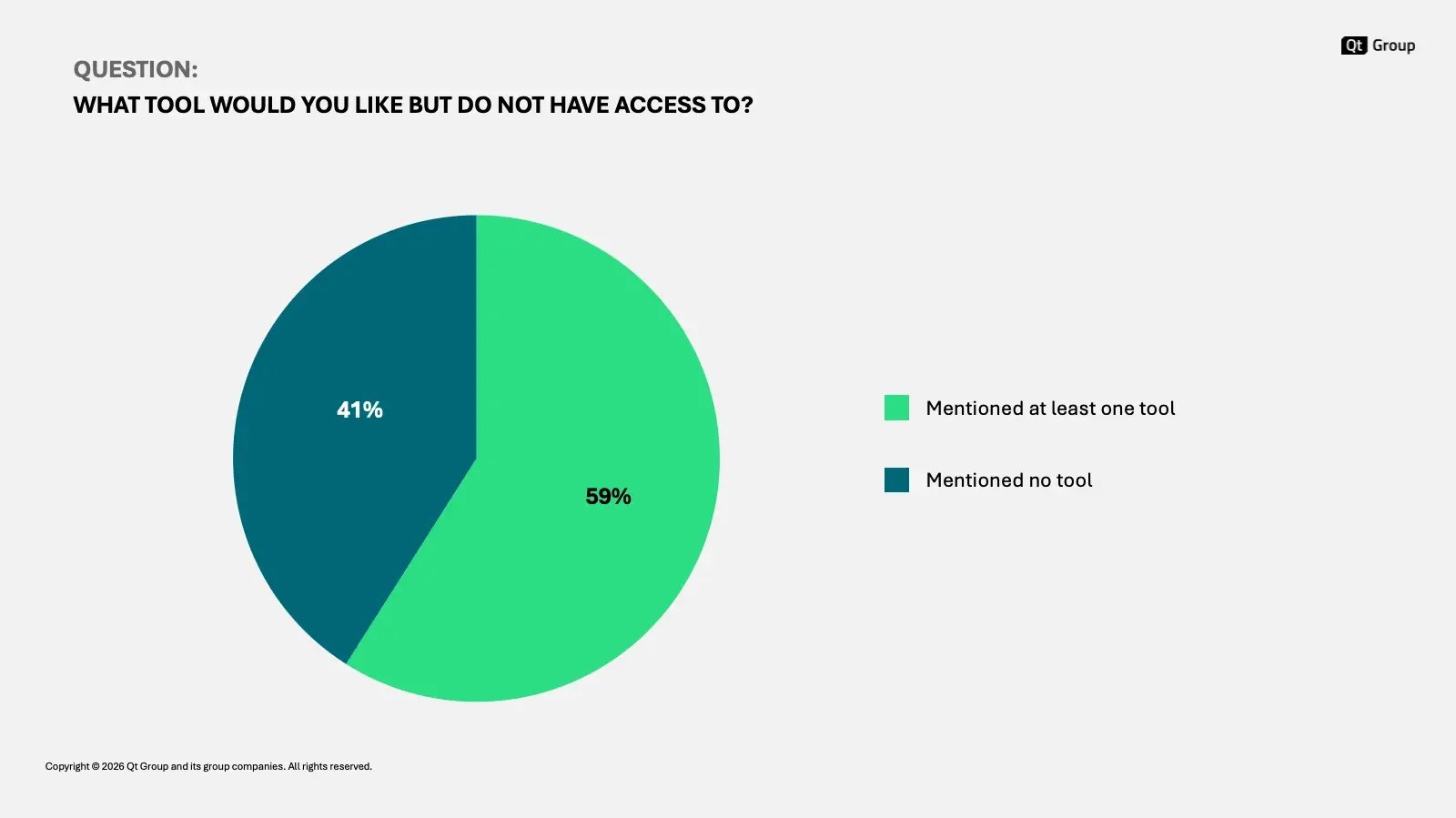
In our research of 420 embedded UI/UX designers, 59% reported at least one missing tool from their workflow, indicating a need for a tool they haven't used yet. Most of them cannot mention what that tool would be (the full research is available here).
The same research showed that most designers in this space are using more than one tool to get their work done. That too is a symptom. When professionals routinely stitch together multiple tools to complete a single workflow, it means no single tool is doing the job.
And then there is the coding question. A significant portion of embedded UI/UX designers reported using code in their day-to-day work, not because they wanted to, but because they had to. They were writing custom scripts and plugins, automating repetitive tasks, compensating for the limitations of their design tools, and building integrations that should have been built in. Coding as a workaround is a reliable indicator that the tool is not meeting the need.
The field is also fragmented in a way without parallel in other mature industries. When you buy a car, you know the names. You know what Mercedes or Volkswagen stands for. There is brand equity. There are trusted references. In the embedded design tool market, outside of two or three widely known names, there is almost none of that. The tools that do focus specifically on embedded devices are largely unknown. The broader tools (Figma, Adobe) are well known but were not built for this context. And many of the more specialized players are focused on one or two verticals at most. Designlab's 2026 industry survey found that more than half of designers are concerned about quality in their current tool workflows, a concern that maps directly onto what we hear from embedded UI/UX designers.
The market, in other words, is scattered. And designers are left to navigate it with a patchwork of solutions.
The Tools That Exist Were Built For A Different Job
It is worth being specific about why the popular tools fall short for embedded user interface design, because the answer is not that they are bad tools. It is that they were built for a different context.
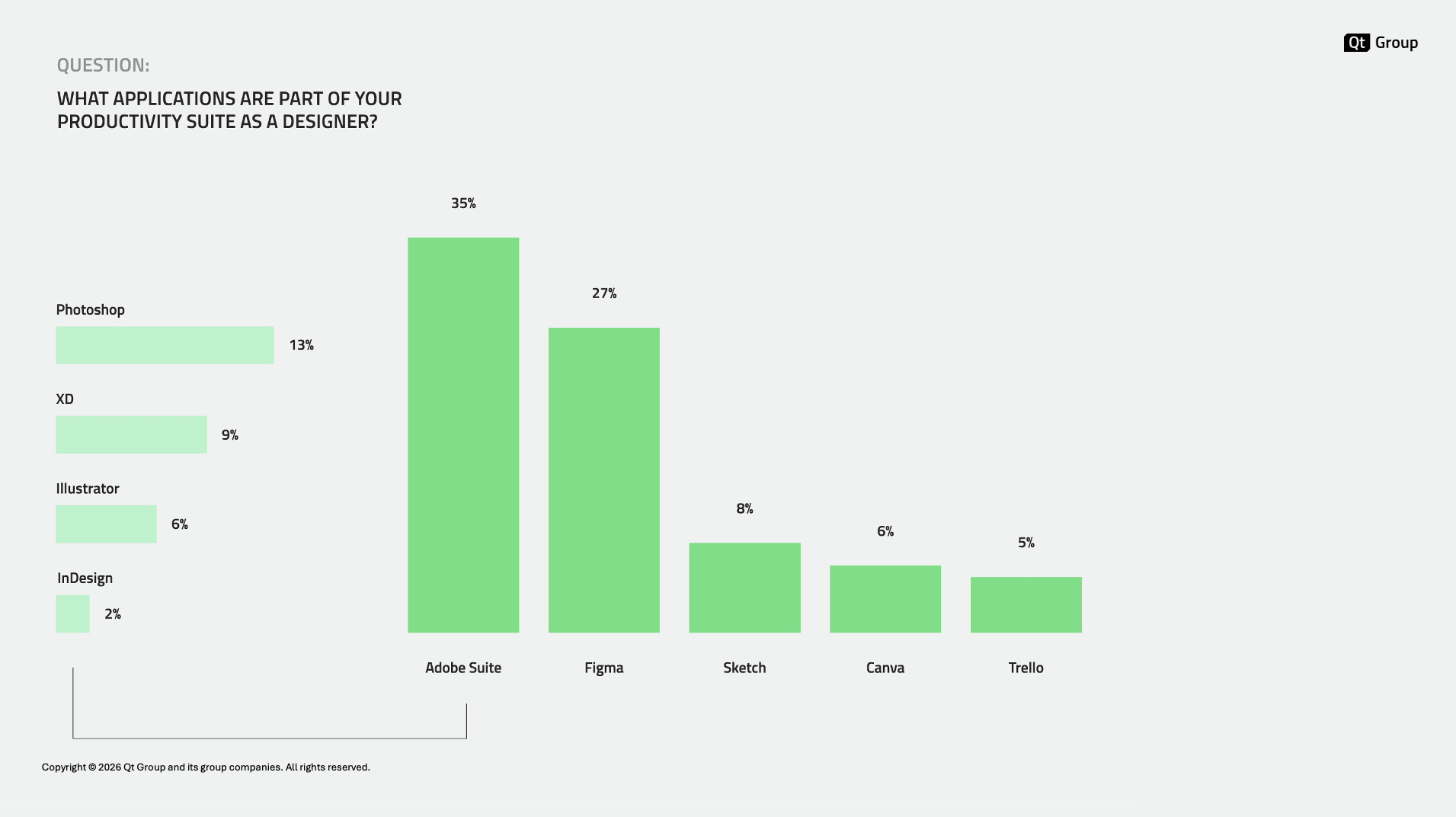
In our research of 420 embedded UI/UX designers, 35% reported using Adobe tools, while 27% use Figma. In the research, they also indicated using tools such as Unreal, Unity, and Qt Design Studio (the full research is available here).
Adobe's tools were built for media, marketing, and visual communication. They are powerful in that domain. But embedded UI development is not that domain. Photoshop is not a UI tool. It never claimed to be.
Figma is genuinely excellent for what it was designed to do: web and mobile UI design. It is the dominant tool in that space for good reason. But it was optimized for those constraints: infinite resolution, strong connectivity, modern browsers, consumer-grade hardware.
Embedded devices operate under entirely different constraints. Figma has limited support for complex animations. Transitions between states are difficult to design accurately. 3D is practically absent. And crucially, Figma has no awareness of what it means to run a UI on hardware with a constrained processor, a limited display, or a specific set of rendering requirements.
Then there are tools that go deeper into specialized spaces: game engines like Unreal and Unity, or tools like Kanzi. These have real strengths, particularly in 3D rendering and in specific verticals like automotive and gaming. But they do not extend across industries. And they tend to lock you in a false dilemma between 2D and 3D, as they rarely handle both well. A designer working on an industrial HMI design project does not necessarily want a game engine as their primary tool.
No one tool is built for the full reality of what UI/UX designers working on embedded devices actually face.
The Right Tool For The Right Job
A few weeks ago, I posted on LinkedIn about this using a running analogy. I have been doing endurance sports long enough to know the difference between a shoe that is fine for walking around and a shoe that is built for race day. The popular brands are popular for a reason: they make excellent all-purpose gear. But when I want to compete at my best, I reach for something purpose-built. Same distance. Same legs. Meaningfully different result.
I could go on (and indeed, I did). A time trial bike and a gravel bike are both bikes. But the former is built specifically for going fast over a long course with focus on speed and precision. When I upgraded from my old alu gravel bike to a second-hand time trial bike for a triathlon, my average speed on the same course went up by more than ten percent. No extra training. Just the right tool for the job.
Designers working on embedded devices are in the same position. They are using excellent all-purpose tools and then doing the equivalent of filing down the edges to make them fit. The workarounds compound. The workflow slows down. The gap between the design and the final product widens.
Purpose-built tools exist in almost every skilled profession. Another example? The adjustable wrench can turn almost any bolt. But a mechanic doing a specific repair reaches for the socket set. The generalist tool will do the job badly. The specialist tool will do it right.
The Unique Demands of Embedded UX Design
The stakes in embedded UI design are not just different from consumer product design. In many cases, they are higher. Smashing Magazine's guide to designing vehicle HMIs puts it well: users now evaluate their entire product experience based on the quality of the interface. A car, a medical device, or an industrial control panel is no longer judged on what it does. It is judged on how it feels to use.
Consider the environments where industrial HMI design operates. Users may be wearing safety gloves, safety glasses, or both. The lighting may be poor. The screen may be in direct sunlight. The user's attention is divided, and a moment of confusion at the interface could have real consequences. UXmatters' series on UX for the industrial environment covers these constraints in depth, from hit-zone sizing for gloved hands to information hierarchy under cognitive load.
In a hospital, the demands are even sharper. Clinical staff are often operating under stress, making decisions quickly, and relying on screens to surface the right information at the right moment. As my colleague Shawn puts it in his recent article, visual hierarchy is not a design preference in medical device UI design. It is a safety requirement.
And at the hardware level, the constraints are severe in ways that smartphone design never is. Battery life, display contrast, processor limits, and ambient light variability: all these shape what a good embedded UI can and cannot do. A display that looks excellent in a controlled environment may be unreadable in sunlight. An animation that runs smoothly on a test machine may stutter on the actual deployment hardware.
You cannot design around these realities with a generic tool and a good eye. You need tools that understand these constraints, that can surface them during the design process, and that can help you understand how your choices will translate into the final product.
Will AI For UI/UX Design Finally Close The Embedded UX Gap?
The emergence of AI-assisted design and agentic AI tools has prompted a reasonable question: Does the embedded UX tooling gap even matter anymore? If a designer can start in Claude, describe what they need, and have AI generate the interface, does the specialized tool still have a role? Nielsen Norman Group's 2026 State of UX frames this well: AI hype created a misleading narrative that new tools could rapidly replace designers and researchers. That was not true. It was, however, convenient in a cost-cutting environment.
I think specialized tools still have a critical role. And here is why.
AI models are generalists. They have learned from an enormous breadth of data, but embedded device design is a relatively narrow domain. The craft knowledge required to design well for constrained hardware, to understand how a specific animation will perform on a specific processor, to make the right tradeoffs between visual quality and battery life on a 2.4-inch display in direct sunlight: these are not well-represented in training data. The models have not learned enough, and the details matter too much for approximation to be acceptable.
There is also something more fundamental. Designing for embedded devices requires an understanding of the target conditions that goes beyond hardware or aesthetics. It is about performance, safety, and user experience under genuinely harsh conditions. A tool that is not built with all this in mind cannot give you the feedback you need to design well for it.
Even more important is the role of collaboration, and this goes beyond domain knowledge. In an honest review of Claude Design, TJ Pitre identified a pattern that matters for any team working at scale: "today's AI design tools are single-player by default, with sharing bolted on". As he puts it: "If teams adopt it widely, they end up isolated in their own little worlds, generating prototypes that aren't anchored to a shared source of truth, and then trying to merge those efforts back together later." Embedded UI design is a team effort. You would not want to find yourself on the receiving end of a UI for a medical device or a construction vehicle built in isolation, with a tool designed to make the creator feel good about themselves. And from a business perspective, if you are developing such a product, you want a workflow that surfaces issues early, not when fixing them means losing months of work and starting over from scratch.
A final point in the argument for specialized tools is the quality of the design. I have previously highlighted how crucial it is to deliver a superior user experience as a differentiator and positioning statement. Designlab's 2026 panel on AI in UX and product design found that the core risk is not that AI replaces designers, but that it lowers the average quality bar: "AI can make weak UX look polished. Judgment, taste, and accountability are the responsibility of the designer.” A point Ali Murtaza also highlights in a LinkedIn post reviewing an AI-generated UI that looks great at first sight. When anyone can generate something quickly, differentiation becomes harder. For embedded UI design, where the constraints are severe and competition is high, that concern is amplified.
What I do believe is that AI will reshape how designers work, including in embedded solutions – exactly what we discussed in a recent webinar about what’s actually working when using AI to design for embedded devices. Designers are already using AI tools as part of their workflow. They start their projects in generalist environments, explore concepts, iterate quickly. The agentic layer is real, and it is not going away. Any tool that wants to remain relevant in this environment needs to understand that. It needs to be accessible, interoperable, and able to participate in that broader workflow. NNg's ongoing work on AI in UX practice consistently reaches the same conclusion: AI frees practitioners from execution tasks, but human judgment, contextual understanding, and domain expertise remain the irreplaceable differentiators.
The tools that will thrive are not the ones that try to keep designers inside a walled garden. They are the ones that have genuine value (domain knowledge, hardware awareness, code output quality) and make that value available to the workflows designers are already building.
Some designers are already writing more code than they ever expected to, because AI has made it accessible. Others, particularly in Asia, in my experience, are pushing firmly in the other direction. They want design tools to be design tools. They do not want to become developers. Others operate in highly regulated industries like Aerospace and Defense, where high barriers to AI use exist. The profession is not converging on a single answer here, and I do not think it will.
What I am confident about is this: the designers who will be most successful in the next decade are those who understand both the creative and the technical dimensions of their medium. Not necessarily by writing the code themselves, but by understanding the constraints well enough to design in dialogue with them. IDEO's David Kelley makes a parallel argument about AI and technology: the technology is always the exciting part, but it takes human-centered insight to determine how people will actually interact with it. That is as true for embedded user interface design as it is for anything else.
What We Are Building For Embedded UI Design
At Qt, our purpose in the design tools space is straightforward: we want to empower designers to build the best-performing, best-designed interfaces in the world. Not in spite of the constraints of embedded hardware, but by understanding and working with those constraints.
We start from where most designers already are. Figma is the dominant professional tool for UI/UX design. Most designers working on embedded devices use it, even though it was not built for them. Our Figma to Qt plugin takes that into consideration: it helps designers convert their GUI designs from Figma into QML code, see how it translates to an embedded environment, identify where the gaps are, and iterate before handing off to development. It does not pretend that Figma is a perfect tool for embedded UI design. It helps designers get the most out of it, and it does so in a way that gives them confidence that what they envision for the product will actually be shipped, free from developers’ interpretations or generative unpredictability.
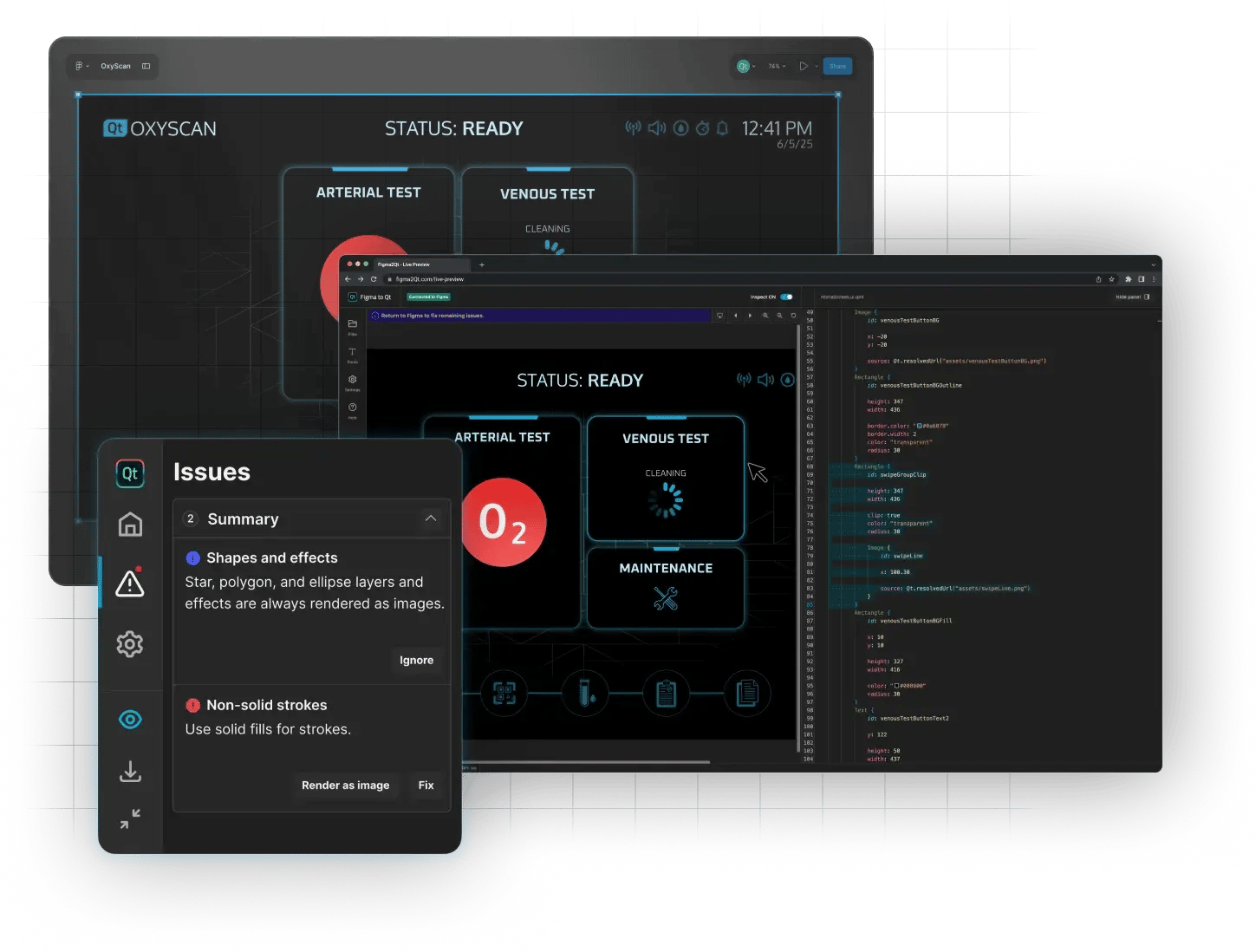
With Figma to Qt, you can preview your GUI design across different screen sizes, check for potential issues early, and convert your design to QML code, including interactive elements and design system components (download the plugin for free in the Figma Community).
We are also building AI directly into our design tools. Qt Design Studio already ships with an AI assistant that can generate QML user interfaces from a natural-language description. In the 4.8.2 release, we have added agentic behavior and MCP capabilities, giving AI assisted design a whole new dimension in Qt design tools.
Beyond Figma to Qt and Qt Design Studio, we are working on the next generation of what a design tool for embedded should look like.
We have been building design tools for embedded systems for nearly a decade. We have learned what works, what does not, and what designers actually need. Later this year, we are bringing out a new product that takes everything we have learned and rebuilds it for the era we are now in. It is not an incremental update. The code model has been rebuilt from the ground up. The design paradigm has changed. And it is AI-native from the start, not as a feature added later, but as a foundational design paradigm.
In the age of agentic AI, tools need to have real value and need to be accessible from anywhere. Ours is designed with both requirements in mind. Qt is open source. The code it generates is high-quality, readable, and AI-friendly. And our ambition is to build something that fits naturally into the workflows designers are already developing, not something that asks them to abandon the tools they use today.
We are also part of a larger ecosystem. Qt includes testing capabilities that can verify UI behavior before code reaches the developer. That means speed as well as quality: you get not just design output, but confidence in how that design will perform.
The Embedded UI Design gap is real. So is the opportunity.
The embedded UI gap is not a niche problem. It is experienced by millions of people every day: every time they interact with a device built to perform a function, not to feel good to use.
Closing that gap requires designers who understand the domain and the tools built for it. The consumerization of expectations is not slowing down. If anything, as AI raises the quality bar on consumer software, the contrast with poorly designed embedded user interfaces will become harder to ignore. I want to repeat this once more, because there’s no better way to put it than in the words of the NNg's State of UX 2026 report: what can no longer be automated is curated taste, research-informed contextual understanding, and careful judgment. Those are precisely the skills that embedded UI design demands most.
Companies that invest in design quality for their embedded products will find that it is not just an aesthetic choice. It is a signal. It tells their customers, their users, and their markets something real about the quality of everything they build.
The tools to support that investment are getting better. And we intend to make them better still.