Want to include notes or comments in your script about what you're recording?
While recording, the Control Bar contains an Insert Script Comment button
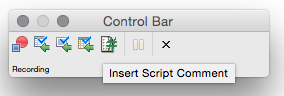
- Click the Insert Script Comment button

- The Comment Window appears
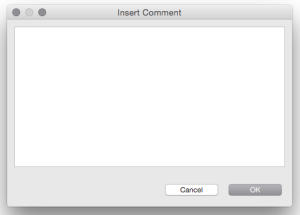
- Enter a comment and click OK
Once you complete your recording, by clicking Stop, the comment appears within your script. The following example's comment is: # Adding a new entry
[code type="python"]
def main():
startApplication("AddressBookSwing.jar")
activateItem(waitForObjectItem(":Address Book_JMenuBar", "File"))
activateItem(waitForObjectItem(":File_JMenu", "New..."))
activateItem(waitForObjectItem(":Address Book - Unnamed_JMenuBar", "Edit"))
activateItem(waitForObjectItem(":Edit_JMenu", "Add..."))
# Adding a new entry
type(waitForObject(":Address Book - Add.Forename:_JTextField"), "sam")
type(waitForObject(":Address Book - Add.Forename:_JTextField"), "<Tab>")
type(waitForObject(":Address Book - Add.Surname:_JTextField"), "smith")
type(waitForObject(":Address Book - Add.Surname:_JTextField"), "<Tab>")
type(waitForObject(":Address Book - Add.Email:_JTextField"), "sam@smith.com")
type(waitForObject(":Address Book - Add.Email:_JTextField"), "<Tab>")
type(waitForObject(":Address Book - Add.Phone:_JTextField"), "123.123.1234")
clickButton(waitForObject(":Address Book - Add.OK_JButton"))
[/code]
The Qt Company acquired froglogic GmbH in order to bring the functionality of their market-leading automated testing suite of tools to our comprehensive quality assurance offering.
Amanda Burma • Published Apr 1, 2015 • Updated Feb 13, 2023
Squish tip of the week: Insert comments while recording
Want to include notes or comments in your script about what you're recording?
While recording, the Control Bar contains an Insert Script Comment button

Once you complete your recording, by clicking Stop, the comment appears within your script. The following example's comment is: # Adding a new entry
[code type="python"]
def main():
startApplication("AddressBookSwing.jar")
activateItem(waitForObjectItem(":Address Book_JMenuBar", "File"))
activateItem(waitForObjectItem(":File_JMenu", "New..."))
activateItem(waitForObjectItem(":Address Book - Unnamed_JMenuBar", "Edit"))
activateItem(waitForObjectItem(":Edit_JMenu", "Add..."))
# Adding a new entry
type(waitForObject(":Address Book - Add.Forename:_JTextField"), "sam")
type(waitForObject(":Address Book - Add.Forename:_JTextField"), "<Tab>")
type(waitForObject(":Address Book - Add.Surname:_JTextField"), "smith")
type(waitForObject(":Address Book - Add.Surname:_JTextField"), "<Tab>")
type(waitForObject(":Address Book - Add.Email:_JTextField"), "sam@smith.com")
type(waitForObject(":Address Book - Add.Email:_JTextField"), "<Tab>")
type(waitForObject(":Address Book - Add.Phone:_JTextField"), "123.123.1234")
clickButton(waitForObject(":Address Book - Add.OK_JButton"))
[/code]
Subscribe to our blog
Comments
Related Articles
How to verify a custom table widget?
Squish GUI Tester operates the Application Under Test (AUT) to run through..
Read ArticleTest Center 2.0 Released with Full Manual Testing Support
The Test Center team is happy to deliver a major release of Test Center,..
Read ArticleSquish Days Online 2021
Join the global Squish community online, from anywhere Get up to speed on..
Read Article