Test Center has always been the place where your test results live: every run, every configuration, every failure, going back as far as you care to keep them. With Test Center 4.4 and the new Results API, we open up your results to your own tooling, and through the Model Context Protocol (MCP), to AI assistants that can query, compare, and reason about them in natural language.
Additionally test plans take another step forward: matrix executions, suite expansion, and template merging make large test plans easier to create and maintain. Related to matrix executions, manual testing gains automatic user assignment.
A New Results API: Your Results, Wherever You Need Them
The new Results API lets you query test results programmatically. It exposes the same information you see in Test Center. Batches, reports, individual tests, and their logged events, in a simple structure that is easy to interpret.
Many teams like to build their own dashboards, tailored to how their organization thinks about quality: a wallboard for the team room, a management report, a flakiness monitor for a specific product line. The Results API is designed to support exactly that. Its structure is simple enough that building a correct result view on top of it is quick work for a developer and, as it turns out, for an AI coding agent as well. Point an agent at the API documentation, and it should reliably assemble a working dashboard on top of your live results.
The Results API is available on every Test Center instance. It complements the existing APIs for uploading results and orchestrating test plans.
Full documentation is available at doc.qt.io/testcenter/results-api.html.
MCP Support: Bring Your Test Results into AI Workflows
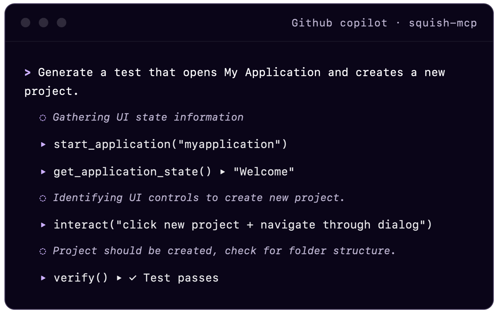
Test Center 4.4 also introduces an MCP server, built on top of the Results API and available as a separate download for Test Center users. Setup is simple: point it at your Test Center instance, provide authentication, and connect it to any MCP-compatible client.
The MCP tools are an abstraction of the Results API designed for large language models (LLMs). They offer the full level of detail: batch selection, result summaries, per-test result matrices, history across batches, and drill-down into individual log events. The responses are shaped and filterable to fit LLM context limits.
This unlocks two things:
Test Center becomes part of your AI workflows. Agentic development loops can consult Test Center as a source of truth: verify that a change didn't break anything, use results as a quality gate before proceeding, or feed failure details directly into the diagnosis and fix. This way your test history becomes a first-class input to automated workflows.
Anyone can ask questions about quality — in plain language. Instead of navigating views and filters, you can simply ask: Which tests started failing this week, and are the failures specific to one configuration? Has this test been flaky before? How does this release compare to the last one? This makes test results accessible to people further removed from day-to-day development. Test Center stores long result histories, and an AI assistant has the patience to track recurring failures and compare results across time frames that would be difficult to trawl through by hand.
Test Plans: Matrix Executions, Suite Expansion, and Template Merging
Test plans, introduced in Test Center 4.0.0, get their biggest upgrade yet.
Matrix executions remove the busywork from large configuration matrices. Instead of specifying every configuration explicitly, you just define the dimensions. For example, operating system × device type × license type, and Test Center expands the full matrix for you. What used to be dozens of hand-maintained entries becomes a single, readable definition. See matrix executions for details.
Suite expansion lets a test plan expand a suite into its individual test cases, based either on the repository or on previously known child tests. When expansion follows the repository, your test plans track the branch automatically: new tests on a feature branch simply appear in the plan, with no manual adjustment. Day-to-day maintenance drops to near zero, and the test list needs explicit verification only where it matters. For example, when preparing a release against a requirements-derived set of tests. Teams that prefer a fixed list can, of course, still define one explicitly. See suite expansion.
Template merging rounds this out: test plan templates can now be combined into a single test plan execution. Depending on the scope of a change, you can mix and match, a smoke set here, a platform-specific set there, without duplicating templates.
Manual Testing: Automatic User Assignment
Until now, assigning manual test runs to testers was itself a manual job. In Test Center 4.4, matrix executions can be combined with automatic user assignment: Test Center distributes the expanded test runs across your testers using mathematical optimization. Capabilities can be assigned to both users and test runs, and the scheduler matches them while keeping the workload evenly distributed. You no longer need to assign each configuration by hand and keep track of tester workloads.
Additional Improvements
A new import strategy can automatically remove or annotate previous results when tests are re-run, simplifying partial re-runs. The release also brings performance improvements for report deletion, maintenance tasks, and comment browsing.
Check out our Release Notes for a comprehensive list of all improvements and fixes.
Get Started
Test Center 4.4 is available now. Customers and evaluators can find packages in the Qt Customer Portal. If you have yet to try Test Center, get to know the platform and its features, or request your free trial here.
Subscribe to our blog