Video Thumbnail
Kaira—Qt Group's Smart Home Project

Create a Unique Smart Home Experience from Design to Embedded Hardware

Kaira is Qt Group home automation project showing how to deliver premium experiences with less effort and cost, using Qt’s comprehensive libraries and one connected design, development, and testing workflow.

Qt Group tools take Kaira from Figma designs to a working hub with real-time 2D and 3D graphics, Zigbee and Matter connectivity, and on-device AI vision.

Advanced Graphics

Real-Time 2D and 3D Graphics on Embedded Hardware

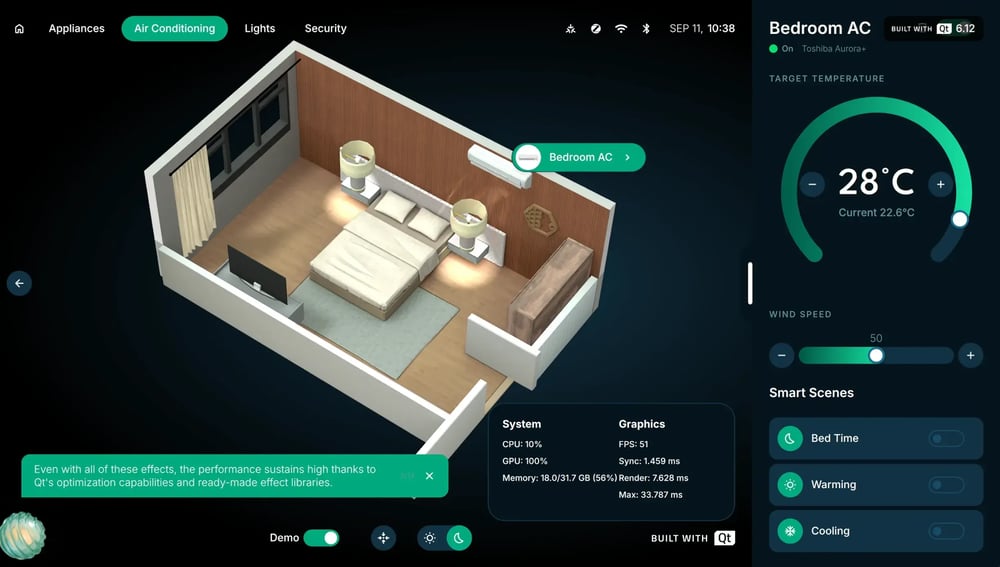
Kaira renders a live 3D home view natively with Qt Quick 3D, in real time on NXP i.MX 95 hardware with constrained memory.

The view shows heat distribution, airflow (via the Qt particle system), air quality, lighting zones, and device states across all rooms.

It sits alongside a 2D control interface in a single QML codebase.

Connectivity

Matter and Zigbee Device Control from One Hub

Kaira controls lighting, locks, cameras, and appliances from one hub over Matter 1.5 and Zigbee, bridged through MQTT with Qt MQTT. A semantic value table abstracts protocol differences, so the UI binds to one uniform device model regardless of the underlying standard.

Additionally, Qt supports connectivity with (LE) Bluetooth, NFC, Wi-Fi, and more.

Edge AI

On-Device Face Recognition with Edge AI

Kaira runs face detection and recognition directly on the board. The pipeline decodes the camera stream with the i.MX 95 hardware VPU, detects faces (UltraFace), and matches embeddings (FaceNet-style model, cosine similarity) against a local database.

Frames, embeddings, and registered faces never leave the device, which makes the feature fully cloud-free.

Kaira at a Glance

Kaira is Qt Group's smart home control hub demonstrator running on a single 15.5-inch touch screen. It controls real connected devices, shows the home as an interactive 3D model, and recognizes residents at the door with on-device AI.

Category Details & Specifications
Hardware 15.5-inch touch screen on NXP i.MX 95
Software Qt 6.12 LTS, C++ back end, QML user interface
Connected Devices
  • Danalock smart lock and Philips Hue bulbs (Zigbee)
  • Aqara Camera Hub G350 and SwitchBot Air Purifier (Matter)
Highlights
  • Real-time 3D home view with airflow visualization
  • Edge AI face recognition
  • Dark and light themes
  • Live performance overlay
Design

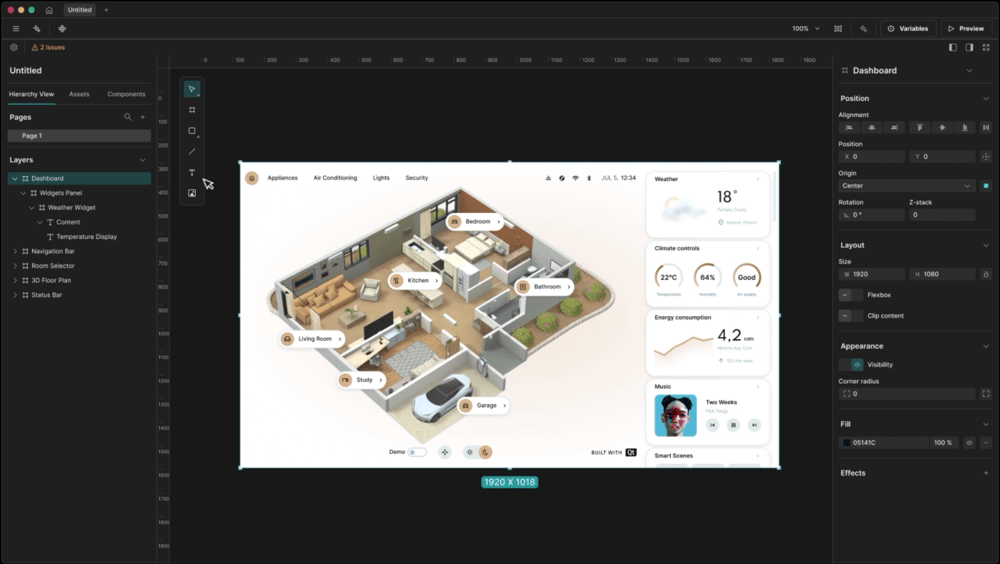
From Figma Design to Working QML Code

Tooling for the automatic conversion of designs into working QML code enables fast prototyping, rapid iterations, better control over the ultimate experience.

Develop

Qt Front End and
Back End

Qt Framework delivers advanced 2D and 3D graphics for a clear and accessible GUI and easy connectivity with a variety of consumer devices.

Assure Quality

GUI Testing, Code Coverage, and Static Analysis

Software Quality Solutions support testing quality of the GUI, code coverage, and compliance with testing standards and architecture design. 

Security

CRA Readiness and Privacy by Design

Built on Qt 6.12 LTS, the first Qt release declared compliant with the EU CRA, Kaira runs face recognition on-device, so biometric data never leaves the board.

Why Choose Qt Group for Consumer Electronics

High-performance 2D and 3D graphics, connectivity with consumer appliance standards, scalability from microcontrollers to top-tier devices, tooling for each stage of the development journey, long-term support, CRA compliance, and more make Qt Group your strategic partner to conquer the consumer market.

  • LG
  • Gruppo Cimbali
  • BSH
  • Keurig Dr Pepper
  • Hasselblad
1280px-LG_logo_(2015)

Stand Out on the Shelf

Real-time graphics and fluid animations create a premium experience, even on resource-constrained devices.

Qt is faster than web-based technology, and, usually, it needs less memory.

Helen Choi, VP, LG Electronics

cimbali logo-orange

Connect Any Device

Ready-made connectivity libraries reduce protocol glue code and let teams focus on the user experience.

Gruppo Cimbali reports 60% Less code with Qt built-in solutions

Qt's connectivity libraries make interfacing with sensors, boards, and the cloud a breeze.

Dario Costa, Senior Software Engineer, Gruppo Cimbali

BSH_Bosch_und_Siemens_Hausgeräte_logo.svg

Release with Confidence

Automated testing reaches a precision and coverage that manual testing cannot, and produces evidence for release decisions.

Today, we can proudly say that there is no gap between what our designers demand and what our developers can deliver.

Daniel Dersmann, Head of Global GUI Framework Development, BSH

Keurig-Dr-Pepper-logo

Ship Faster with Fewer Iterations

Designers, developers, and testers work on the same source of truth, so design changes reach the device without manual rework.

Keurig Dr Pepper reports 1 month - estimated man-time saved with Qt Group's design tooling

Our designers hand off code from Figma, not static files.

Joshua Wilkie, Embedded UI Developer, Keurig Dr Pepper

hasselblad

Reuse Across the Product Line

The same UI components scale from high-end hubs to cost-efficient MCU panels, keeping one look and feel across brands and price points.

Qt for MCUs let us quickly implement a smaller UI on our top display using the same workflow and developers, saving us time and effort.

Richard Röjfors, Software Architect, Hasselblad

Technical Features

Built on Qt 6.12 LTS, Kaira includes the following features.


  • Device Management
  • Lighting Control
  • Climate & AC
  • Weather
  • Energy Monitoring
  • Security & Cameras
  • Performance
Devices (1)

Device Management

Discover, group, and control devices over Zigbee, Matter, and virtual adapters via Qt MQTT (Qt Add-on).

Selecting a Light (1) (1)

Lighting Control

On/off, hue, brightness, color-temperature, and presets — QML binds directly to device.values via QQmlPropertyMap.

Selecting an Air Conditioning (1)

Climate & AC

Thermostat setpoints + per-zone readings: temp, humidity, pressure, AQI, CO₂, PM2.5, VOC — via ClimateManager. 3D view includes particle effects to show air flow.

Selecting a Room (1) (1)

Weather

Live conditions & hourly/daily forecasts from Open-Meteo API — fetched with Qt Network, no API key required.

Energy consumption (1)

Energy Monitoring

Daily, weekly, monthly, and yearly consumption charts rendered with Qt Graphs (Qt Add-on), derived from live device state.

Expanded Device Controls - Cameras (1) (1)

Security & Cameras

RTSP/UDP streams via Qt Multimedia. Edge-AI face detection/recognition on door feed for embedded targets.

Performance

Performance Widget

Reporting live FPS, sync/render frame times & CPU/GPU/memory stats — scene-graph signals + Mali libGPUCounters on i.MX 95.

Efficient End-to-End Workflow

Built leveraging all Qt Group's product portfolio, Kaira showcases the efficiencies that can be gained by building on products that speak the same language and reduce the handover complexity.  

  • Design
  • Development
  • Quality Assurance
  • Security
Clate

Design That Runs on Real Devices​

Built with Clate, Qt Group's UI design tool, Kaira's hub is created by designers with no coding experience and handed over as working code to the development team.

Designers can already set variables and data bindings, build animations and interactions, and can monitor all the time frames-per-second and memory footprint at design time.

Developers build around what the designer hands over rather than rebuilding it.

Expanded Device Controls - Cameras (1) (1)

Advanced Control at the Edge

  • Real-Time 3D Home View: A live 3D model of the home shows device states, lighting zones, and air quality room by room.
  • Connected Devices over Zigbee and Matter: Kaira discovers, groups, and controls devices through Zigbee2MQTT and Matter2MQTT bridges. By abstracting over protocol differences, the UI binds to one consistent model.
  • Edge AI at the Front Door: Face recognition running on the i.MX 95 hardware video unit enables unlocking the door.
Squish Vision

AI-Assisted Quality Assurance

Squish, Coco, and Axivion expose their functions through MCP servers, so any AI agent can drive them.

Tests generated and run in minutes deliver evidence auditable for regulatory compliance.

  • Squish generates and runs GUI tests, and Coco's coverage report identifies functionality the tests never touched, so a new test can target that gap.
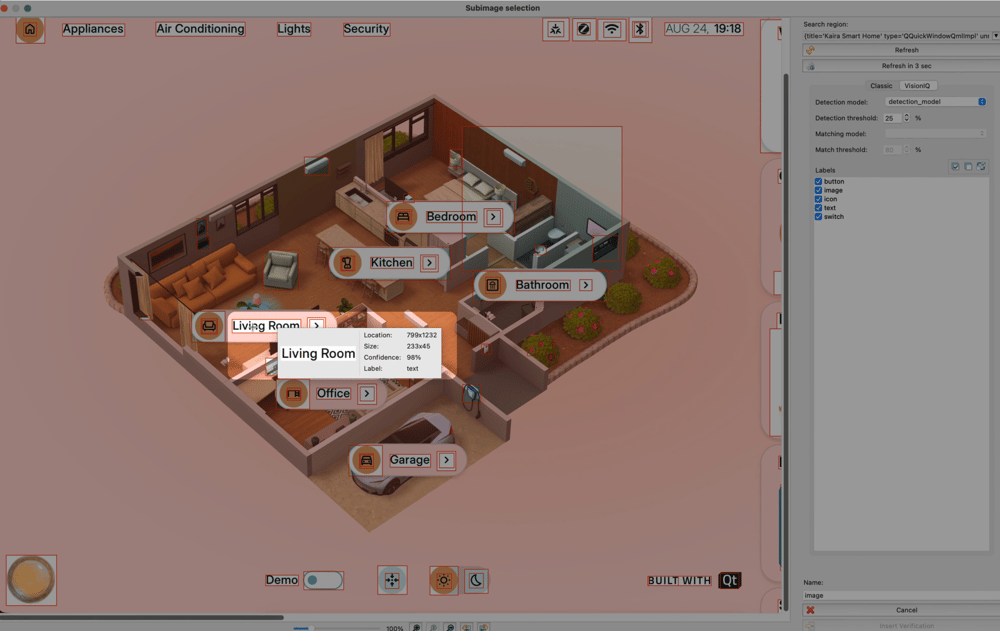
  • Squish Vision recognizes UI elements by their appearance, so tests survive a switch from light to dark mode.
  • Axivion analyzes the source code, reports rule violations, and confirms on rerun that a fixed finding is resolved.


Expanded Device Controls - Locks (1)

Secure by Design

  • Ready for the Cyber Resilience Act: Kaira is built on Qt 6.12 LTS, the first commercial Qt Framework release with a signed EU Declaration of Conformity under the CRA.

  • Long Term Support: Maintenance and security updates for 5 years, and Extended Security Maintenance beyond that.

  • Privacy by Design: On-device inference keeps camera frames, face embeddings, and the registered-face database on the board. No cloud service is involved in unlocking the door.

Design to Code Automation

See how Claude Code turns Kaira's Figma designs into working QML code.

Squish and Coco MCPs

View iterations on quality check driven by AI and approved by the developer.

Squish Vision

Check Squish Vision using advanced computer vision to test the Kaira interface.

What can't be done with other tools? Why should one do this with Qt?

It was easy to build Kaira using Qt. Multimedia, 3D, and MQTT are all part of the same framework, so there is no need to look for third-party libraries, learn them, test. It all works together.

Sakaria Pouke, Senior Software Engineer, Qt Group

sakaria

Frequently Asked Questions

How can a smart home device be prepared for the EU Cyber Resilience Act?

  • Kaira
By building on software components with a declared CRA conformity and covering the device’s own security, vulnerability handling, and update obligations. Vulnerability reporting has applied since September 11, 2026; full requirements apply to products placed on the EU market from December 11, 2027. Kaira is built on the commercial Qt Framework 6.12, the first Qt release with a signed EU Declaration of Conformity under the CRA. The device manufacturer remains responsible for the whole product.

How can a smart home UI be tested automatically?

  • Kaira
With automated GUI tests that recognize UI elements by appearance, combined with coverage and static analysis. For Kaira, Squish generates and runs GUI tests, and Squish Vision identifies elements visually, so tests survive a switch between light and dark themes. Coco's coverage report shows functionality the tests never reached, and Axivion reports coding rule violations and confirms fixes on rerun. Squish, Coco, and Axivion expose their functions through MCP servers, so AI agents can drive them.

Which Qt modules does a smart home hub UI need?

  • Kaira
Requirements vary by product; Kaira uses Qt Quick and QML for the user interface, Qt Quick 3D for the 3D home view, Qt MQTT for device connectivity, Qt Multimedia for RTSP/UDP camera streams, Qt Network for live weather data, and Qt Graphs for energy consumption charts. The back end is written in C++, and QML binds directly to device values through QQmlPropertyMap.

How can face recognition run on-device, without a cloud service?

  • Kaira
By running the full pipeline on the device's own hardware and keeping the face database local. Kaira decodes the door camera stream with the i.MX 95 hardware video processing unit, detects faces with UltraFace, and matches embeddings from a FaceNet-style model against a local database using cosine similarity. Camera frames, embeddings, and registered faces never leave the board, and no cloud service is involved in unlocking the door.

Can real-time 3D graphics run on embedded smart home hardware?

  • Kaira
Yes, with a native rendering engine sized for constrained memory. Kaira renders a live 3D model of the home with Qt Quick 3D, in real time on NXP i.MX 95 hardware. The view shows heat distribution, airflow (via the Qt particle system), air quality, lighting zones, and device states room by room, next to a 2D control interface in a single QML codebase. A built-in overlay reports live frame rate, frame times, and CPU, GPU, and memory usage.

How can one smart home hub control both Matter and Zigbee devices?

  • Kaira
By bridging both protocols to a shared messaging layer and binding the UI to one common model. Kaira connects Matter devices (Aqara Camera Hub G350, SwitchBot Air Purifier) and Zigbee devices (Danalock smart lock, Philips Hue bulbs) through Matter2MQTT and Zigbee2MQTT bridges, read with Qt MQTT. A semantic value table abstracts protocol differences, so the UI works the same regardless of the underlying standard. Qt also supports Bluetooth Low Energy, NFC, and Wi-Fi.

More Resources

Qt in Consumer Electronics

Easily create a world of high-performance 2D and 3D UI applications for consumer electronics such as smart home appliances, wearables, headless devices, companion apps, and more.

Read More

Qt Framework's 3D Graphics

Create stunning user interfaces with a 3D framework that runs smoothly on both embedded systems and mobile and desktop platforms.

Read More

Seamless Connectivity across Appliances

Remove the complexity for your networking and connectivity stack using the protocols and standards you need as one consistent entity.

Read More

Explore More Qt Projects

From immersive 3D experiences to concrete industrial applications, our demos showcase the art of possible with Qt Group's technologies.

Explore Now

Experience the Potential of Qt Group for Consumer Electronics Firsthand

Talk to an Expert