Published On
Comments
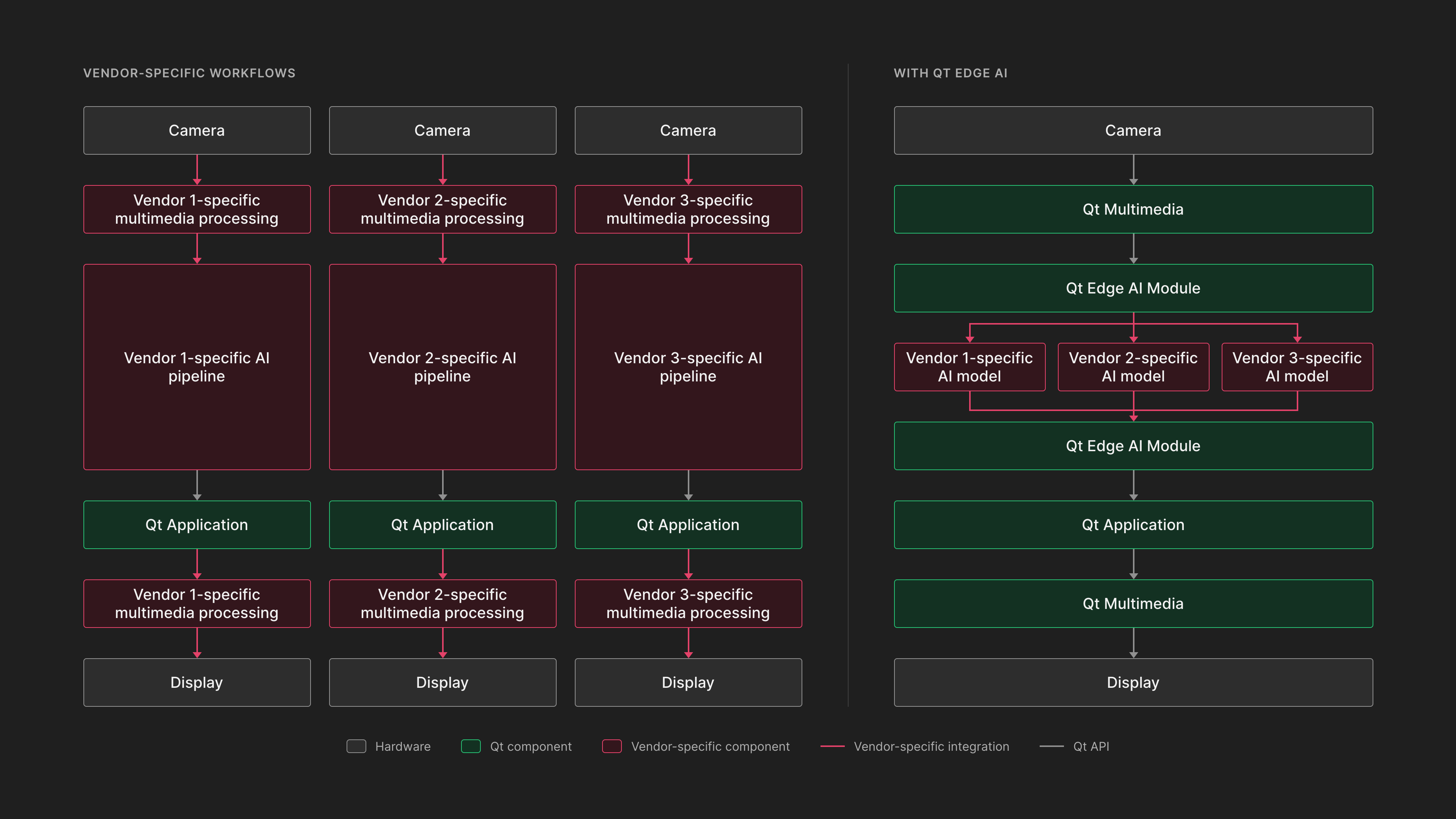
If you want to add computer vision, such as object detection or face recognition, to an embedded product, you usually have to tie your application to one chip vendor’s AI pipeline. That makes building edge AI features into real-world devices complicated and slow, for a few reasons.
First, you need people on your team who know that vendor’s multimedia stack and AI pipeline, a profile that is hard to find. Then, your team has to wire up the plumbing by hand: camera setup, frame handling, model calls, and output handling, which bloats your codebase. And finally, if you want to change vendors, if the vendor changes its AI runtime (which happens often), or if you want to bring the same features to a product for a different market segment, you essentially start over.
Qt Edge AI makes your application logic independent of the vendor-specific pipeline. Your Qt developers build the application using the tools they already know, and they write it once and keep it when the chip, pipeline, or model changes. That makes it faster to iterate on edge AI products and lowers the cost of supporting multiple hardware platforms.
Qt Edge AI is now available as a Technology Preview for commercial Qt license holders.
How It Works: A Cross-Platform Abstraction AI for Computer Vision
Qt Edge AI lets application developers use dedicated QML objects to:
-
Define the relevant multimedia source, such as the Qt’s Multimedia capture session;
-
Direct the video stream to the AI processing pipeline, such as Qualcomm’s Edge Impulse AI technology, without having to worry about the vendor-specific details;
-
Hand the AI processing pipeline output over to an output target, typically the core application itself.
This inference pipeline is implemented as a dedicated QML type that wraps all steps into a coordinated workflow. 
To change the AI model, the only modification required in the application is to modify the AI model specification in the config file specified in the VisionInference QML type.
This flexibility can reduce the effort required to build product families for different price points or markets and give customers more choice when selecting chipsets. Qt also provides few pre-configured pipelines for selected chipsets, which can help shorten development time for supported use cases. These pipelines are limited to the chipsets Qt has configured and tested.
Qt Edge AI In Action
Defect Detection in FactoryPulse
FactoryPulse is our joint industrial automation demo with Qualcomm and Edge Impulse. It runs four production lines from a single Qualcomm Dragonwing IQ9 board. Its defect detection feature watches the camera feed from each line and flags faulty products as they pass, with the detections drawn directly onto the live video. The vision model was trained with Edge Impulse and runs on the board’s AI accelerator, and the results appear in the same Qt interface that operators use to monitor the whole factory.
Face Unlock in Kaira
Our latest smart home hub demo, Kaira, uses an early version of Qt Edge AI for its face unlock feature. As we have shown in the recent Qt World Summit keynote, the device recognizes a registered face from the live camera feed and unlocks. The application describes the inference flow in QML, and the underlying AI pipeline handles the rest.
Simple Face Detection Example
To get you started, the Technology Preview includes a simple face-detection Qt Edge AI example on GitHub. The application shows a live camera video in a window, runs face detection on the same frames, and passes each result back to the application.
Here is the QML that handles the camera, the video display, and the entire AI pipeline:
That’s about 30 lines of QML for the whole multimedia and AI pipeline.
CaptureSession and VideoOutput are standard Qt Multimedia. InferenceFlow is where Qt Edge AI comes in: it takes the video from the same capture session, runs the model via VisionInference, and passes the results to your application via InferenceResultParser.
The same QML runs unchanged on every supported backend. To move from one to another, you change the vendor name and its configuration file.
Getting Started
You need the following components to build your own cross-platform computer vision application:
-
Qt 6.12 or newer;
-
Embedded device board: it is easiest if you get either the Qualcomm Dragonwing IQ9 or the Nvidia Jetson AGX Orin board. We do have a software package available for these boards, which saves you weeks of work;
-
The Qt Edge AI module, which you can download here (you need a Qt commercial license);
-
The computer vision AI model;
Feedback
We’d love to hear from you! Let us know what you like and where you would like to see improvements to Qt Edge AI. You can provide your feedback to your Qt account team or our technical support team.
Blog Topics
Related Articles
MVVM in C#: What Changes When You Switch UI Frameworks?
"If I change UI frameworks, will the C# MVVM backend of my application..
Read Article
Qt C++ Code Review Skill V3.1 Adds clang-tidy and clazy
Version 3.1 of the Qt C++ code review skill can now run the clang-tidy and..
Read Article