Published On
Comments
Starting with Qt 6.12, Qt WebEngine and Qt PDF are released as Qt Extensions modules, on their own schedule, separate from the Qt Framework releases. For you, this means Chromium security fixes reach your applications sooner, and newer Chromium versions arrive more often. Read on to learn about the new version numbers and how to pick the right release for your Qt version.
Why the change is needed
Since Qt 6.8, Qt WebEngine and Qt PDF have been separate downloads in the Qt Maintenance Tool. With Qt 6.12, we went one step further: we removed the Qt WebEngine git submodule from the qt5.git super-repository, so that Qt WebEngine can be released separately. This change is also important for those who build Qt WebEngine from source.
In all Qt 6 versions before Qt 6.12, Qt WebEngine was released together with Qt on a fixed cadence: a minor release twice a year, followed by a series of patch releases.
Qt WebEngine is built around Chromium, and Qt PDF uses PDFium, which is part of the Chromium project. Qt WebEngine and Qt PDF use only part of the large Chromium code base. Still, each Chromium release brings a growing number of security fixes.
Recently, the number of security fixes in Chromium has increased significantly. The chart below shows the number of Critical and High security fixes in Chromium as listed in the "Stable Channel Update for Desktop" posts on the Chrome Releases blog.
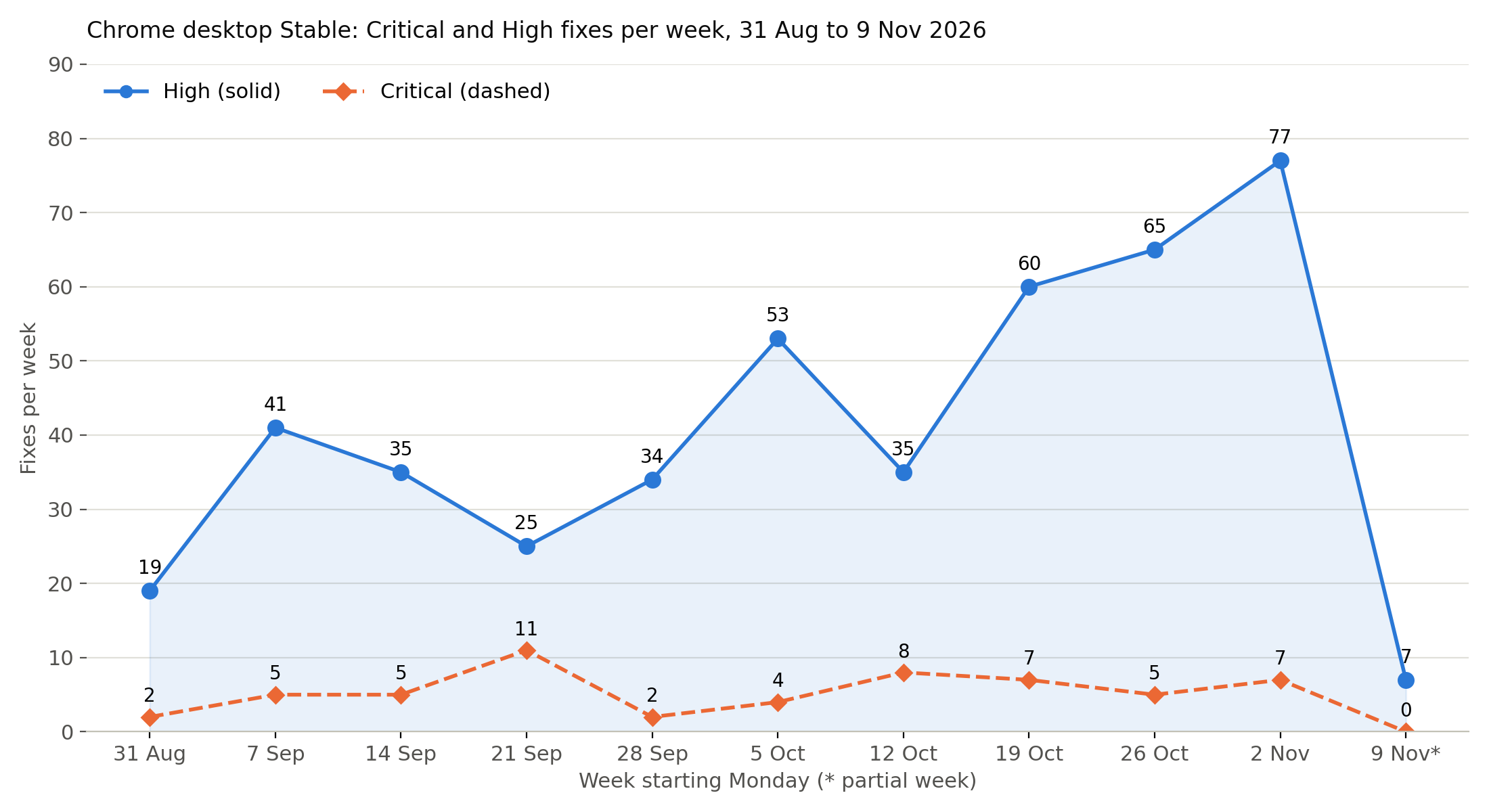
This volume of fixes requires a different intake process and a release schedule driven by security needs, independent of the Qt Framework schedule.
The new Qt WebEngine and Qt PDF release cadence
Qt WebEngine and Qt PDF now have their own version numbers, which are different from the Qt Framework version numbers.
New versioning scheme
Qt WebEngine and Qt PDF now use a new versioning scheme. A version number combines the Qt major version and the Chromium major version, for example, "6.140.0". The third number is the patch version.
Mapping to supported Qt versions
In general, the range of Qt versions supported by a Qt WebEngine release stays the same as before: a patch release of Qt WebEngine works with Qt versions back to the last supported Qt LTS version. Because the version numbers of Qt WebEngine and Qt no longer match, check the mapping carefully. A list of Qt versions compatible with a given Qt WebEngine release is provided in the Qt WebEngine release notes.
Release timing and support
Qt WebEngine and Qt PDF will have a minor release about every 3 months. Each minor release is based on a new Chromium major version and is maintained until the next one is available.
Patch releases of Qt WebEngine are mainly driven by security fixes in Chromium that are relevant for the Qt WebEngine API and its use cases. Users should always update to the next available version to receive the latest security fixes.
New minor versions of Qt WebEngine and Qt PDF are released for the current Qt LTS release. The previous Qt LTS release stays on the last applicable minor version of Qt WebEngine and Qt PDF and receives only security fixes in patch releases.
Support for a Qt WebEngine or Qt PDF version ends when support ends for the Qt LTS release it can be used with.
How to get it
Pre-built binaries for the main desktop platforms are available via the Qt Maintenance Tool (also known as “Qt installer”) under "Extensions".
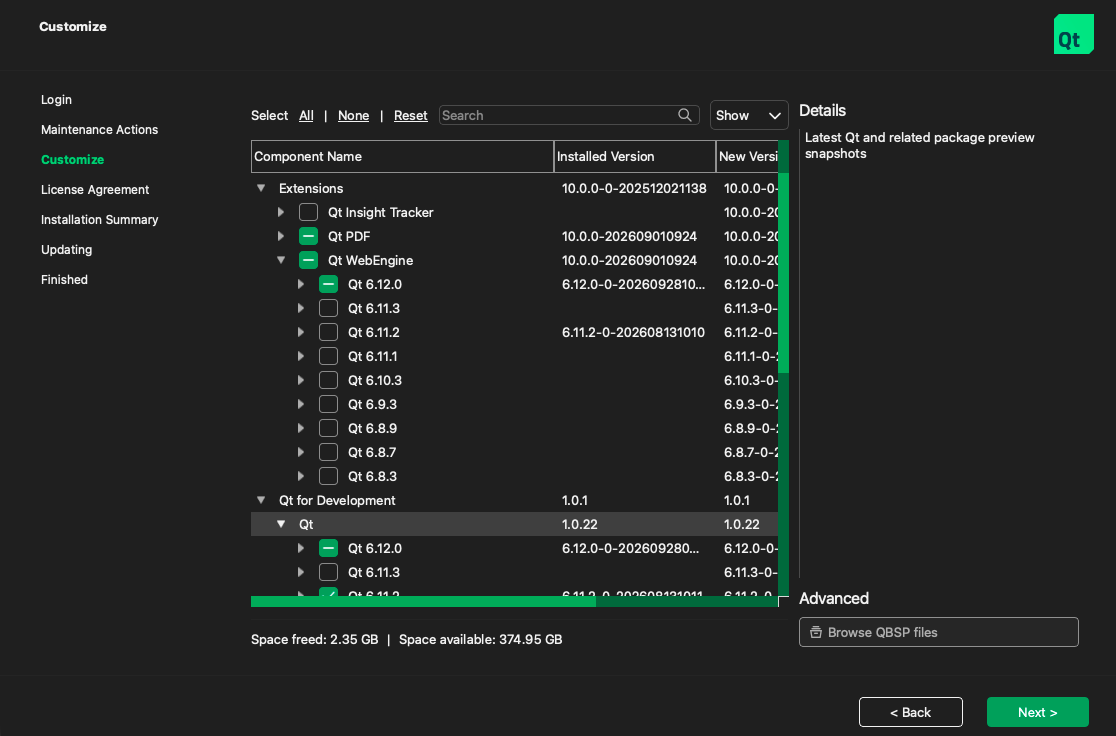
For other Qt versions or platforms, a build from source is required. See the documentation page Qt WebEngine Platform Notes for details.
Formalizing our commitment to security
To cover the Cyber Resilience Act (CRA) requirements for both modules, we are preparing a Declaration of Conformity (DoC) and a technical evidence report in the same format as for Qt 6.12 LTS. Stay tuned!
Stay informed and give feedback
There is a new page in the documentation of Qt WebEngine and Qt PDF with additional information about the new releasing.
Dedicated announcements of new Qt WebEngine and Qt PDF releases will be sent to the Qt Announcement mailing list. Subscribe to the list to receive them. Qt WebEngine and Qt PDF 6.140.0 will be released very soon!
Send feedback and report bugs in the Qt Bug Tracker, using the Qt WebEngine and Qt PDF components.
Blog Topics
Related Articles

Qt WebEngine Separate Release
With the upcoming Qt 6.12.0 release, there will be no Qt WebEngine or Qt..
Read Article
Qt 6.5 Reaches End-of-Support in April 2026
Extended Security Maintenance Is Now Available Standard support for Qt 6.5..
Read Article