Published On
Comments
We are happy to announce the release of Qt Creator 21!
Release 21 of the Qt Creator IDE lets AI agents automate more of your editing, building, running, and debugging, while you control more of what they can do and see what they cost. A new Profile mode tells you not only where your application slows down, but what to do about it.
AI Support
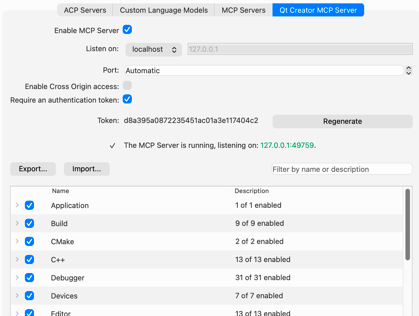
The Agentic AI chat (ACP) integration and MCP server are now enabled by default, and the MCP server now requires authentication with a bearer token by default as well. Agents that you configure in Qt Creator for the Agentic AI chat handle this automatically, but when you connect to Qt Creator MCP from the outside, you need to add an authorization header "Authorization: Bearer <token>" with the token from Qt Creator's MCP settings to be able to connect. You can opt out of authentication in Preferences > AI > Qt Creator MCP Server > Require an authentication token. (Documentation)
We added many new tools to our MCP server and made them configurable individually in the preferences. We also updated MCP to the 2026-07-28 protocol version.
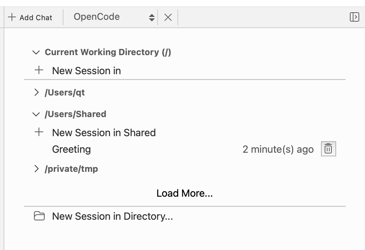
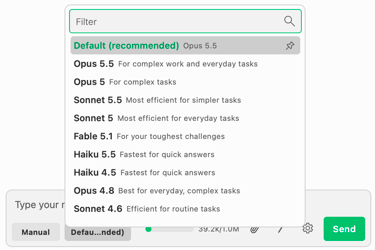
The Agentic AI chat received many improvements as well. Agents from the registry can be automatically updated and new sessions can be created specifically for previously used workspaces. If supported by the agent, sessions can be deleted, agents can be switched to a new session, and token usage and cost information for the session and for the turn are shown in the chat. We added support for the elicitation API, which allows agents to request structured information from users. We also made the mode and model selection more accessible directly from the chat input with support for filtering and favorites.

Debugging & Profiling
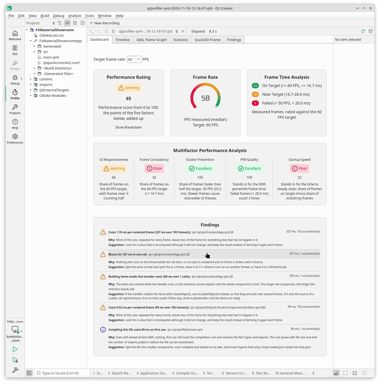
The new Profile mode integrates the new Qt Profiler tool that replaces the QML Profiler. A new dashboard gives various performance characteristics a score and provides insight into individual findings with suggestions for fixes. Traces open as individual documents. Profile mode also supports a Call-Stack Sampler on Windows and macOS as well as for Qt Tracepoints. See what it looks like in the YouTube short.
We added the experimental option to use a combined engine for debugging C++ and QML that enables combined stack traces. Choose C++ and QML in the Debug setting of run configurations to use it.
We also worked on new, modular debugger backends that are easier to test. Test them out by turning on Preferences > Debugger > General > Use the new debugger backends (experimental).
Editing
We added an editor for .qdoc files with a rendered preview, similar to our Markdown editor. It also shows issues as marks in the editor.
The new setting Preferences > Text Editor > Display > Check Spelling turns on spell checking for code comments, text files, and commit messages. This uses OS functionality on macOS and Windows. On Linux it requires the enchant-2 library to be installed.
Git merge conflict markers are now nicely displayed in the text editor with the option to choose the current version, the incoming version, or both.
FakeVim received many many fixes as well as support for various Vim features including a large subset of Vimscript and plugins.
Version Control
The new Changes navigation view shows changed files and provides various actions on these, like Diff, Stage, Revert, Log, and Annotate.
Diffs for single files are now shown in an editable live diff editor.
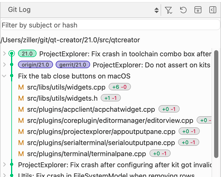
The new Git Log navigation view shows the git log graph. Expanded nodes show the file stats of the change. The context menu provides actions like showing commits or individual file changes, and checking out or cherry-picking commits.
Projects
We updated our CMake parser to version CMake 4.2. The cm Locator filter can now be used to run arbitrary CMake commands. We added a built-in indenter for CMake files that can be used instead of cmake-format, and the CMake editor now supports the Outline view and dropdown. CMake Presets got runSettings and runDevice vendor extensions for Qt Creator, and received many fixes as well.
You can now also create a Workspace project from an executable that is open in an editor, to easily run and debug that executable.
Devices
We added experimental support for HarmonyOS (documentation).
Experimental support for remote Windows devices (over SSH) was also added.
We also fixed issues with running on iOS devices with Xcode 27, Android support got a new Logcat view (Tools > Android > Logcat), containers managed with Podman can now be used in Qt Creator, and we improved the file dialog for remote paths.
Other
If you wonder where the Extensions browser is: It has moved from its own mode to a page in Preferences
There have been many more additions and improvements in Qt Creator 21. Please have a look at our change log for more detailed information.
Get Qt Creator 21
The new version is available as an update in the Qt Online Installer (commercial, opensource). You also find commercially licensed offline installers on the Qt Account Portal, and opensource packages on our opensource download page. This is a free upgrade for all users.
Please post issues in our bug tracker. You can also find us on IRC on #qt-creator on irc.libera.chat, and on the Qt Creator mailing list.
You can read the Qt Creator Manual in Qt Creator in the Help mode or access it online in the Qt documentation portal.
Related Articles

Qt Creator 21 RC released
We are happy to announce the release of Qt Creator 21 RC. Please head over..
Read Article
Meet Clate: the First Design Tool for Real-World Experiences
Clate Beta is out today, free for everyone. It's a no-code, AI-native UX..
Read Article