Apr 7, 2026
Comments
Evaluating and starting to develop professional, production-grade GUIs on embedded Linux should be frictionless. Based on this statement, we are always working with our partners to improve the Qt developer experience. Together with Toradex we recently made major improvements to the Torizon Qt VS Code template, making it easier for you as a developer to use Qt Device Creation Enterprise workflows inside the same template that you might already have been using with the Device Creation Community Edition. On top of that, there is a brand-new Qt demo in the Torizon Demo Gallery which you can try right away.
Torizon is a production-ready, container-based embedded Linux platform that simplifies how Qt applications are deployed and maintained. Qt developers may already be familiar with Boot2Qt, which is a useful tool to get a Qt prototype running quickly. However, scaling that prototype into a secure, maintainable, and updatable product usually requires building and managing your own Yocto stack. Torizon removes this burden, providing a pre-integrated OS, hardware-optimized Qt runtime, OTA automated updates, CVE tracking and a consistent containerized workflow, letting you focus entirely on your Qt application instead of maintaining the underlying Linux distribution.Below you’ll find what’s new, why it helps Qt developers, and exactly how to try it.
What's New
The latest Torizon Qt integration removes any friction to start and deploy your Qt project. A single unified template now supports both Qt Open Source and Qt Enterprise, automatically pulling the correct packages during container builds. The secure credential flow means Qt Enterprise users can access protected packages without editing configuration files or exposing licenses in images. Combined with one-click deployment of Qt Enterprise demos, Torizon now offers a smooth path for evaluating Qt on embedded hardware.
In the VS Code Torizon Templates GitHub repository, Torizon published an updated Qt 6 QML / C++ template. Developers can now use the same template for open-source Qt or Qt Enterprise at: https://github.com/torizon/vscode-torizon-templates?tab=readme-ov-file#toradex-supported-templates.
The Qt template supports a simple credential flow, so you can enter your Qt Enterprise account credentials or leave the fields empty to use the open-source packages. The template will automatically pick Enterprise packages if credentials are present. You can find more details in Toradex’s Developer Site at: https://developer.toradex.com/torizon/application-development/use-cases/gui/qt-on-torizon-os/#qt-c-template-for-torizon-os.
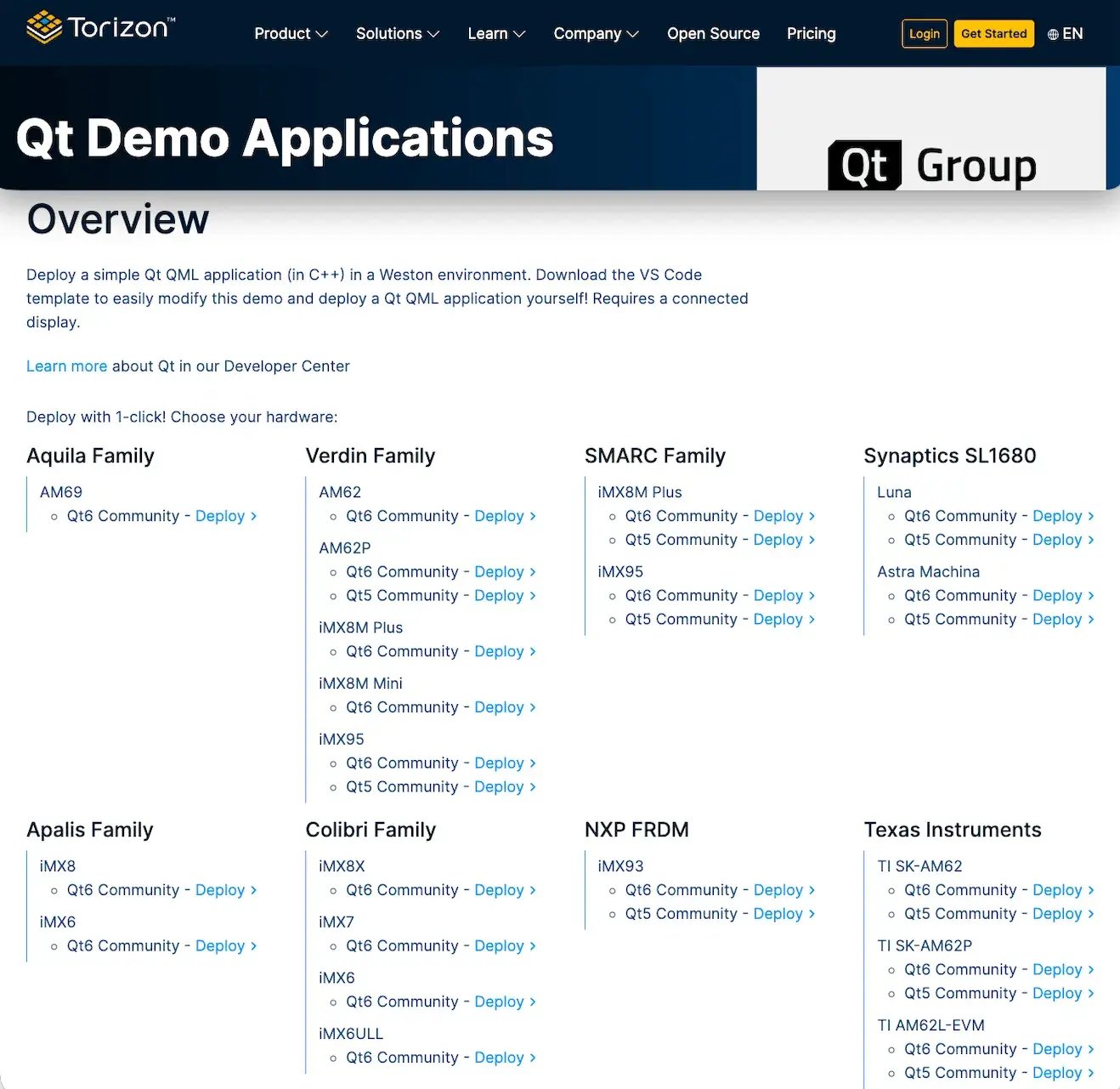
There is also a new demo published for Qt Enterprise in the Torizon Demo Gallery at: https://www.torizon.io/demo-gallery. You can now deploy and evaluate a Qt QML demo on supported SoMs with a single click.
Why this matters
For many embedded projects you’ll want the additional features, hardware integrations and support that the commercial Qt license, the Device Creation Enterprise provides. Until now, switching between an OSS workflow and a commercial (enterprise) workflow required manual package management. With the new template flow is added: - a single template where you can choose the correct Qt packages at build time, and - a secure, guided flow to enter and store your Qt Enterprise credentials so builds can pull protected packages without baking credentials into images.
This removes error-prone steps and helps teams evaluate and prototype faster with the correct runtime.
Also, with a production platform like Torizon, you benefit from an automotive-grade OTA update solution (based on Uptane) to securely deliver patches to devices in the field, as well as accurate SBOMs (Software Bill of Materials) and VEX (Vulnerability Exploitability eXchange) reports to make it easier for you to comply with the vulnerability management requirements of the Cyber Resilience Act.
How it works
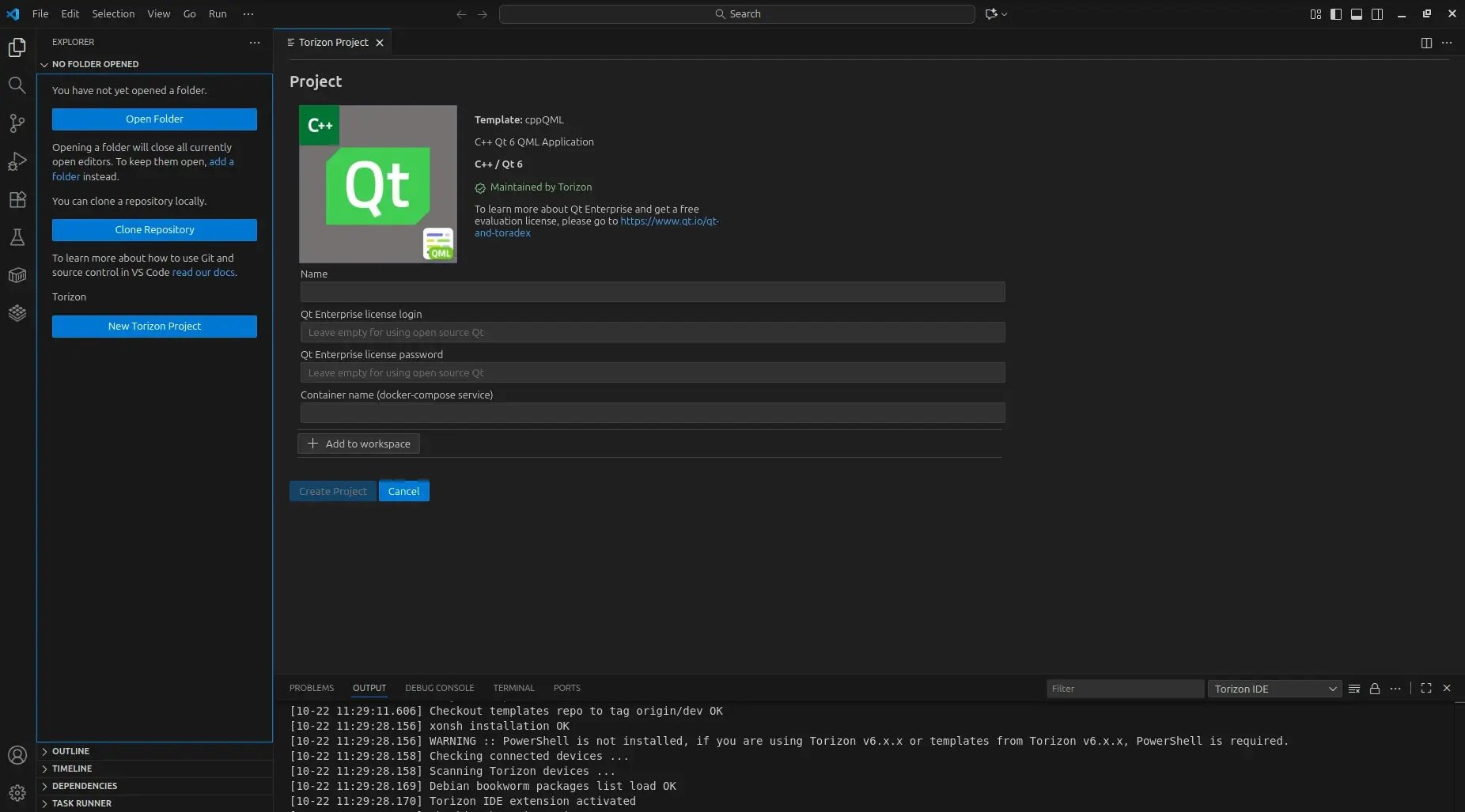
1. Create a Qt project from the VS Code Torizon template
Use the Qt C++ (Qt6 QML) template supplied by the VS Code Torizon IDE Extension. The template is part of the Torizon templates collection. (GitHub)
2. Insert your Qt Enterprise credentials (optional)
The template looks for these settings in your project VS Code settings:
// .vscode/settings.json (example)
{
"qt_license_login": "your-qt-account-login",
"qt_license_password": "your-qt-password"
}
But you don’t manually edit settings.json to store secrets. Instead, run the template task that prompts you for credentials:
Run the task: qt-enterprise-fill-license-login-password (via the Task Runner or Command Palette). Enter your Qt account credentials when prompted. Your credentials will be stored securely as VS Code secrets.
What the template does with those credentials
When credentials are present, the template creates a small auth file (.conf/qt6-enterprise/qt-feed-auth.conf) containing the feed machine entry plus login and password. That file is mounted as a Docker secret during image build so credentials do not persist in image layers. During the build, the script will install the full Qt Enterprise packages for your target (for example qt6.8.2-full-dev on supported HW).
RUN --mount=type=secret,id=qt-feed-auth,target=/etc/apt/auth.conf.d/qt-feed- auth.conf \
apt-get update && \
if [ "$GPU" = "-imx8" ] && \
grep -q "login" /etc/apt/auth.conf.d/qt-feed-auth.conf && \
grep -q "password" /etc/apt/auth.conf.d/qt-feed-auth.conf; then \
apt-get install -y --no-install-recommends \
cmake \
qt6.8.2-full-dev \
qt6.8.2-declarative-dev; \
else \
apt-get install -y --no-install-recommends \
cmake \
libqt6gui6; \
fi
If the credentials are empty, the template installs the open-source packages instead. If you're testing using a Toradex development board together with Torizon OS and don't yet have a commercial Qt Enterprise license, Qt is offering for you a special extended evaluation license. Just visit the Qt + Toradex page at https://www.qt.io/qt-and-toradex for more details and to get started.
Try the demo with one-click deploy
Finally, check the available Qt demos in the Torizon Demo Gallery at https://www.torizon.io/demo-gallery. You can deploy these demos to your target hardware via Torizon with one click from the gallery. This is ideal to verify runtime, GPU acceleration and UI behavior before you start development. If you want to modify the demo and redeploy it, download the VS Code template and follow the template workflow described above. The Community Edition demo includes a simple calculator, while the commercial Enterprise license provides additional demos such as a coffee machine, a thermostat, and a robot arm. These can be accessed through the Qt Demo Launcher.
How to get started
-
Deploy a Qt Enterprise demo to your device with a single click via the Torizon Demo Gallery (https://www.torizon.io/demo-gallery) to test the performance.
-
Download the Torizon VS Code extension (https://github.com/torizon/vscode-torizon-templates#vs-code-torizon-templates) to create your first Qt containerized app and experience the new simplified workflow.
Blog Topics
Related Articles
Qt for Python Release: 6.12 is here!
Qt for Python 6.12 is here, alongside the Qt 6.12 LTS release. This is the..
Read Article
Introducing the QML Live Preview MCP Tool for Agentic Development of Embedded Devices
Agents Edit QML, But Don’t See the Result Without Building, Compiling, and..
Read Article
Qt for MCUs 2.12.3 LTS Released
Qt for MCUs 2.12.3 LTS has been released and is available for download...
Read Article