Published On
Comments
If you want a Qt UI on top of Rust code, there are now two actively maintained options: CXX-Qt by KDAB and Qt Bridge for Rust by the Qt Group.
Both seem to do the same thing: both use procedural macros, both give you QObjects and a QML Engine. But choosing the right Rust bindings depends on whether you need interoperability with existing Qt/C++ code or a simple way to add a QML UI on top of a Rust backend.
Most importantly, the two projects do not compete. You can switch from one to the other, and mix them as you see fit. They also complement each other where the other has weaknesses: Qt Bridge favors simplicity and productivity over C++ interoperability, while that interoperability is exactly the strength of CXX-Qt, paid for with some extra code in Rust-only applications.
This post explains what each one is and when to use which. We show the same small app written with both so you can have a look for yourself, and we also cover how to use them together in one application.
What Is CXX-Qt and How Does It Work?
CXX-Qt is a set of bindings between Rust and Qt's C++ world and an enabler for building your own bindings on top. You describe a bridge module, and CXX-Qt generates real C++ QObject subclasses whose implementation lives in Rust. It follows Qt's C++ API closely ("mirror bindings"): you subclass QAbstractListModel, override rowCount and data, call beginInsertRows(), and work with QString, QVariant and QModelIndex from cxx-qt-lib. Because the generated types are ordinary C++ classes, you can:
-
add Rust to an existing C++/Qt codebase, one QObject at a time,
-
use your Rust QObjects from C++, from QML, or from Qt Widgets code,
-
reach Qt APIs that only exist in C++.
CXX-Qt is maintained by KDAB and has been in production use for years. It is licensed under MIT/Apache-2.0.
What Is Qt Bridge and How Does It Work?
Qt Bridges is Qt Group’s official initiative to connect QML to backends written in languages other than C++ (Rust, C#, maybe Python, Swift or Kotlin soon). The idea is simple: the UI is QML, and the backend only talks to it through a narrow contract of objects, properties, signals and slots. For building a Rust GUI, it provides a mature option, especially for pure Rust backends.
The Qt Bridge for Rust does not try to mirror Qt. Instead it offers a small, hand-designed API that feels like Rust:
-
#[qobject] on a plain Rust impl,
-
qproperty!, #[qsignal], #[qslot] for the QML contract,
-
QApp to start the engine.
Other than that, Qt Bridge relies on standard Rust types, crates and build tools. Under the hood, Qt Bridge uses CXX and CXX-Qt. In particular, Qt Bridge uses the CXX-Qt type library to access QQmlEngine, QCoreApplication, and similar types from Rust. It also uses qt-build-utils from the CXX-Qt project to find and link Qt.
These are implementation details, and no C++ types appear in your Qt Bridge code. However, this makes the two compatible and lets them coexist peacefully, as long as you use the CXX-Qt version Qt Bridge depends on: qtbridge 0.3 and 0.4 use cxx-qt 0.10, so use that version in your own crates as well.
Qt Bridge is also younger. It is a technology preview (currently 0.4), so the API may still change. It needs Qt 6.10 or later (we recommend 6.12 due to some fixed issues that could be interpreted as unsoundness in Rust) and is licensed like Qt (commercial or LGPL-3).
Writing the Same App With CXX-Qt and Qt Bridge
To give you an idea about their API, let's write the same app with both: minimal_app from the Qt Bridge repository. It is somewhat similar to the todo_app of CXX-Qt. It is a list of strings shown in a QML ListView. You can add, edit and delete entries, and the backend rejects duplicates with a duplicateFound signal. The QML file is identical in both versions; only the Rust side changes.
Note that this example suits Qt Bridge very well and does not really exploit the strength of CXX-Qt, namely compatibility and interoperability with C++. So the complication added by CXX-Qt does not pay off in this particular case but would be very valuable when mixing C++ into it. Please keep that in mind!
Qt Bridge
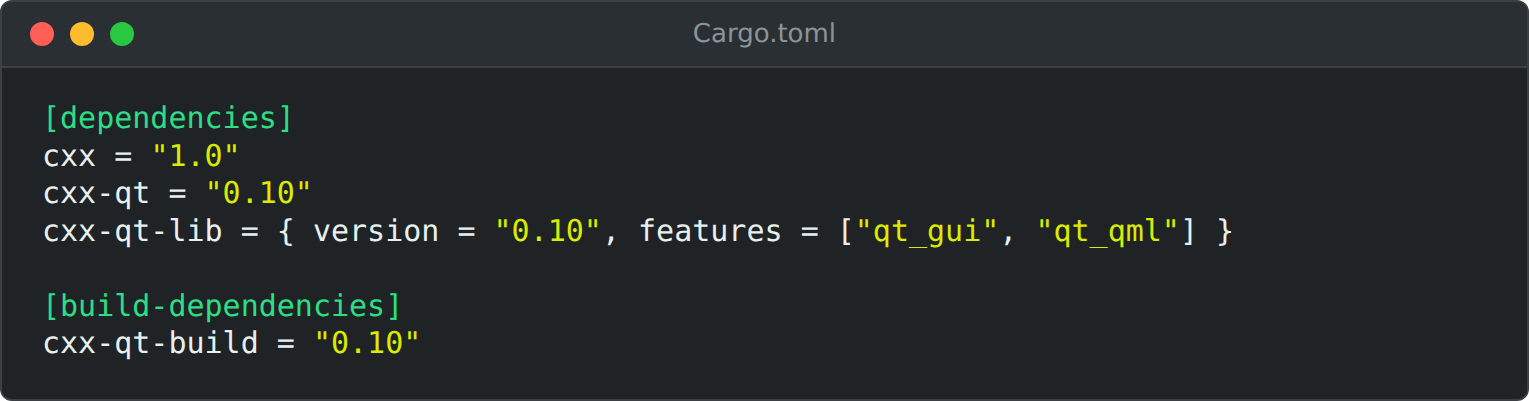
Cargo.toml needs one dependency:

And this is the entire Rust code (main.rs):
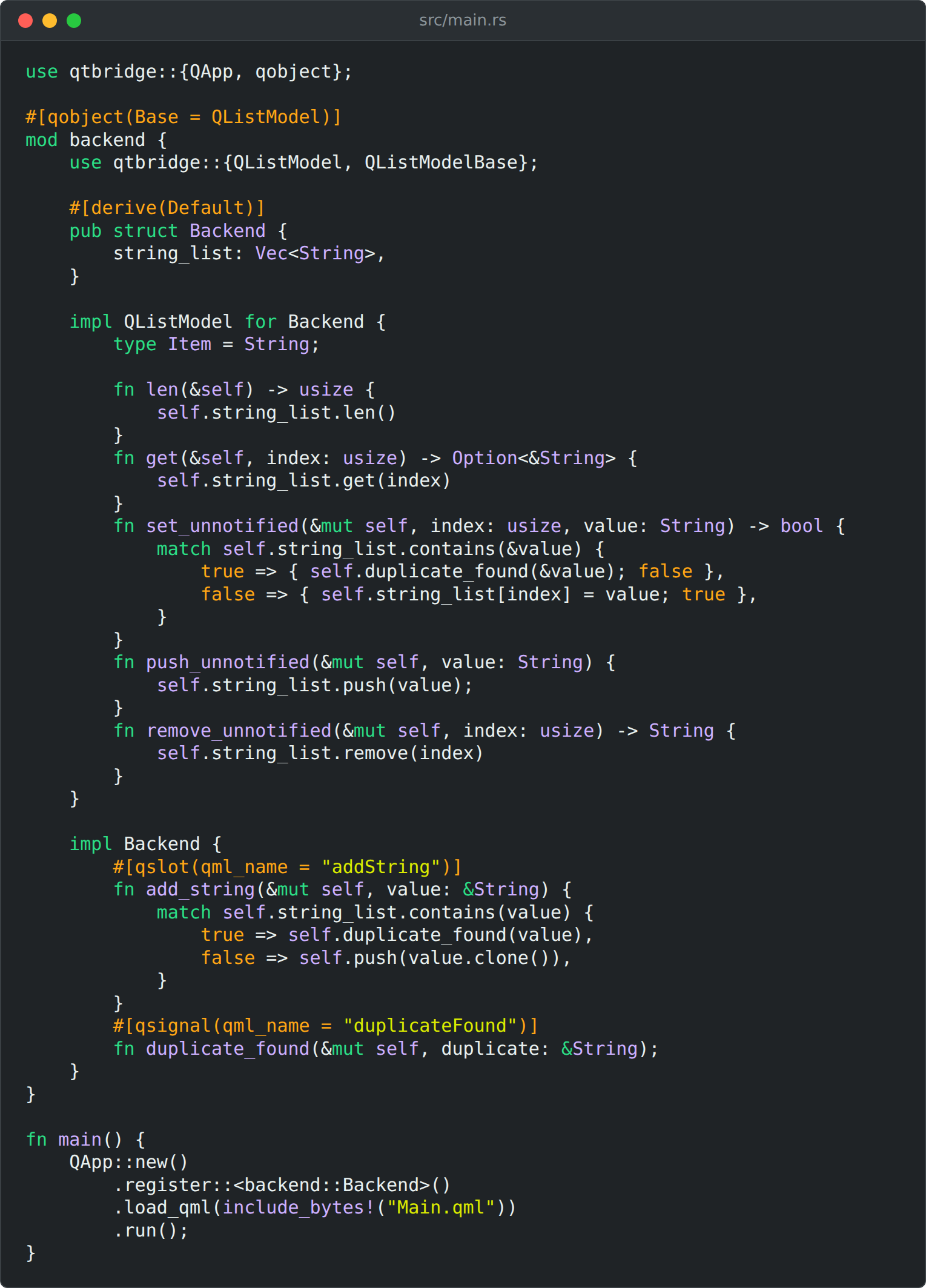
The majority of the implementation relies on the QListModel implementation. QListModel is a Rust trait shaped like a collection: len, get, push, remove. The *_unnotified methods only touch your data and you don't have to think about notifying the Qt model views. The provided functions push, set and remove wrap your functions and emit the right Qt model notifications for you. The item type is a plain String, and QML sees it as the value role. Beyond that we have implementations of a slot and a signal with simple annotations. The QML module is named after the crate, so Main.qml just does import minimal_app. As mentioned before, this API is in tech preview and might change in the upcoming months.
CXX-Qt
With CXX-Qt, we need a build.rs in adition to the Cargo.toml that generates and compiles the C++ side and packages the QML into a module:
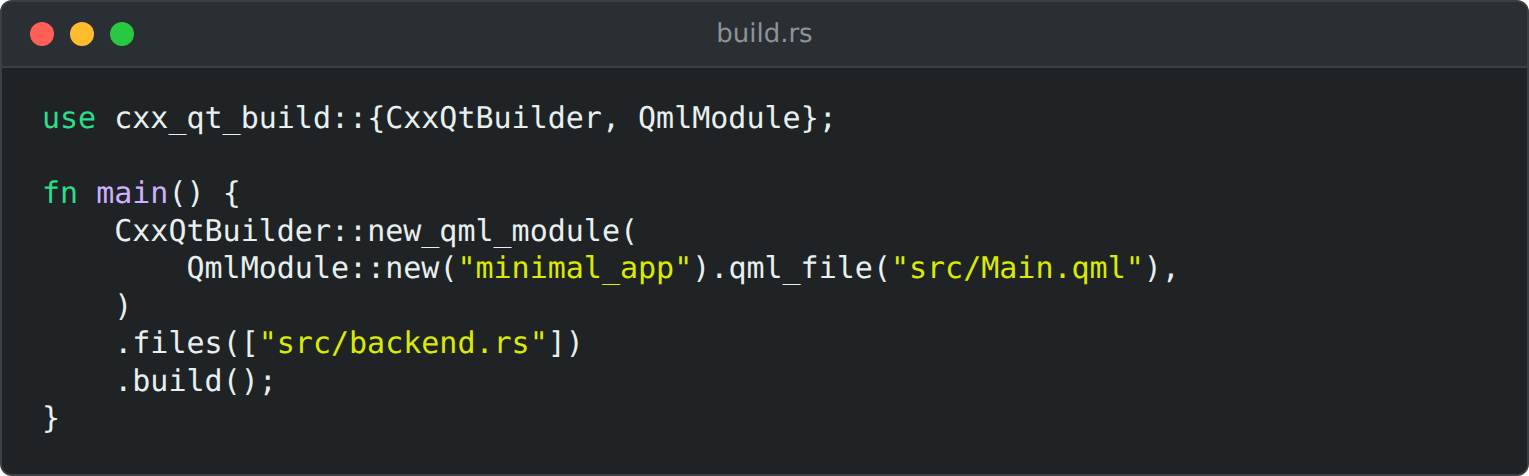
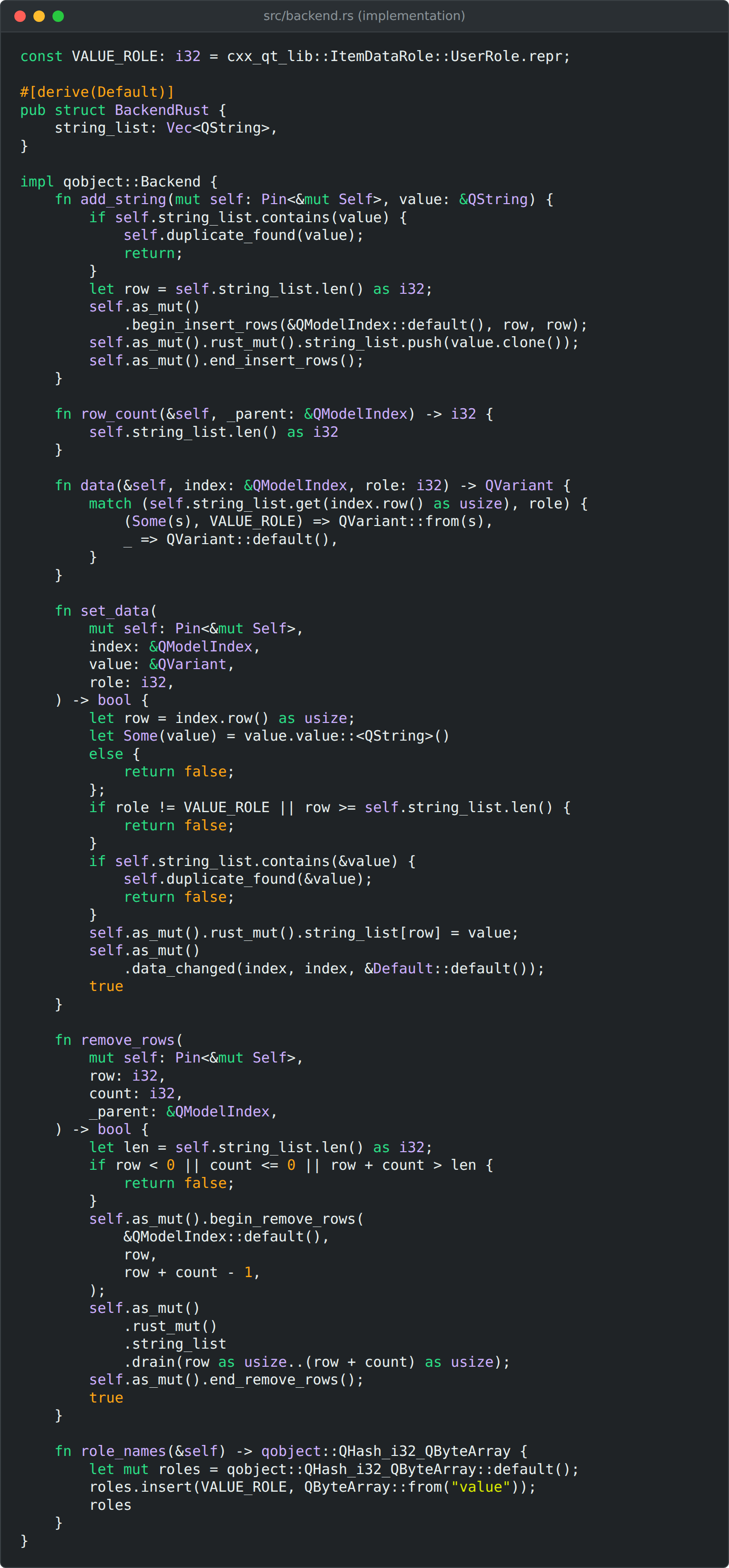
The backend is a real QAbstractListModel subclass. The cxx_qt::bridge declares the C++ types we use, the overrides we implement, and the base class methods we want to call:
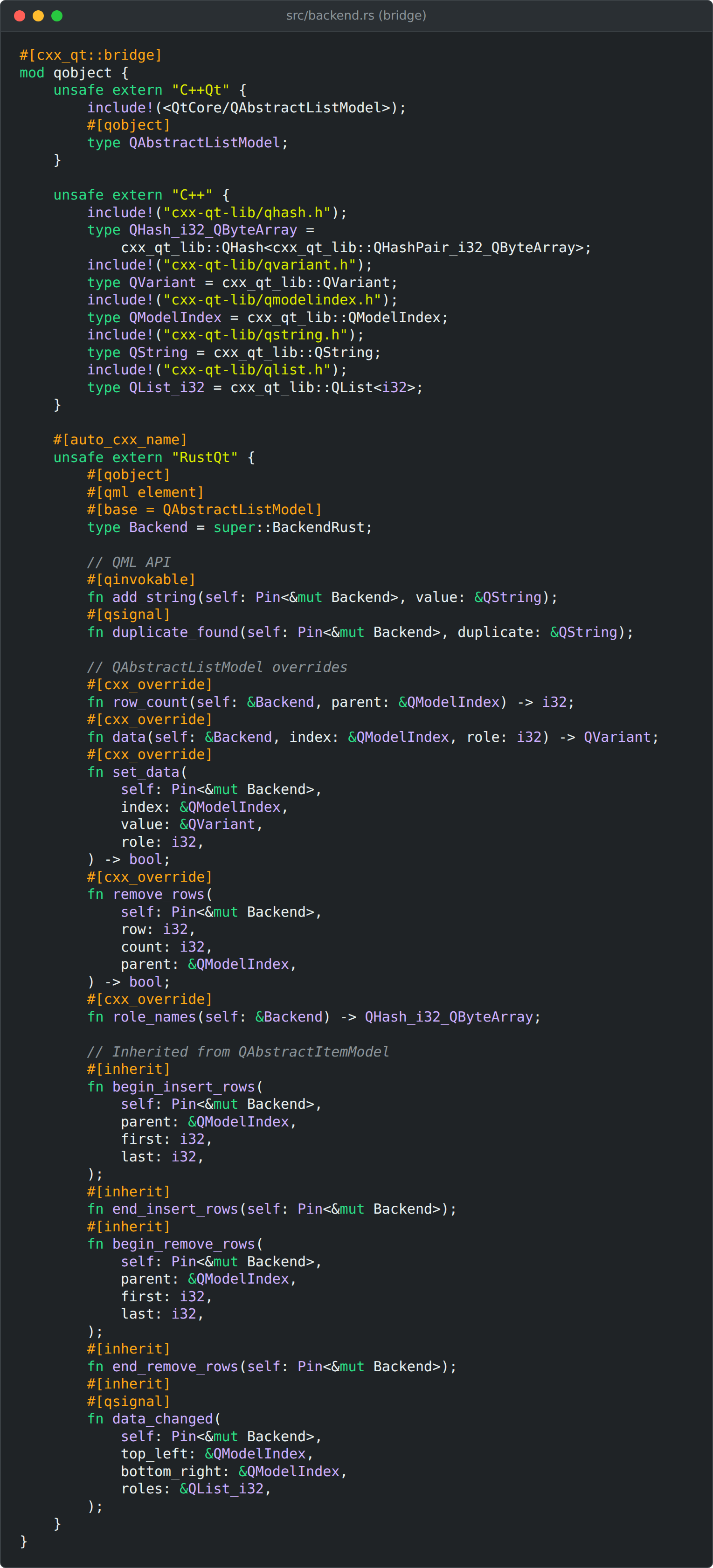
The implementation is the model-view code that any Qt C++ developer will recognize: role numbers, QVariant conversions, and begin/end notifications around every change.
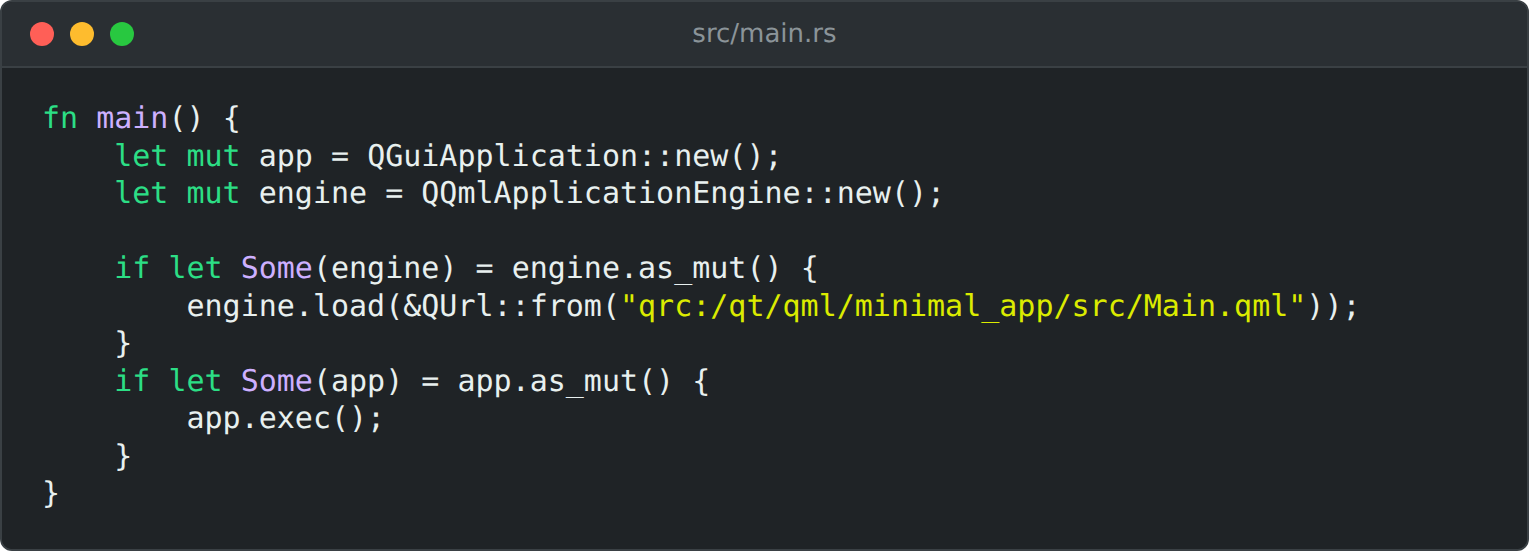
main.rs creates the application and engine through cxx-qt-lib and loads the QML from the resource system:
Comparing Versions Created with CXX-Qt and Qt Bridge
Both versions behave the same and use the same QML. Naturally, the CXX-Qt version uses more code and is more explicit in what it is doing. The biggest difference for you as a user is what you are writing:
-
Qt Bridge hides the Qt model protocol behind a Rust trait. You never see QModelIndex, role numbers or begin/endInsertRows, and you can't forget them. &mut self is an ordinary Rust reference. In other words, Rust traits replace what was subclassing in C++: you implement the QListModel trait instead of overriding QAbstractListModel.
-
CXX-Qt gives you the raw Qt model protocol. That is more code, and keeping begin/endInsertRows paired and in sync with your data is your job, but you get full control. The generated class is a real C++ QAbstractListModel that C++ code, proxy models or a QListView in a Widgets app can use directly. Using QString instead of Rust's String avoids UTF conversions at the language boundary. CXX-Qt also allows you to access every C++ Qt class, while Qt Bridge exposes only selected ones.
If you already know Qt in C++, the CXX-Qt version will look familiar. If you come from Rust, the Qt Bridge version will feel more at home.
One caveat on tooling: CXX-Qt generates C++ code and runs it through Qt's tooling to produce the files required for the QML language server (qmlls) and the QML compiler (qmlcachegen). Qt Bridge doesn't generate any C++ code, so it isn't yet compatible with these tools. We're working on the enablers this needs, and we're confident this gap will be closed by version 1.0.
Compatibility: Using CXX-Qt and Qt Bridge in One Application
An important feature is that you will not be stuck forever with your initial choice. KDAB has published cxx-qt-qtbridge-examples, which builds one QML application with a CXX-Qt backend and a Qt Bridge backend side by side. Each library exposes its own QML module and QML imports both:
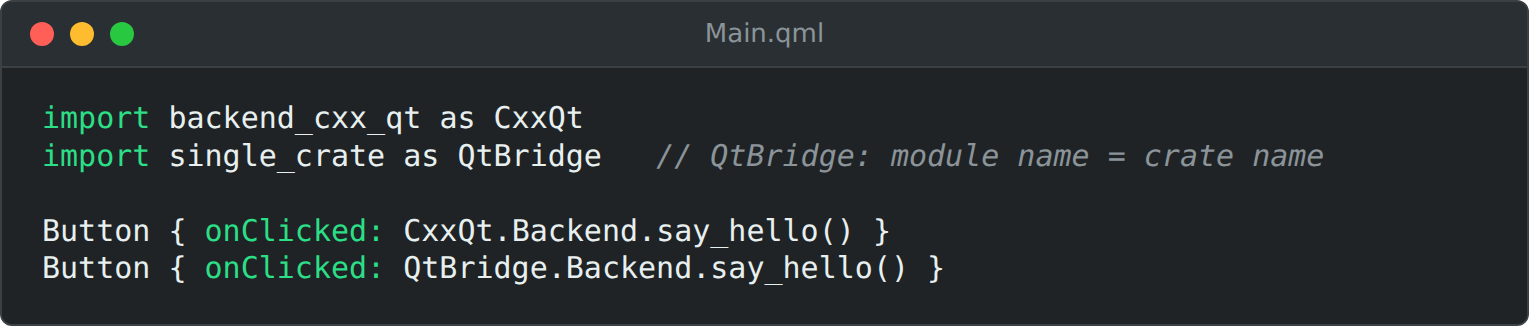
So the two can coexist in one process with one QML engine, and QML can talk to objects from both. This gives you a migration path in both directions: a Qt Bridge app can use a CXX-Qt component when it needs a C++-only Qt API, and a CXX-Qt codebase can transition to Qt Bridge if its future should be mainly written in Rust. Today, QML is where you connect them, but interoperability between CXX-Qt and Qt Bridge within Rust is possible and we want to show that as well in the future.
Which Rust Binding for Qt Should You Use?
In short: Qt Bridge for Rust-only backends. CXX-Qt if your backend contains C++ and Qt already.
| You want to... | ...then use |
| Write a new QML UI for a pure Rust backend | Qt Bridge |
| Keep Qt/C++ types out of your Rust code | Qt Bridge |
| Add Rust to an existing C++/Qt application | CXX-Qt |
| Use Qt Widgets | CXX-Qt |
| Call Qt C++ APIs that Qt Bridge doesn't expose | CXX-Qt |
You can also combine them: write the parts that need C++ or a missing Qt API with CXX-Qt, keep the rest in Qt Bridge, and connect them through QML. Just use the same CXX-Qt version as Qt Bridge (0.10 for qtbridge 0.3 and 0.4). Whichever you pick first, you are not locked in.
Either way, Rust developers now have not one but two solid, actively maintained paths into Qt. Pick the one that fits, and know the other is there if your needs change.
If you're curious, check out the following links and get started with your Rust Qt app:
-
Qt Bridge for Rust: https://www.qt.io/development/qt-framework/qt-bridges/rust-gui
-
CXX-Qt: https://github.com/KDAB/cxx-qt
-
Qt Bridge examples: https://github.com/qt/qtbridge-rust-examples/
-
Combined examples: https://github.com/KDABLabs/cxx-qt-qtbridge-examples
Blog Topics
Related Articles
Qt Creator 21 released
We are happy to announce the release of Qt Creator 21! Release 21 of the..
Read Article
Qt Champions 2026
Dear Qt community! With only seven weeks left before 2026 gets branched..
Read Article