Published On
Read Time
6 mins
An AI assistant fixed seven bugs in my C code in a few minutes. It felt like a win. It also meant I could walk away having learned nothing at all. For embedded developers, that is a risk: the next hard fault will not wait for you to catch up. Here is how to keep the speed and still learn from every AI fix.
Why Does AI-Assisted Debugging Skip the Learning?
It's 4:45 on a Friday. The build is red, the demo is Monday, and the AI in my editor offers to fix it. Thirty seconds later, everything runs. I close the laptop feeling clever, with no idea what just changed.
That exact Friday is made up. But some version of it has happened to me often enough that it might as well be true.
This is vibe coding, and I was doing it. My prompt ended with "Minimal explanation, I just want it working." It worked. Nothing in that exchange asked me to understand why.
Me: Vibe coding, keep it quick. ... It compiles but the output is garbage
or nothing. Build it, run it, and fix it until it works. Minimal
explanation, I just want it working.
The speed is real, and I don't want to give it up. I'm not suggesting you do either. But when the AI does both the diagnosis and the fix, we skip the part where learning happens: the struggle that turns a bug into a breakthrough, and breakthroughs into better judgment. Work through enough bugs and they form patterns. Patterns build intuition, the gut feeling that says "check the buffer size" before you've finished reading the error. That intuition is what makes us good at this job, and it only grows if we do some of the struggling ourselves.
The answer is not to stop using AI. Spend ten minutes of the two hours you just saved turning the session into knowledge you own, not knowledge you rent.
What Do the Developer and the AI Miss in an AI Debugging Session?
Looking back, neither of us was careless. We both stopped one step short.
I took the fixes on faith. I hadn't turned on the compiler checks that would have flagged four of the first six bugs by themselves. Then I accepted six fixes without asking what any of them meant.
The AI called it done too early. After one good run it told me, "It works now." It didn't. A seventh bug, an arithmetic overflow, was still hiding, and one of the fixes was a shortcut with a catch of its own.
AI: It works now. ... It builds with no warnings and runs clean under the
memory and undefined-behavior checkers (ASan/UBSan):
[BoilerTemp] avg = 27.50
31 30 29 28 27 26 25 24
Clean output, no warnings, and still a bug. Neither of us had checked the edge cases, and that is where the learning was. Noting what each of us missed is what turns a quick fix into something you keep.
It also shows why the developer's role matters. A recent IAR blog post AI writes the code. Who guarantees the quality? puts it well: "The model suggests. The developer judges." That only works if the developer stays engaged long enough to judge.
How Do You Know an AI Bug Fix Is Really Done?
What rescued the session wasn't clever prompting. It was a few plain questions.
First, I asked for detailed tests, including the awkward cases: an empty buffer, a full one, and the largest and smallest values. Those tests found the seventh bug.
sensorlog.c:27:46: runtime error: signed integer overflow: 2147483647 + 2147483647 cannot be represented in type 'int'
...
FAIL test_avg_int_max_no_overflow
...
62/64 checks passed
Then I asked, "Did you fix it?" and later, "So all good?" Those questions brought out the shortcut, plus a short list of limits nobody had mentioned.
Me: did you fix it?
AI: I fixed the overflow, but not the label() limitation.
...
label(): not fixed. It still uses one shared static buffer.
Before you accept "done," ask what is still not handled. In my session the AI answered honestly every time I asked. It just never volunteered the answer.
The fix is to say up front what "done" means. For example: the tests pass, including the awkward cases, and the sanitizers report nothing.
How Can You Turn an AI Debugging Session into a Quiz?
Reviewing a session is the habit that slips first, so I made it cheap. When the work was finished, I asked the AI to read back through the whole conversation and do two things:
- Write a short retrospective. What happened, what I missed, what the AI missed, and what to change next time, in the spirit of an Agile retrospective for a single session.
- Quiz me on it. Questions built from those lessons, each with a short explanation and a link to a source.
Taking the quiz right away helps, but the real payoff comes from taking it again a few days later. Recalling the answers cements the lesson (Roediger & Karpicke, 2006a), and spreading the practice over time makes it last (Yuan, 2022).
The AI can write the notes, but the learning happens when you answer the questions. Testing yourself sticks better than rereading notes, a well-documented result known as the testing effect (Roediger & Karpicke, 2006b).
My session produced 21 questions, and taking the quiz was humbling. I missed the first two, then got the third right. Every miss came with an explanation, so each one turned straight into something learned.
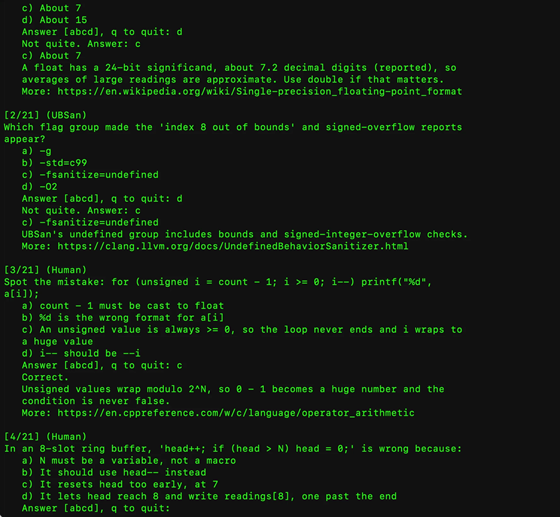
Image: Terminal showing the author taking the quiz: two missed questions with their explanations, then a correct answer
One rule is worth adding to your request: tell the AI to open every link it cites and to label anything it did not check as unverified. Otherwise a guess can end up in your notes looking like a finding.
How to Get Started: Three Steps for Your Next AI Fix
These habits apply to any AI coding agent. You don't need special tooling to start. Next time an AI fixes something for you:
- Before you begin, say what "done" means.
- Before you accept the fix, ask what's left.
- After the session, ask the AI to list what each of you missed, then quiz you on it.
It takes ten minutes. The next time that bug shows up, you'll have a far better chance of being the one who spots it.
What's Next: Try Agentic Development with IAR Tools
If this post made you want to see the full picture, IAR has opened up the tools to try agentic development on your own embedded project. Start with the article, How to Use AI Agents for Embedded Development with IAR Tools. It covers the open IAR integrations that give an agent access to the documentation, the C-SPY Debugger and Python-based firmware tests. You can try it without a board, using the modern-workflow project in Visual Studio Code.
To see it in action, watch the on-demand webinar Give Your AI Agent a Debugger: C-SPY, MCP, and Python in the Modern IAR Workflow . You will see an agent grounded in the official IAR documentation, an agent debugging a running target through C-SPY, and a debug script turned into a repeatable test for your laptop and CI.
Related Articles