Published On
Comments
In the earlier blog posts about Qt Canvas Painter we have looked at what it is, the new rendering features it brings, how fast it is compared to QPainter, and how path caching makes even a million line segments render smoothly. All of those earlier blog posts used the QCanvasPainter C++ API. At the end of the path caching post I teased that a QML element was coming, and it is here now: Canvas2D, available in Qt 6.12.
Note: While the Qt Canvas Painter C++ API is no longer a technology preview in Qt 6.12, Canvas2D still is. It works and we encourage you to use it, but the API is still subject to change and there is no source or binary compatibility guarantee yet.
What is Canvas2D?
Canvas2D is a QML item that lets you paint with JavaScript, using the same imperative drawing model that HTML Canvas and Qt Quick Canvas made popular. Under the hood it uses Qt Canvas Painter, which means the painting happens on the GPU through QRhi, not on the CPU into a QImage.
Getting started is easy. Here's a simple QML example:
If you have ever written a Canvas { onPaint: ... } in QML, or used a <canvas> element in a browser, there is nothing special here. You just need to import the QtCanvas2D module, and you can then create Canvas2D elements.
Compatibility with HTML Canvas
The Canvas2DContext API implements the same W3C Canvas 2D Context API that web developers already know: beginPath(), moveTo(), lineTo(), bezierCurveTo(), fill(), stroke(), etc., and the familiar state properties fillStyle, strokeStyle, lineWidth, lineCap, lineJoin, etc.
This means canvas code from the web, from a tutorial, from Stack Overflow, or from an LLM, often just runs. That is a huge productivity advantage for an imperative 2D API: the knowledge and the code snippets already exist.
The goal of Canvas2D, however, is not 100% HTML canvas compatibility. Some features are left out to keep the API simpler and to keep it fast on the GPU. The features currently missing compared to HTML Canvas are:
- Clipping to paths – all clipping is a (transformed) rectangle, via setClipRect() and resetClipping().
- Dashes – strokes are always solid lines.
- Path testing – no isPointInPath() or isPointInStroke().
- Text stroking – no outline stroking of text.
- Filters – canvas SVG filter effects are not supported.
- Composite modes – limited to the three modes that can be supported without rendering into extra buffers: source-over, source-atop and destination-out.
- Built-in shadow properties – shadowBlur & friends are replaced by adjustable antialiasing and box shadows, see below.
And in the other direction, Canvas2D already adds features that HTML Canvas doesn't have:
- Path2D with path groups – createPath2D() produces a path2d container that can be filled and stroked with an optional path group. Paths in a group share a vertex buffer that is cached GPU-side, which is where the big performance wins of the path caching post come from.
- Adjustable antialiasing – ctx.antialias and ctx.textAntialias set the antialiasing width in pixels, so you can go from crisp to soft glow with a single number.
- Box gradients – createBoxGradient() creates a gradient along the shape of a rounded rectangle.
- Box shadows – createBoxShadow() / drawBoxShadow() render CSS-style box shadows with an SDF approach, similar to Qt Quick's RectangularShadow. Very cheap compared to a gaussian blurred shadow.
- Grid patterns – createGridPattern() for dynamic grid and bar patterns at constant cost.
- Color effects – on top of standard globalAlpha there are additional globalBrightness, globalContrast and globalSaturation color effects.
- Hole subpaths – beginHoleSubPath() / beginSolidSubPath() / setPathWinding() / windingEnforce make donut shapes and cut-outs easy without hand-managing winding directions.
- Text wrapping – fillText(text, x, y, width, height) wraps text into a rectangle, controlled by textWrapMode and textLineHeight.
- Extra shapes – circle(), ellipse() and ellipseRect() as first-class path primitives.
- Transform2d – createTransform2D() gives a real 3x3 matrix object you can build up and hand to setTransform() or transform(), instead of juggling six floats or reaching for a full DOMMatrix.
Compatibility with Qt Quick Canvas
If you are already using Qt Quick Canvas, the Canvas2D API is almost fully compatible with it. All you need to do is import QtCanvas2D and rename Canvas → Canvas2D, and you are mostly good to go.
Here is that two-line change as a code example:
The Canvas 2D Tester example described below relies exactly on this: the very same JavaScript painting functions are called for both a Canvas and a Canvas2D item.
Below is a table summing up the differences between Qt Quick Canvas and Canvas2D.
| Qt Quick Canvas | Canvas2D | |
| Painting backend | QPainter (CPU) into a QImage, uploaded as a texture | Qt Canvas Painter on GPU via QRhi |
| Render targets | Canvas.Image (FramebufferObject ignored since Qt 6.0) | Renders directly into the scene graph using QRhi. |
| Animated / large canvases | Documentation warns against them due to per-update texture uploads | The primary use case |
| Contents between frames | Retained; you clearRect() yourself | Cleared each frame, fillColor defines the background |
| Path caching | No | Yes, via path2d + path groups |
| Clipping | clip() to arbitrary path (potentially costly) | setClipRect(), rectangle only |
| Dashed strokes | Yes (setLineDash) | Not available yet |
| Shadows | shadowBlur / shadowColor | Fast box shadows (SDF) for rounded rectangles, adjustable antialiasing for other shapes |
| Pixel operations | getImageData() / putImageData() (potentially costly) | Not available |
| Antialiasing | Fixed | Adjustable per stroke/fill and for text |
| Extra brushes | - |
Box gradient, grid pattern, tinted images |
| Color effects | globalAlpha |
globalAlpha, globalBrightness, globalContrast, globalSaturation
|
So in a nutshell the trade is this: you give up a few less commonly used features, and you get GPU-speed rendering plus a pile of new brushes and effects. For the typical case — an animated custom visualization, a gauge, a chart, a waveform, a hand-drawn control — that is a good trade. If your code depends on Quick Canvas features that Canvas2D doesn't have and you are happy with it, just continue using it; it is still available. But we would be happy to hear about your use case so we can prioritize these features in the future.
One behavioral difference is worth repeating: Canvas2D repaints from scratch every frame by default, so you do not need to call clearRect() at the start of onPaint like you do with HTML and Quick Canvas.
Compatibility with QCanvasPainter C++ API
QCanvasPainter and Canvas2DContext are two faces of the same painter. The C++ API uses setter methods and Qt value types, the QML API uses properties and JavaScript-friendly arguments, but the method names, argument order and semantics match. Porting in either direction is close to mechanical and can easily be done with a script or an LLM.
Here is the round button example from the QCanvasPainter documentation, side by side with the same example from the Canvas2DContext documentation.
C++ with QCanvasPainter:
JavaScript with Canvas2DContext:
The porting rules are quite straightforward:
| C++ QCanvasPainter | QML Canvas2DContext |
| p->setFillStyle("#ff0000") | ctx.fillStyle = "#ff0000" |
| p->setAntialias(10) | ctx.antialias = 10 |
| p->setTextAlign(QCanvasPainter::TextAlign::Center) | ctx.textAlign = "center" |
| QCanvasLinearGradient lg(...) | let lg = ctx.createLinearGradient(...) |
| QCanvasPath | path2d |
| QRectF rect argument | x, y, width, height arguments |
This unification of the APIs is a big deal and can be more useful than it sounds. Prototype your visualization in QML where the edit-run cycle is seconds, and if profiling later says the JavaScript is the bottleneck, or you need to use the actual data that lives on the C++ side, move the same drawing code into a QCanvasPainterItem in C++ with mostly search-and-replace. Or the other way round: take an existing C++ Canvas Painter item and expose a QML-scriptable variant of it. You are not switching rendering engines when you do so, only switching languages, so the rendering output stays identical.
Canvas 2D Tester example
The best way to get a feel for all of this is the Canvas 2D Tester example that ships with the module. It was built precisely to answer the two questions everyone asks: does my canvas code still work? and is it actually faster?
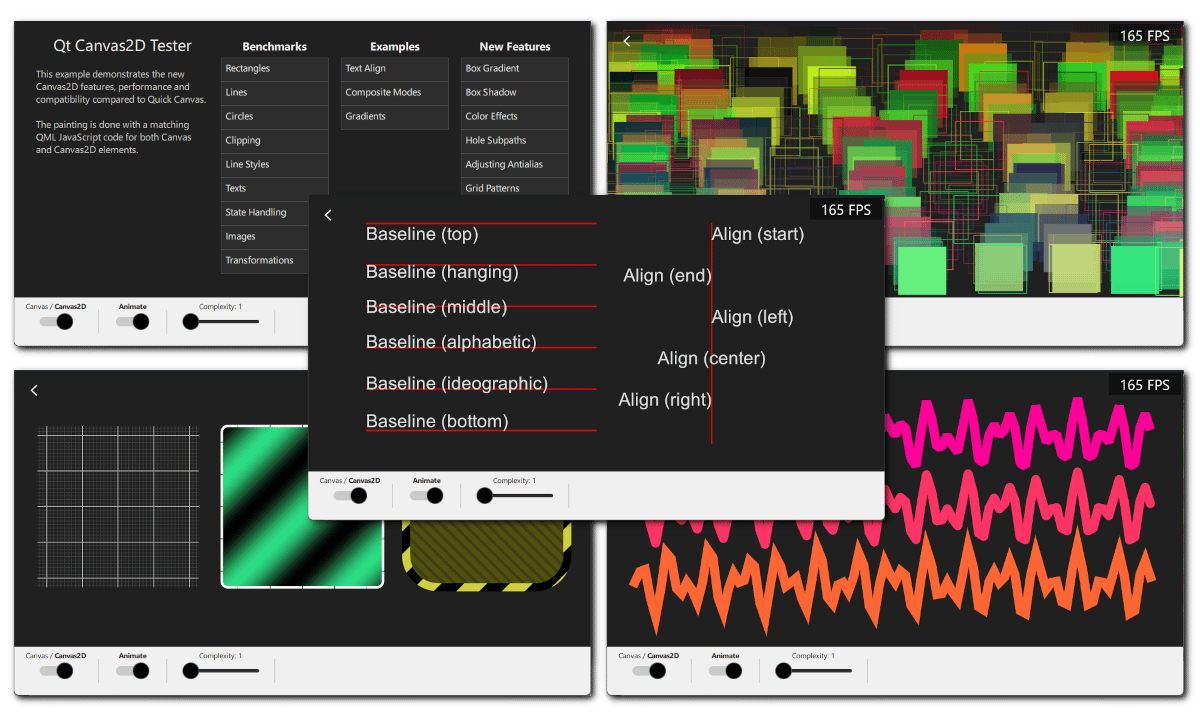
The trick of the example is that the painting is done with matching QML JavaScript code for both Canvas and Canvas2D elements. There is a single set of painting functions, and a switch in the toolbar flips which element executes them. An FPS counter sits in the corner, an "Animate" switch turns continuous repainting on and off, and a "Complexity" slider from 1 to 10 scales the amount of content each test draws. So you can pick a test, watch the frame rate, flip the switch, and see the difference on your own hardware with your own GPU driver.
The tests are grouped in three columns:
Benchmarks — Rectangles, Lines, Circles, Clipping, Line Styles, Texts, State Handling, Images and Transformations. These are the bread-and-butter operations, drawn in the hundreds or thousands. The Rectangles test alternates fillRect() and strokeRect() up to 5000 times per frame, Lines draws up to 50 polylines of 1000 segments each, Circles builds a single path of up to 2000 arcs. Turn the complexity up and watch where each element gives up.
Examples — Text Align, Composite Modes and Gradients. These are correctness comparisons rather than speed tests: the same code on both elements, so you can check that your assumptions about baseline placement, compositing and gradient stops hold.
New Features — Box Gradient, Box Shadow, Color Effects, Hole Subpaths, Adjusting Antialias, Grid Patterns and Path2D. These only run on Canvas2D. This column is a quick tour of the new Canvas2D features.
The example is a good place to steal code from, too. Its CanvasView.qml is a few hundred lines of plain JavaScript painting functions, including the Path2D test that builds an SVG-path-based icon and renders many transformed, cached copies of it.
You can find the example project on code.qt.io or in the Qt Creator examples by searching for "canvas".
Benchmarking with QCPainterBench
If the Canvas 2D Tester example above did not yet convince you of the performance of Canvas2D, maybe QCPainterBench does. We have updated this benchmark application with two new backends: (old) Quick Canvas and (new) Canvas2D. Have a look at this video showing the performance difference between the two:
With all the tests rendering 16 times, the performance numbers on my laptop are 4 FPS vs. 165 FPS, so Canvas2D is over 40 times faster than Canvas.
The important detail is that the JavaScript code for both is exactly the same, so the performance difference comes solely from Canvas2D being better optimized for animated content. High-performance painting like this from QML JavaScript can open up a lot of possibilities.
Current status and what's next
Canvas2D is new in Qt 6.12 and is a technology preview. The API may still change based on what we learn, and performance will very likely improve further — that has been the pattern with every release so far.
So try the Canvas 2D Tester, run it on your target hardware, and try porting one of your existing Canvas items to Canvas2D. Then tell us how it went — for example through the Qt bug tracker or the forum. Feedback given now, while the API is still a technology preview, is the feedback that shapes what the final API looks like.
In the next blog post I will present a concrete application using Canvas2D (together with effects and Quick3D!), so see you soon.
Blog Topics
Related Articles

Qt Creator 21 RC released
We are happy to announce the release of Qt Creator 21 RC. Please head over..
Read Article
Meet Clate: the First Design Tool for Real-World Experiences
Clate Beta is out today, free for everyone. It's a no-code, AI-native UX..
Read Article
With Qt 6.12, the SkyMaterial is the limit
Qt Quick 3D 6.12 introduces a new SkyMaterial QML type, and in this post..
Read Article