Jun 22, 2026
Comments
Qt Creator 20 has become an Agent Client Protocol (ACP) Client extension. The protocol is supported by many AI providers and handles the details of the communication between the AI coding agent and the IDE.
At the ACP Registry we can see Claude Agent, Codex CLI, Gemini CLI, or GitHub Copilot ACP Agents.
These ACP Agents will communicate with their respective cloud AI offerings, which requires a subscription.
In this article I will present the case of local AI running on existing hardware.
The hardware
I am going to test on my work laptop, namely a 2023 14” MacBook Pro M3 with 36GB of RAM. ebay.de lists it starting from 1.700€ and going up to 2.300€.
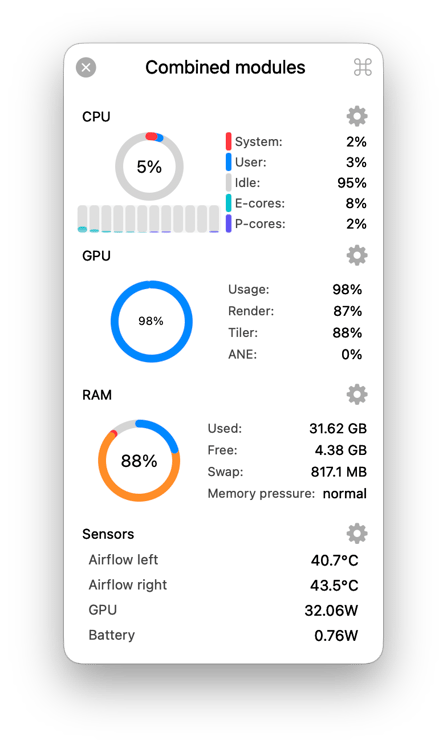
The 36GB of RAM was important, since 32GB would not have been sufficient to run at full context. Below you have the laptop running Qt Creator with the pi ACP agent. It’s at 88% memory usage. This was without any Electron apps running like Microsoft Teams, or a Web Browser.
The local AI
In August 2025, OpenAI has launched the gpt-oss models:
We’re releasing gpt-oss-120b and gpt-oss-20b—two state-of-the-art open-weight language models that deliver strong real-world performance at low cost. Available under the flexible Apache 2.0 license, these models outperform similarly sized open models on reasoning tasks, demonstrate strong tool use capabilities, and are optimized for efficient deployment on consumer hardware
gpt-oss-20b with its 128K context would be the model that I would choose. On this laptop for a “Hello World” prompt it would give me an answer with 40-45 tokens/s.
In April 2026, Google released Gemma 4 models. The license is also Apache 2.0, and the context size is up to 256K, which is double what gpt-oss-20b offers.
The model I had in mind would be gemma-4-26B-A4B-it.
When compared to gpt-oss-20b, besides the double context size, gemma-4-26B-A4B-it is also a multimodal - it supports text and image input.
In the following months Google has released:
-
May 2026 Accelerating Gemma 4: faster inference with multi-token prediction drafters
-
June 2026 Gemma 4 QAT models: Optimizing model compression for mobile and laptop efficiency
With these two optimizations, gemma-4-26B-A4B-it-qat gives an answer at 55 tokens/s for a “Hello World” prompt!
The local AI software
I’ve installed llama.cpp from homebrew, and ran it with the unsloth/gemma-4/qat model as:
#!/bin/sh

llama-server \
   -hf unsloth/gemma-4-26B-A4B-it-qat-GGUF:UD-Q4_K_XL \
   --spec-type draft-mtp --spec-draft-n-max 2 \
   --reasoning off
The task at hand
I have picked a task from Qt Blog: Introducing Qt Agentic Development Skills, namely the qt-cpp-docs skill with the renderarea.cpp source code.
Opencode ACP agent
I first tried the opencode.ai ACP agent. I configured the TheQtCompanyRnD/agent-skills as:
$ ln -s ~/Projects/qt.io/agent-skills/skills ~/.config/opencode/skillsMy opencode.json file looks like:
{
  "$schema": "https://opencode.ai/config.json",
  "provider": {
    "llama-cpp": {
      "npm": "@ai-sdk/openai-compatible",
      "name": "llama.cpp server",
      "options": {
        "baseURL": "http://127.0.0.1:8080/v1"
      },
      "models": {
        "default": {
          "name": "Default Model"
        }
      }
    }
  },
  "model": "llama-cpp/default"
}
Below you have the recording of Qt Creator 20 with the opencode ACP agent:
Pi ACP agent
Then I have tried pi.dev with an ACP adapter. I have configured the TheQtCompanyRnD/agent-skills in the same fashion:
$ ln -s ~/Projects/qt.io/agent-skills/skills ~/.pi/agent/skillsBelow you have the recording of Qt Creator 20 with the pi ACP agent:
Manual skill usage
Lastly I have manually tried using the web interface of llama.cpp and I’ve given the same prompt with the skill and the source files.
Below is the recording:
Summary
I’ve packed the results of the runs above in a table:
| ACP agent | Time (mm:ss) | Power (Wh) | Convenience | Result |
|---|---|---|---|---|
| opencode | 2:00 | 1.80 | ✅ | renderarea.md |
| pi | 1:02 | 0.89 | ✅ | renderarea.md |
| none | 0:27 | 0.66 | ❌ | renderarea.md |
The direct usage of the skill with the proper source files as context was the fastest and consumed the least energy on my laptop. But, this was at the cost of convenience, as the Markdown file had to be created manually. Similarly for the task of preparing the prompt with the skill and context source files.
I don’t know why opencode ACP agent took twice the time as the pi ACP agent. For those willing to find out, the first step would be to enable more logging from llama-server. This way one could trace all the communication to the local AI.
With a local AI, you don’t pay for tokens, but you pay in energy and time. However, with an Apple Silicon computer, the energy cost is smaller due to the efficiency of the platform.
How fast is your ACP agent with the task at hand? Write in the comments. Do you know how much energy and water your AI cloud provider is using when doing inference?
Blog Topics
Related Articles
Canvas2D: New QML canvas element using Qt Canvas Painter
In the earlier blog posts about Qt Canvas Painter we have looked at what..
Read Article
A Cross-Platform C# UI Framework via Qt’s Bridging Technology
Every C# UI framework comes with a familiar pattern: Windows-first, Linux..
Read Article
QML and C# without C++: Qt Bridge for C# 0.4.0 Beta Released
As part of the on-going development of Qt Bridges, and beyond the two Beta..
Read Article