Apr 1, 2026
Comments
The latest Qt for Android Automotive 6.11 was just released and is based on Qt 6.11. The Qt release itself brings a lot of new features, especially with the regard to 3D features. Let's have a look!
News in Qt for Android Automotive
In Qt 6.11 for Android Automotive the focus was to stabilize the Service module, bring a new and simple communication for the Service module and to improve quality of life for the developers working with Android Automotive Vehicle Properties.
Service module
First of all, the two features released in Qt for Android Automotive 6.10 Service module (Rendering as a Service and Surface Streaming) are now ready for the production use and are no longer marked as a Technical Preview (TP). The module allows developers to run a Qt application as an Android Service and use the content from the service in either native Android applications or even streamed to different operating systems with next to no latency.
Improvements to Rendering as a Service
From now on developers can now monitor whether the QML engine has loaded successfully or encountered an error in QtRaaSApplication so that client applications can react to loading failures. For example, they can show a loading screen until the first frame is ready or react in the case of a crash.
Improvements to Surface Streaming
Surface streaming has received an improvement that allows fine-tuning of hardware encoder behavior by setting arbitrary Android MediaFormat parameters directly on QAndroidMediaFormat to enable latency optimization for specific hardware. This allows developers to further optimize the latency and quality of the streaming.
Communication with Service module
To communicate with the Qt application running as a service, previously developers had to rely on Android Broadcasts, JNI or an RPC which added unnecessary complexity. With 6.11 it's now possible to read and write QML root object properties from Java in QtRaaSApplication which enables native Android clients to interact with the QML application state without any Qt dependencies. You can check out the latest documentation for the getProperty and setProperty methods on the documentation page.
Interface Framework
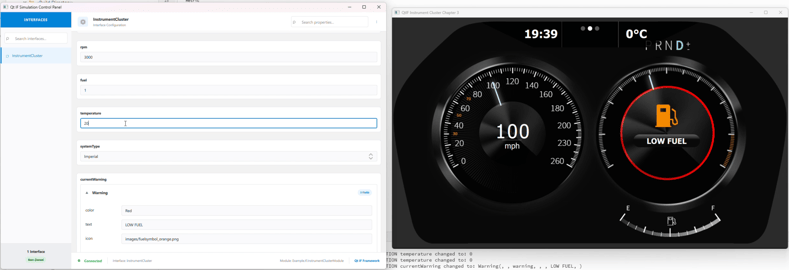
Interface Framework has received a new update in the form of a Control Panel that can easily be enabled in the configuration. Since Interface Framework has a pre-defined map for default Android Vehicle Properties the new Control Panel will be populated with the default set of properties that can then be easily simulated to check the functionality of the different parts of the UI. Compared to the Vehicle Properties simulation panel in the Android Studio, the Control Panel provides a much more pleasant and simple experience that also scales when custom Vehicle Properties are defined and used in the vehicle.
We will be following up on the topic in a separate blog in the coming weeks so stay tuned.
Improvements to the UI and graphics
The Qt 6.11 brings a lot of new improvements to the rendering capabilities in the 3D that allow developers, technical artists and designers to bring their vision of the automotive user interfaces to life on embedded devices found in the car. Let's take a look at a few of the most important advancements.
New Real-Time Rendering Techniques: SSGI, SSR, and Motion Vectors
Where Qt 6.10 introduced improvements on lightmap baking, a technique used for how light interacts with static objects, the 6.11 release now introduces a dynamic alternative. SSGI (Screen Space Global Illumination) is a rendering technique for simulating how light bounces off surfaces on the screen as a post-processing effect, reacting to changes in real time. SSGI does come with some performance costs, though, suggesting going for lightmap baking for resource-constrained targets and SSGI rather for rich 3D UIs especially on less performance-sensitive applications.
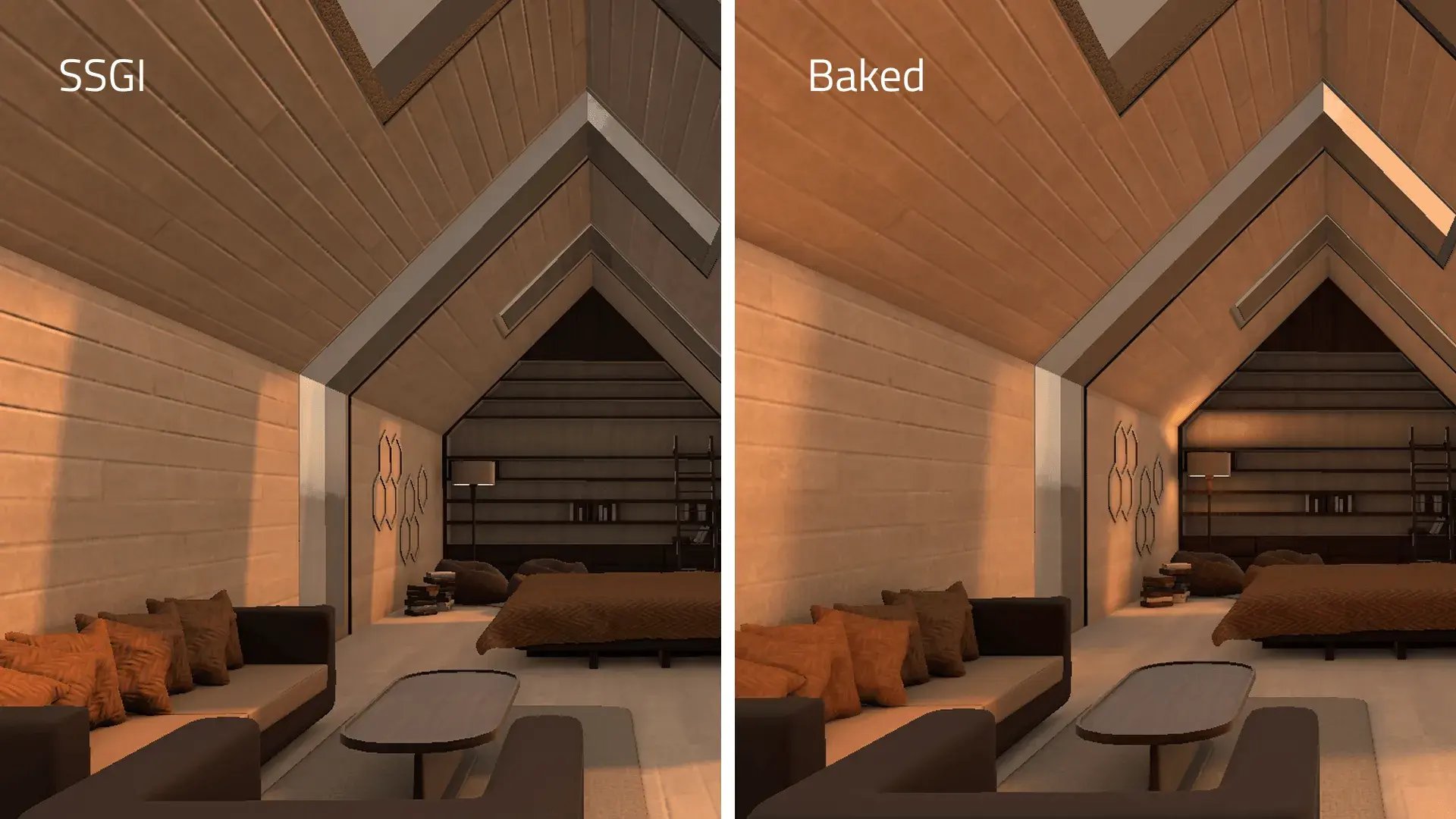
Another real-time rendering technique new in 6.11 is the Screen Space Reflections (SSR). Similar to SSGI, it uses what’s visible on the screen but for rendering reflections, "raymarching" through each pixel and reflecting them correspondingly. You can find more about that in the Jonas’s blog on lightmap baking, SSGI and SSR. Give a new example a try, you can find it as Qt Quick 3D - SSGI Lightmap in Qt examples.
Furthermore, through the SceneEnvironment and ExtendedSceneEnvironment types, Qt Quick 3D supports a variety of techniques for anti-aliased rendering of 3D objects. Temporal anti-aliasing and motion blur are particularly interesting for reducing jaggedness of moving objects. With Qt 6.11, we are adding the generation of per-object motion vectors, which provides an excellent balance of computational cost and fidelity of output.
Improvements to particles and weather effects
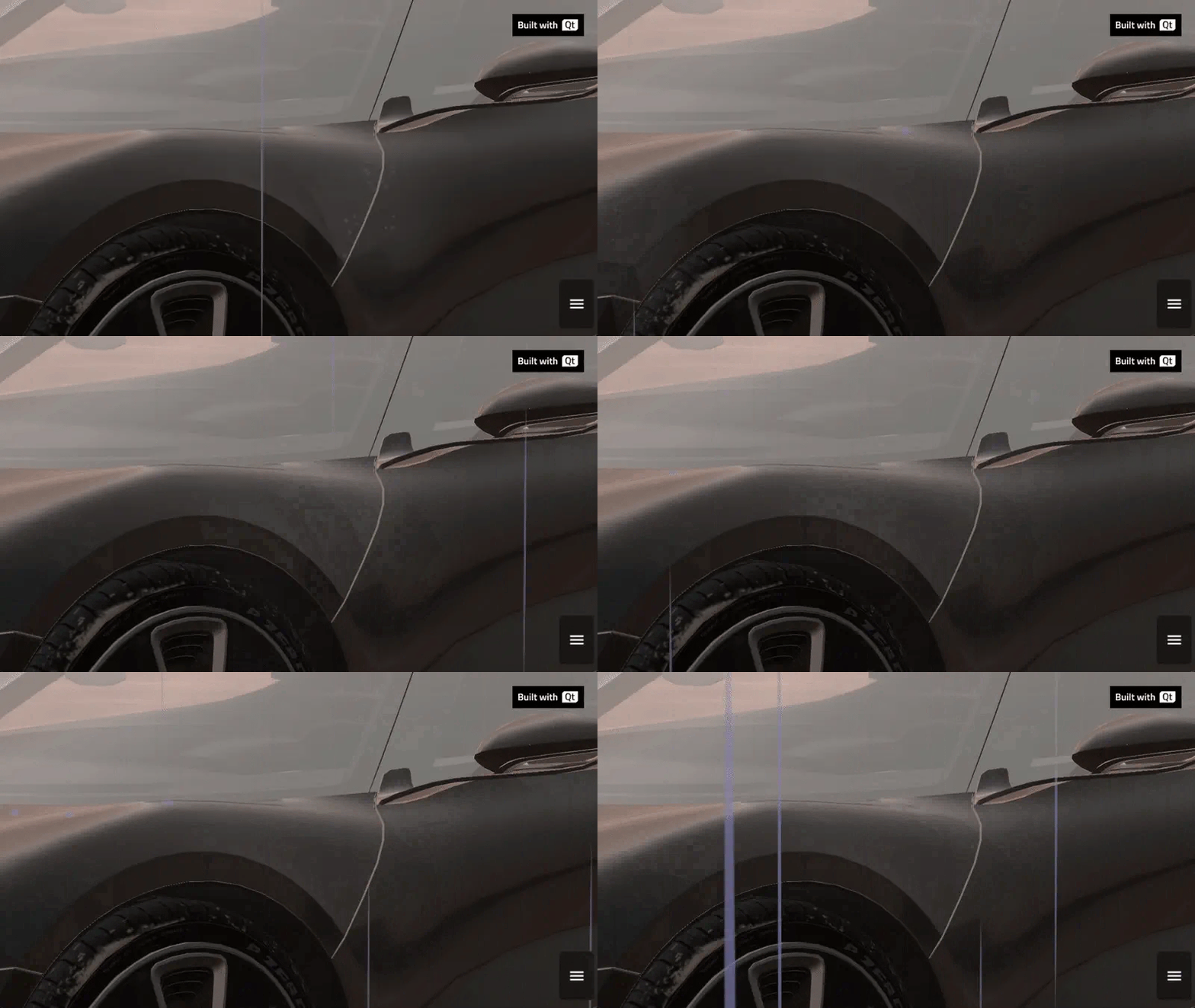
One of the most sought after features by automotive customers on the graphics side was the addition of realistic weather effects. Quick 3D has supported particle effects for a long time but there were still some improvements to be made so that effects would look more realistic. Newly added trail emitter makes it possible to have snow pile up on the ground slowly while reversed property allows showing how raindrops splash on a surface.
Take a deeper look at the features in Antti’s blog about Rain and Snow effects with Qt Quick 3D Particles.
The rain effect has been added to the car-configurator demo in Qt 6.11 along with the snow effect.
Volumetric lights with IES profiles
A big improvement for the fidelity of the 3D comes from the emitted lights as well. One of the improvements done within the scope of Qt 6.11 is the blueprint for volumetric lights. Those can be used in headlights of the main car in the scene but they can also be used anywhere on the scene where you need cinematic experience. Usually, rendering of these lights takes a lot of GPU processing power but the proposed blueprint minimizes the load and allows for smooth scenes, animations and transitions.
Even if the solution is not fully integrated with Qt as of now, you can read more about the solution in Sadegh's blog post and you will soon find it in our upcoming demo.

Advanced Render-Pass Customization
For users that need to go beyond the default rendering pipeline because they require advanced visual effects, optimized performance, or integration of custom techniques, Qt Quick 3D now provides options to customize the render passes. New APIs for layers and tags make it possible to specify which items should be included in different parts of the render pipeline, direct them to different render targets, and give control over the individual render passes. Use existing materials, augment materials with additional shaders, or override aspects of materials. All this new flexibility is directly usable from QML.
Provide feedback
For any issues, please submit a detailed bug report to bugreports.qt.io or contact our technical support team if you have a support plan with your commercial license. You are also welcome to join the Qt Project mailing lists and developer forums discussions.
Qt 6.11 release plan
We will continue releasing new patch releases to the Qt 6.11 series. The target is to release Qt for Android Automotive 6.11.1 in May 2026..
Where can you get more info?
For the full list of improvements check out What's new in Qt 6.11 and What's new in Qt for Android Automotive 6.11. For further technical information about Qt for Android Automotive, please check out Qt for Android Automotive technical documentation.
Blog Topics
Related Articles
Qt for Android Automotive 6.8.8 is released
The latest patch release for Qt for Android Automotive 6.8.8 was just..
Read Article
Qt for Android Automotive 6.11.1 is released
The latest patch release of Qt for Android Automotive 6.11.1 was released...
Read Article
Qt Interface Framework with a new Control Panel
You've just implemented a new feature on the project you're working on...
Read Article