Nov 12, 2025
Comments
Get to know Qt License Server
Qt License Server is centralized solution for managing license verification and reservations across all Qt Group products. It authenticates users, validates product licenses, manages license reservations and provides detailed usage reporting and statistics.
Designed for scalability, Qt License Server supports Named, Pool and Floating license models, ensuring flexibility for organizations with multiple teams.
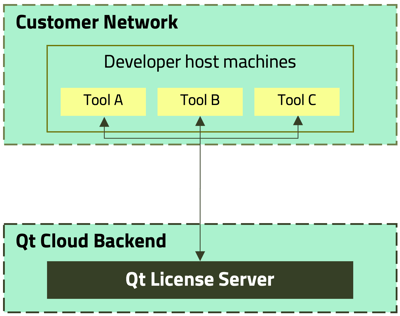
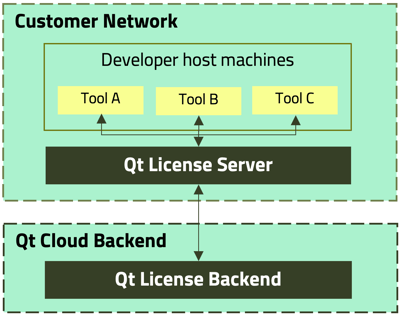
Qt License Server is available in two deployment options:
- Cloud-hosted by Qt for effortless setup and maintenance
- On-premises deployment for customers who prefer full control over their infrastructure
Cloud Server Hosted by Qt
On-Premise Server hosted by Customer
Qt License Service (daemon on workstations)
The Qt License Service is a lightweight background process that manages license reservations on your workstation, ensuring your Qt and Qt Quality Assurance tools stay properly licensed.
It securely communicates with the Qt License Server to reserve, validate and automatically renew licenses. In case of a network interruption, the service continues operation using cached license data until the connection is restored.
The service is installed automatically with the Qt Online Installer but can also be installed manually, for example on build servers or custom environments.
What’s new in Qt License Server 3.6
On-Premises Server
- Local Report Storage: Keep local copies of license usage reports for easier access and backup.
- Optimized Performance for Floating Licenses: High-concurrency license usage is now handled more efficiently, improving performance under heavy loads.
- Email Notifications for Lost Connections: Configure an SMTP server with On-Prem Server to automatically send notifications when the connection to the Qt Cloud is lost.
- Interactive License Registration: Prompt for credentials interactively if not provided and warn when insecure (HTTP) connections are used.
- Enhanced Offline License Usage Reports: Reports now include Consumer auxiliary info and Name fields and exported reports cover all record types.
- New REST API Endpoints: Query current license pool utilization and active users for easier integration with external systems.
Qt Server
- License Admin Role: Restricted from performing license reservations and can only carry out administrative tasks.
Qt License Service (daemon on workstations)
- IPv6 Support: Local TCP connections between client applications and Qt License Service now support IPv6.
- Log File Rotation: Limit log file size automatically, new log files are created when the maximum size is reached.
- Automatic Qt Account Login Renewal: Automatically refreshes Qt Account credentials with a configurable renewal interval.
- Error Reporting for License Reservation Failures: Qt License Service provides clearer diagnostics when license reservations fail.
- Telemetry Configuration via CLI: Update telemetry preferences directly through the Qt License Service command-line interface.
For the full list of updates and bug fixes, see the What's new in documentation: https://doc.qt.io/qtlicenseserver/qls-whats-new.html
Availability
Qt License Server is available exclusively to Qt Pool License and SQS Tools customers. It can be easily installed using the Qt Online Installer.
For detailed setup instructions and full documentation, visit: https://doc.qt.io/qtlicenseserver/
Blog Topics
Related Articles

Commercial LTS Qt 6.8.9 Released
We have released Qt 6.8.9 LTS for commercial license holders today. As a..
Read Article
Commercial LTS Qt 6.8.8 Released
We have released Qt 6.8.8 LTS for commercial license holders today. As a..
Read Article
Commercial LTS Qt 6.8.7 Released
We have released Qt 6.8.7 LTS for commercial license holders today. As a..
Read Article