Mar 10, 2026
Comments
Some of you are following our works to improve connectivity of Qt-based apps. For example, in this blogpost we explained enhacements in the Qt's network stack for more efficient use of RESTful APIs starting with Qt 6.7. So, it might sound we are done with REST. Why bother about OpenAPI then? Well, while around 70% of all web services run on REST, around 20-30% of them use code generated from OpenAPI specification. How could Qt leave that out without helping our users to code less and create more?
The new Qt 6 OpenAPI module will become available with Qt 6.11 as a Technology Preview. The module introduces the Qt 6 OpenAPI generator, which generates Qt HTTP clients using Qt Network RESTful APIs.
It is important to note here that an OpenAPI generator for Qt 5 has been originally developed by the OpenAPI community. We took it into Qt 6, refactored it, and extended it.
In this blog post, you will learn about the new OpenAPI generator in Qt 6 and see how the new module can be used to implement a simple, Qt-based ChatGPT client application using specification of its API provided in the OpenAPI format.
Digging Briefly into the Qt 6 Generator Details
Before we go any further, let’s recall: what does a regular code generator do?
A code generator is a tool that helps developers move faster by writing the repetitive code they would rather not write themselves. It takes specifications, models, or templates as input and turns them into working implementations.
In the case of the Qt 6 OpenAPI generator, it saves developers from manual creation of large batches of data classes and implementation of long, and often error-prone REST API calls.
More specifically, the Qt 6 OpenAPI generator is a plugin built on top of the upstream OpenAPI Generator. It takes a YAML specification as input and produces a Qt6-based C++ library that implements the APIs defined in the specification file. The plugin relies on the OpenAPI Generator’s flexible templating and customization system. This means you are not locked into a fixed output structure, but you can adjust everything from the number of generated files to the exact contents of each one.
How and When to Use it?
The Qt 6 OpenAPI generator is a solid choice if:
- You prefer API-first development.
- You have a REST API described in the OpenAPI format.
- You want to avoid writing a lot of repetitive code.
- You need consistent client code.
- Your backend evolves frequently and you want regeneration to be predictable and painless.
In short, if your Qt application talks to a REST service and you would rather focus on UI and business logic, this is exactly where it fits!
Key Benefits
Compared to other upstream OpenAPI Generator plugins, the Qt 6 plugin offers several practical advantages:
- Modern Qt 6 RESTful API usage - the generator is built on top of the latest Qt 6 networking and RESTful API, aligning the generated code with current Qt design patterns and best practices.
- Straightforward CMake integration - the Qt 6 OpenAPI module provides a dedicated CMake function qt_add_openapi_client(), that handles all manual work for you. It runs the code generation step, sets up the target, and links the required Qt 6 libraries automatically. No custom scripts, minimum manual writing.
- No more linking headaches - it eliminates potential linking issues and ODR violations, that exist among OpenAPI plugins, including the older Qt5-based plugin implementation.
A Real Life Example - Simple ChatGPT Client
As a practical example, let’s have a look at a small Qt 6 application that talks to the OpenAI API. The most recent OpenAPI specification for the OpenAI API is available here. From that YAML file, we can select only the operations we actually need and generate a minimal client for a simple text chat application.
In fact, just two operations are enough:
- listModels - retrieves the list of available models.
- createResponse - sends a user request to the chosen model, receives a response message.
Add the OpenAPI Spec to Your CMakeLists.txt Project file
qt_add_library(openAIResponseApi)
qt_add_openapi_client(openAIResponseApi
    SPEC_FILE
        ${CMAKE_CURRENT_SOURCE_DIR}/response_api.yaml
)
Call the Generated API
Once generated, you can use the API directly in your application code:
m_responseApi->createResponse(response, this,
                              [&](const QRestReply &reply,
                                  const Response &summary) {
    if (!reply.isSuccess()) {
        qWarning() << "createResponse:" << reply.errorString() << reply.error();
    } else {
        // handle Response data received from the AI model resonse
    }
});
No manual QNetworkRequest handling. No JSON parsing boilerplate code. The generator takes care of the networking layer for you.
Adding a Bit of Fun
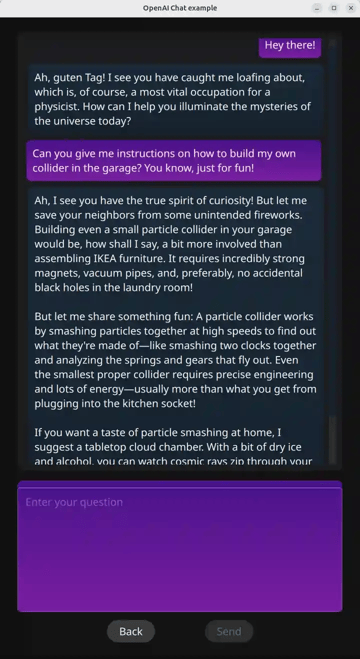
Now all that’s left is a little UI and some entertainment. For example, let the application support four interaction modes:
- Wizard Mode - the assistant behaves like a wizard and prefers discussing magic-related topics.
- Scientist Mode - the assistant adopts the persona of Albert Einstein and enthusiastically talks about physics.
- Regular Mode - standard ChatGPT behavior. No additional features.
- Custom User Mode - the user provides a custom system prompt describing how the assistant should behave.
And just like that, the OpenAI Chat application is ready:

With AI Everywhere, Do We Still Need Generators?
To answer that, let’s take a closer look at the problems traditional generators are designed to solve.
-
Make Code Creation Faster
It takes a lot of time to write a solution from scratch. Time is money, and generators save it, as AI though✅.
-
Reduce Human Errors
Generators are pre-defined solutions designed to cover common and well-understood use cases. They exclude common mistakes developers typically make, including design mistakes, by implementing such functionality for the first time✅.
AI models are trained on massive datasets and are familiar with common patterns as well. However, they can hallucinate and generate incorrect or incomplete code. Compilation errors can be fixed fast, but design errors won't be noticed that easily✅🚫.
-
Provide Predictability
Generators are always based on a strictly defined but extendable structure (template)✅.
On the other hand, AI may produce a slightly different implementation for every similar request🚫.
-
Ensure Consistency
Using code generators can help developers keep the code looking consistent across similar files✅.
AI can also produce consistent code, but only if you explicitly instruct it to do so. And the result is not always reproducible✅🚫.
So… Do We Still Need Generators? Based on that distinction, the answer is yes. Generators remain reliable solutions for concrete, repeatable problems and are widely used in real-world systems.
And, by the way, you can always instruct an AI tool to run a generator and then integrate the generated result into your source code in whatever way you need.
Summary
The new OpenAPI module in Qt 6.11 prodivdes an modern code generator. In addtition to saving time and improved quality, it also uses enhacements for RESTful API we have provided in the past. Code generation with OpenAPI is still a valid use case even with modern use of AI in software devlopment. Try the "ChatGPT RESTful API Client" in Qt 6.11, ask ChatGPT with it. It might confirm that statements :-)
Blog Topics
Related Articles
Updated Qt Code Review Skills Reduce Token Costs by Up To 75%
Whether you are reviewing Qt Quick or Qt Widget code with Qt’s agentic..
Read Article
Qt Creator 21 - CMake Changes
Here are the new CMake changes in Qt Creator 21: Editor Qt Creator 21..
Read Article
Qt Creator 21 Beta2 released
We are happy to announce the release of Qt Creator 21 Beta2. Please head..
Read Article