Published On
Sep 21, 2026
Read Time
7 mins
-webp.webp?width=1000&name=Multi-panel%20(1)-webp.webp)
The drone industry largely adopts QGroundControl (QGC), customizes it, and then maintains that customization for the life of the product—carrying a steep learning curve into an unfamiliar code base, a rebuild for every change, and a merge cost at every upstream release. Qt Group engineers examined this hands-on and found that the choices which define a product—branding, protocol vocabulary, operator panels, maps—can live in configuration files read at startup.
The drone industry approach to QGroundControl customization
Most drone programs do not build a ground control station from scratch. They start from QGroundControl and adapt it to their product.
QGroundControl is deliberately generic, so adaptation is expected, and the project supports it through a compile-time extension mechanism. That mechanism is capable, but the costs of working through it are consistently underestimated:
- A learning curve into a large, unfamiliar code base, for requirements that are usually modest—a panel with better visualization, one additional MAVLink message, an extra menu option.
- A rebuild for every change, which lengthens each iteration.
- A merge cost at every upstream release, which recurs for the life of the product and grows with the number of files edited.
Qt Group engineers set out to establish whether this work could be done more efficiently—which of these changes could be made without touching the source at all, and what workflow and tooling would support them.
Walkthrough Video—configuration, launch, panel drop, fleet dispatch.
The absent runtime configuration layer
QGC’s compile-time extension mechanism is capable, but it carries a considerable learning curve for developers new to the codebase. The product customization requirements themselves are usually modest—a new panel with better visualization, an additional MAVLink message, new map layers—yet the effort is high, because every change means locating the right place in a large source tree, rebuilding, and carrying the edit forward against upstream releases.
Interface work carries a second barrier. A new panel has to be written in QML, so even a purely visual change is a coding task, handled by an application developer rather than a designer—and the conventional workflow offers no tooling to do it otherwise.
The alternative presented below—developed internally as a proof-of-concept (PoC)—leverages a runtime configuration layer, where such customizations require no recompilation.
Runtime configuration possibilities
In this PoC, four areas of customization move out of QGC's mainline sources and into a folder the application reads at startup—each a file that can be edited, replaced or generated, with no compiler involved.
Editing those files by hand is possible, but the PoC pairs the station with a Configuration App—built with Qt for Python and QML—with one tab per configuration. The Configuration App validates each change, writes every file atomically, assembles the drop folder, attaches a minimal simulator for verification, and builds and launches the station from the same window.
In this workflow, the working loop becomes configure, run, observe, adjust, with no recompilation anywhere in the cycle.
The four customization areas at work
The PoC requires no new Qt module and no modification to Qt behavior. It stays within QGC’s supported extension architecture—the custom build directory and plugin subclassing (QGCCorePlugin, FirmwarePlugin)—and otherwise relies on mechanisms Qt already provides.
MAVLink configuration
MAVLink defines its messages in XML, and conventionally, that file is fed to a code generator and compiled in.
In our PoC, it is read at startup, so adding a message—or changing which messages surface in the interface—requires no generator run and no rebuild. Runtime-defined messages pass the same protocol validation as compiled-in ones.
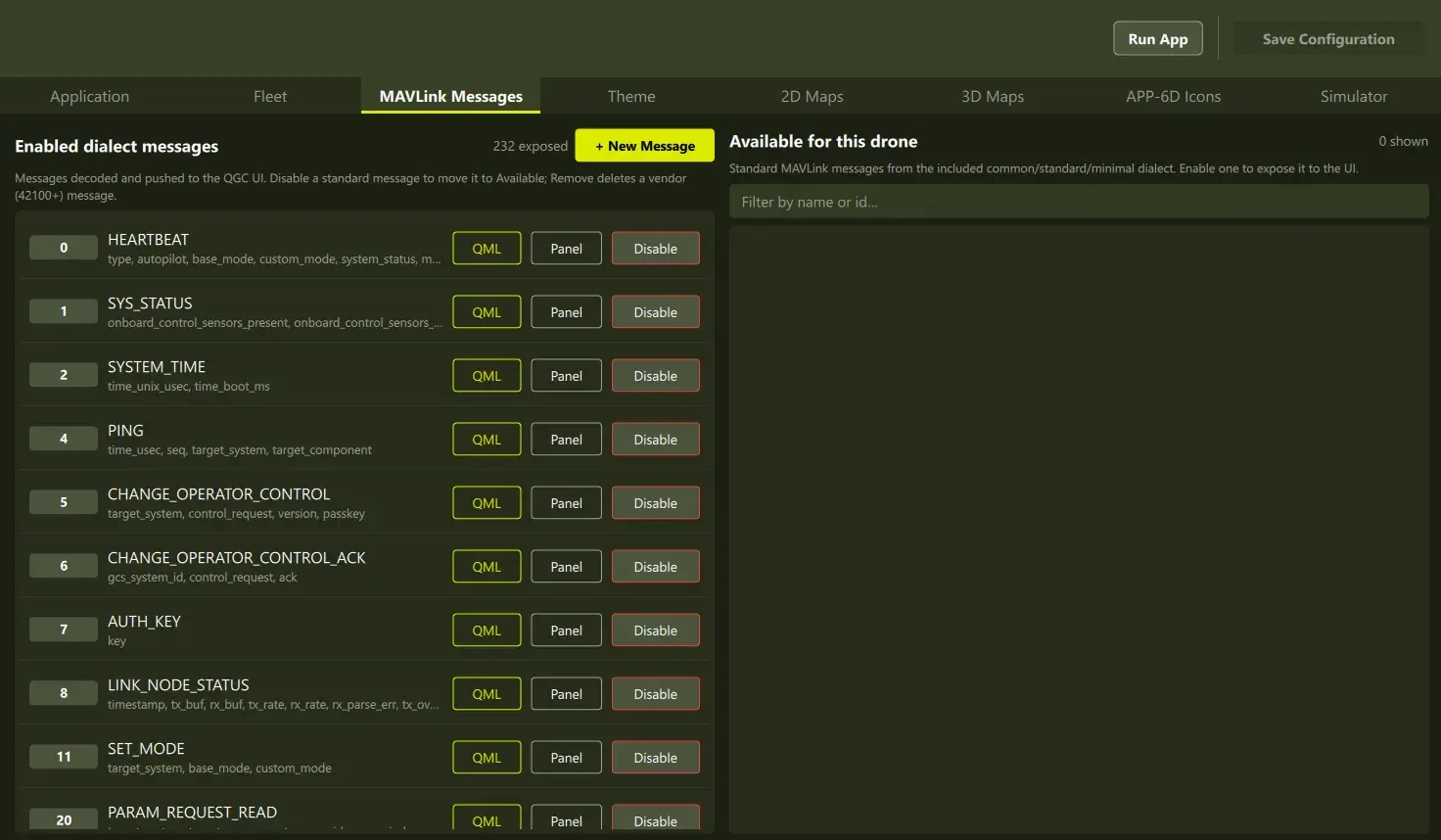
Choosing which MAVLink messages the station supports.
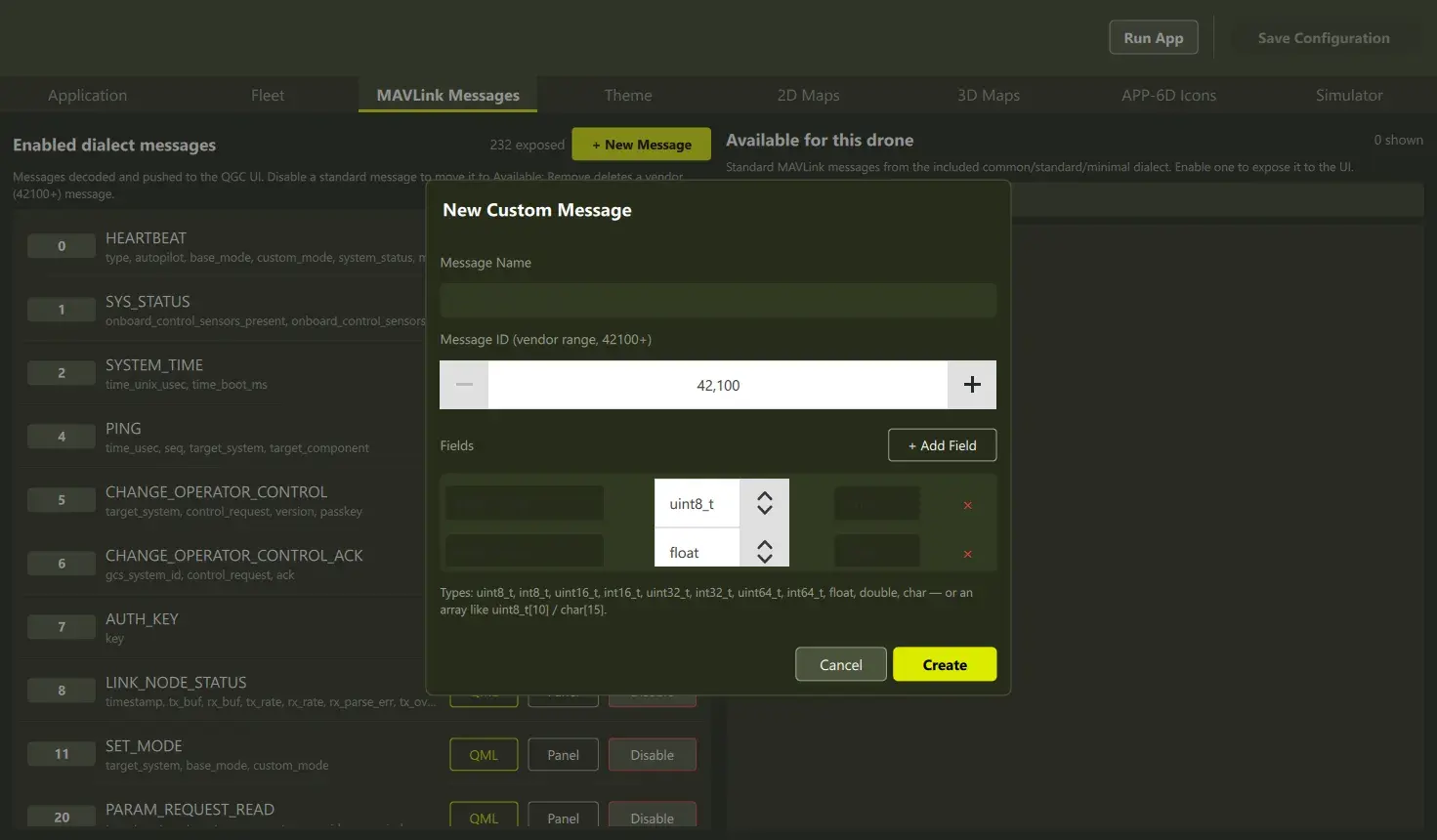
Adding a custom MAVLink message that the station supports.
Implementation
QXmlStreamReader (Qt Core) parses the dialect at startup. Field wire offsets follow MAVLink’s serialization rules, and each message’s CRC seed is derived and registered with the protocol layer, so runtime-defined messages pass the same validation as compiled-in ones. Decoded values land in QGC’s Fact system, to which QML binds declaratively—an additional panel needs no intermediate plumbing.
<message id="200" name="DRONE_HEALTH">
  <field type="float" name="battery_temp">Battery C</field>
</message>
Custom panels, authored in Qt Design Studio
In our PoC, a telemetry panel, message log, or video wall is a QML file placed in the drop folder. Each is instantiated as a floating window which can be positioned on any display, or docked within the main window; removing the file removes the panel, and panels bind to live vehicle data.
With Qt, UI authorship does not require an application developer: Qt Design Studio, used as a standalone design tool, lets a designer lay out a panel against a generated mock of the vehicle data contract and save a file that the application loads directly.
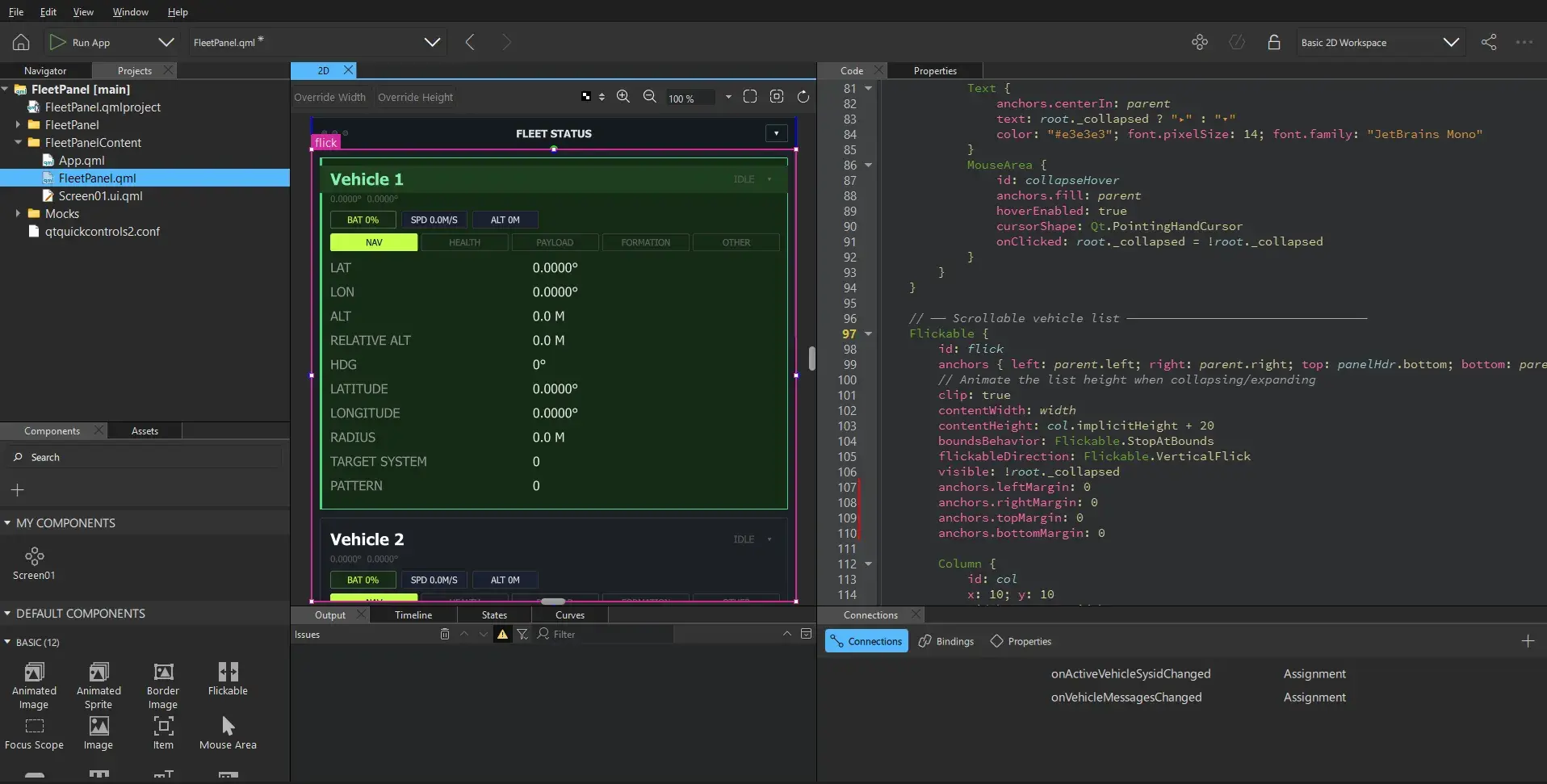
Qt Design Studio editing a panel against the generated mock of the vehicle data contract.
Implementation
The QML engine instantiates components from any URL, so panels are discovered from the drop folder rather than resolved against a fixed resource path. A single URL interceptor makes the built-in interface overridable by filename:
QUrl OverrideInterceptor::intercept(const QUrl &url, DataType) {
    if (url.scheme() != QStringLiteral("qrc"))
        return url;
    const QString candidate = m_dropDir.filePath(url.fileName());
    return QFile::exists(candidate) ? QUrl::fromLocalFile(candidate) : url;
}
For Qt Design Studio, a script reads the dialect definition and emits a mock QML module mirroring the vehicle data contract, declared under the project’s mockImports. The same import resolves to the mock inside the design tool and to the real application object at runtime, so the finished panel ships unchanged.
2D and 3D maps
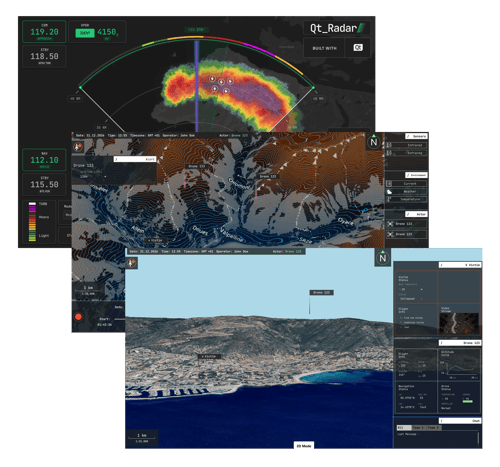
Most stations display map images fetched from a provider, so the appearance is fixed and a connection is required. This station draws the map itself from map data, following a single style document — one JSON file that sets colors, layers and labels. It can be edited visually in the free Maputnik editor, and it works with no network.
The 3D view is assembled from two data files for the area of operation: building footprints and heights from OpenStreetMap, and a terrain elevation grid. Replacing those two files moves the scene to a different part of the world, and both can be downloaded per region—so a station configured in the office stays fully functional at a field site with no connectivity.
-webp.webp)
Customizing the style of MapLibre 2D Maps
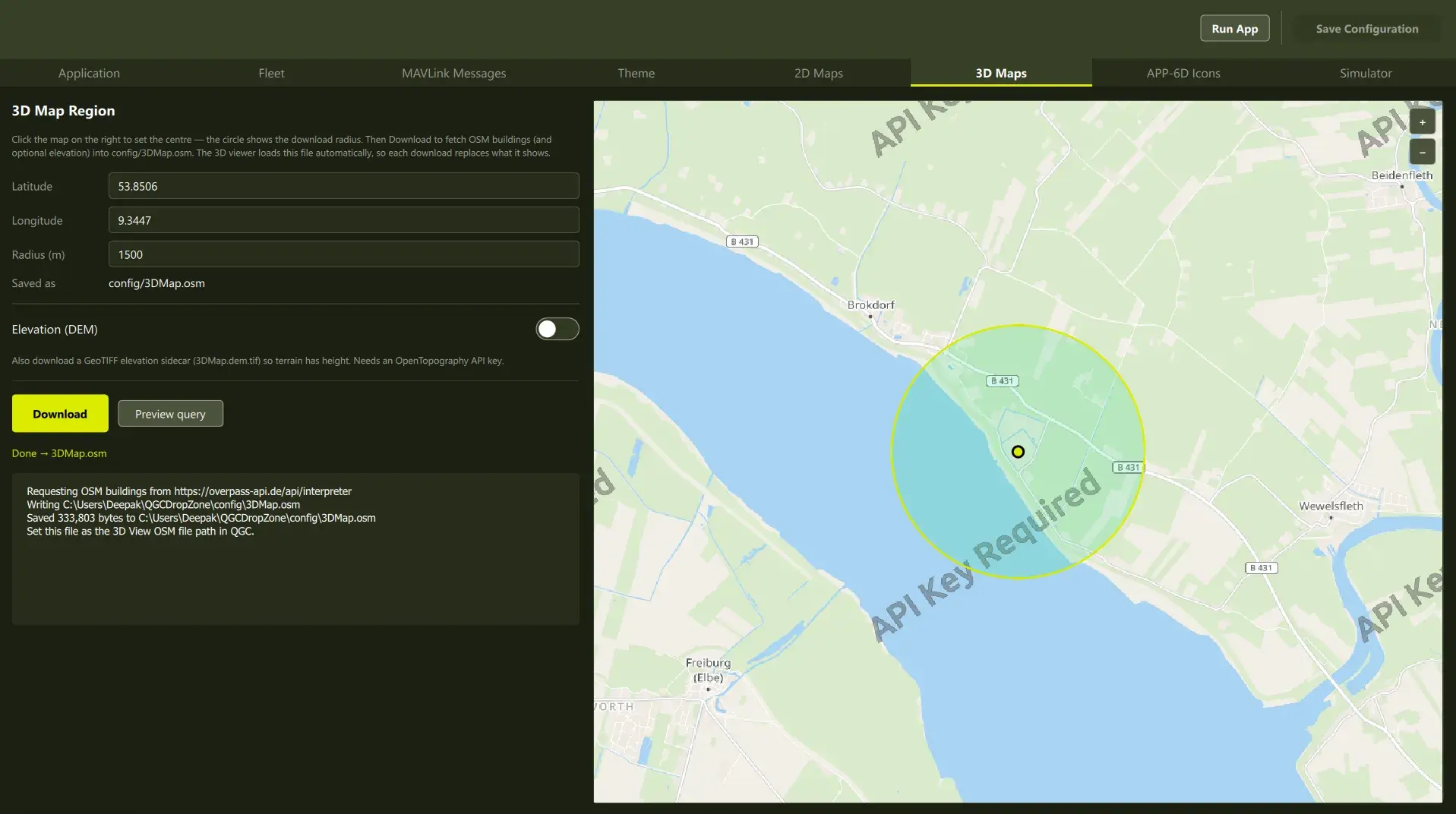
3D operational view—terrain, structures and aircraft at true altitude.
Implementation
The 2D style is a MapLibre style document. The 3D scene extrudes buildings from the OpenStreetMap extract and samples terrain elevation from the DEM (GeoTIFF); the terrain texture reuses the active 2D style, so both views share one appearance.
Theme, branding, icons
The color palette, the application name, and the window icon are files read at startup. The station launches already branded and themed.
The same build can be presented as several different products by changing a few configuration files rather than maintaining a separate code base per product.
Setting App name and Logo
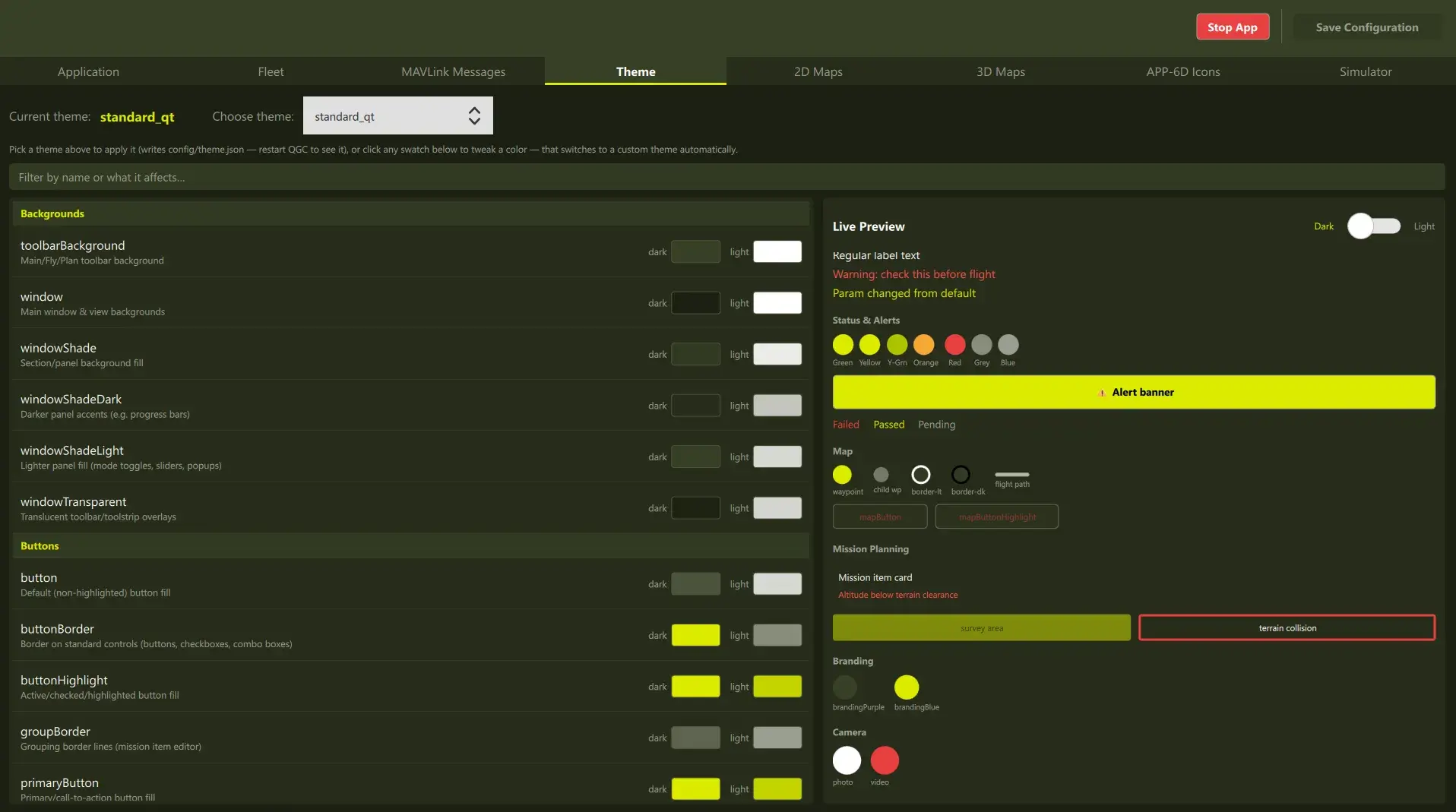
Choosing the theme.
Implementation
For theme and branding, JSON and image files are read at startup by the plugin—nothing more is required.
From configuration to execution
After the Configuration step, the user can run the app, and the Ground Control Station launches branded and themed, with the selected map style, palette, and telemetry, and custom Panels/Windows already present.
-webp.webp)
Custom Embedded / Floating Panels [enabled by Qt Design Studio Workflow]
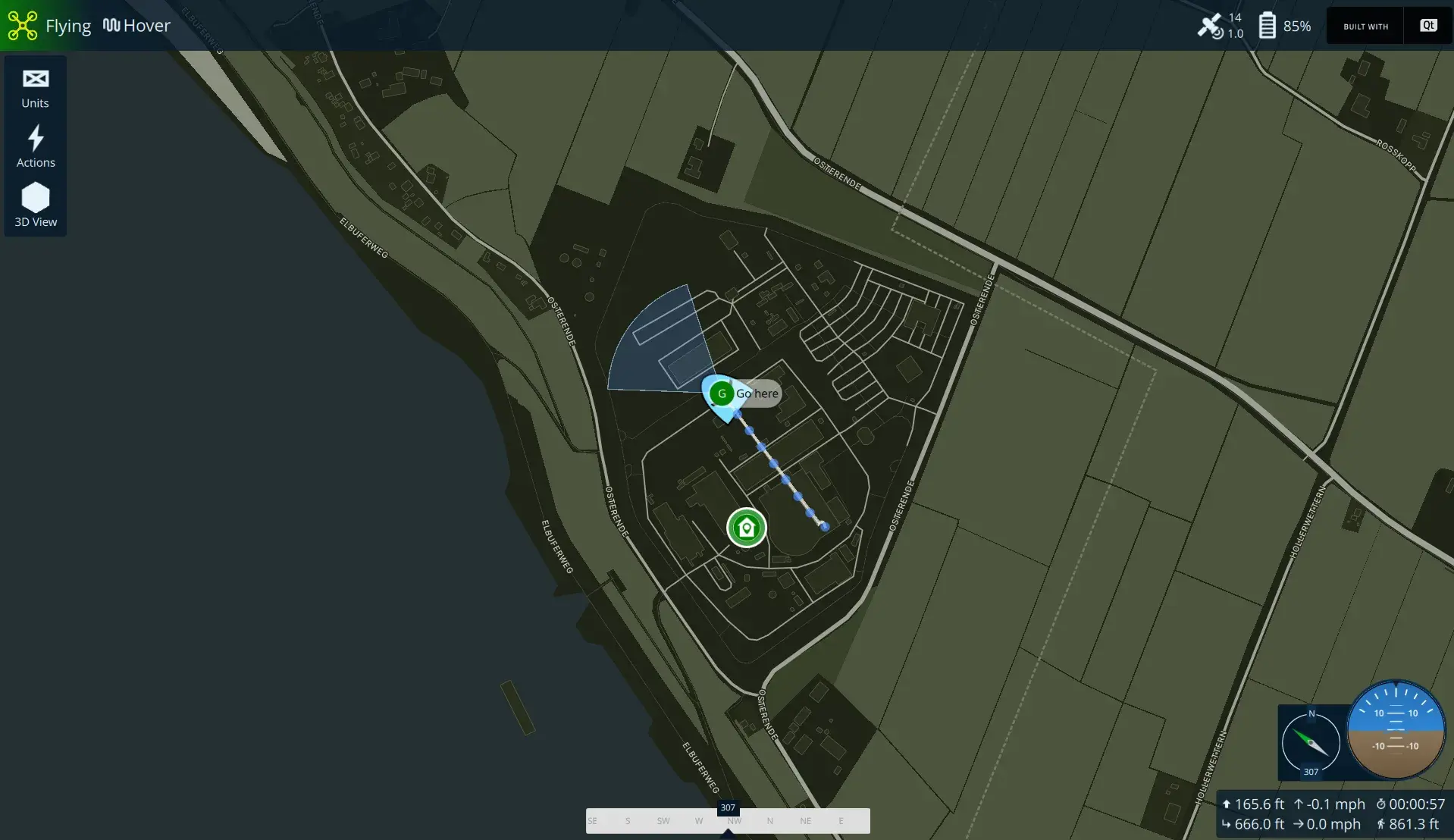
MapLibre 2D Maps with custom styles
-webp.webp)
3D operational view—terrain, structures and aircraft at true altitude.
Maintenance and the mainline delta
Forking is expected—the QGC developer guide directs teams to fork and copy custom-example—but the maintenance cost is proportional to what is edited inside the fork. The guide is explicit:
“It is best to keep modifications in mainline QGC source to a minimum.”
A configuration layer holds that delta near zero, and a scheduled rebuild against current upstream keeps any remaining divergence observable. Where a modification is of general utility—terrain-elevation support in the 3D viewer is a candidate from this work—contributing it upstream removes the delta permanently, which is also what the project itself requests.
Doing something similar? Get in touch
This effort is a proof of concept, and it exists to be discussed. If your team builds on QGroundControl—or is deciding whether to—we are glad to walk through what was built, the mechanisms behind it, and what a configuration layer would look like in your product.
Licensing and regulatory considerations
QGroundControl is dual licensed under Apache 2.0 and GPL v3, and the path selected determines the obligations attaching to the shipped product.
Under GPL v3, modifications must be published. Under Apache 2.0 they may remain proprietary, which in turn requires a commercial Qt license.
Because the choice governs what a company may want to keep proprietary, it costs far less to settle before development starts than after there is code to unpick.
Related Articles