Published On
Oct 30, 2026
Read Time
5 mins
Give Your AI Agent the Same Tools You Trust on Your Embedded Project
AI agents for embedded development are only as good as what they can reach. Coding assistants write firmware fast, then stall on the parts that aren’t just about producing code. They can’t see your target, they guess at toolchain options, and every debug step you paste into the chat eats context you’d rather spend on the problem.
That’s an access problem, not a model problem. We opened up three pieces of the IAR toolchain so an agent can do real embedded work: the documentation, the debugger, and a Python layer for automation and testing.
Why Do AI Assistants Struggle with Embedded Development?
Embedded work depends on things a general-purpose assistant can’t see. The answer to “why does this hard fault happen?” lives in registers, memory, and a call stack on a running target. The answer to “which option do I need?” lives in toolchain documentation that changes between releases. Without access to either, an assistant fills the gap with confident guesses, and in embedded a slightly wrong guess can cost an afternoon.
Can an AI Assistants read the IAR Documentation?
Yes. The IAR Documentation MCP Server connects your assistant to the official documentation on docs.iar.com. MCP, the Model Context Protocol, is an open standard that lets assistants call external tools and data sources. Answers are grounded in the same pages you’d search yourself, often with links back to the source, so you can verify in one click.
It needs no authentication and works with MCP-compatible tools such as Claude Code, GitHub Copilot in Visual Studio Code, Cursor, and Claude Desktop. Setup is a single command or a short config entry.
A practical tip: name the product and target architecture, and paste error messages verbatim. The more exact the question, the better the answer.
How Can an AI Agent Debug Firmware with C-SPY?
Documentation tells you what should happen. A debugger shows what did happen.
The C-SPY MCP server exposes the C-SPY Debugger to your agent as tools. It can start a session, run and halt the target, set breakpoints and watchpoints, inspect the stack and locals, read registers and memory, view disassembly, and capture terminal output. Responses are structured and carry machine-readable error codes, so when something fails, the agent can recover instead of looping. The repository also includes short playbooks written for agents, such as bootstrapping a session or waiting for the target to stop.
If you don’t want to disturb a running system, an attach to running target mode reads the state without resetting or reprogramming the target.
Can Python Scripts Save Tokens and Automate Firmware Tests?
They can, and this is where the workflow gets efficient. Debug sessions where an agent performs different actions with different tools means a round trip for every step. The agent calls a tool, the result lands in the conversation, the model rereads the growing history, and it decides the next call. A ten-step investigation means ten trips through the model, and every payload stays in context.
The cspy-py Python package changes the shape of the work. The agent writes one script that launches the backend, sets breakpoints, runs to them, reads the values, and prints only the answer. The loop runs outside the model, and only the result comes back into context.
python
import iar_cspy as cspy
with cspy.launch("/path/to/iar/install") as client:
with client.debugger.session("launch.json") as dbg:
client.breakpoints.add("your_function")
dbg.go_and_wait(timeout=10)
print(dbg.eval_int("your_variable"))
Fewer round trips mean a smaller conversation, which should mean fewer tokens and faster turnaround. We haven’t published measurements, so try it on your own project and compare.
The script also outlives the session. cspy-py includes a pytest plugin, so the same logic becomes a repeatable firmware test, including hardware-in-the-loop setups, and it runs on Linux and Windows for both laptops and CI. Test doubles let you unit-test the code around your tests without a backend.
Try it Without a Board Using the Modern Workflow Tutorial
The quickest way to see this working is the modern workflow project available at IAR's GitHub. It’s a ready-made example you open in Visual Studio Code inside a Dev Container, so the IAR Build Tools, CMake, and the debugging extension are set up for you and everyone on the team gets the same environment.
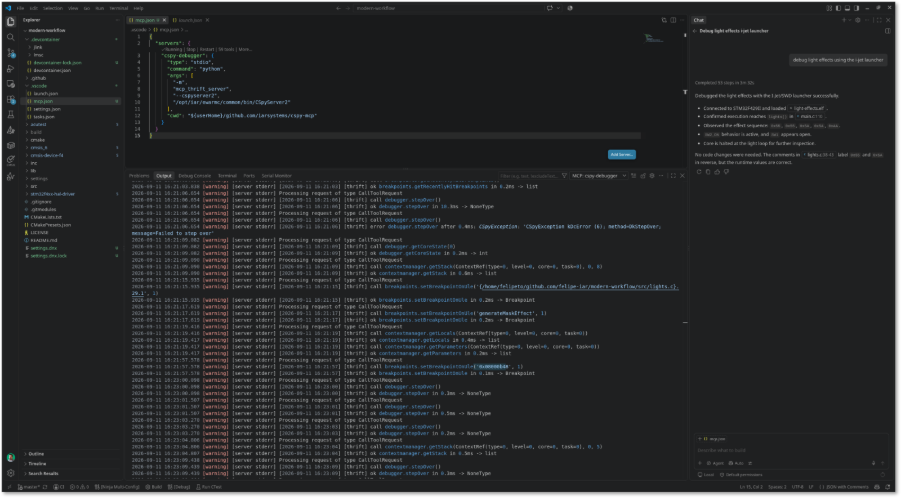
It builds with CMake presets, runs unit tests under the C-SPY Simulator, and debugs with F5 on the simulator, with I-jet and J-Link supported when you have hardware. No board is required to get started, which makes it a safe project to point your agent at. Ask it to look something up in the documentation, start a C-SPY session, stop at a breakpoint, and turn what it found into a test.
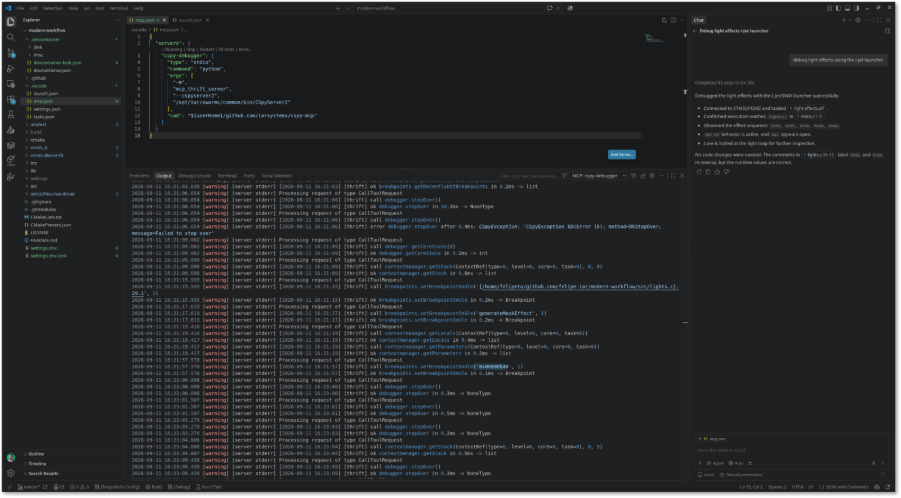
Figure 1. AI-assisted embedded debugging workflow using the C-SPY MCP server in Visual Studio Code.
You’ll need an IAR cloud license or an evaluation token to build, and the repository explains both sign-in options. Get in contact with IAR to get your evaluation cloud license.
What to Keep in Mind
These pieces are young, so expect change. They’re open on IAR’s GitHub and we’d like your feedback. The agent drives the debugger, but you stay the engineer: review what it finds, and review the tests it writes before they go into your pipeline.
Same debugger. Same toolchain. Now open to your agent.
Not an IAR Customer Yet?
Get in contact with our team to see how IAR helps teams develop embedded software faster with AI-assisted workflows, or download a free trial and experience it firsthand.
Related Articles