Published On
Dec 30, 2025
Read Time
11 mins
The design handoff process - transferring design vision from the designer to the developer - is one of the most critical yet challenging phases in product development. When executed poorly, it leads to misaligned expectations, inconsistent UI implementation, frustrated teams, and a very poor customer experience. This guide explores how to hand off design to developers effectively while maintaining your original design vision.
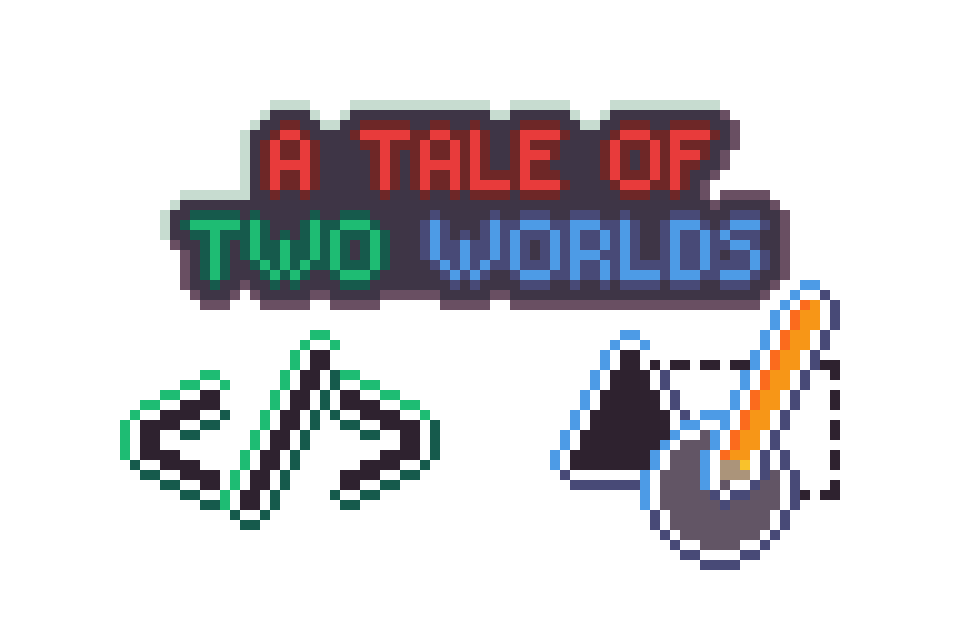 Design Handoff: A Tale of Two Worlds
A designer sketches out an idea in their favorite tool, then turns it into wire-frames in Figma. Over time, those wireframes gain color, typography, and layout polish. Sometimes the designer even builds a clickable prototype to demo interactions and animations.
Then comes the design handoff to development, the critical moment where vision meets implementation. A team of engineers takes these designs and recreates them in code.
Two weeks later, the designer looks at the build and feels their stomach drop. The fonts have changed. The colors are off. The perfect 16-px border around every rectangle is inconsistent. A developer decided to add a slightly larger radius around the buttons.
On a personal level, this bruises the designer’s ego. And often the stylistic requirements came directly from the client. That shade of blue was not just a random hex code the designer picked. It was Dark Cornflower Blue, #194390.
Designers and developers have different mindsets and priorities. Yet both have to come together to ship something real.
The Traditional Workflow and Its Challenges
The Design Handoff Process: How It Works Today
Before any UI project starts, teams usually agree on a list of requirements: screen resolutions and sizes, platforms, features, web versus mobile, and so on. Once those are set, design begins.
This is where the idea of a "single source of truth" shows up, a principle that’s essential for successful design handoff. The term evolved from a need to prevent discrepancies in data management, and it applies just as well to design handoff and implementation.
Design Tools: The Evolution From Photoshop to Figma
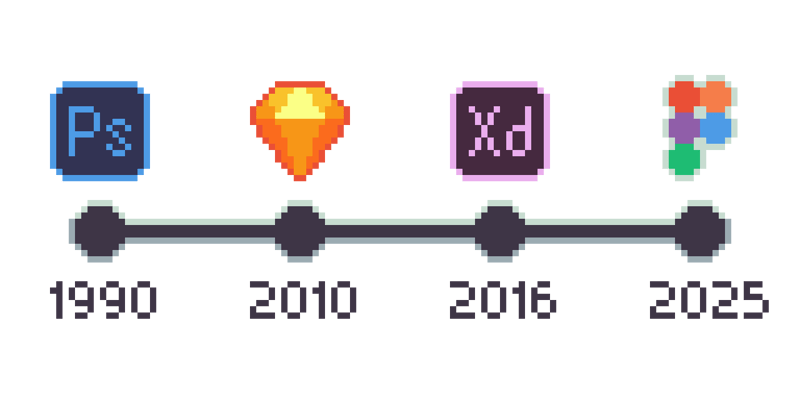
In the early days, UI design was often done in tools like Photoshop. The heavy use of Photoshop instead of Illustrator always confused me. I personally prefer vector assets when dealing with user interfaces. Either way, these tools were generating static assets that were not specialized for UI work.
The handoff process was also clumsy. Layer comps would be batch exported from Photoshop and then assembled into a PDF with footnotes for development. The industry had not yet recognized the need for tools specifically tailored to UI and UX.
Fast forward to today, and we have tools like Sketch, Adobe XD, and now most popularly, Figma. These tools give designers almost everything they need to create and even prototype a UI.
The industry has been moving quickly toward design systems as the default. Design teams maintain libraries of components and styles they can reuse across projects. In many cases, a designer is not creating everything from scratch anymore, but instead pulling from their design system.
The UX Design Handoff Problem
Tools like Figma have become essential design handoff platforms, creating a reference for what the end product should look like. In most cases, development cannot directly use the working Figma files the designers have worked on. They use them as a reference and rebuild the front end in code.
Things like advanced animations and fully functional controls are not truly implemented in Figma. However, designing those interactions remains a core part of the designer’s role. It is the "UX" part of the job.
Things get lost in translation when going from design to development. Design reference documents serve as a bridge, but the gap remains.
Designer-Developer Collaboration: Understanding the Fundamental Differences
Mindset and Priorities
There is a common saying in development: "Make it work first, you can make it look good later." This mentality makes sense when your responsibility is to ship something functional.
For designers, the job starts from the opposite end. The priority is to make something visually clear and appealing that will attract and support users.
Designers often follow a fairly strict process. The one I was taught looked something like: ideation ⇒ thumbnail ⇒ keyframe ⇒ storyboard ⇒ wireframe ⇒ creative treatment.
The point is that it can be a slow process to get from an idea to a finished product. Art and design are processes that do not respond well to being rushed.
Design Is Done With Intention
Just as a developer makes conscious decisions about control structures and data types, a designer makes intentional choices about typography, color, and layout.
Often, a designer is also working within strict brand guidelines. Large companies do not let you casually adjust their logo or color system. Those constraints are intentional, not arbitrary.
Constraints and Limitations
Designers are limited by the tools they use. To a certain extent, you can write almost anything you want in code. Designers are limited by what their tools allow them to express.
When designing for low-end hardware, such as microcontroller units (MCUs), there are also hard limitations on what can be displayed. Frameworks like Qt for MCUs help the designer-developer collaboration, though designers are generally not hardware experts, so these constraints are not always obvious to them when they start their creative process.
The Designer-Developer Power Dynamic
It is worth calling out that the power dynamic between design and development is skewed. A developer can build a fully working project without a designer. For a long time, and in many industries, that has been the norm.
Certain sectors, such as medical, aerospace, and defense, often care less about how a UI looks and more about whether it works reliably and safely. In those environments, design is sometimes treated as a nice-to-have.
Most designers, however, cannot build an entire project on their own. They depend on developers to make their work real.
User interfaces are everywhere now. Devices that probably have no business having a screen suddenly have one. The demand for "modern" interfaces is at an all-time high. Designers are needed more than ever, while developers still hold the keys to what actually ships. That imbalance sits under many of the conflicts between design and development.
The AI Question
It is impossible to avoid talking about AI in 2025. Just before writing this, I was playing around with Figma Make and was able to generate a functional prototype with creative treatment in a matter of minutes. Developers I work with no longer always ask me to quickly mock something up. They are experimenting with AI as well.
I do believe AI is something we can live alongside, but it is still shifting the balance. If an AI can generate convincing designs, it is natural to ask: What do we need a designer for?
Different vs Better
One of the first things we learned in art school was how to do a proper critique. We were taught to avoid centering feedback around "I" and "you," and instead try to be objective. As designers, we have to separate ourselves from our work.
That is hard to do. Art and design are fields filled with passion. You cannot simply switch your emotions off. At some point, though, every designer has to learn to "kill your babies", to avoid becoming so attached to a piece that it becomes impossible to improve.
Let us go back to that dramatic situation at the start with the developer who changed the button radius. What if the new radius better matches the rounding on other components in the UI? Just because someone is a designer does not mean they cannot be wrong, and it does not mean a developer cannot offer input that improves the design.
Often, these situations boil down to a lack of communication and collaboration.
The tools we have listed so far are helpful because they allow both developers and designers to access the files and leave comments. But what about the other direction? I would guess that not many designers are tracking Git repositories to see how the front end is evolving.
Designer-Developer Collaboration: Who Gets Final Say?
Speaking as a designer, of course, the designer gets final say.
In reality, though, shipping something functional always requires collaboration and compromise. There will always be back-and-forth between development and design. It is why features like development mode in Figma exist.
Once the project is in the hands of developers, design changes will still come up. A back-and-forth between development and design is not a failure of the process. It is THE process.
How to Handoff Design to Developers: Bridging the Gap
Successful design handoff to developers requires more than just transferring files. It requires the right tools, clear communication, and established processes.
Low-code and No-code Solutions
Even before the wave of AI, there was interest in "low-code" or "no-code" tools - tools that let people without programming experience generate working code.
We still do not have a perfect version of this, but we do have node graph editors in Unreal, Blender, and Unity, as well as visual ways to define flows and transitions in tools like Figma. These systems help visualize logic, state, and flow in a way that is less intimidating to non-programmers.
In that sense, the traditional gap between the roles of designer and developer can be blurred.
Qt offers its own workflow that allows importing assets from Figma and generating a front end in QML. Figma to Qt helps transfer a GUI design from Figma to QML code, saving the developer the time they would need to rewrite everything from scratch. Qt Design Studio, on the other hand, allows users to build out the front-end interactions all within a graphical user interface.
Designers Learning Code
Generally speaking, many designers are hesitant to learn programming. There is a reason a lot of us went to art school. We wanted to draw and design, not do math.
But learning even a small amount of code can go a long way. Understanding basic concepts like state, events, and constraints makes it easier to design interfaces that are realistic to implement. It also builds empathy for the constraints developers live with every day.
The Unicorn

People sometimes talk about the mythical "Unicorn”. This is someone who can both design and code.
A designer uses UI tools like Figma to create static or semi-interactive assets for an interface. A front-end developer takes those assets and recreates them in code, whether that is HTML/CSS and JavaScript, QML, or something else.
The unicorn is someone who can do both. They can design and they can implement.
I do not see many true unicorns in the wild. While they definitely exist, they are rare. As GUI-based tools become more powerful and coding environments become more accessible to beginners, the lines between the two historic roles will continue to blur.
However, the need for both perspectives does not go away.
Design Handoff Best Practices: A Guide for Designers and Developers

Is there a perfect solution to the workflow between designers and developers? Probably not. But there are practices that can make it less painful and more collaborative.
1. Communicate Intentionally
Effective designer-developer collaboration starts with communication. Just as clear communication can help a strained relationship, it can also save a project.
In development, it is a normal practice to leave comments in code: high-level notes before blocks of logic that explain the thought process and intention. The same mentality now exists in design tools like Figma through comments and annotations.
Explaining the intent behind certain design decisions gives developers the context they need:
- Why a color was chosen.
- Why spacing is tight in one place and generous in another.
- Why an interaction needs to feel a certain way.
This shared context makes it easier for developers to respect design choices, and for designers to understand when developers push back.
2. Practice Redundancy and Version Control
We have all been there. You open your machine looking for a file you just worked on, and it is nowhere to be found. Maybe it ended up in the recycle bin. Maybe something else happened. Either way, it is gone.
The lesson is the same every time: back up your files.
Designers should be using:
- Cloud services like OneDrive, Dropbox, or similar.
- External drives or network storage for local, redundant backups.
On the development side, version control is already standard practice. Maintaining a local or remote repository makes it possible to:
- Track changes over time.
- See who changed what and why.
- Revert to a previous build when something breaks.
Design teams can borrow this mindset. Whether it is consistent file naming, versioned exports, or dedicated design versioning tools, some form of redundancy and history is essential.
3. Build Mutual Respect
Developers and designers come from different worlds. Different training, different priorities, and often different vocabularies. But they still have to ship the same product.
Mutual respect means recognizing that:
- Design is done with intention, not just vibes.
- Code is also crafted with care, not just hacked together.
Lines of code can be as elegant and thoughtful as a well-balanced color palette. Designers can push for clarity and delight, while developers push for performance, maintainability, and stability.
The best products come from both sides assuming the other is acting in good faith.
4. Use AI as a Tool, Not a Replacement
My stance is that AI should fill in the gaps of our process instead of replacing it. I strongly believe humans should be the ones to create art. But AI undeniably has its uses.
For example, AI can help:
- Quickly generate commit messages.
- Draft comments or documentation.
- Suggest layout variations or visual directions.
- Help structure or refine writing when you are not a confident writer.
I even used Notion’s AI to help structure some of the paragraphs in this piece. I am not a trained creative writer, so I used it as a supplement, not a ghostwriter.
AI can speed up the tedious parts and help visualize ideas. But it should not replace what you, as a designer or developer, bring to the table: taste, judgment, and lived experience.
Final Thoughts
UI design is a craft. It is passion. And yes, it comes with egos.
I like to think of the designs I create as blueprints for what the final product will become. There will always be changes, but the overall vision and concept should remain recognizable. Just as an architect designs a house for a structural engineer to build, designers and developers rely on one another.