Jun 30, 2026
Comments
Authors: Otso Virtanen and James Vance
The Context Problem in Test Case Generation
Generating tests is one of the most common practical use cases for AI coding agents. However, without runtime code coverage data, an AI coding agent reasoning about test gaps must statically analyze source files and test files to infer what is likely covered. This is unreliable: the agent cannot distinguish between a function that is called indirectly through several layers and one that is never reached, nor can it detect dead code reliably.
Code coverage solutions, such as Coco, provide exact, per-instrumentation-point execution data from real test runs to the agents as context. Subsequent invocations of Coco can be used to create a feedback loop that will drive the test code generation workflow towards a coverage goal in the search space.
In the first part of this blog post series, Part 1, we implemented the mentioned workflow for the task of generating unit tests with the help of Coco CLI tools to maximize code coverage. Today we are releasing Coco MCP Server Preview which can be leveraged in generative AI powered workflows by developers, testers, managers and CI/CD.
Introducing the Coco MCP Server
The Coco MCP server is a Model Context Protocol (MCP) server that wraps the Coco Command Line Interface (CLI) tools in a structured interface. Instead of calling cmreport and cmcsexeimport directly and parsing the returned output, the agent calls purpose-built tools in the MCP server and gets structured data back which it can process efficiently and not pollute the context window.
MCP is the de facto industry standard for connecting AI coding agents to external tools and data sources. All major AI coding agents support the protocol and act as MCP hosts - including GitHub Copilot in VS Code and Claude Code – so the Coco MCP server works across all MCP hosts without any changes to the workflow prompts. The below diagram shows the setup:
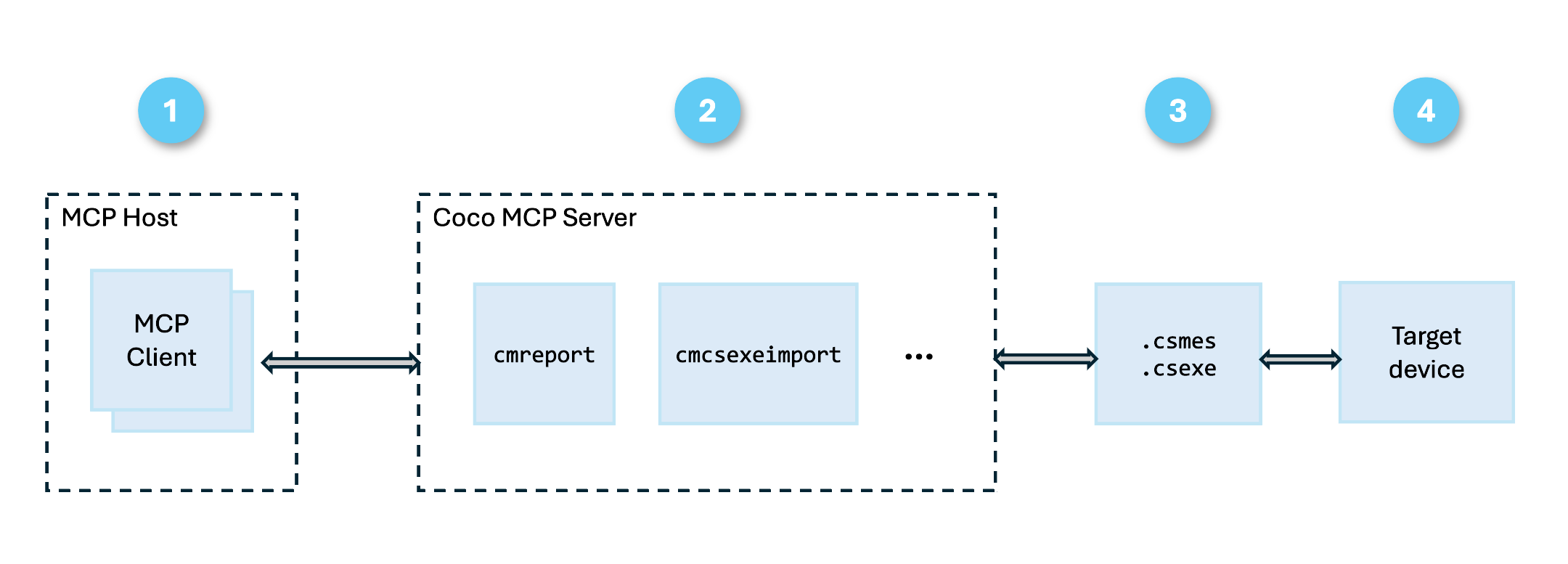
The Coco MCP server has the benefit of:
- Token sensitivity Lowering the tokens needed and limiting the context by stripping unnecessary fields in coverage summaries and streaming for coverage report sections rather than loading the whole report into context window. The Coco MCP server also exposes coverage data through progressive disclosure so the AI coding agent receives minimal useful information at first, then much more targeted and detailed information when it needs to.
- Easy CLI tool use Coco CLI flags can be cumbersome and the complexities are hidden in the MCP tool calls.
- Workflows built-in The Coco MCP Server comes with baked-in workflows that need to be defined in any case if you are using code coverage.
We are assuming the above to be useful especially for bigger projects - for smaller projects usage of Coco CLI tools directly by the AI code agents would still work well.
Tools exposed by the Coco MCP server
As mentioned, the tool set is structured so the agent retrieves only as much data as the current decision requires. This keeps responses small and the agent’s context window focused.
check_coverage_summary
A lightweight sanity check that calls cmreport and returns a single boolean. If false, the database contains no execution results and further reporting calls would return empty data. If so, the agent should call import_execution_report first.
import_execution_report
Merges a .csexe execution report into the .csmes database via cmcsexeimport. After this call, coverage data is available for all subsequent tools.
get_coverage_overview
Returns global coverage percentage, a per-file breakdown, and an optional per-function breakdown — enough for the agent to identify which files and functions are worth investigating. The agent uses this to prioritize so that it does not need to look at every file in detail.
Example output (decision coverage, parser sample):
|
File |
Coverage |
Decisions |
Complexity |
|
parser.cpp |
47.6% |
137/288 |
121 |
|
error.cpp |
25.0% |
9/36 |
19 |
|
variablelist.cpp |
47.1% |
8/17 |
11 |
|
functions.cpp |
0.0% |
0/17 |
7 |
|
parser.h |
100% |
9/9 |
7 |
|
error.h |
100% |
4/4 |
4 |
|
Global |
45.0% |
167/371 |
— |
get_file_coverage_detail
Returns exact file:line locations grouped by coverage status (unexecuted, dead-code, executed). The agent uses this to locate precisely which lines to target when writing new tests, removing the need to read the entire source file and reason about what might be missing.
status_filter narrows the response to only the statuses the agent needs to act on (typically ["unexecuted"]). On a large codebase, the executed lines would otherwise dominate the response with no actionable content.
With include_tests=True, the response also maps each instrumentation point to the list of test names that executed it. This is useful when the agent needs to understand existing test coverage before modifying a specific section of code, or when deciding which tests to run after a targeted change.
analyze_patch_coverage / analyze_patch_coverage_from_diff
This tool exposes Coco’s patch analysis feature: Given a unified diff, it returns the set of existing tests that cover the modified lines, along with their current pass/fail state. The agent uses this to determine which tests are at risk after a code change - enabling targeted re-execution rather than a full suite run. It accepts either a patch file path or an inline diff string, so the agent can call it directly from the output of git diff without writing an intermediate file.
Workflow examples
The following is an example session with an AI coding agent that uses the Coco MCP server on the Coco parser sample.
Prompt: “Build the parser sample and analyze its current decision coverage”
|
Step |
Coco MCP server |
Outcome |
|
Build instrumented binary |
- |
unittests.exe + unittests.exe.csexe produced |
|
Sanity check |
check_coverage_summary |
has_coverage_data: false — no results imported yet |
|
Merge test results |
import_execution_report |
.csexe merged into .csmes |
|
Confirm data available |
check_coverage_summary |
has_coverage_data: true |
|
Retrieve decision coverage |
get_coverage_overview (decision, global + source-tree + function-tree) |
Global 45.0%; functions.cpp 0%, error.cpp 25%, parser.cpp 47.6% |
Prompt: “Improve the coverage of parser.cpp”
|
Step |
MCP Tool |
Outcome |
|
Read source and existing tests |
- |
parser.cpp, unittests.cpp read to understand structure |
|
Get exact unexecuted lines |
get_file_coverage_detail (status_filter: unexecuted, file: parser.cpp) |
151 unexecuted instrumentation points identified |
|
Write targeted tests |
- |
New test cases added for bitwise, comparison, arithmetic, math, trig operators |
|
Rebuild instrumented binary |
- |
Updated unittests.exe.csexe produced |
|
Merge updated results |
import_execution_report |
New execution data merged |
|
Verify improvement |
get_coverage_overview (decision, global + source-tree) |
parser.cpp 47.6% → 88.9%; global 45.0% → 80.1% |
What’s Next?
We will continue adding and exposing more Coco capabilities in the MCP server. Likely next candidates are Change Risk Anti-Patterns (CRAP) metric, support for Python, integration of agent skills and code coverage for QML.
Need More Information?
See our product page and product documentation for more information about Coco. For Qt developers, see the QML example and the Qt instructions.
Please contact James.Vance at @qt.io for any feedback or suggestions. James is a Senior Software Engineer in the Coco project.
Blog Topics
Related Articles

Coco Code Coverage - Deeper Support for Qt for MCUs
Teams building embedded applications with Qt for MCUs have always faced a..
Read Article
Using AI Code Assistants to Generate Unit Tests and Maximize Coverage
Code coverage measures which parts of the source code have been executed..
Read Article