Release 20 of the Qt Creator IDE adds support for working with AI coding agents, a Zen Mode that puts your code editor into the focus, support for the GN (Generate Ninja) build system, and many more improvements.
AI Agent Support
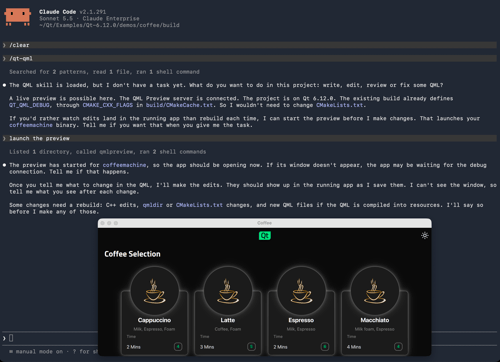
The new ACP Client extension adds a chat panel with AI agents that understand your codebase and perform actions on your behalf, such as analyzing code, editing files, running commands, or triggering builds. The chat is based on the Agent Client Protocol (ACP) which is supported by many AI providers and handles the details of the communication between the AI coding agent and the IDE.
To use the new chat with AI coding agents, enable ACP Client in the Extensions mode. Configure the agents you want to use in the settings: You can either provide the details of how to connect to the tool, or you can just choose a configuration for one of the common agents directly. These templates are provided by the public ACP Registry and include automatic configuration for AI coding agents like Claude Code (Anthropic), Codex (OpenAI), Gemini CLI (Google), GitHub Copilot, and many more. Depending on the agent you might need to have appropriate tools available in your PATH environment or other prerequisites (for example you need npx and the Claude Code CLI installed and in your path for the Claude Agent - Claude Desktop does not support ACP). Check the documentation for more information.
You should also consider enabling the MCP Server extension (Model Context Protocol) that gives AI assistants access to more information about the current state of Qt Creator, and enables agents to perform various kinds of tasks within Qt Creator. We added support for MCP Tasks and greatly expanded on the available tools and tasks. The new Preferences page AI > MCP Servers enables you to register additional MCP servers. We now also support Cross-Origin Resource Sharing (CORS) to make it possible to connect to the MCP server from a web application. Find out more in the documentation.
Editing
The new Zen Mode extension adds Tools > Zen Mode > Toggle Distraction Free Mode and Zen Mode and
corresponding actions and tool buttons in the main window's status bar that put the editor into the focus of your work. Enable it in the Extensions mode. For more information check the documentation.
We updated Clangd for the C++ code model to LLVM 22.1.2. Our prebuilt binaries ship a PGO (profile-guided optimization) build of Clangd on all platforms now. Check the separate blog post for more details. You can now fold preprocessor branches (#if, #ifdef, #ifndef), C++-style comment blocks, and #pragma regions. This is also available for all other language servers that support this functionality. If you use other means to generate a compilation database for your project and keep that up to date, you can now tell Qt Creator to use that instead of its own, auto-generated one with the new option Use externally provided compilation database.
For QML, Qt Creator now uses the semantic highlighting provided by qmlls by default and also makes the refactoring actions from qmlls available.
Projects
The new GN extension adds support for opening GN (Generate Ninja) projects and working with them. Enable it in the Extensions mode. For more information check the documentation.
CMake Presets are now watched for changes and got support for new "qt" and "compiler" Qt Creator vendor presets. The kits that are created for CMake Presets are now also explicitly temporary, project-specific kits and are managed accordingly. The Package manager auto setup now supports CONAN_HOST_PROFILE and CONAN_BUILD_PROFILE.
Find out more about our improvements for CMake projects in our separate blog post.
Devices
We split the UI of the editor for Android Manifests into separate interfaces for editing icons, splashscreen, and permissions.
The File System view, the Locator, and remote file dialogs have limited access to the file system of iOS devices now as well. That includes the crash reports directory and the developer's application directories.
Remote Linux devices are now automatically connected to before deploying and running applications on them. For remote build devices you can now specify host directories that the remote device can access in some way that you have set up (via some mounting mechanism or via an explicit syncing method). This allows opening local project sources for building on remote devices in these directories (similar to the existing option for Docker build devices) which in turn allows you to run local-only tools on these sources. Of course you can still just open the remote project in Qt Creator directly as before as well.
Other Improvements
The version control actions are now available at more places, such as the Open Documents view. The version control state is now also shown in the file properties dialog and is also available for files under Subversion version control. The Git submit editor now warns in some situations that could lead to information loss, and the Continue Rebase dialog now makes it harder to trigger destructive operations.
We added a Remote Debugger run configuration type with functionality similar to Debug > Start Debugging > Attach to Running Debug Server, making it easier to repeat and switch between different configurations.
Please have a look at our change log for more detailed information.
Get Qt Creator 20
The new version is available as an update in the Qt Online Installer (commercial, opensource). You also find commercially licensed offline installers on the Qt Account Portal, and opensource packages on our opensource download page. This is a free upgrade for all users.
Please post issues in our bug tracker. You can also find us on IRC on #qt-creator on irc.libera.chat, and on the Qt Creator mailing list.
You can read the Qt Creator Manual in Qt Creator in the Help mode or access it online in the Qt documentation portal.