Mar 11, 2026
Comments
Completing the Software Architecture Transition
In the previous installment of this series, we started moving our sample Qt Widgets based application to a MVP architecture. Most of the code has been moved out from a widget to two proxies with well defined roles (one wrapping domain items, the other one intending to wrap business logic).
For this fourth and last part in our series, we'll complete the architecture transition and see how easy it will be to iterate on a new GUI at this point.
Moving the Remaining Business Logic in Its Corresponding Proxy
In the case of our application, the business logic is all driven by one slot and one method: onUpdateCurrentItemQuality() and updateQuality(). We just need to move them to PageProxy [commit 5eea88d].
The resulting implementation for the Window class gets really slim:
The class is now basically down to a single constructor setting up the relationships. It can't give us a more declarative feel than that. Also, we moved the lower level dependencies (like Repository) to the proxy, so we improved the encapsulation and separation of concerns as planned.
Of course we mostly just needed to move code around, so PageProxy grew by around the same amount of code.
At this point, since we did all those changes without introducing regressions thanks to our test, we could even evaluate simplifying the logic in updateQuality(). But this is a battle for another day.
Setup the Qt Quick GUI
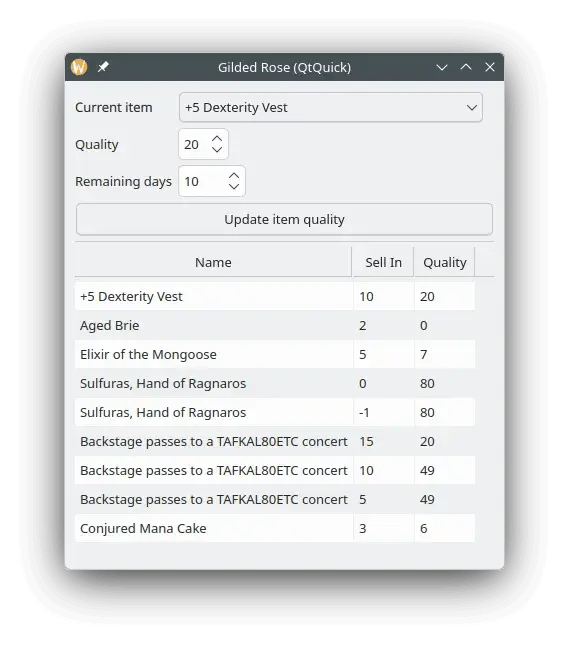
We're almost there! We moved our whole application to the MVP pattern, it feels much better overall. Now it's time to add the Qt Quick GUI [commit 7e4e72a] and [commit 66accfb].
For this we introduce a Window.qml file which we register in the com.gildedrose module:
Some code has been elided for brevity reasons. One thing you might notice is that the integration between this Qt Quick based window and the PageProxy is looking very similar to the one with our Qt Widgets based Window.
Then in the main function, we replace the code creating our old Window instance with the following code:
And then we switched to the new Qt Quick based GUI.
What Now?
We finally completed our architecture transition toward MVP and even slapped a new QtQuick GUI on top. At this point we have both the QtWidgets and QtQuick GUIs fully functional. We could have both running in parallel, or use conditional compilation to have one or the other. This is all the freedom we have to drive the transition at the pace we need for our users.
We might want to do something with our test now. There would be three options:
-
Drop it altogether, to be considered later if it doesn't bring anymore value (e.g. because we accumulated proper unit tests over time).
-
Keep it as is, which might not be practical middle to long term if the Qt Widgets GUI is decommissioned completely.
-
Modify it to work directly on the
PageProxyrather than going through the GUI (maybe with a much simpler GUI only test next to it with a stubbed proxy).
Out of those three, the last option definitely has our preference as it'll interfere with GUI transitions the least. Of course this doesn't prevent dropping it later if it gets obsoleted.
Conclusion
Hopefully this series will have convinced you that our approach, although requiring discipline, is a valid one to move an application from Qt Widgets to Qt Quick.
Let's unwrap the important points of our approach:
-
Write simple wide coverage tests to act as non-regression tests during the transition.
-
Get the missing
QAbstractItemModelsubclasses to emerge, get rid of theQListWidget,QTableWidgetandQTreeWidgetto favor their view counterparts. -
Introduce
QObjectbased proxy classes for your domain objects. -
Introduce
QObjectbased proxy classes to receive business rules trapped in yourQWidgetsubclasses. -
Move all the remaining business logic in the proxies.
-
Develop the new Qt Quick based GUI on top of the introduced proxies.
-
Remove the Qt Widgets based GUI.
As a parting thought, we'll also point out that there is value in doing the transition to the MVP pattern even if you plan to stick with Qt Widgets. Nothing forces you to execute the steps 6 and 7 above. Even if you don't, going through the other steps will lead you to a better architecture overall with an improved separation of concerns and better testability throughout the application.
About enioka Haute Couture
Businesses of all kinds have become highly dependent on their IT systems. And
yet, many of them have lost control of this essential part of their assets. enioka Haute Couture specializes in mastering complex software development, be it because of the domain, the organization or the timing of the project.
enioka Haute Couture works in close collaboration with customer teams to build software tailored
to the specific needs. And if developing it, enioka goes the extra mile to ensure the customer has it under control. enioka helps customer teams adopt the right organization, technologies and tools. Finally, every time it is suitable, enioka helps to setup Free and Open Source Software projects or interact with existing ones.
With enioka Haute Couture, customers have a trusted provider who facilitates the development needs while keeping full control of their systems. No more vendor or service provider lock-in.
Blog Topics
Related Articles
Canvas2D: WatchUI Demo
In the previous blog post I introduced Canvas2D, the new QML item in Qt..
Read Article
Canvas2D: New QML canvas element using Qt Canvas Painter
In the earlier blog posts about Qt Canvas Painter we have looked at what..
Read Article
A Cross-Platform C# UI Framework via Qt’s Bridging Technology
Every C# UI framework comes with a familiar pattern: Windows-first, Linux..
Read Article