Published On
Updated On
Comments
As part of the on-going development of Qt Bridges, and beyond the two Beta versions already released, we've continued to add new features to the C# bridge, and we're now announcing the release of a new Beta version 0.4.0. The highlight of this release is the possibility to develop C# + QML applications without the need for a C++ compiler. This means that C# developers can now take full advantage of Qt’s UI framework capabilities while keeping their familiar development workflow. Other features that we've added in this release include support for macOS and Windows on ARM.
C++ Not Needed
Qt Bridges are focused on developers working with languages besides C++, and aim to give those developers access to Qt's UI framework with little to no impact on the typical workflows of their languages and development environments of choice. For the C# bridge, perhaps the biggest hurdle that was yet to be overcome was the fact that a C++ toolchain was needed to compile generated native wrappers for C# types. This not only forced developers to install an otherwise unnecessary toolchain, but also introduced a significant increase in project build times due to the overhead of the C++ compilation step.
With the new version 0.4 Beta that we're now releasing, a C++ compiler is no longer a requirement. Instead of generating source code, the C# bridge is now able to export type metadata that can be used to configure generic native wrappers at run-time. This means that build times will be significantly faster, on par with what is expected of typical C# projects.
For now we're releasing this feature as experimental for the Windows platform. To try it out, create a new Qt Bridge for C# Application project with the option to export types as metadata by default.
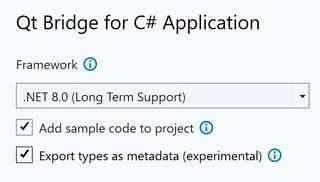
Creating a Qt Bridge for C# project with no C++ compiler requirement
Exporting C# types as C++ source code remains an option, and can be enabled globally for an entire project, or for specific types marked with an Export attribute.
[Export(Options = ExportAs.SourceCode)] |
Enabling C++ source code generation for a specific type
macOS and Windows on ARM
The 0.4.0 Beta release also introduces support for macOS and Windows on ARM. Packages for these platforms will be available in NuGet, alongside the existing packages for Windows and Linux.
You can check all new features and improvements included in the 0.4.0 Beta release by reading the updated change log.
What’s Next?
Try out the C# bridge and share your feedback with us. Start from the dedicated blog for more details and instructions on how to use Qt as your new C# UI framework.
The next release of the Qt Bridge for C# will be a Technology Preview (TP) including a complete and stable set of features. In the meantime, your feedback is very valuable for reaching this milestone, so we hope to hear from you.
Use the Qt Bridges Forum for any related discussions, as well as our bug tracking platform (JIRA) to report issues that you may find.
Blog Topics
Related Articles

Qt Creator 21 RC released
We are happy to announce the release of Qt Creator 21 RC. Please head over..
Read Article
Qt Bridges Technology Preview: Qt Quick UIs for Rust and C# Developers
When we announced Qt Bridges at Qt World Summit 2025, we had a simple..
Read Article
Meet Clate: the First Design Tool for Real-World Experiences
Clate Beta is out today, free for everyone. It's a no-code, AI-native UX..
Read Article