Sep 30, 2026
Comments
The 6.12 release for Qt Framework is now available, with improved cybersecurity, UI performance, and a wealth of capabilities to mix-and-match from across your architectural layers. As a Long-Term Support release, Qt 6.12 is not a simple incremental update, but a culmination of various efforts started years ago. Take a closer look.
Watch the Highlights Release Video
In this quick summary, Maycon gives a broader scope to what’s been added to Qt Framework during the past two years, since the last LTS:
If the embed doesn't show, you can watch the release video in YouTube.
Long-Term Support with 5 Years of Maintenance
Qt 6.12 is a Long-Term Support (LTS) release. The Qt LTS releases are designed, above all, to provide stability and reliability over a five-year maintenance period. Especially appreciated for developing proprietary software, the LTS releases overlap, allowing you to plan and carry out the updates to the newer version in an organized manner.
There is a new Qt LTS release every 2 years, now 6.12 being the newest.
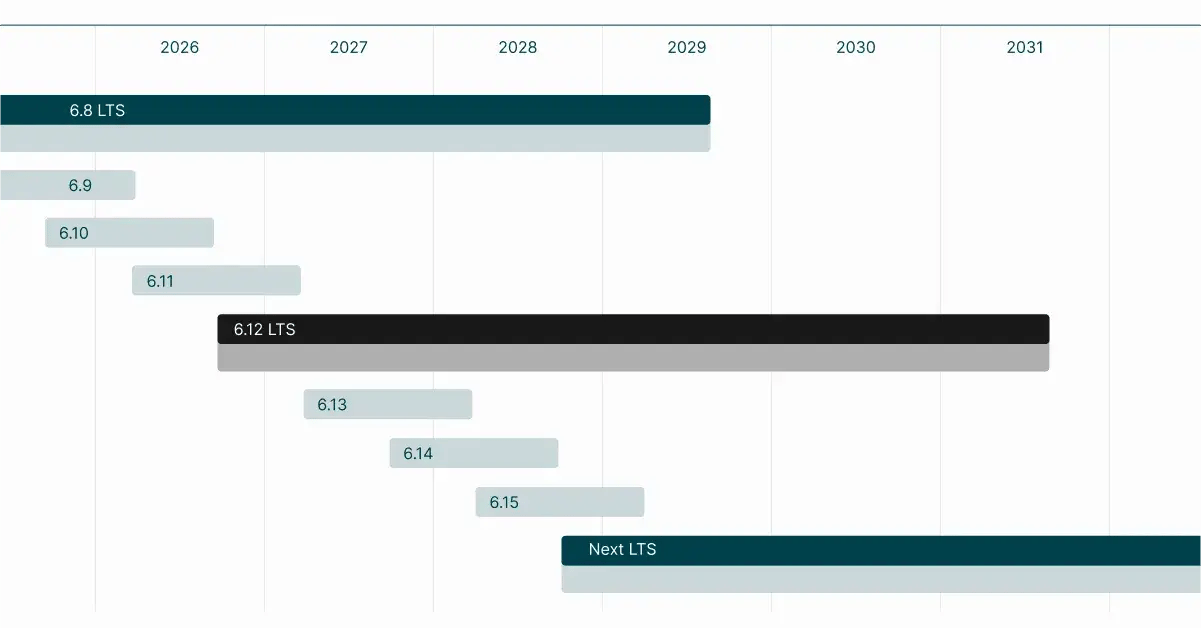
Learn more about the Qt LTS releases: qt.io/development/qt-framework/qt-lts
More-Secure-than-Ever Products
Especially for those selling proprietary products to the European market, there’s urgency around getting compliant with the new EU Cyber Resilience Act (CRA). However, the regulatory cybersecurity work benefits also those who aren’t affected by the CRA.
Cybersecurity Beyond Regulations
Regulatory requirements aside, there are various improvements helping you build more secure software. Qt 6.12 LTS ships without known exploitable vulnerabilities and it is secure by default, with sustained security updates, a new vulnerability disclosure process, and guaranteed response times (SLAs) for commercial customers. Security-critical items are marked in Qt’s source code files and information on run security tests shared transparently. Further, we commit to ensuring that the latest 3rd party libraries are integrated.
Related to 3rd parties, watch also Maurice’s video on how dependencies add to your software stack complexity and why it's riskier than you think.
Qt 6.12 Is CRA-Compliant
The commercial Qt 6.12 LTS is compliant with the EU Cyber Resilience Act (CRA) now, so that you can get your product ready and compliant on time. The first CRA deadline passed on September 11th, and the final one is approaching fast. The regulation brings many requirements on internal processes and legal assessments as well as product-related aspects.
Qt 6.12 is built to meet the requirements set by the CRA as we today know will take effect in December 2027. In the coming maintenance releases, we will continue to ensure that the 6.12 release conforms to the regulation throughout its 5-year support period. This not only allows you to get your product ready on time but also provides a foundation to rely on over the years. Qt 6.12 comes with the CRA Declaration of Conformity, which doesn’t make your product automatically CRA-compliant (you’ll always have to do your own CRA work) but it does give many things ready-made for Qt’s part of your product.
In addition, Qt Framework helps you meet CRA’s technical feature requirements, such as secure-by-default authentication and verification, the software bill of materials (SBOM), and secure-by-design software.
Learn more about how Qt 6.12 can significantly reduce your CRA-related efforts and risks:
Comprehensive UI Capabilities
Looking at our UI framework, we keep bringing in new capabilities for creating modern user interfaces; the past years have seen new Qt Quick controls like the Safe Area, Context Menu, Search Field, Double Spin box, and a new layout type with the FlexBox layout. We’ve also expanded the Vector Image module, supporting more properties and animations for SVG and Lottie files.
On the side of completely new things, let’s take a closer look at the new accelerated imperative painting engine and new QML Canvas2D type for easy use, how it improves also graphs performance. In addition, we invite you to try out our new StyleKit.
Qt CanvasPainter Is Out of TP: A New Way of Drawing with High Performance
We received a lot of great feedback to Qt CanvasPainter after its introduction earlier this year as technology preview in Qt 6.11. An imperative painter-like rendering API for C++ and QML that uses the GPU for hardware acceleration, and that can use shaders for rich and high performant visual effects, has evidently been missing in Qt for a long time! In Qt 6.12, after a fair amount of optimization work, API refinement, and closing of feature gaps, we are taking the core API of the module out of Technology Preview. It's ready for production for both C++ and QML developers, and we are very excited to see what you all are going to create with this.
The most significant addition is the introduction of the Canvas2D element. The Canvas2D API is modelled after the HTML Canvas, and makes it easy to use JavaScript to draw shapes that then get rendered efficiently by Qt CanvasPainter, via Qt's Rendering Hardware Interface (QRhi), on the GPU. Canvas2D is a significant architectural upgrade and modern replacement of the Qt Quick Canvas element.
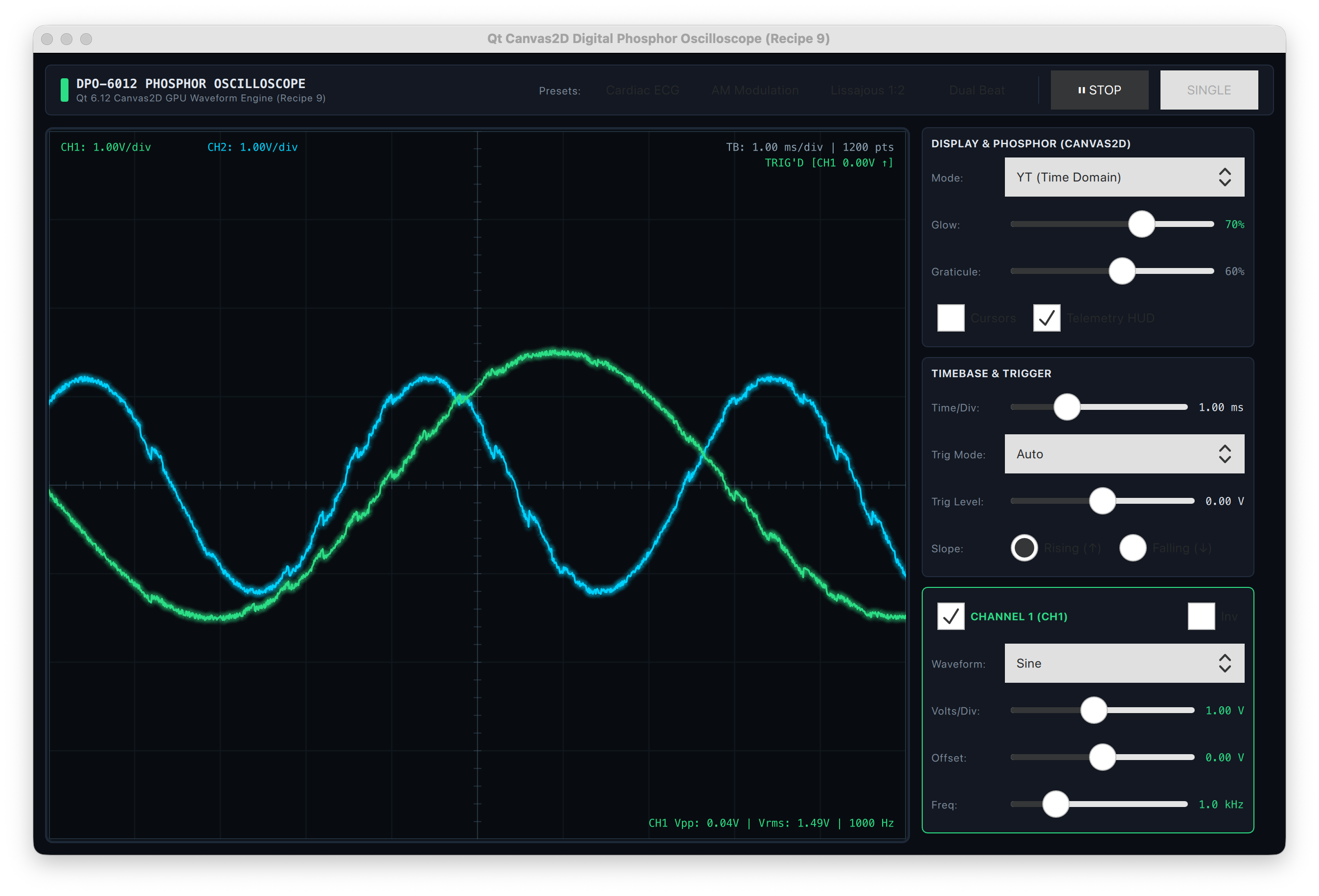
As a brand-new API, the Canvas2D element remains in technology preview, together with the QCanvasCustomBrush C++ class.
Read more about Qt Canvas Painter in Kaj's blogs:
- https://www.qt.io/blog/2d-rendering-introducing-qt-canvas-painter (from 6.11)
- https://www.qt.io/blog/new-canvas-rendering-features-in-qt (from 6.11)
- https://www.qt.io/blog/accelerated-2d-canvas-benchmarks (from 6.11)
- https://www.qt.io/blog/canvas2d-new-qml-canvas-element-using-qt-canvas-painter (new)
- https://www.qt.io/blog/canvas2d-watchui-demo (new)
Graphs Evolves: Flexibility and High Performance
Qt Graphs also had quite some improvements. Responding to popular demand, we added a logarithmic axis to the Graphs2D capabilities, and more customization options for axis labels. End-user interactions have become easier with built-in zoom and pan interactions, and we have implemented several improvements to performance and usability.
For high-performance use cases, especially when visualizing large amounts of fast-changing data, we have implemented a rendering backend for 2D graphs using CanvasPainter, which for now is opt-in at configure time. We want to make sure that it’s rock solid before making it the default, so we are looking forward to your feedback when using this backend.
StyleKit Is Available in Labs: Try It Out
The new StyleKit module addresses several problems at once: creating a consistent style for a hybrid application that uses both Widgets and Qt Quick; doing so in a modern, design system and tooling-friendly way that cleanly maps to how such a system might be defined in tools like Figma; and a clean separation of UI component structure and styleable attributes, making it easy to define dark, light, and high-contrast themes without having to repeatedly specify that a button is a rectangle with a label.
Qt StyleKit provides a QML-based styling API that lets you style both Widgets and Qt Quick from a single source that configures property-value pairs, such as geometry and colors.
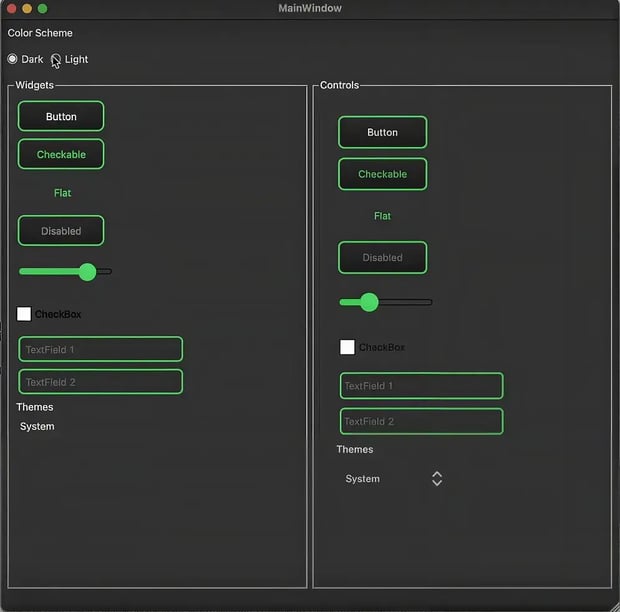
Thanks to property propagation, defining a style using StyleKit greatly avoids repetition, while using using established QML techniques for property animations makes it easy to define smooth transitions between control and widget states. Support for theming, control variations, and extensibility for custom controls, make StyleKit a powerful solution for defining the design of a complex user experience that looks great across devices, system configurations, and for users with different preferences.
Read more about it and share your thoughts in the related Forum discussion: https://forum.qt.io/topic/165049/stylekit
Less Complex Tech Stack
Beyond the UIs, there is a lot to bringing efficiency and reducing complexity throughout the architectural layers. We’re constantly finding ways to make it easier for you to integrate your old and new code, re-using what you already know through architectural layers, APIs to tooling, and desktop to MCUs. Here are some highlights from the 6.12 release.
QRangeModel
QRangeModel was introduced on Qt 6.10, receiving further improvements on Qt 6.10 and continuous growing on the current release. For a quick remainder, QRangeModel is a helper class that turns regular iterable C++ containers into types that the model/view framework of Qt can easily display.
Coming fresh in Qt 6.12 is built-in sorting support which allows the model to sort its data directly, without needing a separate class. Also, there are new properties to control what kind of drag & drop actions are allowed and what happens with the existing data on this operation. Also, faster searching with the match() method and further customization for header data and per-row or per-item behavior round up the changes are introduced in this release.
gRPC
For the QtGrpc module, 6.12 focus is on network efficiency. With client-side compression for messages, it is possible to select and apply the available compression algorithms, saving communication bandwidth. On top of that, now it is also possible to limit how large a server's incoming message is allowed to be, protecting clients from being overwhelmed by an unexpectedly huge or malformed response.
Other Notable Improvements
While there’s plenty to note, let’s focus here on Hot Reload for QML, and the support for a new platform, HarmonyOS.
Hot Reload for QML: No More Losing Your Place
The QML Engine has been extended to enable native support of the hot reload mechanism, and the qmlpreview tool has been reworked to use it. This enables a live preview of your running QML code, showing visually the outcome of your edits on the UI as you make them, in the IDE.
The Hot Reload is available in Qt Creator and from the command line via qmlpreview.
Read more about QML Hot Reload, how it works, and what’s still planned, in Ulf’s blog:
Support for HarmonyOS
Starting with Qt 6.12, Qt officially supports HarmonyOS as a Long-Term Support (LTS) platform, bringing the same guarantees for stability, maintenance, and support that Qt already delivers across its other major platforms. This reinforces Qt's cross-platform nature further; existing Qt applications can now extend into HarmonyOS without a re-architected codebase, cutting development time and speeding time-to-market.
HarmonyOS already spans a wide range of device categories in China, from IoT and automotive to PCs and tablets, and Qt's support opens that ecosystem in both directions: Chinese Qt applications can reach a global audience, and enterprises entering the China market gain a proven, LTS-backed path onto Huawei's platform.
What Else Is New?
The above highlights some of the big additions in Qt 6.12. In the What’s New in Qt 6.12 document you’ll find a lot of other things, such as the new QtQuick.Controls.Native style, additional joint types for Qt Quick 3D Physics, WebAssembly audio and video improvements, and smaller compiled-in resources thanks to content deduplication in the Resource Compiler (rcc).
Thanks
Qt 6.12 is the result of work by many people across the Qt community and we want to thank every one of you. Everyone who got a patch merged into the Qt source code for this release is named at the end of release notes.
Code is only part of the story. Bug reports, feature requests and feedback on the Beta releases and technology preview modules shaped what went into Qt 6.12. Thank you all who took the time to share them. And a big thank you to the people who worked behind the scenes to get the release shipped!
Update Today
As always, the new release is available through the Qt installer. You can also download the release via our website or your Qt Account page.
Blog Topics
Related Articles

Qt Creator 20.0.2 released
We are happy to announce the release of Qt Creator 20.0.2! The release..
Read Article
Commercial LTS Qt 6.8.9 Released
We have released Qt 6.8.9 LTS for commercial license holders today. As a..
Read Article