Published On
Sep 26, 2025
Read Time
6 mins

Introduction
"We are at 85% coverage — are we good?"
It is a familiar question in development teams, QA standups, and compliance reviews. Code coverage has become a default testing metric, one of the most visible and easiest to track. But here is the thing: chasing a specific percentage like 70%, 80%, or even 100% can be misleading if we do not understand what that number actually reflects. And worse, it can give a false sense of confidence.
In this article, we’ll unpack what those numbers really mean, what 100% statement coverage does (and does not) guarantee, and how team, that use tools like Coco, approach code coverage more strategically, not just to measure activity, but to improve quality and reduce risk.
What Code Coverage Really Means
At its core, code coverage tells you how much of your code was executed during testing. It does not tell you whether that code behaved correctly, whether edge cases were tested, or whether decision logic was verified. And depending on the type of coverage you are measuring, it may be missing critical blind spots.
There are several types of code coverage:
- Statement coverage - Did each executable statement run at least once?
- Line coverage - Did this line of code run?
- Decision / Branch coverage - Did both if and else paths execute?
- Condition coverage – Did all boolean sub-conditions evaluate both true and false?
- MC/DC (Modified Condition/Decision Coverage) - Was each condition shown to independently affect the outcome?
So, Is 70%, 80%, 90%, or 100% Coverage “Good Enough”?
The short answer? It depends on what you're testing, how you're testing it, and what coverage metric you are using. Here’s how you can think about common targets:
70% Coverage
A minimum baseline in many organizations. It often means core functionality is being touched by tests, but edge cases, error handling, and rare conditions may still be untested.
80–90% Coverage
This range is typically seen as healthy. It suggests a solid test strategy, assuming your tests are not just shallow line hits. Coco users often operate in this range with confidence, particularly when branch or decision coverage is included.
100% Coverage
“100% coverage” can sound like the gold standard, but only if you understand what kind of coverage is being measured.
- Statement coverage means every executable statement ran at least once.
- Line coverage checks whether each line of source code was executed. They often look similar, but they’re not the same: a single line can contain multiple statements, and some lines aren’t executable at all.
Neither metric, however, says anything about how thoroughly your tests explore the logic of your program. A test suite may achieve 100% statement coverage by executing each line once, yet still miss entire decision paths, untested exception flows, or critical edge cases. In practice, this is where some of the most serious bugs hide within branching logic, error handling, and rarely exercised conditions.
What 100% Statement Coverage Actually Means
So, when a tool reports 100% statement coverage, what it really means is just that every statement was executed at least once. It does not mean that both outcomes of every branch were taken, that the individual conditions inside complex decisions were validated, or that negative scenarios and boundary values were tested. In other words, high statement coverage without depth can give a false sense of security, while the riskiest defects remain undiscovered.
Here’s a simple example:
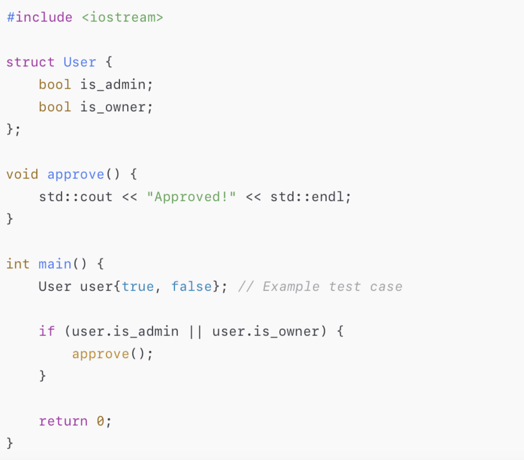
If your test only checks with user.is_admin = true, the if statement executes and code coverage tools may report 100% statement coverage. But what about when user.is_owner = true? Or when both are false? Or when both are true?
These untested combinations reveal why statement coverage alone is not enough as branch/decision coverage gives a more complete picture.
With Coco, you would catch this gap using only decision coverage, which highlights whether each logical branch was actually exercised. That is why coverage depth matters more than a top-level number.
The Problem with Chasing 100%
Too often, teams pursue 100% coverage like it is a badge of honor. But that goal, without context, can lead to serious trade-offs:
- Time is wasted writing superficial tests that don’t assert anything meaningful
- Focus is shifted away from testing high-risk paths to “easy to cover” code
- Missed bugs, especially in branching logic, exception flows, or legacy modules
- Test fatigue, where teams spend more time trying to hit the number than write good tests
Coco, by contrast, helps prevent this trap. It visualizes not just what lines were hit, but which logical paths, conditions, and branches were not tested, and why that matters. It turns coverage into a conversation, not just a checkbox.
A Smarter Way to Use Coverage
Rather than fixating on a specific percentage, high-performing teams use code coverage as a diagnostic to uncover what is missing, not to measure what already exists.
Here’s how teams using Coco approach coverage more effectively:
- They prioritize coverage by risk, not just by module size
- They use MC/DC and decision coverage to expose subtle bugs in logic-heavy code
- They review gaps and redundancies, not just totals
- They track coverage across unit, integration, and system tests — not in isolation
- They use Coco’s visual reports to make coverage part of code reviews and test planning
In other words, they use coverage to ask better questions, not just to answer, “Did this line run?”
Final Thoughts
So… is 70%, 80%, 90%, or 100% coverage good enough?
It could be but only if that number reflects tests that matter.
A high coverage percentage is helpful, but it’s not proof of quality. Code coverage tools like Coco can help you move beyond shallow metrics and into real insights, the kind that reduce bugs, accelerate releases, and satisfy auditors.
Don’t chase 100% just to say you did. Use coverage as a guide, and let it show you what you’re not seeing.
Free Guide on Code Coverage For Safety-Critical Programs
 |
Read a Free Guide on Code Coverage For Safety-Critical Programs to learn about:
|
Coco’s Approach: Test the Right Code, Not Just More of It
Coco was built for teams that care about real outcomes: teams working in embedded systems, safety-critical domains, or long-lived legacy codebases. These teams cannot afford to guess.
Coco provides:
- Advanced coverage metrics like MC/DC and condition coverage
- Support languages like C, C++, QML, Tcl, and mixed codebases
- CI/CD integrations to make coverage part of every pipeline
- Clear, interactive reports that show untested logic, not just lines
- Compliance kits and traceability tools to support standards like ISO 26262 and DO-178C
Because in complex software systems it is about knowing what that number really means, not about hitting 100%
How To Measure the Code Quality
Coverage percentage is only part of the story
Even if you understand what 100% statement coverage means, it’s just one piece of the testing puzzle. To truly measure quality, you also need to consider test coverage and test effectiveness, and how all three metrics work together. In our blog, “Code Coverage vs. Test Coverage vs. Test Effectiveness: What do you measure?”, we break down each metric, where they overlap, and how to connect them into one actionable workflow.
See how you can use GitHub Copilot + Coco Code Coverage to raise test coverage from 65% to 78%, and how this approach can be adapted for other frameworks and industries, including safety-critical domains.