May 21, 2026
Comments
When comparing Qt for MCUs vs LVGL, an independent study by Spyrosoft (updated with new data in May 2026) shows that Qt for MCUs reduces development time by approximately 30% compared to LVGL, requires roughly half the handwritten application code, and achieves better or equivalent FPS performance at a fraction of the CPU usage. The efficiency improvement comes mainly from Qt's integrated toolchain, which facilitates better collaboration among designers, developers, and QA engineers. Additionally, Qt for MCUs offers comprehensive safety certification, professional services, and support, positioning it as a superior LVGL alternative for complex projects where functional safety and compliance are essential. A second benchmark released by Silicon Signals confirms the performance advantage in both CPU and RAM consumption.
Qt vs LVGL Performance Study: Methodology and Real-World Testing
To determine which framework provides better results for embedded GUI development on microcontrollers (MCUs), we partnered with Spyrosoft for an independent comparison of Qt for MCUs and LVGL. This updated version of the study (May 2026) includes a broader range of benchmarks and a more in-depth look at the development workflow.
Spyrosoft has over 20 years of experience in embedded HMI development for automotive, aviation, and UAV systems, working with all major hardware manufacturers and GUI frameworks. The 2026 update to their study expands the evaluation with additional benchmarks and an in-depth analysis covering the full development lifecycle, from design import and toolchain integration through testing, safety, and long-term maintenance.
The Spyrosoft findings are partially corroborated and expanded by a benchmark study from Silicon Signals, an embedded systems engineering firm, published in March 2026. Silicon Signals evaluated Qt for MCUs, LVGL, and TouchGFX on one of the two platforms also used by Spyrosoft (STM32U5), using a common benchmark application across six UI scenarios, including video rendering, 2D animation, and text scrolling.
The two studies were conducted independently with different test applications and methodologies, which makes their directional alignment on CPU efficiency and memory usage particularly significant.
For the sake of this article, we will focus on the Spyrosoft study and add the benchmark from Silicon Signals to expand the understanding of the Qt for MCUs vs LVGL comparison. The full study by Silicon Signals can be downloaded from their website.

If you are looking for a primer on when to choose Qt for MCUs over LVGL, see our one-page summary of the studies.
Read NowComprehensive Framework Evaluation: From Design to Deployment
The Spyrosoft study analyzed the full development process using the latest available tools for both frameworks. For Qt for MCUs, Spyrosoft used the Figma to Qt plugin (currently in beta), Qt Creator, and Squish for MCUs. For LVGL, they tested Figma to LVGL combined with the new LVGL Editor. This comparison offers insights into how each framework manages modern GUI development needs on resource-constrained microcontrollers.
The test application—a sophisticated washing machine interface—reflects the current market demand for consumer appliances with smartphone-quality user interfaces and experiences. Spyrosoft’s UX designer created multiple screens featuring smooth animations, modern visual styles, and intuitive navigation patterns that users expect from modern digital devices.
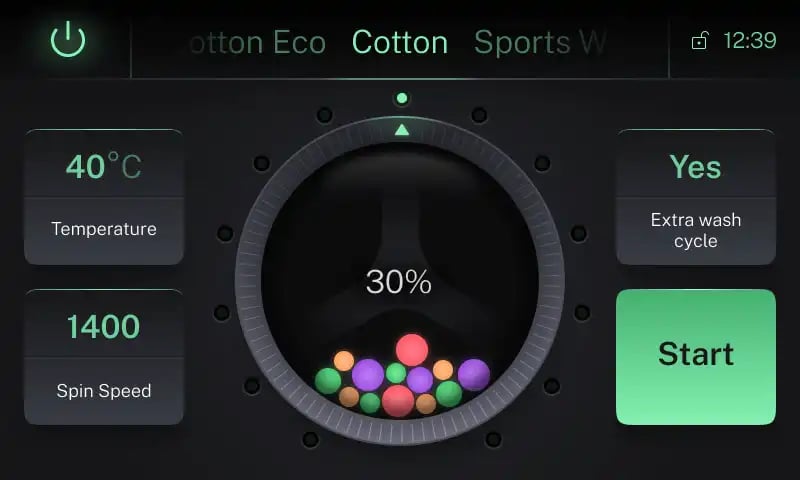
For the Qt for MCUs vs LVGL framework comparison study, Spyrosft used a smartphone-quality washing machine GUI with smooth animations.
Hardware Platforms: Testing on Industry-Standard Microcontrollers
We chose two popular microcontroller platforms to ensure our Qt for MCUs vs LVGL comparison reflects real-world deployment scenarios.
- NXP i.MX RT1064 - A popular mid-range microcontroller with LCD and PXP 2D pixel processing, commonly used in industrial HMIs and consumer products. This platform represents the sweet spot for cost-effective embedded GUI applications.
- STM32U5 - STMicroelectronics' ultra-low-power microcontroller featuring advanced graphics capabilities, ideal for battery-powered devices and IoT applications requiring sophisticated user interfaces.
Both platforms were set up with double buffering for optimal rendering performance, with platform-specific optimizations applied to ensure a fair comparison between Qt and LVGL.
Why This Comparison Matters for Embedded Development
Choosing between Qt for MCUs and LVGL influences key project factors that affect product success. Development teams need data-driven insights into time-to-market, total development costs, team collaboration efficiency, long-term maintenance needs, and the potential user experience quality.
The study conducted by Spyrosoft offers both quantitative metrics and qualitative insights to assist embedded developers in selecting the best framework. Whether you're assessing LVGL alternatives for a new project or considering migration from existing solutions, the findings provide practical guidance based on real development experience rather than theoretical analysis.
From Figma to Code: The Design Implementation Journey
The first crucial step in any modern GUI development project is turning a designer's vision into working code. Many designers now use Figma in their workflow. Usually, when the design is finished, developers receive static images like PDFs or, at best, Figma prototypes. This causes two main issues.
First, developers often have to guess design choices, such as colors, sizes, transitions, and more. They essentially need to recreate the design from scratch while writing the code for it. In the words of our customer Joshua Wilkie, who has used Qt for MCUs to develop a Human-Machine Interface (HMI) for the Keurig K-4500 coffee machine, it feels like “digging through PDFs or figuring out specifics like measurements and colors”.
Second, partly due to the previous point, the designer’s vision gets lost during translation. It is common to have designs in Figma that don’t work on the actual device, forcing developers to simplify the design to its essentials, which can forever impact the user experience.
Both Qt for MCUs and LVGL have Figma plugins designed to solve these issues. Here’s where Spyrosoft has identified the biggest differences between the two approaches.
Figma to Qt
Qt's Figma to Qt plugin marks a major shift in embedded GUI development. The plugin converts Figma GUI designs into QML (Qt Markup Language) code.
The plugin was used in its beta version for the Spyrosoft study and has since been released as Figma to Qt 1.0, the official successor to Qt Bridge for Figma. Although the generated code often needs some optimization for production, it provides an immediate, functional starting point for development.
Figma to Qt exports visual properties such as colors, fonts, spacing, as well as component positioning and layouts, complete UI structure and hierarchy, basic interactions and states, and asset references and resources.
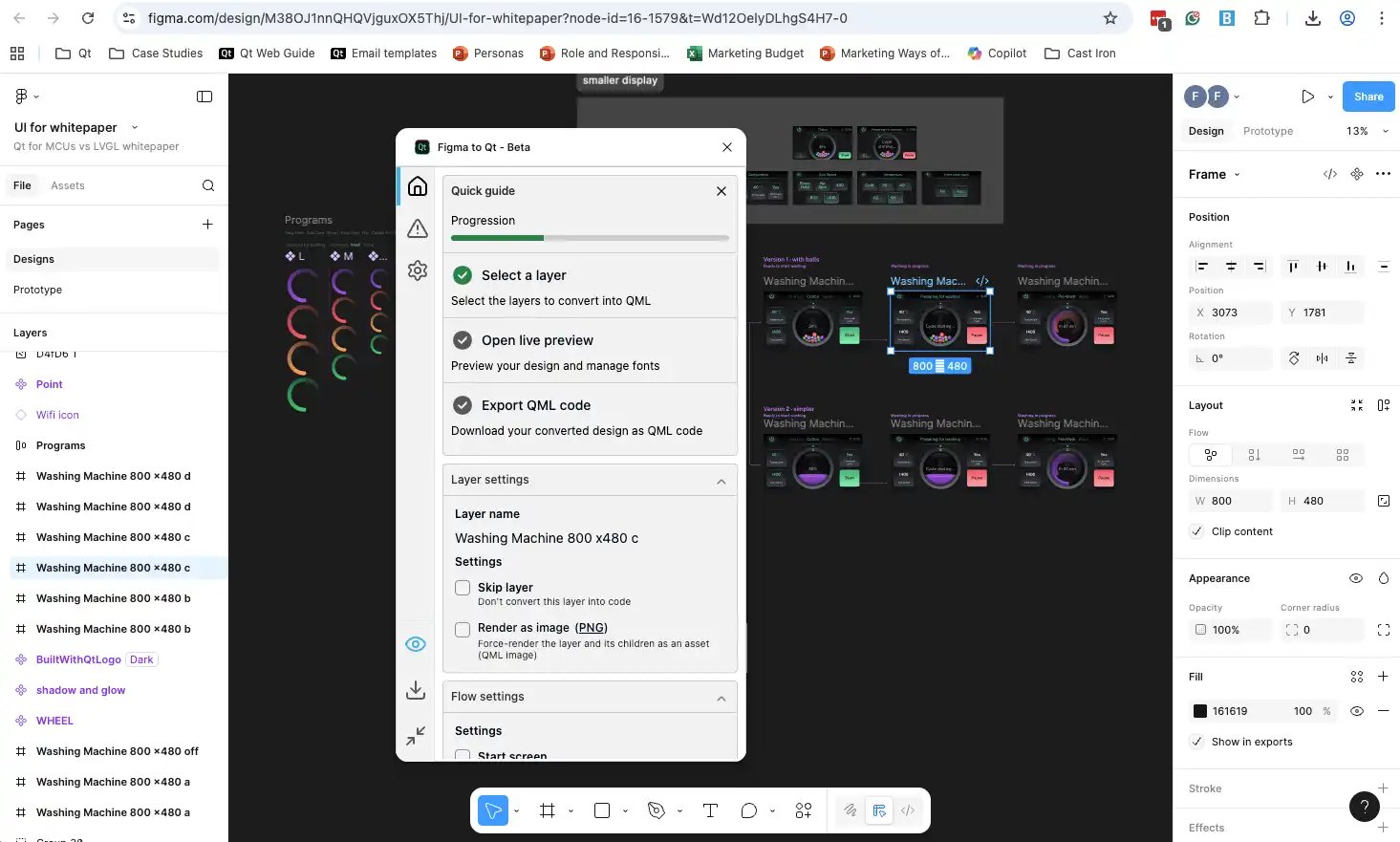
In their comparison study,Spyrosoft used the Figma to Qt plugin to transform the Figma design into working QML code, which they could then import into Qt Creator, Qt Design Studio, or Visual Studio Code.
Mikalai Arapau, a developer at Spyrosoft who conducted the Qt for MCUs versus LVGL study, describes Figma to Qt as follows: "The Figma to Qt plugin makes a really good job exporting Qt Quick Ultralite code. It's not final production code, but it saves at least half of the development time for the project.”
The code generated by Figma to Qt can then be imported into Qt Design Studio, Qt Creator, or, notably, Microsoft’s Visual Studio Code, expanding options for developers to work in their preferred environment. This is one of the reasons why Figma to Qt marks a significant advancement compared to the previous plugin, Qt Bridge for Figma, which could only export the code into Qt Design Studio.
Figma to LVGL (and Editor)
The LVGL approach to design implementation involves a more manual, multi-step process where developers must write code to rebuild the GUI. Although LVGL provides tools to help with this, its paradigm is quite different from Qt's code generation method.
The Figma to LVGL plugin offers style extraction features, exporting colors, fonts, text properties, and component IDs from Figma designs. However, unlike Figma to Qt, this plugin does not generate working code or retain the UI structure and hierarchy. Developers get style definitions but need to manually build components, screens, layouts, and interactions.
To bridge the gap between design and implementation, LVGL developers can use the LVGL Editor, a separate tool that provides an XML-based declarative approach to UI construction. The editor offers a live preview environment where developers can visually assemble components and screens, then link the styles exported from Figma to their XML nodes. Once the XML structure is finished, the editor generates the corresponding C code for deployment on the target device.
Mikalai Arapau describes the LVGL workflow: "The code shall be created manually. In my case, I did that with XML composition, seeing how it looks on the preview, and then generating C code from this XML."
This multi-tool approach means developers need to interpret the original Figma design and reconstruct every screen, component relationship, and layout from scratch.
Bringing the Code to the Devices
After translating design concepts into code using Figma to Qt or the Figma to LVGL + Editor workflow, development teams face the crucial task of deploying that code to target microcontroller hardware.
This stage involves setting up development toolchains, writing and debugging application code, integrating with hardware peripherals, and flashing the compiled application onto the device.
The study conducted by Spyrosoft highlighted that Qt for MCUs and LVGL support this deployment phase in different ways, which in turn affects developer productivity and the amount of context switching required.
Devices Manufacturers Toolchains
In both setups used for the study, the first step was to install the vendor-supplied IDEs and SDKs for the two boards.
For the NXP i.MX RT1064-EVK, Spyrosoft installed MCUXpresso IDE, NXP’s Eclipse-based environment for Arm Cortex-M MCUs, which provides start-up code, peripheral configuration tools and flashing/debugging support.
For the STM32U5G9J-DK2, they used STM32CubeIDE and the associated STM32CubeU5 MCU package, which supply HAL drivers, middleware, examples and integrated debugging for that discovery kit.
These vendor tools remain the foundation for low-level initialization, BSP code, and flashing, regardless of whether the GUI layer is implemented with Qt for MCUs or LVGL.
Where the frameworks differ is how tightly their own tooling integrates with this lower layer.
Qt Creator
Qt for MCUs offers a fully integrated development experience through Qt Creator IDE, which serves as a comprehensive environment for the entire development workflow. Developers can write QML or C++ code, build the application, and deploy directly to desktop, mobile, or target hardware without leaving the IDE.
Qt Creator integrates the manufacturer toolchains behind the scenes, once they are configured, handling compilation, linking, and flashing operations through a unified interface. This integration significantly reduces context switching between multiple tools and provides a consistent development experience across different microcontroller platforms, whether working with NXP, STM, or other supported manufacturers.
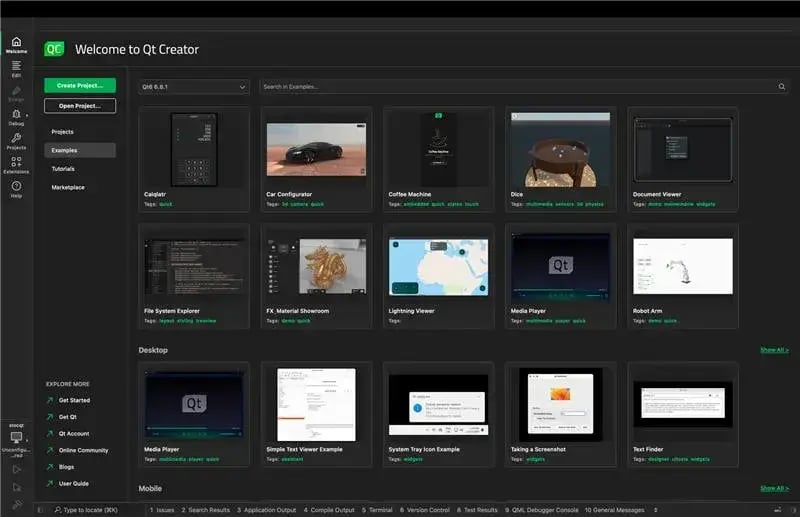
With Qt Creator, developers can integrate the low-level manufacturer's toolchains behind the scenes, considerably reducing context switching.
It's also worth noting that Qt for MCUs does not restrict developers to a single IDE. The framework supports CMake-based build systems and provides command-line tools for developers who prefer terminal-based workflows or need to integrate with automated build pipelines.
Qt for MCUs extends its flexibility further through project exporters and build-system integration that enable collaboration with third-party IDE environments. Teams using specialized tools like Green Hills MULTI IDE, CMake-based CMSIS-compliant environments, or IDEs such as IAR Embedded Workbench can integrate Qt for MCUs projects into formats compatible with these tools.
The ability to work across different IDE environments positions Qt for MCUs as an LVGL alternative that adapts to team preferences rather than dictating rigid workflows.
LVGL Editor
The LVGL Editor handles UI design and code generation, creating C code from XML component definitions and providing preview capabilities for visual verification. However, the LVGL Editor cannot deploy code to devices or manage the complete build process.
Developers must still use a C toolchain and build environment—often manufacturer IDEs like MCUXpresso or STM32CubeIDE, or alternative setups such as GCC/CMake—for actual code development, compilation, and device flashing. This separation creates a two-tool workflow, where developers move between the LVGL Editor for UI work and the chosen build environment for all other tasks.
The multi-tool LVGL workflow introduces several friction points in the development process. When making UI changes, developers must switch from their primary IDE or build environment to the LVGL Editor, modify XML definitions, regenerate C code, return to the build environment, integrate the updated code, rebuild, and flash to the device.
This context switching interrupts development flow and makes rapid iteration more cumbersome compared to Qt for MCUs' unified environment. Additionally, the separation between UI design and code development tools can create synchronization challenges when multiple team members work on different aspects of the application simultaneously.
Qt for MCUs prioritizes developer productivity through integrated tooling, cross-IDE compatibility, and built-in optimization features that work out of the box. LVGL offers a lightweight framework with manual control over most aspects of development, requiring developers to assemble and coordinate multiple tools while implementing performance optimizations themselves.
For teams prioritizing rapid development cycles and consistent code quality across developers with varying expertise levels, Qt for MCUs' integrated approach delivers measurable advantages in the Qt vs LVGL comparison.
Testing the Code: Different Quality Assurance Approaches
After implementing and deploying the GUI application to microcontroller hardware, development teams must verify that the interface behaves correctly under all usage scenarios. Testing embedded user interfaces presents unique challenges compared to desktop or mobile applications. Resource constraints, real-time performance requirements, and hardware-specific behaviors all complicate the testing process.
The Qt for MCUs vs LVGL study analyzed how each framework supports testing, from unit testing individual components to comprehensive end-to-end validation of the entire user experience. In fact, the testing capabilities that a framework provides will directly influence product quality and development speed, making it a vital part of creating applications for embedded devices and microcontrollers.
Squish for MCUs: Functional GUI Testing on Real Hardware
Qt for MCUs testing uses Squish for MCUs, a specialized testing tool that offers functional GUI testing capabilities directly on target hardware. Squish interacts with the device via DeviceLink, Qt's technology for connecting development tools to embedded targets, allowing it to capture frame buffers from the device and send input events to mimic user interactions.
What sets Squish for MCUs apart as a testing solution is its accessibility to quality assurance professionals who lack expertise in embedded development. The tool offers extensive scripting support through real-world scripting languages like Python, JavaScript, Perl and more, enabling QA engineers to design sophisticated test scenarios without needing to write C code or understand low-level hardware details. Test scripts can verify UI behavior using image matching and optical character recognition (OCR), comparing actual screen output against expected golden references.
Mikalai Arapau, who conducted the testing for the comparative study, notes the learning curve advantage: "What I liked about Squish, when I saw it first, was that the learning curve was very comfortable and quick. I think that I used maybe about 60 minutes to get to know how to use this tool and understand what it offers in terms of scripting and different approaches. And it's really very powerful.”
Squish for MCUs tests the real user experience on actual hardware, verifying not only functional correctness but also performance aspects like smoothness of animations and responsiveness. This black-box approach ensures tests stay valid even when internal implementation details change, reducing the effort needed for test maintenance during refactoring or optimization.
Furthermore, the development plan for Squish for MCUs includes object awareness features that will allow scripts to reference specific QML components, enabling even more precise testing beyond visual matching.
LVGL Test Tools: Unit Testing at Code Level
LVGL adopts a different approach to testing by providing a C-level test stack (Unity/Ceedling) and an SDL2 desktop simulator. Tests create widgets/screens in C, inject input events programmatically, and compare captured framebuffers against golden images. This allows headless CI runs on a desktop without target hardware.
However, the LVGL testing method requires software developers to create and maintain tests. QA professionals without C programming experience cannot independently develop test scenarios or verify application behavior. As Mikalai Arapau notes: "With Squish, a quality assurance specialist can do some scripting, it's not hard. And for LVGL testing, a software engineer, C/C++ developer is required to create tests. So that's the main difference I would say."
The developer-focused testing approach means LVGL mainly verifies functional correctness at the code level rather than the complete user experience on target hardware. While desktop simulators offer valuable feedback during development, they cannot fully replicate hardware-specific behaviors like GPU performance, display response times, or touch controller nuances that influence real-world user experience.
Testing Philosophy: Accessibility vs. Technical Control
The different testing approaches highlight broader philosophical differences in how Qt for MCUs and LVGL support development teams.
Squish for MCUs views testing as a team effort where QA professionals add value directly to product quality without needing embedded systems expertise. This separation of concerns lets software developers concentrate on creating features while QA engineers independently verify behavior from the user's point of view.
LVGL's testing tools give developers precise control over test execution and access to internal application states, making them ideal for unit testing and detecting regressions in continuous integration setups. However, this technical focus places testing mainly on the development team and limits involvement from QA specialists who could provide useful usability and quality insights.
For organizations looking for LVGL alternatives that involve the entire team in quality assurance, Qt for MCUs' built-in testing solution via Squish stands out as a key advantage. Spreading testing duties across specialized roles speeds up quality checks while allowing developers to focus on building features instead of maintaining test scripts.
Performance Benchmarks: Real-World Metrics
Performance characteristics on resource-limited microcontrollers are crucial when choosing a framework. Development teams need clear data on memory use, rendering speed, and CPU load to decide which framework best fits their project needs.
The study conducted by Spyrosoft measured performance metrics for both Qt for MCUs and LVGL implementations running identical user interface designs on two representative microcontroller platforms: the NXP i.MX RT1064 and the STM32U5.
With the 2026 update, Spyrosoft now provides an expanded and revised set of benchmark results for both Qt for MCUs and LVGL. These measurements provide objective comparisons that go beyond theoretical claims to demonstrate real-world behavior under controlled conditions.
Both test platforms were set up with double buffering to improve rendering performance. The NXP i.MX RT1060 platform, which has only 1MB of internal RAM, needed external SDRAM for frame buffers. This external memory setup influences performance compared to solutions that operate entirely within faster internal RAM, reflecting a common challenge faced by many embedded projects.
A few important notes on how to read these results.
LVGL is shown at two operating points - 30 FPS and 60 FPS - because LVGL deployments on MCU-class hardware are commonly configured to a lower refresh cadence to reduce CPU load and power consumption. This reflects real-world practice rather than a limitation. The comparison should focus on what each framework delivers at its intended operating point.
On STM32U5, the Qt for MCUs build was optimized for frame rate rather than minimum footprint, with resource compression disabled and caching enabled. This is reflected in the larger flash and RAM figures for Qt on that platform.
| NXP i.MX RT1064 | STM32U5 | |||||
| Metric | Qt for MCUs | LVGL @30FPS | LVGL @60FPS | Qt for MCUs | LVGL @30FPS | LVGL @60FPS |
| Frame Rate (FPS) | ||||||
| Avg FPS | 59 | 29 | 34 | 60 | 29 | 60 |
| Max FPS | 60 | 30 | 40 | 60 | 30 | 60 |
| Min FPS | 57 | 23 | 20 | 59 | 28 | 59 |
| CPU Utilisation | ||||||
| Avg CPU | 58% | 55% | 74% | 13% | 17% | 72% |
| Max CPU | 68% | 65% | 88% | 17% | 25% | 85% |
| Memory Footprint | ||||||
| Flash occupied | 1,949 KB | 2,132 KB | - | 4,964 KB | 3,021 KB | - |
| Runtime RAM | 602 KB | 1,070 KB | - | 1,582 KB | 1,339 KB | - |
| Source Code (authored SLOC) | ||||||
| App Code Lines | 1,360 | 2,794 | 1,618 | 3,030 | ||
Comparison table of Qt for MCUs vs LVGL performance on NXP i.MX RT1064 and STM32U5.
Qt for MCUs vs LVGL Benchmark Results: NXP i.MX RT1060
On the NXP i.MX RT1064 platform, Qt for MCUs achieved the strongest frame rate result in the dataset: 59 FPS average with a 57 FPS minimum, while keeping CPU utilisation at 58% average and 68% maximum.
LVGL at its practical 30 FPS operating point delivered 29 FPS average at 55% average CPU - comparable CPU cost, but roughly half the frame rate. When LVGL was configured for a 60 FPS target, it averaged only 34 FPS with a 20 FPS minimum, while consuming 74% average and 88% maximum CPU - substantially more resource expenditure for a frame rate still well below Qt's sustained result.
On memory, Qt for MCUs came out leaner on the NXP platform despite the common assumption that LVGL is always the lighter option. Qt occupied 1,949 KB of flash versus LVGL's 2,132 KB, and reserved 602 KB of runtime RAM versus LVGL's 1,070 KB - a difference of 468 KB, or roughly 44% less runtime RAM. This result is sensitive to implementation choices, including asset handling, buffer sizing, and memory placement, and should not be generalized as a universal rule.
Qt for MCUs vs LVGL Benchmark Results: STM32U5G9J-DK2
On the STM32U5, both Qt for MCUs and LVGL configured for 60 FPS achieved true 60 FPS-class smoothness. The critical difference is the CPU cost.
Qt for MCUs reached 60 FPS average and 59 FPS minimum at just 13% average CPU and 17% maximum CPU usage, leaving substantial headroom for the application tasks that run alongside the GUI in any real product. LVGL at 60 FPS achieved the same frame rate but at 72% average and 85% maximum CPU, more than five times the CPU load.
LVGL at 30 FPS represents a compact, lower-power operating point at 17% average CPU, which is a legitimate and practical choice for products where the UI is simple and not the primary differentiator.
On footprint, the STM32U5 results favor LVGL: 3,021 KB flash versus 4,964 KB for Qt, and 1,339 KB runtime RAM versus 1,582 KB for Qt. The study explicitly states, though, that the Qt build was configured for frame rate rather than footprint, so resource compression was disabled and caching was enabled. These figures reflect a deliberate configuration choice, not a fixed property of the framework.
A second study on STM32U5
For the STM32U5 platform, a second independent study by Silicon Signals can be used to expand the understanding of the frameworks.
The benchmark was presented at Embedded World Europe in March 2026 and measured CPU utilization and render time per frame across six UI scenarios, as well as overall RAM usage.
| Metric (STM32U5) | 2D | Video | Text Scroll | Cluster | |
| Qt for MCUs | CPU | 5-6% | <1% | 2% | 2-3% |
| Render Time | 8-9 ms | 5 ms | 9-10 ms | 8-9 ms | |
| RAM | 1,719 KB total | 0 KB stencil buffer | ||||
| LVGL | CPU | 30-33% | 5-6% | 4-5% | 12% |
| Render Time | 3-4 ms | 5-6 ms | 23-28 ms | 8 ms | |
| RAM | 2,164 KB total | 375 KB stencil buffer | ||||
The results of the comparison study conducted by Silicon Signals show lower CPU and RAM consumption for Qt for MCUs vs. LVGL (the full study can be downloaded here).
The most striking individual result is the 2D animation scenario, where Qt used 5–6% CPU versus LVGL's 30–33%, roughly a fivefold difference on the same hardware. On RAM, Silicon Signals found Qt for MCUs using 1,719 KB total versus LVGL's 2,164 KB. A notable structural contributor to the LVGL figure is a 375 KB stencil buffer that Qt does not require. This is an architectural difference rather than a tuning difference, and it is consistent with the runtime RAM gap observed by Spyrosoft on NXP.
Source Code: Qt for MCUs Requires Roughly Half the Handwritten Code
The 2026 Spyrosoft study also measured the source code footprint of each implementation, focusing on authored application code: lines that had to be written or edited for the washing-machine demo itself. Generated resource and font code, framework sources, vendor SDK code, and build scripts are excluded from the count.
On the NXP platform, the Qt implementation contained 1,360 authored lines of code compared to 2,794 for the LVGL implementation - approximately 2.1 times more code for LVGL.
On STM32U5, the Qt implementation contained 1,618 lines versus 3,030 for LVGL, a factor of approximately 1.9.
The difference is primarily in the UI layer: QML expresses layout, state, and bindings declaratively, while the LVGL implementation requires more explicit imperative construction and update logic.
A smaller authored codebase means less to write, review, test, and maintain over the product's lifetime. This finding reinforces the development time advantage: not only does Qt for MCUs take fewer hours to build the same application, it also results in a leaner codebase to carry forward.
Performance Analysis: Framework Efficiency and Optimization
The 2026 benchmark results from both Spyrosoft and Silicon Signals paint a clear picture: Qt for MCUs delivers significantly lower CPU utilization at equivalent or higher frame rates (or render time per frame), both on NXP and STM. On top of that, Spyrosoft found that the same application requires roughly half the SLOC (Source Lines Of Code) with Qt for MCUs, making the codebase smaller and easier to implement and maintain.
As for RAM, the results are mixed. In the Spyrosoft study, Qt for MCUs is lighter on NXP, while LVGL has an advantage on STM. In the Silicon Signals benchmarks, Qt for MCUs is lighter on the same STM hardware, suggesting that the Spyrosoft results might be mainly due to the specific configuration used to optimize for frame rate.
In any case, it is important to consider the context when choosing between Qt for MCUs and LVGL, since different products require different balances of smoothness, CPU headroom, and memory footprint. As the Spyrosoft study puts it: "The most appropriate product decision is therefore not 'Qt for MCUs vs. LVGL' in the abstract, but which framework-and-configuration combination most reliably meets the target user experience on the chosen MCU platform."
One final thing to note is that Qt for MCUs continues to improve performance with each release. Qt for MCUs 3.0, for example, emphasizes modularization, allowing developers to exclude unused framework features and further lowering the RAM footprint. This architectural upgrade will let teams customize the framework precisely to their application needs, paying for memory only for the features they actually use.
Time to Completion: Qt for MCUs Enables Speed and Efficiency
The most important discovery from the Spyrosoft comparative study is development velocity—how fast teams can move from initial design to deployment and testing. Development time directly influences project costs, time-to-market, and competitive edge, making efficiency improvements in this area especially valuable for commercial products.
The study tracked hours spent across four distinct project phases: initial Figma design import and cleanup, full UI implementation for desktop builds including all screens and interaction flows, device bring-up and hardware integration, and light performance validation. These phases represent the core workflow for embedded GUI development and offer clear comparison points for Qt for MCUs vs LVGL productivity.
| Qt for MCUs | LVGL | |
| Figma to code (initial import + cleanup) | 8-12 hrs | 8-16 hrs |
| Build UI (desktop, all screens and flows) | 32-48 hrs | 48-80 hrs |
| Device bring up | 8-12 hrs | 8-12 hrs |
| Light performance sanity | 12-16 hrs | 12-16 hrs |
| Total | 60-88 hrs | 76-124 hrs |
Comparison table of Qt for MCUs vs LVGL time to completion for the project. Best performer is highlighted.
Figma to Code: Time Savings with Code Generation
The initial phase of importing Figma designs and preparing them for implementation demonstrated the first major efficiency advantage for Qt for MCUs. The Qt workflow required a maximum of 12 hours compared to LVGL's 16 hours, with the main difference coming from the extra manual reconstruction work needed in the LVGL process.
However, this small difference in the first phase understated the impact of code generation capabilities. The real efficiency gains appeared in the next phase, when developers finished implementing the complete UI with all screens and interaction flows.
UI Implementation: Where Code Generation Shows Its Value
The UI implementation phase revealed the most dramatic difference in development efficiency between the two frameworks:
- Qt for MCUs: 32-48 hours for complete UI implementation
- LVGL: 48-80 hours for complete UI implementation
This 16-32 hour difference, which indicates an average 30% time savings with Qt for MCUs compared to LVGL, highlights the core value of the Figma to Qt plugin's code generation capabilities.
The LVGL workflow requires developers to manually rebuild every screen, component relationship, and layout as shown in the original Figma design. Although the LVGL Editor offers XML-based visual composition tools, developers still need to interpret design specifications and convert them into code structures entirely by hand. This rebuilding process takes a lot of development time and increases the risk of deviating from the original design intent.
Qt for MCUs developers, on the other hand, start with executable QML code that already includes the visual design, component hierarchy, and basic interactions. Although this generated code usually needs optimization and refinement for production, it offers a working foundation that developers can iteratively improve instead of building from scratch.
Device Bring-Up and Performance Validation: Comparable Effort
The later phases of device bring-up and performance validation showed comparable time requirements across both frameworks.
These similar timeframes suggest that hardware-specific work and performance optimization depend more on the target platform’s characteristics than on the framework choice. Both Qt for MCUs and LVGL offer sufficient tools and documentation for these stages, with the key factors being the developer's familiarity with the target microcontroller, the complexity of hardware-specific optimizations needed, and who is involved in the different stages of the project – whether it is only developers or other roles (for example, QA engineers or designers).
Implications for Project Economics and Time-to-Market
At the midpoint, Qt for MCUs required approximately 74 hours to complete the project, compared to LVGL's 100 hours, representing a 26-hour savings or a 26% reduction in development time. This efficiency improvement grows more pronounced for complex projects at the upper end of the estimate ranges, where Qt for MCUs's 88 hours compares favorably to LVGL's 124 hours - a 36-hour difference representing a 29% time savings.
These measurements validate the key claim that Qt for MCUs reduces development time by approximately 30% compared to LVGL for projects of similar complexity, with the efficiency gains primarily attributable to integrated tooling that facilitates collaboration across designers, developers, and QA engineers.
A 30% decrease in GUI development time leads to cost savings and faster product launches. For a team with blended rates of $100/hour (a conservative estimate for embedded software engineers in Western markets), the 26-36 hour reduction equates to $2,600-$3,600 in lower labor costs for each product.
More importantly, these efficiency gains accumulate across product portfolios. Companies developing multiple products with microcontroller GUIs benefit from these savings repeatedly, and faster development cycles allow for quicker iteration and feature refinement within fixed development timelines.
As development teams evaluate LVGL alternatives, the time-to-market advantage becomes especially important in competitive markets where being the first to launch or quickly responding to market feedback determines product success. The ability to create high-quality user interfaces in 30% less time offers significant strategic benefits beyond just cost savings.
The Power of Qt: Beyond Qt for MCUs Features
While technical capabilities, performance metrics, and development efficiency offer key comparison factors, several strategic considerations set Qt for MCUs apart from LVGL as an embedded GUI solution. These benefits include ecosystem integration, long-term support, professional services, and compliance requirements, which become more important as projects grow from prototypes to production across multiple product lines.
Part of the Qt Family: Scalability Across Product Ranges
Qt for MCUs benefits fundamentally from its position within the broader Qt framework ecosystem. Qt represents one of the most comprehensive application development platforms available, powering user interfaces across microcontrollers (MCUs), microprocessors (MPUs), embedded Linux systems, desktop applications, and mobile platforms. This ecosystem integration creates unique advantages for companies developing diverse product portfolios.
Companies can initially develop user interfaces on microcontrollers using Qt for MCUs, then scale those interfaces to more capable hardware running Qt 6 when market requirements or product roadmaps demand richer features, such as 3D graphics, web connectivity, or multimedia capabilities. The transition path remains straightforward because both platforms share the same fundamental architecture and declarative language.
Conversely, teams can develop sophisticated prototypes on Qt 6 running on Linux and then scale down to Qt for MCUs for cost-effective production hardware. This bidirectional flexibility allows product planning to follow market demands rather than limiting hardware choices based on framework constraints.
For companies looking for LVGL alternatives that support diverse product strategies across both MCUs and MPUs, Qt's unified ecosystem is a strong differentiator. LVGL remains focused mainly on microcontroller implementations, which limits its usefulness as products scale to more powerful hardware that needs operating system support and advanced features.
Support and Roadmap: Enterprise-Grade Reliability
Qt for MCUs customers benefit from Qt Group's commercial support infrastructure, which includes expert solution engineers, professional services teams, certified training programs, and an extensive partner ecosystem. This professional support structure proves particularly valuable during project planning, architecture decisions, and troubleshooting complex integration challenges.
Beyond immediate support, Qt provides exceptional release stability and long-term maintenance commitments. The framework follows a predictable three-releases-per-year schedule with clear roadmaps published well in advance. Each release maintains backward compatibility with previous versions, minimizing disruption during upgrades and allowing teams to adopt new features incrementally rather than through forced migrations.
As part of the commitment to ongoing platform development, Qt has recently launched an AI Assistant that accelerates converting Qt to Qt for MCUs, significantly assisting companies working with both MPUs and MCUs. Additionally, Qt's code coverage solution Coco will soon be available for Qt for MCUs, enabling test coverage analysis on microcontrollers.
Long-term support (LTS) releases receive extended maintenance and security updates, providing production stability for products with multi-year lifecycles. This predictable evolution and maintenance commitment matters enormously for industries like automotive and medical devices where product lifecycles extend five to ten years or longer.
LVGL, as an open-source project, offers community support through forums and GitHub but does not have the commercial support infrastructure or formal support agreements that enterprise projects typically require.
Security and Compliance: Safety-Critical Applications
Qt for MCUs addresses the growing importance of cybersecurity and functional safety in embedded systems through explicit compliance commitments and safety certification packages.
Qt has committed to full compliance with the European Union's Cyber Resilience Act (CRA), which will impose mandatory cybersecurity requirements on connected products starting in 2026. Qt for MCUs will achieve complete CRA compliance in 2026, ensuring customers can confidently deploy products in the European market without regulatory risk.
For safety-critical applications in automotive, industrial, medical, and other fields, Qt offers complete safety certification packages that speed up compliance with standards like ISO 26262 (automotive), IEC 61508 (industrial), and IEC 62304 (medical devices). These packages include pre-certified components, safety manuals, test specifications, and documentation that significantly lower the effort needed to get certified.
LVGL, as an open-source library without official safety certification, requires development teams to carry out their own safety validation and certification processes when used in safety-critical applications. While LVGL's open source nature allows teams to perform necessary audits and validation, the lack of pre-certified components and thorough safety documentation significantly increases the effort and risks involved in certification.
Conclusion: Choosing the Right Framework for Your Embedded GUI Project
The detailed comparison between Qt for MCUs and LVGL conducted by Spyrosoft, now partially corroborated and expanded by an independent benchmark study from Silicon Signals, offers clear insights into how these frameworks meet different project needs and organizational goals.
Both frameworks are technically capable of delivering modern user interfaces on resource-limited microcontrollers. The 2026 data shows that performance outcomes depend heavily on configuration, target hardware, and the chosen operating point—there is no single winner across all metrics. What the study clearly establishes is that the frameworks differ significantly in development efficiency, CPU consumption, and codebase size, and these differences are consistent and measurable.
Qt for MCUs: Advantages for Complex, Team-Based Projects
Qt for MCUs offers clear benefits when projects involve cross-functional teams of UX designers, software developers, and QA engineers. The integrated toolchain - Figma to Qt, Qt Creator, and Squish for MCUs - allows each role to contribute efficiently without needing deep embedded systems knowledge from every team member.
The Spyrosoft study found a ~30% reduction in development time compared to LVGL, driven primarily by the code generation capabilities of Figma to Qt and the unified development environment. The same study measured the Qt implementation at roughly half the handwritten lines of code of the equivalent LVGL implementation - 1,360 vs 2,794 on NXP, and 1,618 vs 3,030 on STM32U5. A smaller codebase is faster to build, easier to review, and simpler to maintain over the product's lifetime.
On runtime performance, both the Spyrosoft and Silicon Signals studies show Qt for MCUs delivering the same or higher frame rates at significantly lower CPU load - most strikingly on STM32U5, where Qt achieved 60 FPS at 13% average CPU versus LVGL's 72% to reach the same frame rate. That CPU headroom is available for the sensors, communication, and control logic that run alongside the GUI in most real products.
For safety-critical industries such as automotive, medical devices, aerospace and defense, and industrial control systems, Qt for MCUs' comprehensive safety certification packages and CRA compliance commitment make it the practical choice when regulatory requirements cannot be addressed through community-driven processes alone.
LVGL: When Simplicity and Developer Control Matter
LVGL remains a strong choice for projects where minimal footprint is the primary constraint, developer resources are concentrated in a small embedded team, or MIT runtime licensing is a hard requirement. The framework's lightweight design and pure C implementation offer maximum flexibility for developers who want full access to internal workings and the ability to customize behavior at the lowest levels.
LVGL's 30 FPS operating point on STM32U5 at 17% average CPU is a compact, predictable, and power-efficient configuration that suits products where the UI is a simple, secondary feature rather than the primary differentiator. For teams comfortable with a code-centric workflow and without separate designer or QA roles, LVGL's manual approach can be entirely appropriate.
Making the Framework Selection Decision
Embedded development teams evaluating Qt for MCUs vs LVGL should consider the following key factors.
-
Time-to-Market Pressure: Projects with aggressive launch schedules benefit from Qt for MCUs' ~30% reduction in development time, confirmed by the 2026 Spyrosoft study. Projects with more relaxed timelines can absorb LVGL's longer development cycles.
-
Codebase Size and Maintainability: The 2026 study found Qt for MCUs requiring roughly half the handwritten application code of LVGL for the same interface. For teams that iterate frequently on UI or maintain multiple product variants, a smaller codebase reduces long-term cost and risk.
-
Runtime Performance and CPU Headroom: Where smooth frame rates and CPU headroom for non-UI tasks matter, Qt for MCUs shows a clear advantage—60 FPS at 13% average CPU on STM32U5, versus 72% for LVGL at the same frame rate. On very resource-constrained MCUs, LVGL is a practical choice.
-
Project Complexity: Complex interfaces with many screens, animations, and interaction flows benefit more from Qt for MCUs' code generation and integrated tooling. Simpler interfaces with limited navigation reduce the value of these advantages, and LVGL can be a good option in these cases.
-
Team Composition: Projects involving UX designers, developers, and QA engineers favor Qt for MCUs' role-specialized tooling. Projects with a small, focused embedded development team can better leverage LVGL's developer-centric approach.
-
Product Portfolio Strategy: Companies developing products across microcontrollers and application processors gain substantial advantages from Qt's unified ecosystem and shared QML codebase. Single-product organizations focused exclusively on MCU implementations see less benefit from this integration.
-
Safety and Compliance Requirements: Any safety-critical application or product requiring CRA compliance makes Qt for MCUs the practical choice, due to its comprehensive certification packages for ISO 26262, IEC 61508, and IEC 62304. Applications without such requirements can consider either framework.
-
Long-Term Support Needs: Products with extended lifecycles benefit from Qt's predictable release schedule, backward compatibility commitments, and long-term support releases. Shorter product lifecycles or teams comfortable maintaining an open-source fork reduce the importance of these factors.
For teams evaluating their options, the right starting point is not the frameworks themselves but the product requirements. Both Qt for MCUs and LVGL have proven themselves in production. The value of a study like this one is not to declare a winner, but to give development teams the data they need to make that choice with confidence.
Blog Topics
Related Articles
Updated Qt Code Review Skills Reduce Token Costs by Up To 75%
Whether you are reviewing Qt Quick or Qt Widget code with Qt’s agentic..
Read Article
Qt Creator 21 - CMake Changes
Here are the new CMake changes in Qt Creator 21: Editor Qt Creator 21..
Read Article
Qt Creator 21 Beta2 released
We are happy to announce the release of Qt Creator 21 Beta2. Please head..
Read Article